
Claude Code Mods Guide: Install, Build, Audit, and Secure In-Process Extensions
Claude Code mods let developers change how Claude Code behaves, intercepts events, and draws its interface. This guide explains the architecture, the safest installation path, a practical build workflow, enterprise controls, and the security questions to answer before any mod runs on your machine.

Claude Code Mods: The Quick Answer
Claude Code mods are small JavaScript or TypeScript functions that run inside Claude Code and hook into events such as a prompt being submitted, a tool being called, a permission decision being requested, or a piece of interface being drawn. A mod can observe an event, change it, stop it, replace the default behavior, or add a new surface such as a pane, band, button, slash command, or tool. Anthropic introduced the feature publicly on October 1, positioning it as a way to make Claude Code feel less like a fixed product and more like a programmable workbench.
The important phrase is inside Claude Code. Classic hooks normally launch a separate script at a lifecycle point and communicate through structured input, output, and exit codes. A mod runs in the same process through function hooks. That gives it richer control: it can rewrite prompts, modify tool calls, redact outputs before the model sees them, draw interface elements, and even replace built-in behavior. It also raises the security stakes because the mod is executable code with the same local access as Claude Code.
This guide does not recommend downloading random mods or pasting commands from an unknown directory. It teaches a review process you can apply to an official example, a mod your team owns, or a community package whose author and source you can verify. If you are still tuning Claude Code itself, start with our Claude Code usage limits guide and Claude Code permissions guide before adding in-process customization.
Why Claude Code Mods Matter Now
Claude Code already had several extension layers. A project could use CLAUDE.md instructions, skills, slash commands, subagents, Model Context Protocol servers, plugins, status lines, and classic lifecycle hooks. Each solves a different problem. What was missing was a supported way to reach deeper into the product loop without maintaining a fork or waiting for Anthropic to ship a feature.
Mods fill that gap. Anthropic's launch examples make the ambition clear: a context forecast can render above the prompt, a safety component can pause a destructive command and show its blast radius, and a replay interface can let a person step through file edits. Anthropic also moved the built-in diff experience into a mod, demonstrating that the same mechanism can power first-party behavior. This is a meaningful architectural shift because a feature that used to require a core-product release can now be packaged, tested, distributed, enabled, disabled, or replaced.
The timing also matters for content strategy. AI Feature Drop's current analytics show recurring interest in coding-agent limits, permissions, and safe workflows. During the latest 30-day period, the site's Claude Code usage-limits guide received 25 pageviews and 24 sessions, while related permissions and subagent articles continued to attract readers. That pattern suggests people do not only want launch news; they want to know what a feature changes in practice, what can go wrong, and how to adopt it without turning every repository into an experiment.
What Is a Claude Code Mod?
A useful mental model is middleware for an AI coding agent. Claude Code emits events as a session moves through its loop. A mod registers a function for one or more events. When an event fires, the function receives the event data and a way to continue the chain. The function can inspect the input, call the next handler, alter the result, refuse the action, or substitute something else. It can also use supported interface and session capabilities to draw or store state.
Anthropic describes mods as small TypeScript functions distributed inside Claude Code plugins. That distinction prevents a common terminology mistake. A plugin is the package and distribution container. It may include skills, agents, commands, MCP servers, classic hooks, and a mod. A mod is the in-process behavior implemented through function hooks. Every distributed mod arrives inside a plugin, but many plugins contain no mod at all.
Mods can operate at different points in an event's life. A before-style handler can inspect or rewrite input before the default behavior runs. An after-style handler can transform output. An instead-style handler can replace the default. A wrapping handler can run code on both sides. When several mods hook the same event, they form an ordered chain: the first loaded sees the incoming event first and the outgoing result last. That ordering makes composition possible, but it also means conflicts can be subtle.
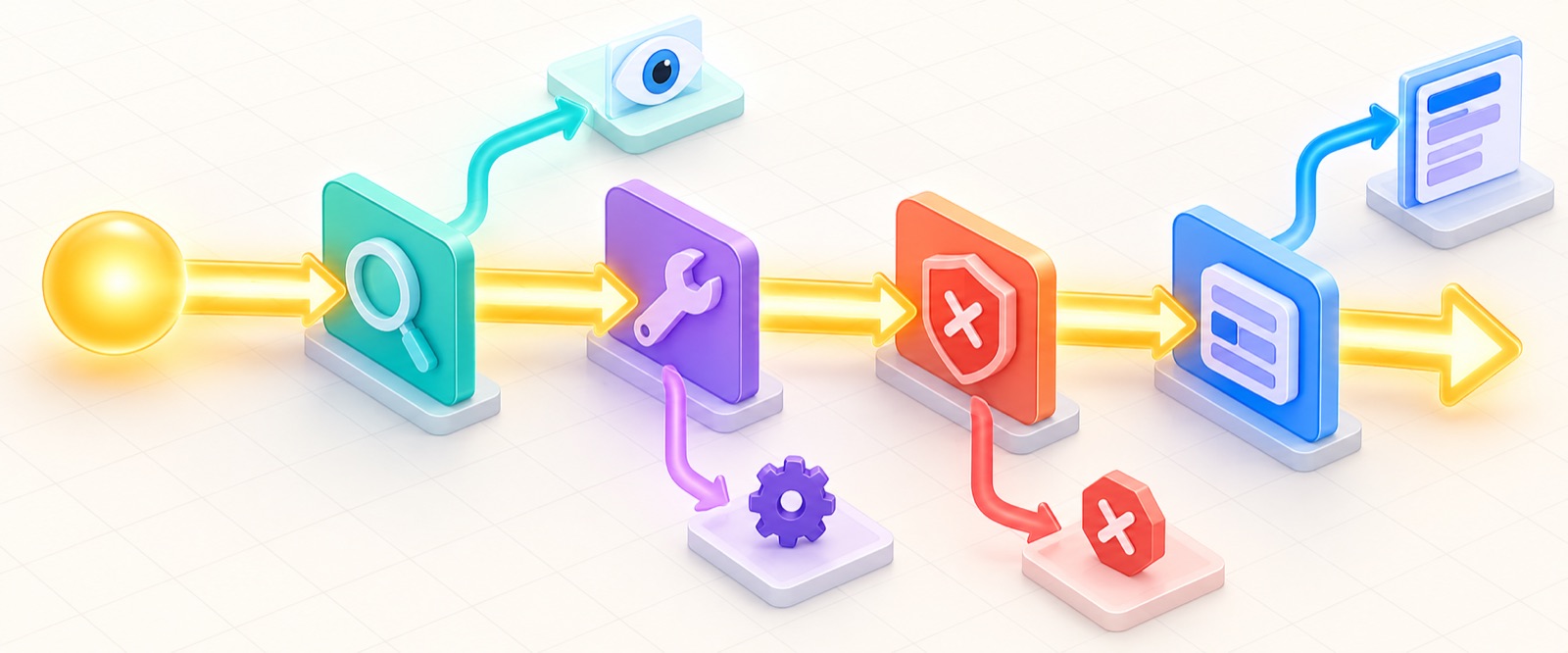
The visual is conceptual: a mod can observe an event, transform it, stop it, or create a user-facing interface. Exact capabilities depend on the event and host.
What a mod can do
✓ Read an event and add observability without changing its result.
✓ Rewrite a prompt or tool input before it reaches the next stage.
✓ Block, retry, or replace a tool call when policy requires it.
✓ Redact secrets from tool output before the model receives that output.
✓ Draw a band, pane, status component, button, input, or custom result in supported interfaces.
✓ Register a tool or command, keep state, respond to timers, or coordinate a workflow.
This power is broader than presentation. A cosmetic mod and a policy mod may install through the same plugin system while carrying very different risk. The review process should therefore focus on behavior, not a friendly package name or screenshot.
Claude Code Mods vs Plugins, Hooks, Skills, Agents, and MCP
The fastest way to choose the correct extension is to ask what must change. If Claude needs better instructions, use a skill or project guidance. If Claude needs a new external service, use MCP. If you need a repeatable specialist with isolated context, use a subagent. If an external script should run at a lifecycle moment, a classic hook may be enough. Use a mod when the feature must intercept internal events, alter the interface, or participate in the runtime chain.
| Mechanism | Best for | Where it runs | Main risk |
|---|---|---|---|
| CLAUDE.md / rules | Persistent project instructions and conventions | Model context | Contradictory or bloated guidance |
| Skill | Reusable instructions, references, and task workflows | Loaded into model context when relevant | Prompt injection, stale instructions, context cost |
| Subagent | Delegated specialist work with separate context | Another agent session | Excess scope, tool access, coordination mistakes |
| MCP server | External tools, data, and service integrations | Local process or remote service | Credentials, data exposure, tool poisoning |
| Classic hook | Run a deterministic script at a lifecycle point | Separate shell process or request | Arbitrary commands, fragile parsing, broad permissions |
| Plugin | Package and distribute several extension components | Claude ecosystem container | Hidden or unnecessary bundled components |
| Mod | Intercept events, rewrite behavior, or add rich UI | Inside Claude Code's process | Unsandboxed code with deep runtime access |
If your goal is simply to enforce how commits are written, a skill may be the most transparent answer. If you want a script to run tests after file edits, start with a classic hook. If you need to hold a tool call, show its affected files in a side pane, and let the reviewer proceed or cancel, that is a strong mod-shaped problem. Our Claude Code hooks explainer and hook permission-gates guide provide the external-hook side of this decision.
How the Claude Code Mods Architecture Works
The core idea is an event chain. Claude Code reaches a point in its lifecycle—perhaps a user submits a prompt or the model asks to call a tool. Registered mod handlers are invoked in load order. Each handler decides whether to pass the event onward, change it, answer it, or stop it. A handler that calls the next stage can also inspect the returned result on the way back. Developers familiar with web middleware, editor extension APIs, or compiler passes will recognize the pattern.
Why load order matters
Imagine three mods on a tool-call event. The first records an audit entry, the second redacts a secret from the command, and the third enforces a production policy. If the redactor loads before the audit logger, the log may contain only the sanitized value. If the audit logger loads first, it may capture sensitive input before redaction. If a policy mod stops the event without continuing, later handlers never see it. Correct behavior therefore depends on documented ordering, not merely on installing the right packages.
For personal setups, local ordering choices may be flexible. In managed Team and Enterprise environments, administrators can load organization-owned controls first. Anthropic also ships a built-in security mod, commonly referred to as sec-default, for Team, Enterprise, and other managed-settings machines. Its purpose is to prevent user-installed mods from reaching around protected policy boundaries. Administrators who replace default ordering need to understand which protections they are assuming responsibility for.
UI support is host-specific
A mod's event logic may run in several Claude Code hosts, while its visual components are meaningful only where that host exposes the required interface region. Anthropic's launch explicitly highlights the CLI and desktop app. Community questions show that users also care about VS Code, headless runs, cloud sessions, and the Agent SDK. The safe assumption is not “every mod looks identical everywhere.” The safe assumption is “runtime and rendering capabilities vary; test every target host.”
This is especially important for safety controls. A mod that blocks a command through an event handler may still enforce the block when its decorative pane cannot render. A mod whose only warning appears in a side panel could fail to communicate risk on a host without that panel. Separate enforcement from presentation, and make the enforcement path fail closed when a warning cannot be shown.
How to Install Claude Code Mods Safely
The official getting-started flow uses the existing plugin system. A marketplace identifies a repository that publishes plugins; you add the marketplace, install a named plugin, and reload plugins or restart Claude Code. Those commands are convenient, but convenience should come after review. Never paste a marketplace command from a sponsored search result, copied chat, unknown social post, or look-alike domain without independently confirming the source repository.
Confirm your Claude Code version and update source
Check the installed version and how it is managed. Native installs may update differently from Homebrew, WinGet, or an enterprise deployment. Mods launched with Claude Code 2.1.287, and subsequent releases immediately included fixes affecting permissions, rendering, authentication, and plugin testing. A supported version is part of the safety boundary, not just a compatibility detail.
Verify the publisher and repository
Open the source from an official directory or a publisher URL you already trust. Check that the organization, repository history, release tag, and documentation agree. Look for look-alike names, newly created forks, opaque binaries, install scripts that fetch more code, and branches that can change without notice.
Inventory every bundled component
A plugin may contain more than the mod you came for. Inspect its manifest, commands, skills, agents, MCP configuration, classic hooks, function-hook module, scripts, dependencies, and binaries. Ask why each component exists. An attractive status panel does not need an undeclared network client or a post-install script with broad filesystem access.
Run structural validation
Use Claude Code's plugin validation command against the local source before loading it. Validation can reveal malformed manifests, unsupported paths, registered events, and used capabilities. It is a useful inspection step, but it does not prove that the code is safe, honest, or free of logic triggered only at runtime.
Pin what you reviewed
Prefer a specific release, tag, or commit over a moving branch. Record the exact revision, publisher, validation output, approved capabilities, target Claude Code version, and reviewer. Automatic updates turn a one-time review into a standing trust decision; teams should decide whether updates are automatic, staged, or explicitly approved.
Test with low-value data
Use a disposable repository without production credentials, SSH agents, cloud tokens, private package registries, customer data, or sensitive environment files. Trigger each advertised path, inspect the debug log, and confirm what happens when the network is unavailable, a permission is denied, another mod intercepts the same event, or the interface cannot render.
Install through the verified marketplace
Only after the review should you add the verified marketplace and install the exact plugin. Inside Claude Code, the official tutorial uses a sequence like the one below. Replace the placeholders only with a source you have independently reviewed.
If you manage permissions broadly, pair this workflow with the Claude Code network allowlist guide. A network boundary is not a substitute for source review, but it can reduce the consequences of an extension that unexpectedly tries to contact an external host.
Claude Code Mods Security: The Threat Model
Anthropic's most important warning is straightforward: mods run with the same access to your machine as Claude Code and are not sandboxed. If Claude Code can read a repository, launch a process, use credentials exposed to the process, or reach a network destination, a mod may be able to interact with that environment too. The exact capability depends on the API surface and code, but the review posture should begin with executable local software.

Five risks to examine
Validation is not a security audit
A structural validator answers questions such as whether a package is shaped correctly, which events it registers, and which declared capabilities it calls. It may help reviewers focus. It cannot guarantee that a dependency is benign, a URL is trustworthy, a dynamically constructed command is safe, or a future update will behave like the reviewed revision. Treat validation as the beginning of code review, not the end.
Controls that reduce risk
✓ Use a dedicated, low-privilege operating-system account or disposable development environment for initial testing.
✓ Remove cloud credentials, signing keys, production kubeconfigs, browser sessions, and unrelated secrets from the test environment.
✓ Limit network destinations and log outbound connections where practical.
✓ Keep built-in deny rules, managed settings, and sandbox boundaries independent of the mod.
✓ Pin reviewed revisions and require a new review for changes to dependencies, events, capabilities, or update behavior.
✓ Keep an inventory with owner, purpose, version, installation source, reviewer, rollout ring, and removal plan.
Do not ask a mod to be the sole control against its own failure. A destructive-command guard can add useful context, but native permission rules, repository protections, least-privilege credentials, branch protection, backups, and code review remain the real boundary. Our subagent permissions guide explains the same layered principle for delegated work.
How to Build a Claude Code Mod
The official tutorial presents a deliberately small TypeScript workflow: create a plugin structure, generate the current plugin type declarations, register one event handler, validate the package, load the local directory, and iterate with hot reload. That sequence is more important than any single sample because the API can evolve. Generate types from the Claude Code version you are targeting instead of copying old declarations from a blog post.
1. Define a narrow behavior contract
Write one sentence that says what the mod sees, what it may change, and what it must never do. For example: “When a shell command is proposed, show the affected repository paths and require confirmation for destructive patterns; never send command text over the network.” This contract becomes a testable boundary. “Make Claude safer” is too vague.
2. Choose the event and position
Identify the smallest event surface that supports the feature. Decide whether the handler observes, runs before, runs after, replaces, or wraps the default. Write down the consequences of not calling the next handler. If the feature depends on order, state which policy must load earlier and what happens when another mod refuses the event.
3. Generate version-matched types
Inside a development session, use the supported command for plugin type declarations. Regenerate those types after Claude Code updates rather than editing generated definitions. Type safety will not prevent malicious behavior, but it does catch incompatible assumptions and makes the event contract easier to inspect.
4. Keep logic reviewable
Prefer a small handler with explicit branches over a framework-sized abstraction. Avoid dynamic code loading, hidden downloads, obfuscated bundles, shell-string concatenation, and broad catch blocks that silently convert failures into approvals. Put network access behind a clear function, declare every destination, and make sensitive logging opt-in.
5. Validate, test, and exercise failure paths
Run structural validation, unit tests, and a local session loaded from the reviewed directory. Test ordinary input, malformed input, timeouts, denied permissions, missing UI surfaces, other mods on the same event, restarts, reloads, and upgrades. A security mod should default to the safer state when it cannot calculate a result.
6. Package and distribute deliberately
A mod ships inside a plugin, so the plugin's manifest and marketplace are part of the product. Document supported Claude Code versions, hosts, events, capabilities, data handling, network destinations, update policy, uninstall steps, and known conflicts. If a team will use it, add an owner and incident path before publishing.
For prompt-side behavior, you may not need a mod at all. A clean CLAUDE.md template can establish project conventions, while a Claude Code statusline may expose basic context and cost information with less runtime power.
High-Value Claude Code Mod Use Cases
Context and session awareness
A visual indicator can show context pressure, long-running tasks, parallel agent state, or the point at which a workflow should hand off. The value is not flashy decoration; it is preventing a developer from operating blind. A good design makes uncertainty explicit and does not claim that a context percentage directly measures answer quality.
Safer command review
A mod can intercept a risky tool call, calculate which files or commits might be affected, and show that evidence before the person proceeds. This is useful as an explanation layer above native permissions. It should not automatically approve a command merely because the display rendered successfully.
Secret redaction
A tightly scoped handler can remove known credential patterns from tool output before that output enters model context or a transcript. The hard part is correctness: an incomplete pattern creates false confidence, while an overbroad pattern destroys useful debugging information. Use deterministic tests with representative data and keep the original boundary—secret storage and process isolation—intact.
Repository and CI visibility
A side pane can summarize branch status, checks, review state, or deployment health while Claude works. This is a sensible team use case when the integration uses read-only credentials and the display makes stale data obvious. Avoid giving a display mod deployment authority unless that action is separately approved and audited.
Team-specific policy and audit
An organization-owned mod that loads early can record event metadata, enforce a production-change handshake, or attach provenance to automated work. It should minimize captured content, define retention, and avoid logging prompts, source code, or tool output by default. Teams already using Claude Code Auto Mode should align mod controls with existing permission policy rather than create two contradictory decision systems.
Claude Code Mods for Teams and Enterprise
Enterprise adoption turns a personal customization into a governance problem. The central questions are who may publish, who may install, which marketplaces are allowed, which mods load first, how updates are approved, what telemetry is collected, and how quickly a mod can be disabled across the fleet.
Anthropic says existing plugin controls apply to mods because mods are distributed inside plugins. Team and Enterprise owners can allow or block plugin marketplaces, while managed settings can control the local runtime. The key mod-specific option is allowManagedModsOnly, which restricts loading to organization-managed and built-in mods. Notice the verb: the control is about what loads. A plugin may still be present on disk while its mod is refused, so inventory should distinguish installed, enabled, and actually loaded states.
On Team, Enterprise, and managed-settings machines, sec-default is designed to load before user-installed mods and protect policy boundaries such as deny rules. Administrators can deploy their own first-loaded controls, but removing the default protection is a serious design decision. If you replace it, document which invariants your control preserves and test them on every supported host.
| Rollout stage | Environment | Required evidence | Stop condition |
|---|---|---|---|
| Review | Offline source inspection | Publisher, revision, manifest, events, capabilities, dependencies | Opaque binary, unexplained network, dynamic download, unclear owner |
| Sandbox | Disposable repo and low-privilege account | Validation output, event tests, outbound network log, failure behavior | Unexpected file, credential, process, or network access |
| Pilot | Small volunteer group | Host compatibility, usability, false positives, conflict log | Policy conflict, silent failure, unbounded logging |
| Managed rollout | Staged production rings | Pinned version, owner, monitoring, removal command, incident plan | Unreviewed update or security regression |
| Maintenance | Full supported fleet | Periodic re-review and version compatibility checks | Abandoned publisher, stale API, or changed data handling |
A mature rollout also has an exit. Record how to disable the mod, remove the plugin, remove its marketplace, clear generated state, revoke credentials, and verify that no background process remains. Our Claude Code Auto Mode configuration examples show how explicit trusted repositories, domains, and ask rules can complement this lifecycle.
Claude Code Mods Troubleshooting
The mod is installed but nothing happens
First verify that the current process allows function hooks and that organization policy does not restrict loading to managed mods. Then confirm you installed the plugin directory rather than a marketplace root, reload plugins, and check the debug output for the mod name. An installed package, an enabled plugin, and a loaded function-hook module are three different states.
The mod works in terminal but its UI is missing elsewhere
Separate event behavior from drawing. The host may run the handler while lacking the same pane, band, selection, or input surface. Check the mod's documented host targets and design a nonvisual fallback for required warnings. Do not infer that an enforcement handler failed only because a decorative component is absent—and do not infer that enforcement succeeded merely because a widget appeared.
A hot-reloaded change is ignored
Hot reload is associated with development sessions loaded from a local plugin directory or explicitly enabled development flows. Marketplace-installed plugins may require a reload command or restart and may report details only in the debug log. Confirm that the path points at the actual plugin root containing its manifest, not the parent marketplace.
Two mods behave differently when both are enabled
This is usually an ordering or replacement problem. List every handler registered for the event, its load order, whether it calls the next handler, and which data it changes. Disable all but one, reproduce, then add them back in a documented order. Security and audit controls should load early enough to see the original event but must avoid recording sensitive material that a later redactor was meant to remove.
An update changed behavior
Compare the pinned plugin revision, generated types, Claude Code version, dependencies, and managed settings with the last known-good record. Read the official release feed for permission and mod fixes. Roll back only to a version your organization has approved; do not chase an unofficial older binary from a random mirror.
Claude Code Mod Readiness Checker
This decision helper does not certify a mod. It highlights missing evidence before you install executable in-process code.
Limitations and Open Questions
Mods are new and the API will evolve. Early guides may reference preview flags, event names, or version requirements that no longer apply. The official Claude Code feed changed repeatedly in the days around launch, including fixes to permissions and interface failures. Check current documentation and regenerate types before relying on copied examples.
The ecosystem also lacks a universal independent security rating. A directory can confirm that a repository responds or that source is visible, but that is not a code audit. Star counts, screenshots, community enthusiasm, and a clean validator result are useful signals, not guarantees. A popular extension can still be compromised later.
Host parity remains another source of confusion. “Works in Claude Code” may mean the CLI, the desktop Code tab, an IDE extension, headless mode, or an Agent SDK host. Require a compatibility matrix for any mod that matters to production work.
Finally, avoid using mods to route paid subscriptions, credentials, or model traffic in ways that may violate provider terms or bypass organizational controls. Community threads show interest in cross-model adapters, but a clever technical path is not automatically authorized. Prefer official APIs and documented integrations, and ask your security, legal, or platform owner when the boundary is unclear.
Should You Use Claude Code Mods?
Use Claude Code mods when the job genuinely requires in-process event control or richer interface behavior. They are a strong fit for observability, review surfaces, team-specific guardrails, controlled transformations, and custom workflows that cannot be expressed cleanly as a skill, classic hook, MCP server, or status line.
Do not use a mod simply because it is new. Every extra extension increases maintenance and interaction complexity. Start with one narrow, read-only use case. Verify the publisher, pin the revision, inspect the complete plugin, validate the structure, test in isolation, and stage the rollout. Keep native permissions and independent controls underneath it.
The best outcome is not a Claude Code setup with the most mods. It is a setup where each installed component has a clear owner, a small purpose, an understood blast radius, and an easy removal path. That discipline lets you benefit from the new extension layer without turning your coding agent into an unaudited collection of powerful middleware.
Sources and Further Reading
- Anthropic: Customize Claude Code with mods in TypeScript
- Anthropic developer blog: Getting started with Claude Code mods
- Claude Code documentation: Mods overview
- Claude Code documentation: Admin controls for mods
- Claude Code documentation: Troubleshoot a mod
- Claude Help Center: Use plugins in Claude
Feature behavior and administrative settings can change quickly. Verify the current official documentation and your organization's managed settings before installation or rollout.
FAQ: Claude Code Mods
What are Claude Code mods?
Claude Code mods are JavaScript or TypeScript functions that run inside Claude Code, hook into lifecycle and interface events, and can observe, change, block, replace, or render behavior. They are distributed inside plugins.
Are Claude Code mods the same as plugins?
No. A plugin is the package and distribution container. A mod is an in-process function-hook component that a plugin may contain. A plugin can also contain skills, agents, commands, MCP servers, and classic hooks.
Are Claude Code mods sandboxed?
Anthropic says mods are not sandboxed and run with the same machine access as Claude Code. Treat them as executable local software and review them before loading.
How do I validate a Claude Code mod?
Use Claude Code's plugin validation command on a trusted local copy. Then read the source and dependencies and test failure paths in an isolated environment. Structural validation is not a full security audit.
Can a Claude Code mod change tool calls or permissions?
A mod can participate in events around tools and permissions, depending on the supported API. Managed environments use controls such as sec-default and allowManagedModsOnly to protect organization policy. Keep native deny rules and independent boundaries in place.
Do mods work in Claude Code desktop and terminal?
Anthropic's launch supports the Claude Code CLI and desktop app. Runtime and visual capabilities can differ by host, so verify the mod's compatibility matrix and test every required surface.
What is the difference between a mod and a classic hook?
A classic hook normally runs a separate command or request at a lifecycle point. A mod's function hook runs in the Claude Code process, can wrap an event, return changed data, and draw richer interface components.
What is sec-default?
Sec-default is a built-in security-oriented mod used on Team, Enterprise, and managed-settings machines to load early and protect managed policy boundaries from user-installed mods.
What should my first mod do?
Start with read-only observability, such as a context indicator, test-status pane, or workflow timer. Avoid tool rewriting, credentials, and production actions until you have a mature review and test process.
How should a team roll out a mod?
Review the exact source revision, test in a disposable environment, pilot with a small group, pin the approved version, deploy through managed controls, monitor behavior, and document a fleet-wide disable and removal plan.
Can I trust a mod because it appears in a directory?
No. A listing proves discovery, not safety. Confirm the publisher, repository, revision, complete package contents, dependencies, events, capabilities, network behavior, and update policy yourself.
How do I decide whether I need a mod?
Use a mod only when you need in-process event interception or rich interface control. Prefer CLAUDE.md, a skill, a status line, a classic hook, a subagent, or MCP when a smaller and easier-to-audit mechanism can solve the problem.
Post a Comment