
Claude Code Hooks Team Rollout Guide: Events, Guardrails, and Debugging
Claude Code hooks turn AI coding sessions from “ask and hope” into predictable developer workflows. This guide explains what hooks do, which event to choose, how to block risky actions, how to automate formatting and notifications, and how teams can roll hooks out without making Claude Code painful to use.
Claude Code Hooks: Quick Answer for Busy Developers
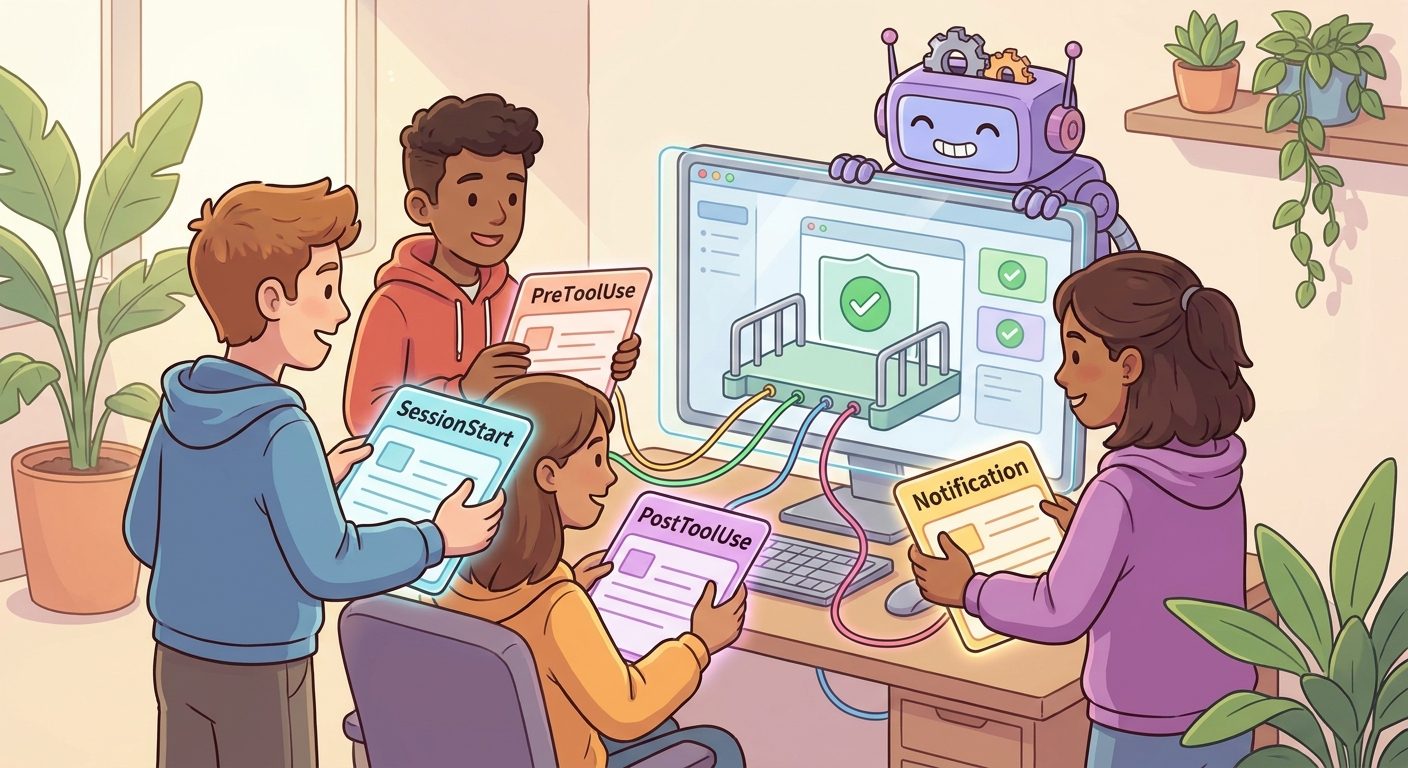
Claude Code hooks are automatic actions that run at specific points in a Claude Code session. A hook can run a shell command, call an HTTP endpoint, or trigger prompt-based behavior when an event fires. The most practical events are SessionStart for setup, UserPromptSubmit for prompt checks, PreToolUse for blocking or inspecting tool calls before they happen, PostToolUse for formatting or logging after a tool succeeds, and Notification for alerts when Claude needs attention.
The simple mental model is this: permissions decide what Claude Code may do, while hooks decide what your environment should do around Claude’s actions. A permission rule can say “ask before running this command.” A hook can inspect the actual command, reject a dangerous pattern, format changed files, log an audit event, or notify a teammate when a background agent finishes.
This article focuses on practical hook design rather than copying the official reference. You will learn which lifecycle event fits which task, when a hook should block, when it should merely warn, and how to keep your setup maintainable as Claude Code adds more background agents, subagents, worktrees, and remote control workflows.
Why Claude Code Hooks Matter Right Now
Claude Code has been moving from a single interactive coding assistant toward a richer agentic development environment. Recent changelog entries show ongoing work around background agents, subagents, worktrees, notifications, manual permission visibility, remote control, and hook reliability. The official hook reference also documents a much broader lifecycle than most developers initially expect: session events, prompt events, tool events, task events, subagent events, worktree events, file-change events, compaction events, and notification events.
That expansion creates a new problem. Developers want Claude Code to be powerful, but they do not want every powerful action to depend on memory, vibes, or repeated manual instructions. If you always tell Claude “run tests after editing” or “never use destructive shell commands,” you are relying on a conversational reminder. Hooks let you move the repeatable part into a predictable workflow.
AIFeatureDrop analytics support this direction. In the latest 28-day report, the site recorded 301 active users, 387 sessions, and 672 page views, with Organic Search contributing 161 sessions. Existing Claude pages already appear in Search Console for permission-related queries, and the Claude label page receives traffic. Pages about practical limits, permissions, subagents, and workflow safety are clearly relevant to the audience. That makes a deeper hooks pillar useful as both a standalone guide and an internal-link hub.
The search gap is also obvious from user intent. Someone searching for Claude Code hooks usually does not need another list of event names. They need answers like: Which event blocks a command before it runs? Where should team-shared hooks live? How do hooks differ from permission rules? What should I automate first? What can break? This guide is built around those decisions.
How Claude Code Hooks Work
A hook has three parts: an event, an optional matcher, and one or more handlers. The event says when the hook should be considered. The matcher narrows the hook to a tool, filename pattern, or context. The handler is the actual command, HTTP endpoint, or prompt that runs. For command hooks, Claude Code sends JSON input through standard input so your script can inspect the event details and return an optional decision.
For example, a PreToolUse hook can watch Bash tool calls before they execute. If the command matches a destructive pattern, the hook can return a denial with a reason. If the command is harmless, the hook exits without a decision and the normal permission flow continues. That distinction matters: a quiet hook does not automatically approve everything. It simply means the hook has nothing to add.
Claude’s documentation groups common lifecycle events into three cadences. Some run once per session, such as SessionStart and SessionEnd. Some run once per turn, such as UserPromptSubmit, Stop, and StopFailure. Others run inside the agentic loop around each tool call, including PreToolUse, PostToolUse, PostToolUseFailure, and PostToolBatch. There are also async and background-oriented events such as Notification, SubagentStart, SubagentStop, WorktreeCreate, WorktreeRemove, and FileChanged.
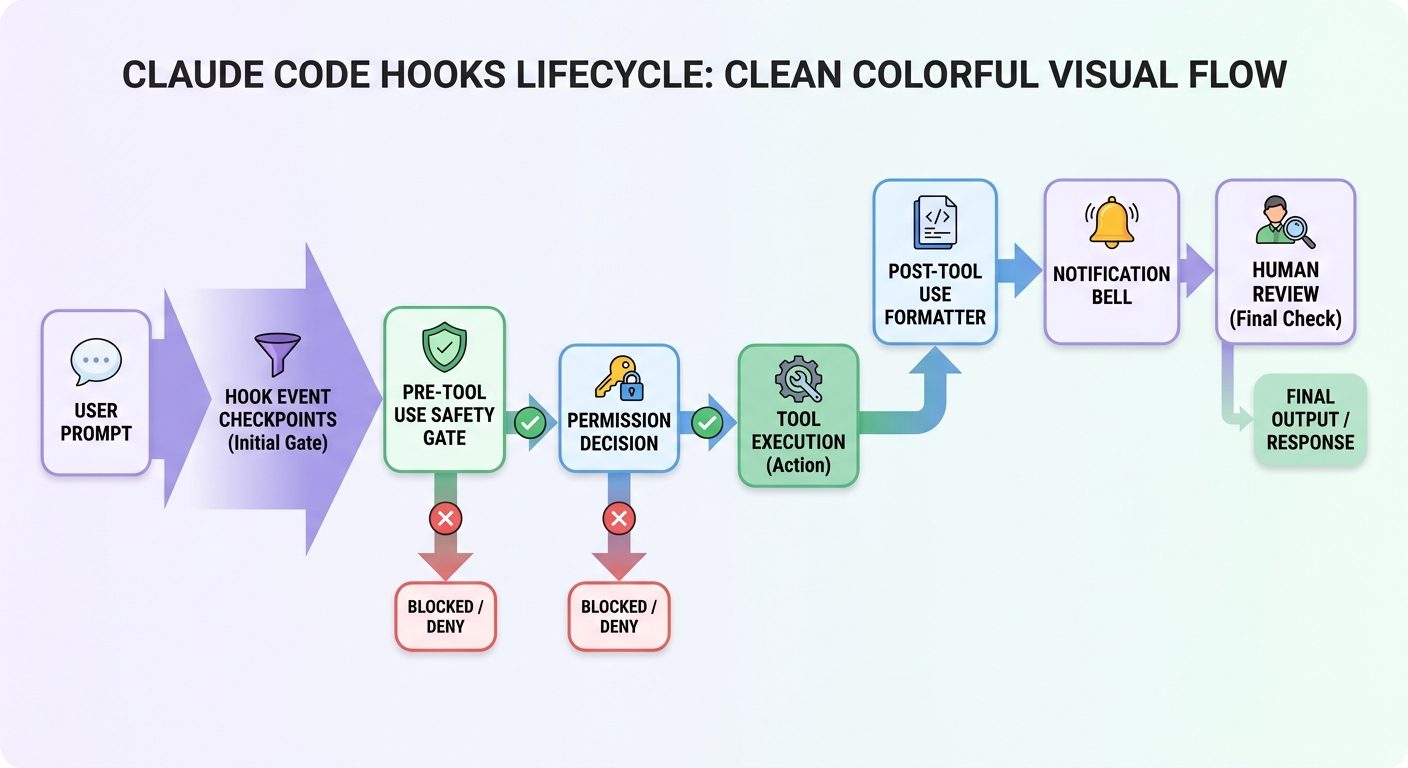
The best hooks are narrow. A hook that runs on every tool call can slow down the session, create noisy logs, and make failures hard to diagnose. A hook that runs only for Bash commands matching risky patterns or only after edits to specific file types is easier to understand and easier to trust.
Which Claude Code Hook Event Should You Use?
Most hook mistakes come from choosing the wrong event. Developers often start with PreToolUse for everything because it sounds powerful. It is powerful, but it is not always the right event. If you want to load context when a session opens, use SessionStart. If you want to validate prompts before the model sees them, use UserPromptSubmit. If you want to format files after edits, use PostToolUse or a file-change event. If you want to alert yourself when a background agent needs input, use Notification.
| Goal | Best hook event | Why it fits |
|---|---|---|
| Prepare environment, check dependencies, print repo instructions | SessionStart | Runs when a session begins or resumes, before the main work starts. |
| Stop risky prompts before they reach Claude | UserPromptSubmit | Lets you inspect the user’s submitted prompt before Claude processes it. |
| Block destructive shell commands or sensitive file access | PreToolUse | Runs before a tool call executes and can deny or redirect risky actions. |
| Run formatter, linter, log event, or verify a generated file | PostToolUse | Runs after a successful tool call, when there is something concrete to inspect. |
| Capture failed tool calls for debugging | PostToolUseFailure | Records failures without confusing them with normal successful edits. |
| Notify when Claude needs attention or a background agent finishes | Notification | Designed for user-facing alerts and background workflow updates. |
| Prepare isolated workspaces for subagents | WorktreeCreate | Fires around worktree creation, useful for team-specific checkout behavior. |
| React when a watched file changes | FileChanged | Better than running broad post-tool automation for every single tool. |
| Log session completion or summarize activity | SessionEnd | Runs when the session terminates, useful for audit trails and cleanup. |
If you are just starting, build three hooks first: one PreToolUse guardrail for dangerous Bash patterns, one PostToolUse formatter or linter for edited files, and one Notification hook for background-session attention. That trio covers safety, quality, and awareness without turning Claude Code into a fragile Rube Goldberg machine.
Practical Claude Code Hook Examples
The examples below are intentionally simple because the goal is not to produce the most clever hook. The goal is to show the kind of deterministic behavior that belongs outside a chat prompt.
1. Block destructive shell commands before they run
A PreToolUse hook is ideal for obvious danger patterns. You can deny commands that include rm -rf, direct writes into protected directories, production database commands, or deployment commands that should never run from an AI session without human approval.
{
  "hooks": {
    "PreToolUse": [{
      "matcher": "Bash",
      "hooks": [{
        "type": "command",
        "command": "${CLAUDE_PROJECT_DIR}/.claude/hooks/block-dangerous-bash.sh"
      }]
    }]
  }
}
The handler can parse JSON input, inspect the proposed command, and return a denial reason. Keep the deny list focused. If every normal developer action is blocked, people will bypass the hook instead of improving it.
2. Format files after Claude edits code
A PostToolUse hook can run a formatter after write or edit operations. This is useful because AI coding agents often make correct edits that fail local style rules. A formatter hook gives Claude cleaner diffs and gives humans less noise to review.
Do not run every formatter on every tool call. Match only the relevant tools and file types. For JavaScript projects, run the project’s formatter on changed files. For Python projects, run the configured tool rather than inventing a new team standard. The hook should reinforce the repository’s existing workflow, not surprise the team.
3. Notify when a background agent needs input
Claude Code’s background-agent features are useful only if you notice when they need attention. A Notification hook can send a desktop notification, Slack message, or local sound when a session needs input or completes. This is especially helpful for long-running review, migration, or test-repair tasks.
4. Inject context at session start
A SessionStart hook can run lightweight checks and print reminders: active branch, package manager, test command, recent migrations, or links to team docs. Keep this short. If the hook dumps pages of text into every session, it becomes noise and may increase context clutter.
5. Keep an audit trail for sensitive repositories
For regulated or high-risk codebases, hooks can record which tools were used, when risky actions were attempted, which commands were blocked, and when a session ended. Treat audit logs as operational metadata, not a place for secrets. Redact command arguments if they may contain credentials, customer data, or private URLs.
Claude Code Hooks vs Permission Rules vs Human Review
Hooks are only one layer of a safer AI coding workflow. Claude Code settings and permission rules define what is allowed, denied, or should ask first. Hooks add deterministic checks and automation around those actions. Human review remains the final layer because hooks cannot understand business intent as reliably as a developer reviewing the diff.
What hooks are good at
- Blocking clear danger patterns before execution.
- Running repeatable checks after file changes.
- Sending notifications for background work.
- Logging structured activity for later review.
- Standardizing team workflows across a repository.
What hooks should not do
- Replace code review or security review.
- Grant unlimited permissions because a script says so.
- Hide important errors from the developer.
- Run broad automation on every event without a matcher.
- Store secrets or private data in logs.
Recent Claude Code releases also reinforce why observability matters. Changelog fixes mention hook stderr visibility, background-session recovery, subagent error reporting, worktree isolation, notification behavior, and remote-control reliability. These are exactly the areas where teams need clear feedback. If a hook fails, the developer should see why. If a subagent is rate-limited, partial work should be visible. If background sessions need input, notifications should not disappear into a hidden panel.
The safest architecture is layered: managed or project settings for policy, permission rules for static access control, hooks for repeatable runtime checks, and pull-request review for judgement. This keeps Claude Code useful without pretending automation can understand every consequence.
How Teams Should Roll Out Claude Code Hooks
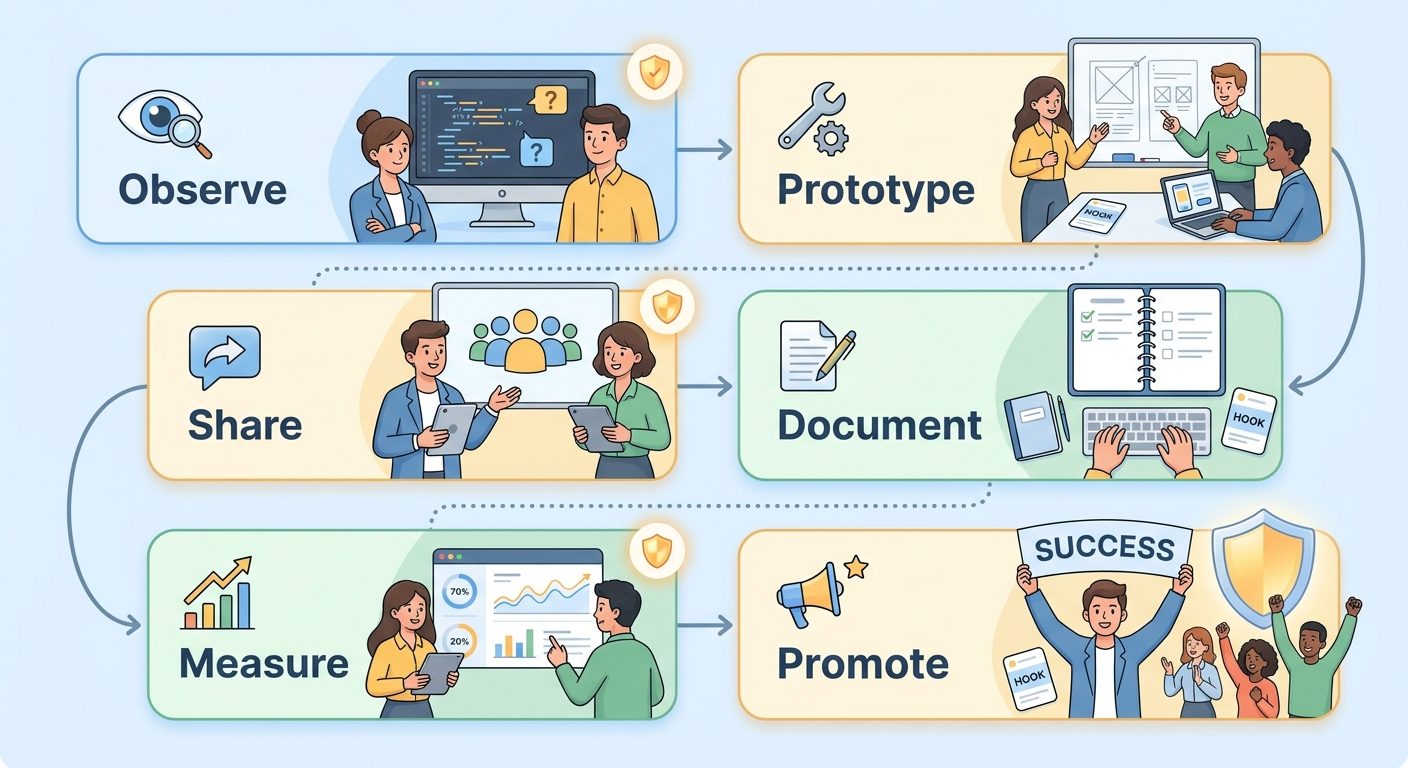
Do not start by committing a giant hook framework to every repository. Start with the smallest workflow that solves a real problem. If developers frequently forget to run the formatter, add a formatter hook. If someone almost ran a dangerous shell command, add a focused Bash guardrail. If background agents go unnoticed, add a notification hook. The best rollout feels like a seatbelt, not a cage.
| Stage | What to do | Success signal |
|---|---|---|
| Observe | List repeated manual reminders, risky commands, noisy diffs, and missed background notifications. | The team agrees the hook solves a real recurring problem. |
| Prototype locally | Put the hook in local settings or a branch and test it on normal workflows. | It catches the target issue without blocking ordinary development. |
| Share narrowly | Move stable hooks into project scope for one repository or one team. | Developers understand the hook and know where to change it. |
| Document decisions | Explain event choice, matcher, expected output, and failure behavior. | New teammates can debug the hook without asking the original author. |
| Measure friction | Review false positives, slowdowns, and bypass requests. | The hook saves more time than it costs. |
| Promote carefully | Only then consider managed or organization-level policy. | The hook is boring, reliable, and broadly applicable. |
Scope matters. User-level hooks are good for personal preferences. Project-level hooks are good for repository standards that should travel with the code. Local hooks are good for experimentation and machine-specific behavior. Managed settings are good for organization-wide controls that should not be overridden. Choose the least powerful scope that solves the problem.
Also decide how hooks are reviewed. A hook is code that runs during development, sometimes with access to repository paths and command inputs. Treat it like infrastructure. Review changes, keep scripts readable, avoid clever one-liners, and document why each hook exists.
A Beginner-Friendly Hook Workflow You Can Copy
If you want a practical starting point, use this workflow. First, create a repository-level .claude/hooks directory for scripts that are safe to share. Second, create one Bash guardrail script that denies obviously destructive commands. Third, create one post-edit script that runs the project formatter only on relevant files. Fourth, create a notification script for long-running sessions. Fifth, write a short README that explains every hook and how to disable or debug it during emergencies.
For most teams, that is enough. You do not need a hook for every event. In fact, the event list is long because Claude Code supports many advanced workflows, not because every repository should use all of them. A small number of well-named hooks beats a sprawling automation layer that nobody wants to touch.
Use hooks to reduce repeated prompting. If your team has a CLAUDE.md template, hooks can support it by enforcing the operational parts: run tests, format code, block dangerous commands, and notify when attention is required. If you are already using Claude Code permission rules, hooks can add runtime checks that permissions alone cannot express. If you are experimenting with subagent permissions, hooks can make background work more visible and auditable.
Troubleshooting Claude Code Hooks
When hooks fail, resist the urge to add more automation. Debug the lifecycle. Ask four questions: did the event fire, did the matcher match, did the handler run, and did Claude Code understand the handler output? Most problems fit into one of those buckets.
PostToolUse when you needed PreToolUse, or a session event when the action happens per turn.Use visible, actionable error messages. Recent Claude Code changelog entries specifically mention fixes around hidden hook stderr for SessionStart, Setup, and SubagentStart hooks. That kind of improvement is useful only if your own scripts explain failures clearly. “Blocked by security policy” is worse than “Blocked because this command matched rm -rf outside the project directory.”
Final Recommendation: Treat Hooks as Workflow Infrastructure
Claude Code hooks are not just a customization feature. They are workflow infrastructure for AI-assisted development. As coding agents become more autonomous, the teams that get the most value will be the teams that convert repeated instructions into predictable guardrails. They will not rely on memory. They will not trust every agent action blindly. They will build small, reviewable automation around the moments that matter.
Start with one safety hook, one quality hook, and one notification hook. Keep matchers tight. Keep scripts boring. Log only what you need. Review hook changes like code. Then expand only when a real workflow pain justifies it.
If you are building a Claude Code practice across a team, pair this guide with our Claude Code usage reduction checklist, dynamic workflows checklist, and Claude Code usage limits guide. The broader lesson is the same: the better you define the workflow, the more useful and safer the AI agent becomes.
Hook Patterns Worth Building Next
Once the basic setup is stable, teams can add more specialized patterns. A dependency-change hook can warn when Claude edits package files without updating lockfiles. A secrets hook can scan newly written files for accidental tokens before they are committed. A test-selector hook can suggest the smallest relevant test command after a file edit. A worktree hook can prepare isolated branches for subagents so background work does not collide with the lead developer’s checkout. These patterns are valuable because they target known failure modes instead of adding automation for its own sake.
The key is to keep every hook explainable in one sentence. “Block destructive Bash commands” is explainable. “Run a complex policy engine on every model action and rewrite the result” is not. Claude Code hooks should make the workflow easier to reason about, not harder. If a new teammate cannot understand why a hook exists after reading its name, matcher, and short README entry, the hook is probably too broad or too clever.
Another useful pattern is the review checkpoint. After Claude changes files, a hook can create a short local note with changed paths, formatter status, and suggested test commands. The hook should not mark the work as safe. It should simply give the developer a clean handoff point: here is what changed, here is what ran, here is what still needs human review. That keeps responsibility clear while reducing the repetitive work around every AI edit.
For larger teams, a notification hook can integrate with existing engineering rituals. For example, long-running background agents can notify only when they need input, finish a defined task, or hit an error. This is better than constant pings. Agentic coding already produces enough noise; hooks should filter attention toward moments that matter. A good notification hook respects focus by being specific, rare, and actionable.
Finally, hooks can help with cost and limit hygiene. Claude Code usage is affected by repeated attempts, vague prompts, unnecessary context, and large agent loops. A hook cannot solve usage limits alone, but it can nudge better behavior by warning when a prompt is too broad, when a background agent starts in the wrong directory, or when an expensive workflow lacks a clear test command. That turns hooks into part of a broader operating system for safer, more efficient AI coding.
Sources and References
- Anthropic Claude Code docs: Hooks reference
- Anthropic Claude Code docs: Automate actions with hooks
- Anthropic Claude Code docs: Settings and configuration scopes
- Anthropic Claude Code changelog
Claude Code features and event names can change. Verify the current Anthropic documentation before enforcing hooks in production or managed team environments.
FAQ: Claude Code Hooks
What are Claude Code hooks?
Claude Code hooks are user-defined actions that run automatically at specific lifecycle events, such as session start, prompt submission, before a tool runs, after a tool succeeds, when a notification appears, or when a session ends.
What is the most useful Claude Code hook event?
For safety, PreToolUse is usually the most useful because it can inspect and block risky tool calls before they happen. For quality automation, PostToolUse is often better because it can run after a file change succeeds.
Are hooks the same as Claude Code permission rules?
No. Permission rules define what tools or actions are allowed, denied, or require approval. Hooks run automation around Claude Code events, such as blocking a command pattern, formatting files, logging activity, or sending a notification.
Where should team-shared hooks live?
Team-shared hooks usually belong in project scope, such as a repository’s .claude/settings.json and hook scripts committed with the repo. Personal experiments belong in local or user scope.
Can Claude Code hooks block dangerous commands?
Yes. A PreToolUse hook can inspect a proposed Bash command and return a denial decision with a reason. It should be focused on clear danger patterns rather than blocking normal development.
Can hooks run formatters or tests?
Yes. Hooks can run formatters, linters, tests, or custom scripts, but they should be scoped carefully so they do not slow every tool call or surprise developers with heavy automation.
Do hooks work with background agents and subagents?
Claude Code includes hook events for notifications, subagent start and stop, task activity, and worktree behavior. These are useful for making background work visible and auditable.
What is the biggest risk with Claude Code hooks?
The biggest risk is hidden complexity. Broad hooks can slow sessions, overblock normal work, leak sensitive data into logs, or become hard to debug. Keep hooks narrow, reviewed, and well documented.
Post a Comment