
Claude Code Usage Limits Explained: 2026 Guide to Higher Rate Limits, Plans, and Smarter Agent Workflows
Claude Code usage limits became one of the most practical Claude questions after Anthropic doubled Claude Code five-hour limits for key paid plans and removed peak-hour reductions for Pro and Max users. This guide explains what changed, why limits still disappear quickly, and how to design smarter coding-agent workflows.
Quick answer: Anthropic’s May 2026 update makes Claude Code more usable for serious developers: five-hour rate limits are doubled for Pro, Max, Team, and seat-based Enterprise plans, and the old peak-hours reduction is removed for Pro and Max. But Claude Code is still limited by task size, model choice, context length, tool calls, subagents, and long-running loops. If you hit limits, upgrade only after you have scoped tasks, used plan mode, reduced unnecessary context, and monitored where usage is going.

What changed in Claude Code usage limits in 2026?
Anthropic’s May 6, 2026 update is the reason Claude Code usage limits deserve a dedicated guide now. The company announced that Claude Code’s five-hour rate limits are doubled for Pro, Max, Team, and seat-based Enterprise plans. It also removed the peak-hours limit reduction for Claude Code users on Pro and Max. In plain English, paid users should see more usable capacity inside the normal rolling usage window, especially when they code during high-demand periods.
The announcement was tied to a broader compute expansion, including a SpaceX compute deal that Anthropic said would add more than 300 megawatts of capacity and over 220,000 NVIDIA GPUs at Colossus 1 within the month. Anthropic also pointed to large compute partnerships with Amazon, Google/Broadcom, Microsoft/NVIDIA, and Fluidstack. For everyday users, the important takeaway is not the data-center story; it is that Claude Code capacity is now less constrained than it was before the update.
That does not mean Claude Code is unlimited. Limits still matter because Claude Code does heavier work than a simple chatbot message. It can read a codebase, search files, reason through a plan, edit code, run commands, call tools, use MCP servers, spawn subagents, and continue across sessions. The more work it does, the more capacity it consumes. The higher limits give developers more room, but they do not remove the need for good workflow design.
This is also a strong topic for AI Feature Drop’s current content strategy. GA4 for the last 28 complete days shows 19 active users, 37 sessions, and 422 page views on a young site. The Claude label page already has engagement, and the existing Claude design-to-code workflow guide is one of the early category pages getting attention. Search Console is still sparse, so the best SEO move is to build specific topical authority around practical Claude workflows rather than write another broad “what is Claude?” post.
What counts against Claude Code usage limits?
Anthropic does not reduce Claude Code to a public “one prompt equals one unit” formula because coding-agent usage depends on several moving parts. The most important mental model is this: Claude Code usage reflects the amount and complexity of work the agent performs, not just the number of messages you type. A short question about a single file is light. A long-running agent session that explores a monorepo, uses Opus, runs tests repeatedly, calls MCP tools, and coordinates subagents is heavy.
Large repositories, many referenced files, long logs, and broad prompts increase the information Claude must process.
Planning, editing, testing, debugging, and retrying across many turns consumes more than a direct explanation.
Opus-level reasoning and high-effort work are valuable for hard tasks but should not be the default for every cleanup request.
Claude Code documentation also shows why advanced users can consume limits quickly. Subagents have their own context windows and can be configured with model, tools, permissions, hooks, MCP servers, max turns, memory, effort, isolation, and background behavior. Settings files can define permissions, deny rules, hooks, plugin configuration, and environment variables. Those features are powerful, but every extra autonomous step can add usage if you let the tool explore without boundaries.
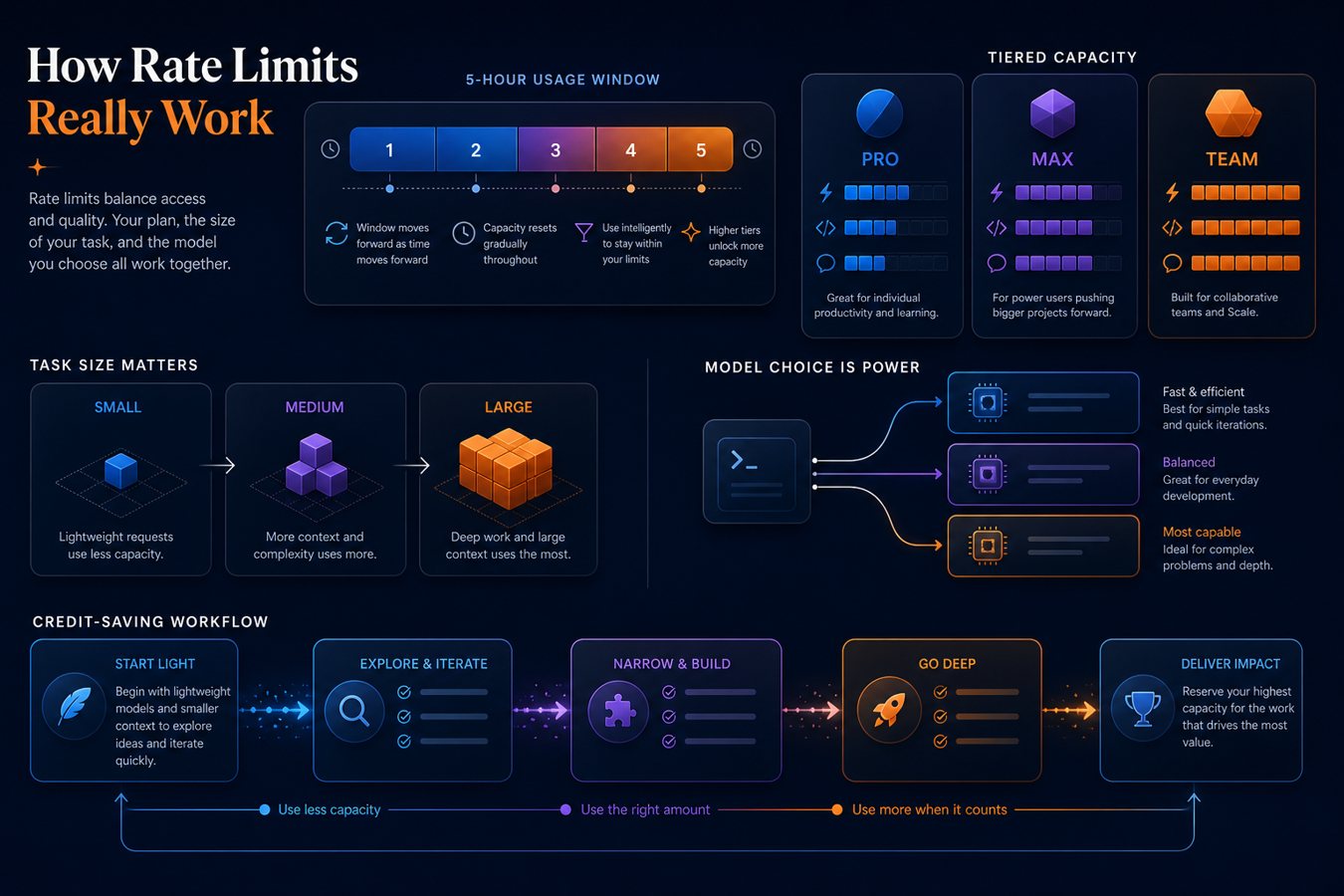
Claude Code plans: Pro, Max, Team, and Enterprise after higher limits
The plan decision is easier if you separate two questions. First, do you need more personal capacity? Second, do you need team governance? A solo developer who hits limits because Claude Code is genuinely saving hours may need Max. A team handling company repositories may need Team or Enterprise even if individual usage is moderate, because security, policy, identity, and administrative controls matter.
| Plan or access type | Best fit | Usage-limit angle | Decision signal |
|---|---|---|---|
| Pro | Individual developers using Claude Code for focused tasks. | May 2026 update doubles five-hour Claude Code limits and removes peak-hour reductions. | Choose when you run occasional to regular coding sessions but can keep tasks scoped. |
| Max | Power users and daily builders. | Also benefits from doubled five-hour limits and removed peak-hour reduction. | Choose when Pro capacity is genuinely blocking valuable daily work, not just vague prompts. |
| Team | Small engineering teams and startups. | Doubled five-hour limits apply to Team in the announcement. | Choose when multiple people need shared Claude Code workflows, billing, and collaboration. |
| Seat-based Enterprise | Organizations with managed users and internal code. | Doubled Claude Code five-hour limits apply to seat-based Enterprise plans. | Choose when governance, security, identity, policies, and auditability are central. |
| API / platform | Custom automations and agent infrastructure. | Anthropic also raised Opus API rate limits considerably. | Choose for SDK-driven or backend workflows rather than interactive terminal coding alone. |
A useful rule: do not upgrade to solve a workflow problem. If Claude Code burns through limits because you ask it to “improve the whole app,” load huge logs, run unrestricted commands, and spawn open-ended subagents, Max may only let you waste more capacity. Upgrade when your workflow is already disciplined and the remaining constraint is real productive volume.
Why Claude Code limits still drain fast
Many users describe Claude Code limits as “draining fast” because coding agents create invisible work. When you ask a chat model for a paragraph, you see the answer. When you ask Claude Code to fix a bug, it may inspect files, infer architecture, build a plan, check tests, edit code, retry after errors, summarize changes, and maybe involve subagents. The final response may be short, but the hidden work can be substantial.
Large context is the first culprit. A codebase overview, dependency graph, test failure log, framework docs, and previous session transcript can all be useful, but they are not free. The second culprit is ambiguity. If your prompt does not specify the target folder, expected behavior, acceptance criteria, and files that should not change, Claude has to explore. The third culprit is model mismatch. Opus 4.7 is valuable for advanced software engineering and long-running agentic workflows, but simpler cleanup or documentation tasks may not need your most capable setting.
The fourth culprit is automation enthusiasm. Claude Code supports hooks, settings, subagents, MCP tools, and background behaviors. Used carefully, these features preserve context and enforce constraints. Used carelessly, they let multiple processes gather information or run tool loops that do not materially improve the result. Usage efficiency is not about using fewer features; it is about using features with a purpose.
How to make Claude Code usage limits last longer
The highest-return habit is to write better task boundaries. Give Claude Code a specific outcome, a scoped area, constraints, and a definition of done. “Fix the bug where the pricing card miscalculates annual savings in components/pricing; do not change billing API code; run the pricing tests; summarize only changed files and risks” is far better than “fix pricing.”
- Use plan mode before edits. Ask Claude to inspect and propose a plan before it writes. Stop bad assumptions early.
- Reference the smallest useful context. Point at the folder, file, test, or error message that matters instead of the entire repo.
- Break large work into slices. Separate investigation, patch, tests, refactor, docs, and PR summary into distinct steps.
- Route tasks by model intensity. Save high-effort Opus-style work for hard architecture, debugging, or long-horizon tasks.
- Use subagents deliberately. A read-only exploration subagent can protect main context; too many broad subagents can waste usage.
- Set permission rules. Deny destructive commands, secret reads, broad network access, and unrelated directories.
- Use worktrees for parallel sessions. Parallel worktrees reduce edit collisions and keep sessions scoped.
- Write reusable project instructions. A tight
CLAUDE.mdor project guide avoids repeating conventions and context every session.
A safe Claude Code workflow for real repositories
Claude Code is most valuable when it behaves like a fast, careful teammate—not an unsupervised production operator. The safe workflow starts before the prompt. Create a branch. Confirm that secrets are not exposed. Make sure project settings deny sensitive files and destructive commands. Decide whether Claude can run tests, install dependencies, or touch network resources. Then ask for a plan before the first edit.

Keep Claude inside the project and deny unrelated folders, credentials, environment files, and private keys.
Use plan mode for non-trivial tasks so you can approve direction before usage-heavy edits begin.
Ask for targeted tests first, then broader tests if the change is risky or touches shared code.
Read the diff, inspect risky files, and require human approval before merging or deploying.
Claude Code settings make this practical. Project settings can define shared permissions for a repository. Local settings can hold your machine-specific overrides. Managed settings can enforce organization-wide policies. Hooks can run formatting, notify you when approval is needed, or protect files. Subagents can isolate exploration, documentation, security review, or test-focused work. These controls are not just security features; they also reduce wasted usage because Claude spends less time wandering.
Claude Code usage limits vs OpenAI Codex limits
Because AI Feature Drop recently covered OpenAI Codex pricing and usage limits, the obvious reader question is whether Claude Code is now the better deal. The honest answer is: it depends on workflow. Claude Code and Codex both move beyond autocomplete into agentic software work, but the buying decision should consider environment, model preference, coding style, governance, and whether your existing stack is Claude-first or OpenAI-first.
| Decision factor | Claude Code | OpenAI Codex |
|---|---|---|
| Fresh limit update | May 2026 doubled five-hour limits for key plans and removed peak-hour reductions for Pro/Max. | 2026 pricing discussion centers on token-based credits, five-hour windows, and model/surface differences. |
| Best fit | Developers who like Claude’s coding style, terminal-first workflows, subagents, and MCP-based tool use. | OpenAI/ChatGPT-heavy users who want Codex app, CLI, IDE, cloud and broader OpenAI integrations. |
| Limit pressure | Large context, Opus-heavy work, subagents, broad exploration, and long loops. | Large context, model choice, output-heavy tasks, browser/computer use, and cloud workflows. |
| Optimization | Plan mode, settings scopes, permissions, subagents, hooks, worktrees, model routing. | Task scoping, model choice, credit monitoring, safe repository boundaries, approval workflows. |
If your team already uses Claude for design, writing, architecture, and code review, Claude Code’s higher limits strengthen the case for staying in that ecosystem. If your workflows depend on ChatGPT, OpenAI APIs, and Codex cloud features, Codex may still be the better hub. Many builders will keep both and route tasks by strength.
Practical examples: which workflow should you use?
Solo developer fixing bugs
Start on Pro. Use narrow prompts, plan mode for anything beyond a small fix, and targeted tests. If the May 2026 higher limits still leave you blocked after a disciplined week, evaluate Max. Do not upgrade before you know whether limits are caused by valuable work or sloppy context.
Founder building an MVP
Use Claude Code for feature slices: onboarding, pricing page, dashboard widget, API route, test coverage, and deployment checklist. Keep each session scoped. A founder who runs Claude for hours daily may prefer Max, but the biggest savings come from splitting the product into small, verifiable tasks.
Engineering manager
Focus on Team or Enterprise controls rather than only personal limits. Create project-level settings, shared permission rules, test expectations, branch protections, code-owner reviews, and a policy for MCP servers. Higher limits are useful only if the team’s agent work is safe and auditable.
Agency or freelancer
Use separate worktrees or repositories for each client. Avoid mixing client context in long conversations. Use local settings and explicit deny rules to prevent Claude from reading unrelated files. Track which tasks generate profitable output; upgrade based on client-deliverable throughput, not curiosity.
SEO summary: should you upgrade because of Claude Code usage limits?
If Claude Code usage limits stop you from finishing valuable, scoped work, consider moving from Pro to Max or from individual plans to Team/Enterprise. If limits disappear because tasks are vague, the repository context is huge, or agent loops run without checkpoints, fix the workflow first. The May 2026 update improves the capacity equation, but it does not remove the need for precise prompts, safe settings, and human review.
Internal linking suggestions for AI Feature Drop
This article should strengthen the Claude and developer-agent topical cluster by linking to these related pages:
- OpenAI Codex Pricing and Usage Limits: 2026 Guide to Plans, Credits, and Safe Coding Workflows OpenAI
- ChatGPT for Excel and Google Sheets: Real Spreadsheet Workflows OpenAI
- Claude Design to Code Workflow: How to Use Claude Design, Opus 4.7, and Claude Code Claude
- Gemini API File Search Multimodal RAG: Practical Guide for Developers GoogleAI
- Copilot Cowork Skills and Plugins: Practical Guide for Microsoft 365 Workflows Microsoft
- OpenAI AgentKit Guide: Build Better AI Agents with Agent Builder, ChatKit, and Evals OpenAI
Suggested future supporting articles: “Claude Code Subagents Explained,” “Claude for Small Business Workflows,” “Claude Opus 4.7 for Coding,” and “Claude Code vs OpenAI Codex Limits.”
External references
- Anthropic: Higher usage limits for Claude and a compute deal with SpaceX
- Anthropic: Introducing Claude Opus 4.7
- Claude Code docs: settings
- Claude Code docs: subagents
- Claude Code docs: hooks
- Claude Code docs: common workflows
FAQ: Claude Code usage limits
Did Anthropic increase Claude Code usage limits in 2026?
Yes. On May 6, 2026, Anthropic said it doubled Claude Code five-hour rate limits for Pro, Max, Team, and seat-based Enterprise plans and removed peak-hour limit reductions for Pro and Max.
Does that mean Claude Code is unlimited?
No. The update gives eligible plans more capacity, but usage still depends on task size, context, model choice, tool calls, subagents, and long-running workflows.
Why do Claude Code limits drain quickly?
Limits can drain quickly when Claude reads large repositories, uses high-capability models, runs tests repeatedly, uses many tools, spawns subagents, or works through broad prompts without clear boundaries.
Is Claude Pro enough for Claude Code?
Pro is enough for focused individual use, especially after the higher-limits update. Daily heavy coding, long agent loops, or large projects may justify Max if your workflow is already efficient.
Should teams use Claude Team or Enterprise?
Teams should evaluate Team or Enterprise when shared billing, repository governance, identity controls, policy enforcement, auditability, and safe collaboration matter.
How can I reduce Claude Code usage?
Use plan mode, narrow context, smaller tasks, appropriate models, permission rules, worktrees, concise summaries, reusable project instructions, and deliberate subagent use.
Are subagents good or bad for limits?
Subagents are useful when they isolate research or enforce constraints, but too many broad subagents can add unnecessary work. Use them for clear roles, not as default parallel exploration.
How often do Claude Code limits reset?
Anthropic describes Claude Code rate limits in five-hour windows for the affected plans in the May 2026 announcement. Always check your current Claude account UI and official docs because plan details can change.
Is Claude Code better than OpenAI Codex for limits?
Neither is universally better. Claude Code’s May 2026 higher-limit update is attractive for Claude-first developers; Codex may fit OpenAI-first workflows. Compare real task throughput, not only headline limits.
Post a Comment