
OpenAI Codex Pricing and Usage Limits: 2026 Guide to Plans, Credits, and Safe Coding Workflows
OpenAI Codex pricing and usage limits became a high-intent search topic after OpenAI moved Codex deeper into ChatGPT plans, credits, desktop workflows, plugins, and safety controls. This guide explains what changed, which plan makes sense, and how to use Codex without burning credits or exposing your codebase to unnecessary risk.
Quick answer: Codex is included across ChatGPT Free, Go, Plus, Pro, Business, Edu, and Enterprise plans, but practical value depends on model access, local vs cloud workflows, five-hour usage windows, token-based credit burn, and whether your team needs admin controls. Plus is enough for light weekly coding. Pro is better for daily agent work. Business and Enterprise/Edu are about shared workspaces, governance, security, and credits. API-key access is best for CI and automation, but it does not include every cloud feature.

Why OpenAI Codex pricing and usage limits matter now
OpenAI Codex is no longer just a historical code-completion model or a developer curiosity. In April 2026, OpenAI described a major Codex expansion that brings it closer to a full software-development partner: a macOS app, computer-use capability, an in-app browser, GitHub review flows, multiple terminal tabs, remote devbox connections, file previews, plugin integrations, scheduled automations, and a preview of memory. That shift is exciting, but it also makes one question much more important: what does it actually cost to use Codex for real work?
The answer is not as simple as “Codex costs $20/month” or “Codex is free.” OpenAI says Codex is included in ChatGPT plans, but the practical experience changes across Free, Go, Plus, Pro, Business, Enterprise, Edu, and API-key access. It also changes by model. A quick local question with a mini model can be cheap. A long-running repository agent with a large context window, tool use, test loops, browser work, image generation, or fast mode can consume allowance much faster.
That is exactly why this pillar guide focuses on the narrower, high-value topic: OpenAI Codex pricing and usage limits. The search gap is not “what is Codex?”—that is already covered by launch posts and generic AI coding guides. The gap is the practical layer: how the plan choices, token-based credits, five-hour windows, user-reported limit confusion, and safe coding setup fit together for someone deciding whether to use Codex this week.
AI Feature Drop’s own analytics also point to the right angle. During the last 28 complete days, GA4 reported 19 active users, 36 sessions, and 323 page views. The OpenAI label page was among the strongest category pages, and the existing OpenAI AgentKit guide already generated early engagement. Search Console is still early for the domain, so this article is designed to build topical authority around specific OpenAI developer workflows instead of chasing a broad news headline.
What is OpenAI Codex in 2026?
Codex is OpenAI’s agentic coding environment for building, changing, reviewing, and operating software with AI assistance. Depending on your surface and plan, you may meet Codex through ChatGPT, the Codex app, CLI, IDE extension, GitHub-style review flows, or API-key-based automation. Its role is broader than autocomplete: it can inspect a repository, plan work, edit files, run commands, test changes, explain decisions, and produce artifacts for human review.
The April 2026 launch language matters because Codex is being pushed beyond “write this function” into “help me move through a software workflow.” OpenAI highlighted computer use on macOS, where Codex can see, click, and type with its own cursor in a bounded way. It also highlighted parallel agents, browser workflows for frontend iteration, image generation for visual assets, more than 90 plugins, GitHub review-comment handling, multiple terminals, SSH devbox connections, and memory-style personalization.
Ask Codex to explain code, edit files, run tests, or refactor a small component from the app, CLI, or IDE.
Use Codex for pull-request review, Slack-connected workflows, cloud tasks, and repository-level changes where available.
Business and Enterprise-style setups add workspace controls, identity policies, audit logs, and data-handling expectations.
If you are familiar with the broader AI development stack, think of Codex as one part of a growing cluster. OpenAI AgentKit helps teams build agent experiences; ChatGPT can support spreadsheets and business workflows; competing tools such as GitHub Copilot and Claude Code cover adjacent coding tasks. For context, see AI Feature Drop’s guides to OpenAI AgentKit, ChatGPT for Excel and Google Sheets, Copilot Cowork skills and plugins, and Claude design-to-code workflows.
OpenAI Codex pricing: plans and who each one fits
OpenAI’s Codex pricing page states that Codex is included in ChatGPT Free, Go, Plus, Pro, Business, Edu, and Enterprise plans. But “included” is not the same as “unlimited,” and it does not mean every surface has identical model access or cloud features. The practical plan question is: how often do you want Codex to act, how long are your tasks, which models do you need, and do you need team controls?
| Access option | Best for | What to watch |
|---|---|---|
| Free | Exploring quick tasks and seeing how Codex feels. | Expect basic access and tighter practical limits. |
| Go | Light coding tasks at a lower monthly price point. | Good for occasional use, not heavy agent work. |
| Plus | A few focused coding sessions each week. | Includes Codex across common surfaces, but limits can drain quickly on large tasks. |
| Pro | Daily coding agents, heavier local sessions, and higher usage allowance. | OpenAI advertised higher multiples than Plus and temporary promotional boosts through May 31, 2026; verify the current page before buying. |
| Business | Startups and growing teams that need shared workspace controls. | Useful when admin, SSO, MFA, workspace security, and scalable credits matter. |
| Enterprise/Edu | Organizations needing governance, data controls, audit logs, RBAC, domain verification, and compliance. | Usage may scale with credits rather than fixed rate limits on flexible pricing plans. |
| API key | Automation in shared environments, CI, SDK usage, and custom workflows. | Billed by tokens through API pricing and may lack cloud features such as certain GitHub review or Slack integrations. |
The most common mistake is choosing a plan by headline price only. A solo developer who asks Codex to patch a few scripts every week may be happy on Plus. A founder building a prototype daily with large context, screenshots, browser iteration, and repeated test loops may find Pro more realistic. A team with private repositories and internal policies should not evaluate only the monthly price; it should evaluate identity, sandboxing, compliance logs, code-review workflows, data controls, and admin enforcement.
How Codex usage limits and credits work
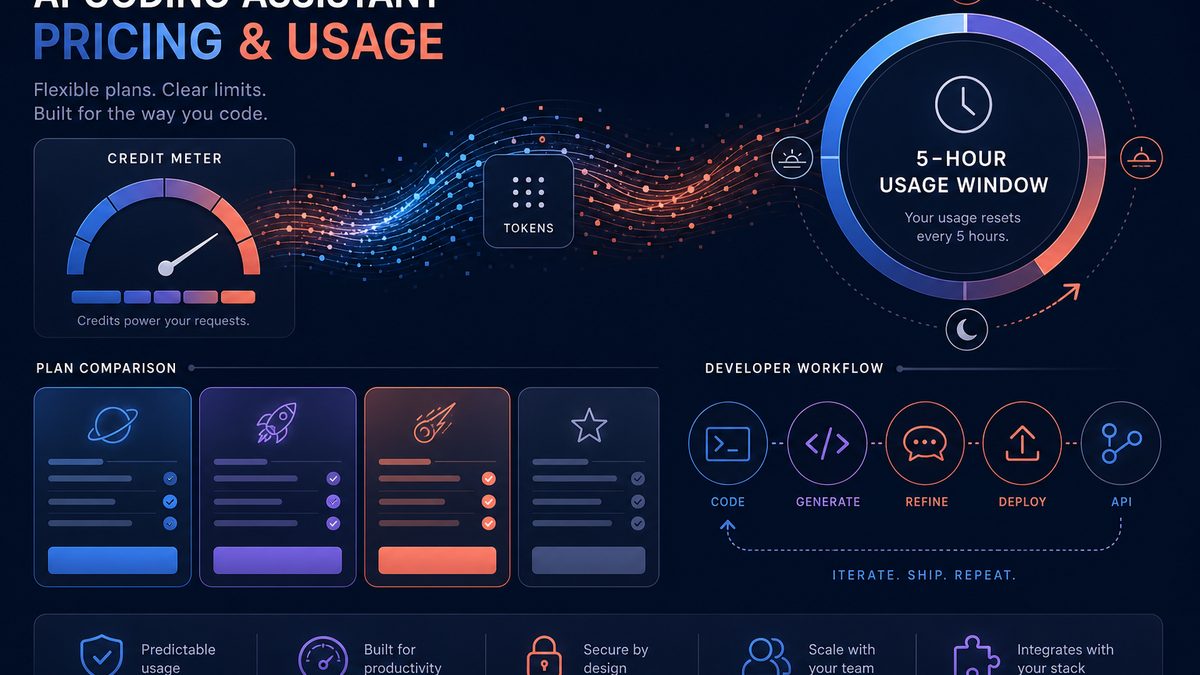
The most important 2026 pricing change is that OpenAI’s Help Center describes a token-based Codex rate card for most customers. The timeline is significant: OpenAI says Codex pricing was updated on April 2, 2026 to align with API token usage instead of per-message pricing for Plus, Pro, Business and new Enterprise plans; then on April 23, 2026 it expanded the update to existing Enterprise plans including Edu, Health, Gov, and ChatGPT for Teachers. That means many users now experience Codex limits as credit usage that varies by model and task size rather than a simple count of prompts.
Token-based usage has three practical components: input tokens, cached input tokens, and output tokens. Output-heavy tasks can cost more. Long repository context can cost more. Fast mode may consume credits at a higher rate for supported models. If Codex needs to inspect many files, hold a long plan, run tests repeatedly, generate code, explain failures, and revise its work, the session can consume meaningfully more allowance than a quick “explain this function” request.
| Why limits drain faster | What it means in practice | Reader action |
|---|---|---|
| Large context | Codex reads more files, history, logs, and instructions. | Start with a narrow folder and clear task scope. |
| Output-heavy work | Large diffs, long explanations, and repeated revisions generate more output tokens. | Ask for smaller patches and concise summaries. |
| Higher-end models | More capable models may have different credit rates and availability. | Use mini/routine models when the task is simple. |
| Fast mode | Speed can trade off against credit efficiency. | Reserve fast mode for urgent or interactive work. |
| Cloud tasks and reviews | Some workflows share five-hour windows or have separate review limits. | Schedule heavy tasks and watch usage settings. |
| Image/browser/computer use | Multimodal and tool-heavy workflows add context and execution steps. | Use only when it improves the task outcome. |
How to reduce Codex credit burn without making Codex less useful
Credit efficiency is mostly about giving Codex better boundaries. The better Codex understands the task, the fewer exploratory steps it needs. The less unnecessary context it loads, the less input it consumes. The more you ask for checkpoints, the easier it is to stop a wrong path before it becomes expensive.
- Start with a one-paragraph objective. Tell Codex the exact outcome, affected area, constraints, and what “done” means.
- Limit the working directory. If the bug is in the billing page, do not point Codex at the entire monorepo unless required.
- Ask for a plan before edits. A short plan helps catch misunderstandings before code changes begin.
- Use smaller tasks. “Fix the validation bug in this component” is usually more efficient than “improve the app.”
- Choose the right model. Use cheaper or mini options for routine cleanup, reserving GPT-5.5-style reasoning for complex work.
- Prefer diffs over essays. Ask Codex to summarize only the key change, tests run, and risks.
- Reuse instructions. A good AGENTS.md, project conventions file, or repo-specific guide reduces repeated context gathering.
- Watch the usage page. OpenAI points users to Codex settings and usage controls for monitoring remaining credit and purchasing/reloading credit where available.
How to use Codex safely in a real coding workflow
Pricing gets attention, but safety is the part teams regret ignoring. OpenAI’s May 2026 “Running Codex safely” guidance describes the basic idea: keep the agent inside clear technical boundaries, let low-risk actions move quickly, and make higher-risk actions explicit and reviewable. That applies even if you are not a Fortune 500 company. The moment Codex can edit files, run commands, access tools, or operate a computer, you need boundaries.
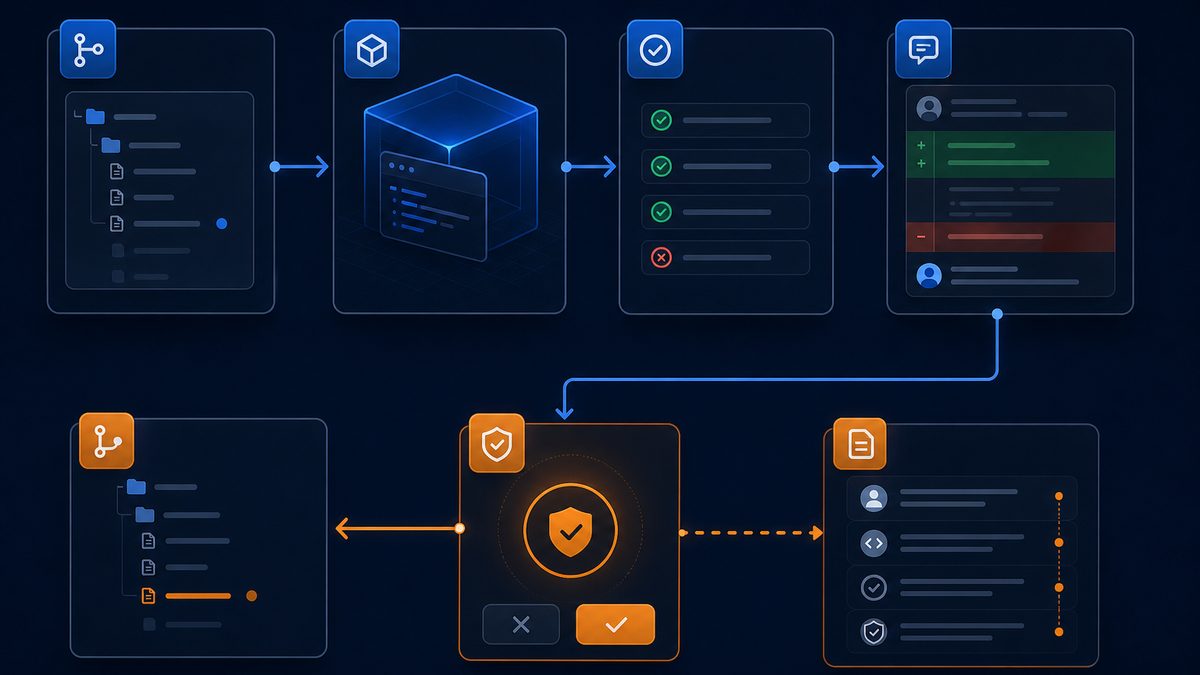
Run Codex in a workspace where write access is scoped to the project area. Avoid exposing unrelated folders, secrets, credentials, or personal files.
Let routine reads and safe edits move quickly, but require approval for network calls, destructive commands, production operations, dependency changes, and credential access.
Prefer a managed network posture. Allow expected destinations, block known-bad domains, and avoid open-ended outbound access when the task does not require it.
Treat Codex output like a junior teammate’s pull request: run tests, inspect diffs, verify security-sensitive changes, and maintain logs.
A practical solo-developer setup might look like this: create a clean branch, open the exact project folder, write a short task spec, ask Codex for a plan, approve only the needed file writes, run tests locally, review the diff, and commit only after you understand the change. A small team can add branch protections, pull-request templates, required tests, code owners, and no-secret policies. Larger teams should layer identity, SSO, audit logs, compliance retention, and workspace-level policies.
This is where Codex differs from a normal chatbot. A chatbot can suggest code that you copy. Codex may operate more directly in your development environment. That is powerful, but it means governance is part of product value. If a vendor or internal champion pitches Codex purely as “more output,” ask about sandboxing, approvals, network access, identity, logging, and incident response.
OpenAI Codex vs GitHub Copilot: which one fits this pricing decision?
Many searchers compare OpenAI Codex with GitHub Copilot, Cursor, Claude Code, and other AI coding tools. The useful comparison is not “which tool is universally better?” The useful comparison is “which workflow am I buying?” GitHub Copilot is deeply integrated into GitHub and IDE workflows, with strong inline assistance and organization features. Codex is increasingly positioned around agentic tasks, ChatGPT/Codex surfaces, broader computer-use workflows, plugin integrations, and OpenAI model access.
| Decision factor | OpenAI Codex | GitHub Copilot |
|---|---|---|
| Core feel | Agentic coding partner that can plan, edit, run, review, and operate across surfaces. | IDE/GitHub-native coding assistant with strong inline and repository workflow integration. |
| Pricing lens | ChatGPT plan, credits, model selection, five-hour windows, API token usage. | Copilot subscription/organization pricing and GitHub ecosystem value. |
| Best for | OpenAI-heavy users, ChatGPT power users, agent workflows, broader tool/plugin experimentation. | GitHub-centered teams, inline code completion, PR workflows, IDE-first productivity. |
| Safety question | Sandbox, approvals, network policy, identity, audit logs, workspace controls. | Enterprise policies, GitHub permissions, code review, organization controls. |
If you already live in GitHub and mostly want inline completion, Copilot may remain the lower-friction default. If you want ChatGPT-connected coding agents, broader OpenAI model access, computer-use experiments, and a workflow that can extend beyond code completion, Codex deserves a closer look. Many teams will use both: Copilot for daily IDE acceleration and Codex for agentic tasks, repository changes, or OpenAI-specific workflows.
Practical OpenAI Codex examples by user type
Solo developer
A solo developer might use Plus for weekly bug fixes, refactors, or small feature branches. The best pattern is narrow scope: “In the billing settings component, fix the validation bug where annual plan discounts display incorrectly. Do not modify payment API code. Run the unit tests for billing.” This gives Codex a clear boundary and reduces wasted exploration.
Founder building an MVP
A founder may use Pro because daily app-building tasks can involve frontend iteration, design feedback, browser previews, image assets, tests, and repeated corrections. The key is to break the MVP into slices: auth screen, onboarding, pricing table, dashboard card, API route. Let Codex finish and test one slice before starting another.
Engineering manager
An engineering manager should care less about the cheapest individual plan and more about governance. Business or Enterprise/Edu access may matter if the team needs admin controls, SSO, MFA, secure workspaces, user analytics, compliance logs, and consistent policies. The right question is not “Can a developer buy Plus?” It is “Can we safely let coding agents interact with our repositories under company rules?”
DevOps and CI automation
API-key access is attractive for CI and custom automation because usage is billed by tokens and can be integrated into scripts or shared environments. The tradeoff is that API-key access may not include every Codex cloud feature or early model. Treat it like infrastructure: set budgets, monitor token usage, restrict secrets, and create explicit approval gates for production-impacting changes.
SEO summary: who should choose which Codex plan?
If you only need to learn Codex, start free or with the lowest plan that lets you test your real workflow. If you use Codex weekly, Plus is the baseline. If you use Codex daily for large tasks, Pro is the more realistic individual tier. If multiple people will use Codex on company code, evaluate Business or Enterprise/Edu for security and controls. If Codex is part of CI, automation, or custom tooling, evaluate API-key access and token budgets.
Internal linking suggestions for AI Feature Drop
This article should strengthen OpenAI developer topical authority by linking to existing related posts:
- ChatGPT for Excel and Google Sheets: Real Spreadsheet Workflows
- Claude Design to Code Workflow: How to Use Claude Design, Opus 4.7, and Claude Code
- Gemini API File Search Multimodal RAG: Practical Guide for Developers
- Copilot Cowork Skills and Plugins: Practical Guide for Microsoft 365 Workflows
- OpenAI AgentKit Guide: Build Better AI Agents with Agent Builder, ChatKit, and Evals
Suggested future supporting articles: “Why Codex Usage Limits Drain Fast,” “OpenAI Codex vs GitHub Copilot for Agentic Coding,” “How to Use OpenAI Codex Safely in a Private Repository,” and “OpenAI Codex Mac App Features Explained.”
External references
- OpenAI: Codex for (almost) everything
- OpenAI Developers: Codex pricing
- OpenAI Help Center: Codex rate card
- OpenAI: Running Codex safely
- OpenAI Developer Community: Codex category
- OpenAI Codex GitHub issues
FAQ: OpenAI Codex pricing and usage limits
Is OpenAI Codex free?
Codex access exists across ChatGPT plan tiers, including Free, but practical limits and available capabilities vary. Free access is best for exploration, not heavy coding-agent work.
Is ChatGPT Plus enough for Codex?
Plus is enough for a few focused coding sessions each week. If you run large repository tasks, daily agent sessions, long test loops, or heavy GPT-5.5/GPT-5.3-Codex workflows, you may hit limits faster and should evaluate Pro or team plans.
Why do Codex usage limits drain so fast?
Codex usage depends on model, task size, input tokens, cached input tokens, output tokens, context, local vs cloud workflows, and whether fast mode or tool-heavy workflows are involved. One large repository task can consume far more allowance than one simple explanation prompt.
Does GPT-5.5 appear in every Codex surface?
Not necessarily. Model availability can vary by plan, surface, rollout status, API-key access, IDE extension, and region or workspace configuration. Check OpenAI’s current pricing/model table and your Codex settings.
Should I use Codex through ChatGPT subscription or API key?
Use subscription access when you want the app, CLI/IDE surfaces, cloud integrations and ChatGPT-connected workflows. Use API-key access when you need custom automation, CI, SDK usage, or shared infrastructure where token-based billing is easier to control.
How can I reduce Codex credit usage?
Scope the task narrowly, use the right model, ask for a plan before edits, limit repository context, avoid unnecessary long explanations, reuse project instructions, and monitor Codex usage settings.
Is Codex safe for private repositories?
It can be used more safely when sandboxing, approval policies, network restrictions, identity controls, secret hygiene, branch protections, tests, and human code review are in place. Teams should evaluate Business or Enterprise/Edu controls for sensitive codebases.
How is Codex different from GitHub Copilot?
Copilot is deeply integrated into GitHub and IDE workflows, especially inline coding and GitHub-native collaboration. Codex is increasingly agentic and OpenAI/ChatGPT-connected, with broader app, CLI, cloud, plugin, and computer-use workflows. Many teams may use both.
What is the best first Codex workflow to try?
Start with a small, low-risk repository task: ask Codex to explain a bug, propose a plan, change one component, run targeted tests, and summarize the diff. Do not start with production credentials, broad repo rewrites, or open-ended deployment tasks.
Post a Comment