
Codex banked resets give eligible OpenAI Codex users a flexible way to save a rate-limit reset for heavy coding sessions. This guide explains what changed, who qualifies, how referral rewards and expiry work, and when to use a reset instead of waiting, switching models, buying credits, or using API-key mode.

Codex Banked Resets: Quick Answer for Busy Developers
Codex banked resets are OpenAI’s new way to let eligible Codex users save a rate-limit reset and use it when a heavy coding session actually needs it. Instead of treating every reset as something that arrives only on OpenAI’s normal schedule, banked resets give Plus and Pro users a limited, expiring reserve that can be redeemed during demanding work such as a long refactor, a stubborn bug investigation, a multi-file migration, or a production incident review.
The feature sounds simple, but the questions around it are not. Developers are asking whether a banked reset restores a full weekly allowance, whether it changes the normal reset date, where the reset button appears, what happens for CLI-only users, whether referrals expire, and how resets interact with GPT-5.5, GPT-5.4, mini models, credits, local messages, cloud tasks, and image generation.
What Are Codex Banked Resets?
Codex banked resets are saved rate-limit resets for OpenAI Codex. The important word is banked. A normal limit reset arrives according to the usage window that applies to your plan and product surface. A banked reset is different because it sits in reserve until you redeem it, subject to OpenAI’s eligibility and expiry rules. That makes it useful when your work pattern does not match the calendar of automatic resets.
OpenAI’s Codex changelog says the Codex app 26.609 release added rate-limit reset banking for Plus and Pro users, including one free reset at launch and referral invitations for earning more during the promotion. OpenAI’s Codex pricing page says that from June 11 through June 24, eligible Plus and Pro users can invite up to three friends. When an eligible recipient sends their first Codex message, both people receive a banked rate-limit reset. The same page says banked resets are usable for 30 days after they are granted.
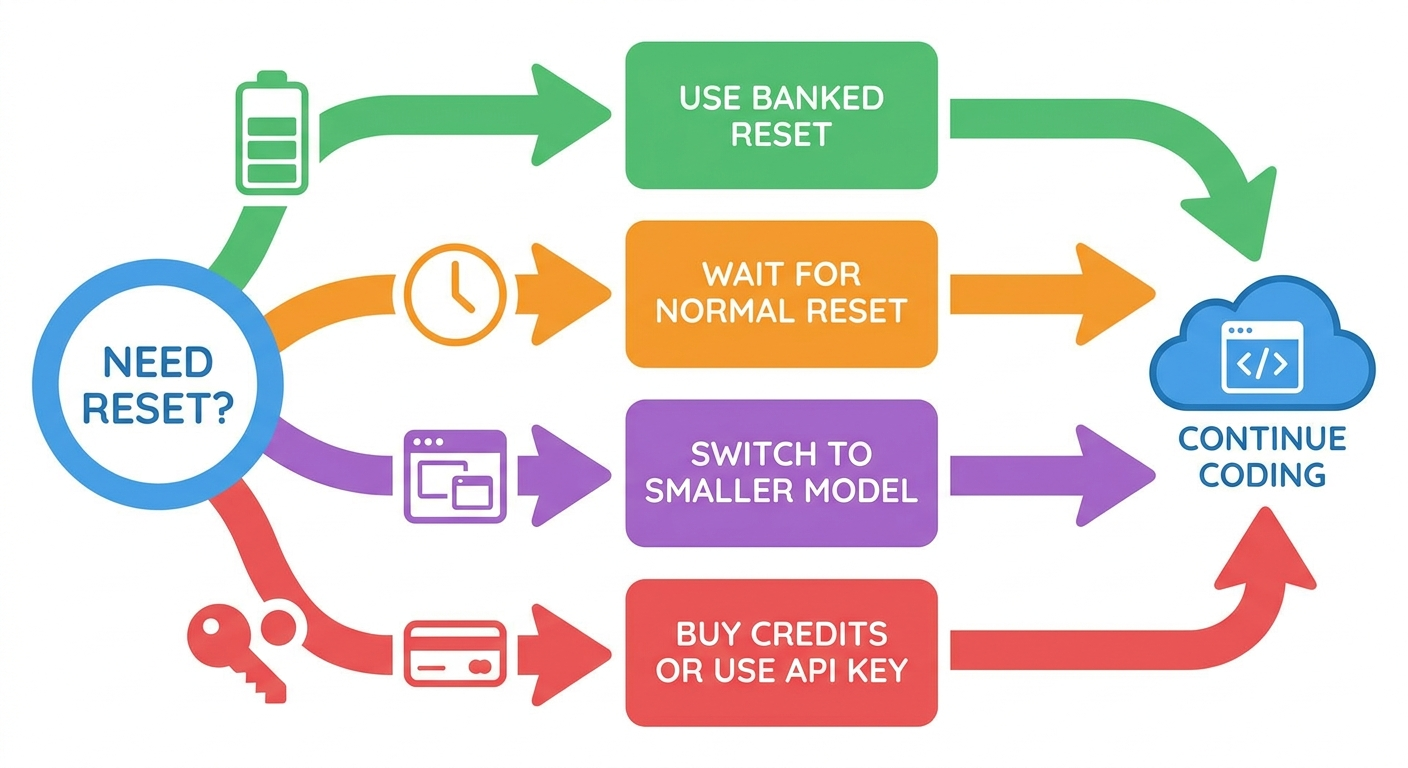
In plain English, the feature gives eligible users a small emergency reserve. If you are halfway through a normal week and you run into a large coding task, you may be able to spend a banked reset instead of waiting for the next automatic reset, buying credits immediately, or moving all work to a smaller model.
| Concept | What it means | How to think about it |
|---|---|---|
| Automatic reset | Usage availability refreshes according to Codex plan windows | Your normal baseline |
| Banked reset | A saved reset you can redeem later if eligible | A limited reserve for high-value work |
| Credits | Paid extension of usage after included limits | A paid overflow option |
| Model switching | Using a smaller or cheaper model when appropriate | A way to stretch limits |
| API key mode | Running local tasks with API billing rather than subscription allowance | A separate billing path for automation or extra usage |
Why OpenAI Added Flexible Codex Resets
Codex is different from a normal chatbot because coding work is bursty. A developer may use almost no Codex on Monday, then need several hours of intense help on Thursday. A startup may ignore an agent for days, then ask it to migrate a codebase, reproduce a bug, review a pull request, write tests, and debug a failing browser flow in one sitting. Fixed reset windows are easy to understand, but they can feel frustrating when they do not line up with real engineering work.
The banked reset feature answers that mismatch. It gives some flexibility without changing the entire pricing model. Instead of promising unlimited usage, OpenAI can give eligible users a reset they choose to spend when the value is highest. That is especially useful for Codex because one successful session can save hours, while one poorly timed session can burn through allowance before the hard part begins.
The feature arrived alongside broader Codex improvements. The same June Codex app release added Developer mode for Browser use, the /init command for project-instruction scaffolding, clearer usage-limit errors with plan and workspace guidance, and performance improvements for Browser use. Recent mobile Codex updates also added worktrees, usage stats, token activity charts, /goal support, and inline review comments. Codex is becoming a more complete coding environment, and flexible usage controls are part of making that environment practical.
Eligibility, Referrals, and Expiry
OpenAI’s official Codex pricing page says Codex is included in ChatGPT Free, Go, Plus, Pro, Business, Edu, and Enterprise plans, but the banked reset promotion described on that page is narrower. From June 11 through June 24, eligible Plus and Pro users can invite up to three friends. When an eligible recipient sends their first Codex message, both people receive a banked rate-limit reset. OpenAI says those banked resets are usable for 30 days after they are granted.
Business users have a separate referral flow using shared workspace credit rewards, and OpenAI says referrals are not currently available for ChatGPT Enterprise. That distinction matters for teams because “Codex is included in my plan” and “I can earn this exact banked reset reward” are not the same claim.
| Account or plan context | What OpenAI documentation indicates | Practical takeaway |
|---|---|---|
| Plus | Eligible Plus users are included in the June referral reset promotion | Check the Codex app profile or invitation area for availability |
| Pro | Eligible Pro users are included in the June referral reset promotion | Useful for planning larger work bursts even with higher limits |
| Business | Business referrals use separate shared-workspace credit rewards | Do not assume personal reset rules apply to the workspace |
| Enterprise | Referrals are not currently available for ChatGPT Enterprise | Use admin/billing controls rather than expecting this promotion |
| Free or Go | Codex may be included, but the cited reset promotion specifically names eligible Plus and Pro users | Check in-product eligibility instead of assuming access |
When Should You Use a Codex Banked Reset?
The easiest way to waste a banked reset is to use it the moment you see a limit warning. The smarter move is to ask whether the task is valuable enough, whether the current thread has useful context, and whether cheaper options would work. Think of the reset as a tactical resource for a high-leverage session.
A good reset candidate has three properties. First, the work is important enough that waiting would hurt. Second, the current Codex thread has built valuable context that you do not want to lose. Third, the task genuinely benefits from a stronger model or longer active session rather than a smaller, cheaper model. If all three are true, a banked reset may be the right move.
Use a banked reset when
- You are in the middle of high-value debugging or migration work.
- Codex already understands the codebase, failing tests, or review context.
- Stopping now would force you to rebuild context later.
- The task is too complex for a quick mini-model pass.
- The reset will expire soon and you have a real task ready.
Save it when
- You only need a small explanation or simple one-file edit.
- The task can wait for the normal reset.
- A smaller model can complete the work.
- You are still exploring and do not know the goal.
- You are tempted to run vague repeated “try again” prompts.
Use this five-line scope brief before redeeming
Goal: migrate the settings module from legacy config to typed config.
Success criteria: tests pass, docs updated, no public API break.
Allowed scope: settings/, tests/settings/, docs/config.md.
Do not touch: auth, billing, deployment scripts.
Stop condition: summarize blockers before spending more capacity.
How Banked Resets Fit With Limits, Credits, and Models
Codex usage limits are not a single universal number. OpenAI says the number of Codex messages you can send depends on the model used, the size and complexity of coding tasks, and whether you run them locally or in the cloud. Small scripts or routine functions may consume only a fraction of an allowance, while larger codebases and long-running tasks use significantly more. OpenAI also says local messages and cloud tasks share a five-hour window for Plus users, with additional weekly limits possible.
This is why some developers feel limits differently even on the same plan. One person may spend all day making small edits with a mini model. Another may burn through capacity quickly by asking a frontier model to inspect a large repo, run a browser, generate images, and keep a long context alive. Banked resets are useful, but they do not remove the need to manage task design.
GPT-5.5 and efficiency
OpenAI’s Codex pricing page says GPT-5.5 uses significantly fewer tokens to achieve results comparable to GPT-5.4, with faster setup and higher-quality results for most users. That matters because many developers instinctively think “newer model equals more expensive usage.” The practical reality may be more nuanced: a more capable model can sometimes finish a task with fewer failed turns, fewer corrections, and less wasted context.
Image generation and speed settings
OpenAI’s pricing page also notes that image generation counts toward the same general Codex usage limits as local messages and cloud tasks, and that image generations can use included limits faster on average depending on quality and size. It also says speed configurations increase credit consumption for applicable models. If you are preserving a banked reset for coding, avoid spending the session on image-heavy or speed-heavy experiments unless those outputs are truly part of the task.

Troubleshooting Missing or Confusing Banked Resets
Because the feature is new, the most common problems are likely to be visibility, eligibility, and platform confusion. Users in search results are already asking where resets appear, whether they work from CLI-only setups, and whether the reset is equivalent to a full weekly reset. OpenAI’s documentation points users toward the Codex app profile menu, invitation dialog, pricing page, and usage dashboard, but the experience may vary by surface.
/status during an active CLI session, but also check the app or usage dashboard if redemption controls are not visible.If a reset expires in 30 days, the right strategy is to spend it on a meaningful task before it disappears, but not so early that you waste it on routine work a smaller model could handle. If your account does not show the feature, avoid assuming something is broken until you have checked plan eligibility, app version, and current OpenAI documentation.
Why This Topic Has a Search Gap Right Now
Search results around Codex banked resets currently mix official OpenAI docs, developer forum discussions, Reddit threads, short news rewrites, and social posts. Official pages explain the feature, but they are split across Codex changelog, pricing, and Help Center release notes. Community threads contain the questions users actually ask: Is it a full reset? Does it change the normal reset date? Where is the button? What about CLI-only users? Do referrals expire?
AIFeatureDrop analytics also support this topic. GA4 shows that practical coding-agent explainers on Codex, Copilot, and Claude already receive meaningful traffic for a young site. Search Console data is still sparse, but early page impressions and existing Codex post performance point toward long-tail practical AI workflow topics rather than generic AI news. This article is designed to satisfy that exact intent: not just “what did OpenAI announce,” but “what should I do before my next heavy Codex session?”
A Practical Workflow for Your Next Heavy Codex Session
Before you spend a banked reset, prepare the session like a small engineering sprint. Start by writing the problem in one sentence, then list the files Codex is allowed to inspect, the files it is allowed to change, and the tests or commands that prove the work is done. This does not make the session slower. It makes the reset more valuable because Codex spends less time guessing what matters.
For example, a vague request such as “fix the auth bug” can expand into a long exploration. A better reset-worthy request is: “The login callback fails when a user has an expired session. Inspect the auth callback, session middleware, and related tests. Do not change billing or account deletion logic. First explain the likely cause, then propose a minimal patch and test plan.” That kind of prompt gives Codex enough freedom to help without inviting it to wander across the repository.
After the first Codex pass, pause and review. Look at the diff, test output, and explanation before asking for another iteration. If the agent is getting closer, continue. If it is looping, stop the run and ask for a concise blocker summary. A banked reset is useful only when each turn moves the task forward; repeated vague retries are the fastest way to waste it.
Teams should also decide whether banked resets are personal productivity tools or part of a shared workflow policy. A solo developer can spend one on a late-night migration. A team should be more deliberate: define which repositories are safe for agentic sessions, which tasks require human approval, and which usage should move to workspace credits or API-key billing instead of personal resets.
Keep Learning on AI Feature Drop
- Codex Computer Use on Windows setup — useful if your Codex work includes desktop or remote control workflows.
- Codex Goal Mode prompt templates — plan longer Codex tasks before spending valuable usage.
- OpenAI Codex Computer Use explained — understand Appshots, permissions, locked use, and safer automation.
- OpenAI Codex pricing and usage limits — broader context for plan limits and cost-control habits.
- GitHub Copilot AI Credits Calculator — compare Codex reset thinking with Copilot credit planning.
Sources and References
- OpenAI Developers: Codex changelog
- OpenAI Developers: Codex pricing and referral resets
- OpenAI Help Center: ChatGPT release notes
- OpenAI Help Center: model release notes
- GitHub: OpenAI Codex issues
Pricing, limits, and feature availability can change. Always verify your active Codex plan, app version, workspace policy, and OpenAI usage dashboard before making purchasing or workflow decisions.
FAQ: Codex Banked Resets and Rate Limits
What is a Codex banked reset?
It is a saved rate-limit reset for eligible Codex users. Instead of waiting only for automatic reset timing, you can redeem a banked reset when you need extra Codex usage for an important session, subject to OpenAI’s eligibility and expiry rules.
Who can use Codex banked resets?
OpenAI’s June documentation names eligible Plus and Pro users for the banked reset referral promotion. Business has a separate shared-workspace credit reward path, and referrals are not currently available for ChatGPT Enterprise according to the Codex pricing page.
Do Codex banked resets expire?
Yes. OpenAI says banked rate-limit resets are usable for 30 days after they are granted.
How many referral resets can I earn?
For the June 11 through June 24 promotion, OpenAI says eligible Plus and Pro users can invite up to three friends. The in-product invitation dialog should show current reward, invite limits, recipient requirements, and expiry details.
Does a banked reset change my normal reset date?
OpenAI’s public documentation describes banked resets as a redeemable reserve, but users are still asking how they interact with normal reset timing. Check the current usage dashboard after redemption and avoid assuming it permanently changes your regular reset schedule.
Should I use a banked reset or switch to a smaller model?
Use a smaller model for routine edits, simple tests, documentation cleanup, and mechanical changes. Save a banked reset for high-value work where the current thread has important context and a stronger or longer session is likely to save meaningful time.
Can I buy credits instead of using a banked reset?
Yes. OpenAI says Plus and Pro users who reach usage limits can purchase additional credits to continue working. Credits may be better when you want paid overflow without spending a scarce banked reset.
Where can I see my current Codex limits?
OpenAI points users to the Codex usage dashboard and says CLI users can use /status during an active Codex CLI session to see remaining limits.
Do image generations affect Codex limits?
OpenAI says image generation counts toward the same general Codex usage limits as local messages and cloud tasks, and may use included limits faster depending on quality and size.
Post a Comment