
Claude Code hooks are becoming one of the most practical ways to turn a powerful coding agent into a safer teammate. This guide shows how to use hook events, permission scopes, MCP boundaries, subagents, and review checkpoints to stop risky tool calls before they become risky changes.
Quick Answer: What Are Claude Code Hooks Permission Gates?
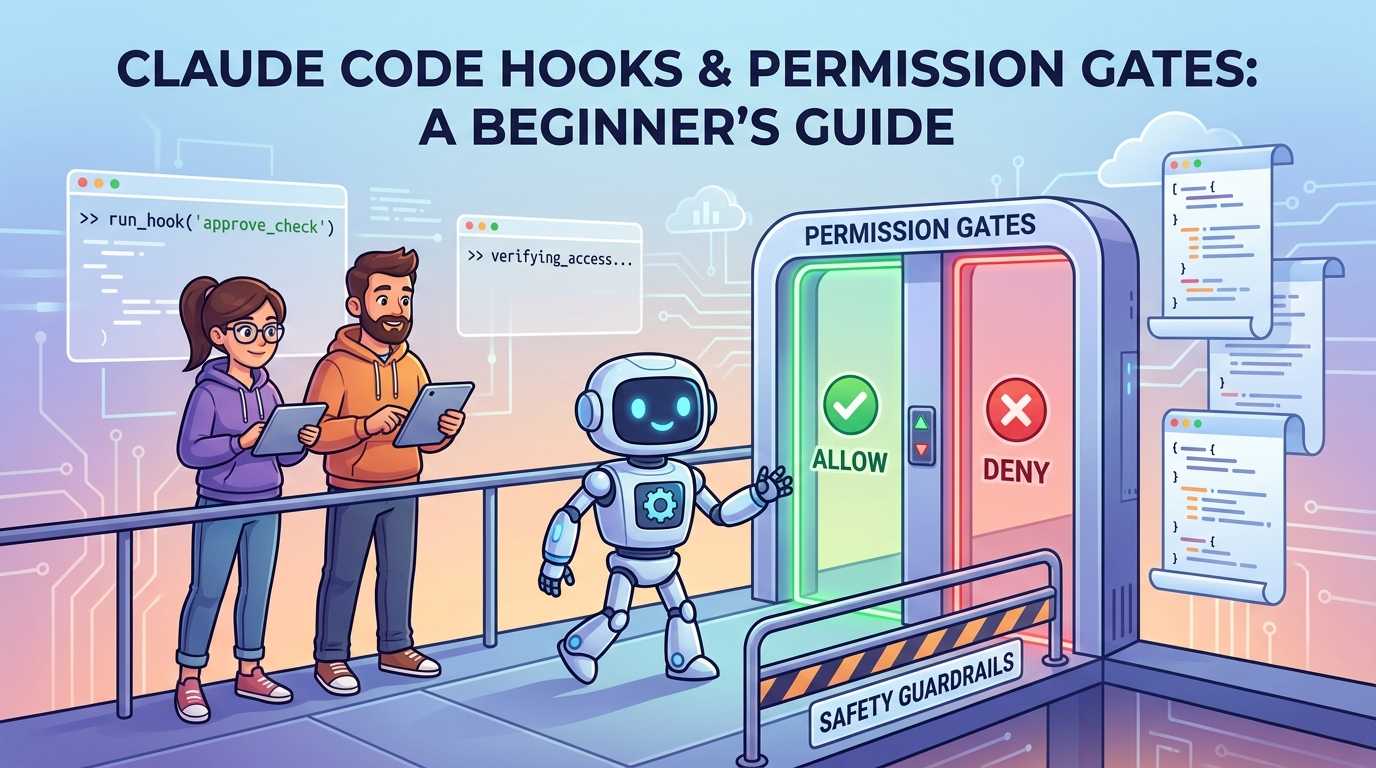
Claude Code hooks permission gates are workflow checkpoints that run around a Claude Code session or tool call so a team can inspect, allow, deny, log, or reshape risky agent actions. Instead of waiting until an AI coding agent has already edited files, called tools, queried systems, or created a pull request, hooks let you place guardrails at the moment the action is about to happen.
The most useful mental model is simple: permissions decide what Claude Code is allowed to do; hooks decide what must happen before, during, or after that permission is exercised. A permission rule might allow a tool category. A hook can still look at the specific file, command, MCP tool, prompt, working directory, or session context and decide whether that exact action is safe enough for the current repository.
This topic is narrower than a broad Claude Code overview. It supports our broader Claude Opus 5 coding guide by answering a specific search intent: how to keep Claude Code productive without giving an agent an unnecessarily wide blast radius.
Why Claude Code Hook Safety Matters Right Now
AI coding assistants are moving from autocomplete into agentic work. Claude Code can inspect projects, reason through multi-step plans, use tools, interact with MCP servers, delegate work to subagents, and operate across terminal, IDE, desktop, web, or managed environments. That capability is exactly why permission design matters. The more useful an agent becomes, the more important it is to define where it may act automatically and where human review is mandatory.
Recent Claude Code documentation and changelog entries show a fast-moving product: expanded hook lifecycle events, settings scopes, subagent behavior, MCP integrations, managed environments, self-hosted runner sessions, remote control, plugin workflows, sandbox improvements, spend-limit warnings, and safer command approval changes. These are not cosmetic details. They are signs that coding-agent operations are becoming infrastructure, not just a chat window.
Analytics for AI Feature Drop point in the same direction. In the last 28 complete days, GA4 showed 583 active users, 693 sessions, 819 page views, and 336 engaged sessions. The strongest pages were practical AI coding-agent explainers around Codex usage, desktop workflows, Windows computer use, Claude Code limits, and permission-related topics. Search Console also showed impressions for Claude permission queries with zero clicks. That gap suggests a focused guide can help users who already know Claude Code exists but need a plain-English safety playbook.
The search results around this subject are often split between official references and scattered community discussions. Official docs are necessary, but teams also need an applied article that says: which gates should we add first, what should we block, what should we only log, and how do hooks relate to permissions, MCP servers, and subagents?
What Claude Code Hooks Actually Do
Claude Code hooks are user-defined actions that run at specific points in the Claude Code lifecycle. The official hooks reference describes hooks as shell commands, HTTP endpoints, or prompt-based handlers that can receive JSON context and optionally return a decision. In practical terms, a hook is a small automation layer between the coding agent and the rest of your development environment.
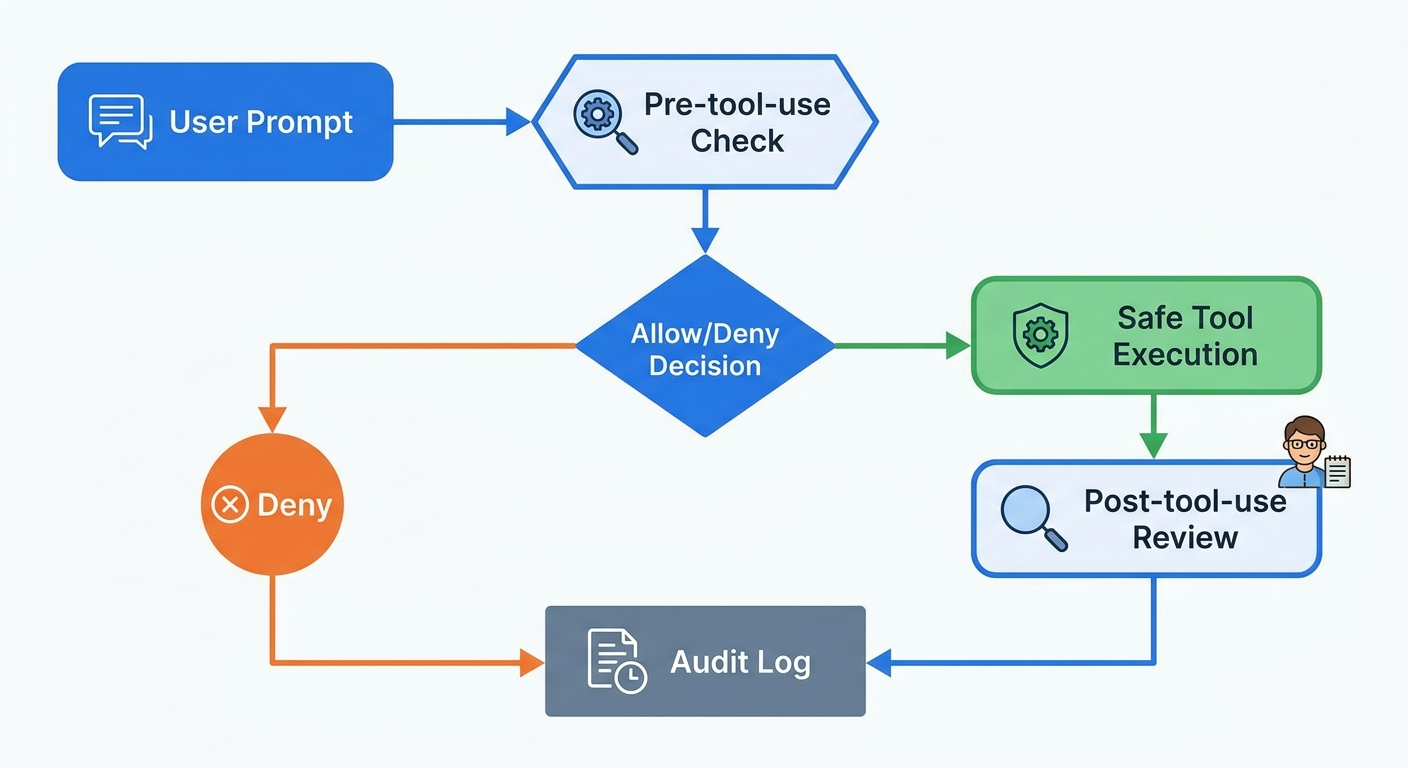
The hook lifecycle includes session-level events, turn-level events, and tool-call-level events. For agent safety, the tool-call events are the most important because they sit closest to the moment of risk. A PreToolUse style gate can inspect a proposed action before it runs. A post-tool hook can record what happened, update an audit trail, or trigger review. Other lifecycle events can help with setup, notifications, compaction, session start, session end, and broader observability.
Hooks are not the same as prompts
A prompt tells the model what you prefer. A hook adds an external checkpoint outside the model's ordinary reasoning path. That distinction matters. A project instruction can say, “do not edit migration files without approval.” A hook can actually inspect whether a proposed edit touches a migration file and block it or require human confirmation.
Hooks are not a substitute for source control
Hooks reduce risk before actions happen, but they do not remove the need for branches, tests, review, backups, and rollback. The best setup is layered: narrow permissions, useful hooks, small diffs, automated tests, human review, and a clear way to revert.
Hooks should be boring
A good permission gate is not clever. It is predictable. It checks a small number of clear conditions and produces a consistent outcome. The goal is not to build an elaborate security theater. The goal is to stop obvious mistakes, surface risky operations, and make the safe path easy.
How Hooks Fit With Claude Code Permissions and Settings
Claude Code settings use several scopes: managed, user, project, and local. Managed settings are useful for organization-wide rules. User settings are personal. Project settings live with the repository and help the team share common behavior. Local settings are machine-specific and should usually stay out of version control. Understanding these scopes matters because permission gates only work well when the team knows which rules are personal preferences and which rules are shared policy.
| Layer | What it controls | Best use |
|---|---|---|
| Managed settings | Organization-wide restrictions and defaults. | Compliance, security policy, required safe defaults. |
| Project settings | Repository-specific rules shared by collaborators. | Team permissions, shared hooks, MCP server definitions, safe workflow defaults. |
| User settings | Personal preferences across projects. | Editor habits, personal tools, private authentication configuration. |
| Local settings | Personal overrides inside one repository. | Machine-specific paths, experiments, temporary local allow rules. |
The safest pattern is to keep repository policy in project settings, keep secrets out of shared files, and use managed settings for rules that individual developers should not override. For example, a team might share hooks that block writes to production deployment files unless a human approves the action. An enterprise might enforce a managed policy that prevents auto-approval for certain command families across every repository.
Be careful with broad allow rules. A rule that allows every shell command or every MCP tool feels convenient in a demo, but it removes the moment where intent can be checked. When a coding agent has access to the terminal, file system, issue tracker, database, browser, or internal tools, the difference between “allowed in theory” and “appropriate for this task” becomes the whole safety problem.
High-Value Permission Gate Patterns for Claude Code
You do not need dozens of hooks on day one. Start with the gates that protect the highest-risk surfaces. The strongest early wins are usually command gates, file-path gates, secret gates, MCP tool gates, and review gates.
These patterns are useful because they map to real ways coding agents create risk. Most incidents do not come from an agent being malicious. They come from ambiguity, overbroad scope, stale context, hidden assumptions, or a tool being allowed to do more than the task required.
Allow, deny, warn, or log?
Not every gate should block. Blocking too much creates hook fatigue, and developers will work around the system. Use four levels: allow safe routine actions, log normal but important actions, warn on medium-risk actions, and deny or require approval for high-risk actions. A formatting command might be logged. A migration edit might warn. A production deployment command should require explicit approval.
The strongest gate is task scope
Before hooks even run, give Claude Code a narrow job. “Fix this failing test without changing public API behavior” is safer than “clean up this module.” “Inspect the payment retry function and propose a patch” is safer than “refactor billing.” Hooks are guardrails, but good scoping reduces how often the agent reaches the guardrail in the first place.
Claude Code Hooks With MCP Tools and Subagents
MCP expands Claude Code from a coding assistant into a tool-connected agent. It can connect to issue trackers, monitoring systems, databases, design tools, communication systems, or custom internal APIs. That is powerful, but it also means permission gates need to care about the difference between reading information and changing external state.
For MCP servers, the first safety question is trust. Only connect servers you understand and trust. A server that fetches external content can introduce prompt-injection risk, and a server that writes to business systems can create real-world side effects. Use read-only connections where possible, separate write tools into explicit approval paths, and avoid giving a single broad connector every capability by default.
Subagents add a second dimension. Claude Code subagents run in their own context window with focused instructions, tool access, and independent permissions. That is excellent for preserving context and constraining task-specific work. A research subagent can be read-only. A test-runner subagent can run a small command set. A release subagent should probably have stricter gates than a documentation subagent.
| Workflow | Suggested default | Gate to add |
|---|---|---|
| Explore repository structure | Read-only subagent. | Log files inspected; deny writes. |
| Implement issue from tracker | Read issue, edit scoped files, create branch. | Approve external write actions and large file changes. |
| Query monitoring data | Read-only MCP access. | Block exports of sensitive user data. |
| Create pull request | Allowed after tests and diff summary. | Require review if CI files, auth, billing, or deploy files changed. |
| Send external message | Manual approval by default. | Deny automatic sending unless explicitly configured for a safe channel. |
The key design principle is least privilege by workflow. Do not ask “what can Claude Code do?” Ask “what does this task need Claude Code to do?” Then grant the narrowest useful set of tools, settings, hooks, and subagents for that task.
A Practical Claude Code Hook Workflow for Teams
Here is a simple rollout plan for teams that want agent productivity without chaos. It deliberately avoids trying to solve every edge case in the first week.
1. Inventory your risky surfaces
List the files, commands, tools, and systems where mistakes would hurt. Common examples include deployment scripts, cloud infrastructure, database migrations, billing code, authentication code, secrets, CI workflows, customer data exports, and write-enabled MCP tools. This inventory becomes your first permission-gate map.
2. Split read and write capabilities
Most agent tasks begin with reading. Let Claude Code inspect code, documentation, logs, and issue context more freely than it can change external state. Reading still needs privacy controls, but write actions deserve stricter gates because they alter files, systems, tickets, messages, or repositories.
3. Create a project-level baseline
Use project-level settings for team-shared defaults. The baseline should define safe tool access, common hooks, MCP server expectations, and any repository-specific restricted paths. Keep private secrets and personal experiments out of project settings.
4. Add hook decisions where they reduce real risk
Start with a pre-tool gate for risky commands and sensitive file paths. Add post-tool logging for changed files and executed commands. Add review requirements for large diffs or high-risk directories. Keep messages clear so developers understand what happened and how to proceed.
5. Test with real but low-risk tasks
Do not validate your hook system on a production migration. Test it on documentation edits, failing unit tests, harmless refactors, and read-only MCP calls. Confirm that normal work remains smooth and risky work gets slowed down in a useful way.
6. Review the logs weekly
Hook logs are only useful if someone looks at them. Review blocked actions, repeated warnings, high-friction gates, and suspicious patterns. If a warning fires constantly but never catches real risk, refine it. If a blocked action appears repeatedly, update documentation so developers understand the safer path.
Claude Code Hooks Permission Checklist
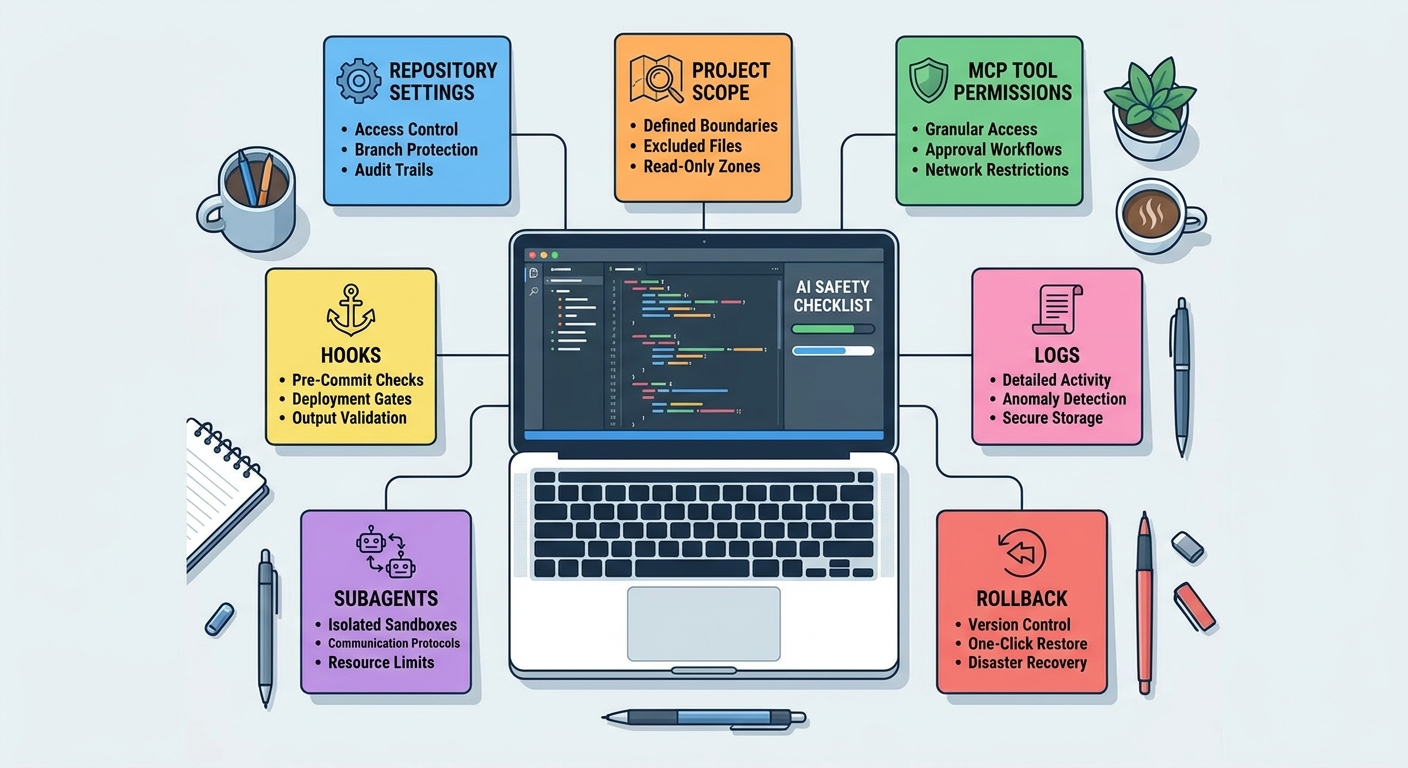
Use this checklist before enabling broader agent workflows across a real engineering team.
- Define sensitive paths: infrastructure, auth, billing, migrations, security policy, CI/CD, and production configuration.
- Separate read from write: allow low-risk reads more freely than edits, external updates, or deploy-related actions.
- Gate shell commands: flag delete, force, amend, deploy, network, credential, package-publish, and permission-changing commands.
- Constrain MCP tools: prefer read-only connectors first; require approval for write tools and external side effects.
- Use subagents deliberately: create read-only research agents and narrower implementation agents instead of one all-powerful worker.
- Limit diff size: warn or stop when a task changes too many files without a plan.
- Require verification: ask for tests, lint, typecheck, or a human review before accepting agent changes.
- Keep logs useful: record decisions, changed paths, commands, tool names, and reasons without storing secrets.
- Review friction: adjust gates that block useful work too often, but do not silently loosen high-risk rules.
- Document the safe path: tell developers how to request approval, split work, or run a lower-risk task.
What hooks improve
- Earlier detection of risky tool calls.
- Clearer team policy around agent actions.
- Better audit trails for coding-agent workflows.
- Safer use of MCP servers and subagents.
What hooks cannot fix
- Bad task scoping or vague prompts.
- Untrusted MCP servers.
- Developers bypassing policy outside Claude Code.
- Lack of tests, review, backups, or rollback.
Examples of Good and Bad Permission Gate Design
Good: block production deployment commands by default
A hook that stops deployment commands unless the user explicitly confirms the environment, branch, and review status is practical. It catches a high-impact action and creates a short pause before external side effects.
Bad: ask for approval on every file read
This creates friction without much benefit for most repositories. It trains developers to approve mechanically. A better pattern is to allow normal source reads while blocking secret files, private keys, production dumps, or known sensitive directories.
Good: warn on broad multi-file edits
If Claude Code attempts to edit 40 files from a vague prompt, a warning can ask the user to split the task. The agent may still be useful, but the diff deserves a plan, staged commits, and careful tests.
Bad: trust all MCP tools because the server is official
Even a trustworthy server can expose high-risk actions. Reading an issue is different from closing it. Reading a database row is different from exporting customer records. Create gates around capability, not just vendor reputation.
Good: route exploratory work to a read-only subagent
Repository exploration can flood the main context and does not need write access. A read-only subagent keeps the main conversation cleaner and reduces accidental edits during discovery.
Keep Learning on AI Feature Drop
- Claude Opus 5 Coding Guide — the broader pillar guide this article supports.
- Claude Opus 5 Effort Levels Guide — choose model effort without wasting tokens.
- Claude Code Permission Rules Explained — related permission concepts and safe defaults.
- Claude Code Subagent Permissions — context and tool boundaries for delegated agents.
- Claude Code Usage Limits — plan and rate-limit context for heavy users.
- GitHub Copilot MCP Tools Guide — compare MCP safety patterns in another coding agent.
- Codex Plugin Permission Boundaries — similar plugin safety thinking for OpenAI Codex.
Sources and References
- Claude Code Docs: Hooks reference
- Claude Code Docs: Settings and scopes
- Claude Code Docs: Custom subagents
- Claude Code Docs: MCP tools
- Claude Code changelog on GitHub
- Anthropic: Introducing Claude Opus 5
Claude Code changes quickly. Verify current settings, hooks, plan limits, and permission behavior in the official documentation before enforcing organization policy.
FAQ: Claude Code Hooks and Permission Gates
Are Claude Code hooks required for safe agent workflows?
No, but they are strongly useful once Claude Code can run tools, edit important files, or connect to MCP servers. Basic users can start with permissions and review habits; teams should add hooks for high-risk actions.
What is the best first Claude Code hook to add?
Start with a pre-tool gate for risky shell commands and sensitive file paths. This catches the most obvious mistakes before they run and teaches the team where approval is required.
Can hooks stop Claude Code from editing certain files?
Hooks can inspect proposed tool actions and enforce decisions around paths or tools, depending on the configured event and handler. Use project-level policy for shared repository rules and managed settings for organization-wide enforcement.
Do hooks replace Claude Code permissions?
No. Permissions define allowed capabilities. Hooks add contextual checks around those capabilities. Use both: narrow permissions first, then hook gates around risky allowed actions.
How do hooks work with MCP tools?
MCP tools should be treated by capability. Read-only calls may be logged, while write actions such as updating tickets, sending messages, querying sensitive data, or changing external systems should require stricter approval.
Should every Claude Code action require approval?
No. Too many approvals cause fatigue. Allow routine low-risk actions, log useful context, warn on medium-risk actions, and require approval or deny only high-risk operations.
Are subagents safer than one main Claude Code session?
They can be safer when configured narrowly. A read-only research subagent or focused test subagent reduces context pollution and tool exposure. A broadly privileged subagent is not automatically safer.
What should teams log from Claude Code hooks?
Log decisions, event type, tool name, changed paths, command category, and reason. Avoid storing secrets, full private outputs, or sensitive customer data in hook logs.
Post a Comment