
Claude Opus 5 gives developers a bigger ceiling for difficult coding work, but the winning workflow is not “send the whole repo and hope.” This guide explains how to use the 1M context window, effort levels, Claude Code changes, and Managed Agents features without turning every task into an expensive long-running experiment.

Claude Opus 5 for Coding: Quick Answer
Claude Opus 5 is Anthropic’s most capable Opus model for complex agentic coding and enterprise work. The headline capabilities are large: a 1M token context window, up to 128k max output tokens, thinking on by default, and an effort control that lets you trade off deeper reasoning against token efficiency. In Claude Code, the latest changelog also makes Opus 5 the default Opus model and connects it with practical agent features such as dynamic workflow guidance, nested subagents, stricter sandbox network allowlists, better MCP diagnostics, and clearer model picker labels.
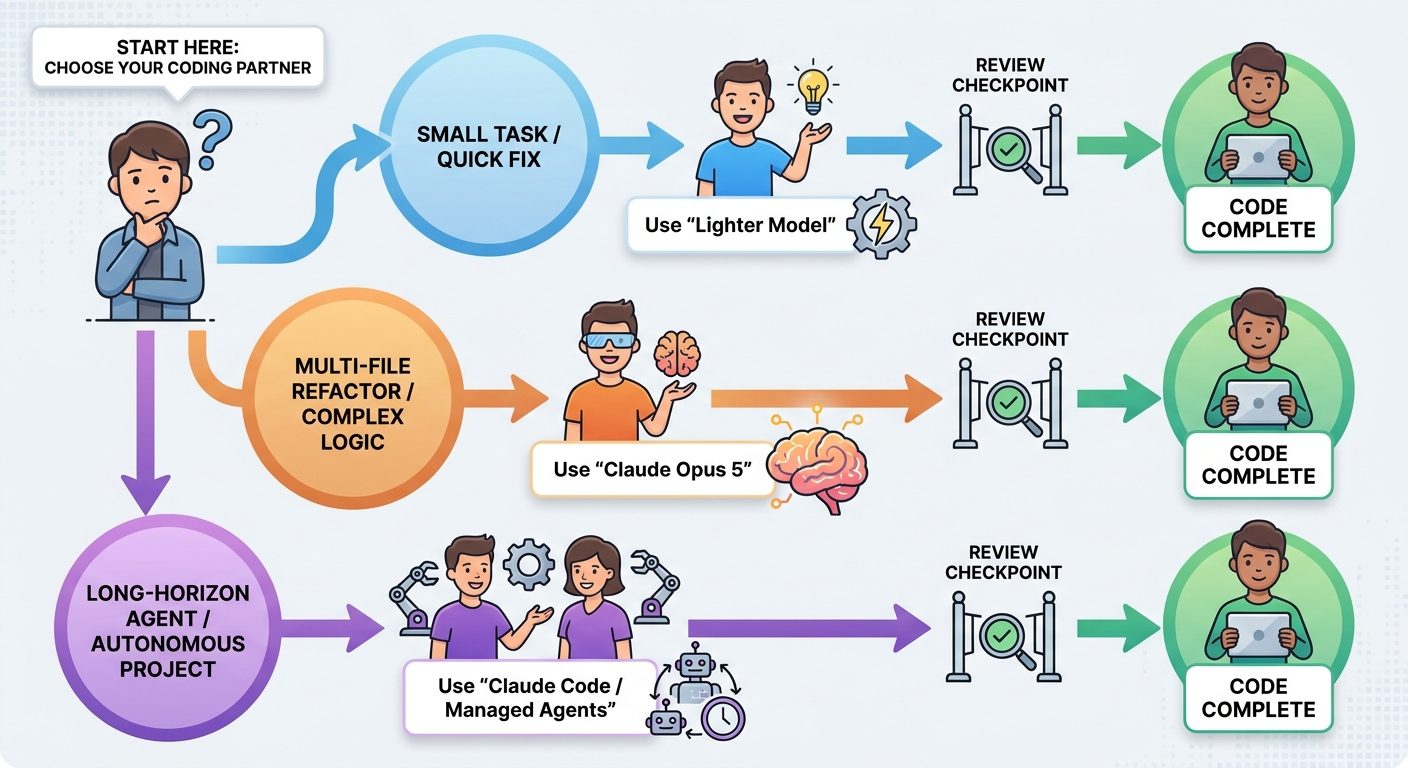
The practical answer is simple: use Claude Opus 5 when the task is genuinely hard, broad, or long-horizon. Reach for it when you need architecture-level reasoning, multi-file refactoring, difficult debugging, migration planning, codebase analysis, review of a large diff, or a managed agent that must plan and act over many steps. Do not use it as the default for every autocomplete-style question. For simple edits, documentation cleanup, one-file explanations, or high-volume background subagents, a lighter model or lower effort setting is usually the better product decision.
This matters because AI coding performance is no longer only about model quality. It is about workflow shape. A vague instruction with a million tokens of context can perform worse than a tight brief with the right files, tests, constraints, and acceptance criteria. The search gap around Claude Opus 5 is that official docs explain individual features well, but developers still need one plain-English guide that connects model specs, Claude Code behavior, Managed Agents setup, cost control, and everyday coding habits.
What Changed With Claude Opus 5?
Anthropic’s platform release notes describe Claude Opus 5 as a step-change improvement over Claude Opus 4.8, especially for deep reasoning, agentic tasks, long-horizon work, and test-time compute scaling. The model ID is claude-opus-5. The official model docs describe a 1M token context window, 128k max output tokens, and thinking on by default. They also call out mid-conversation tool changes in beta, a default fallback mode in beta, a lower prompt-cache minimum, and a fast mode option on the Claude API.
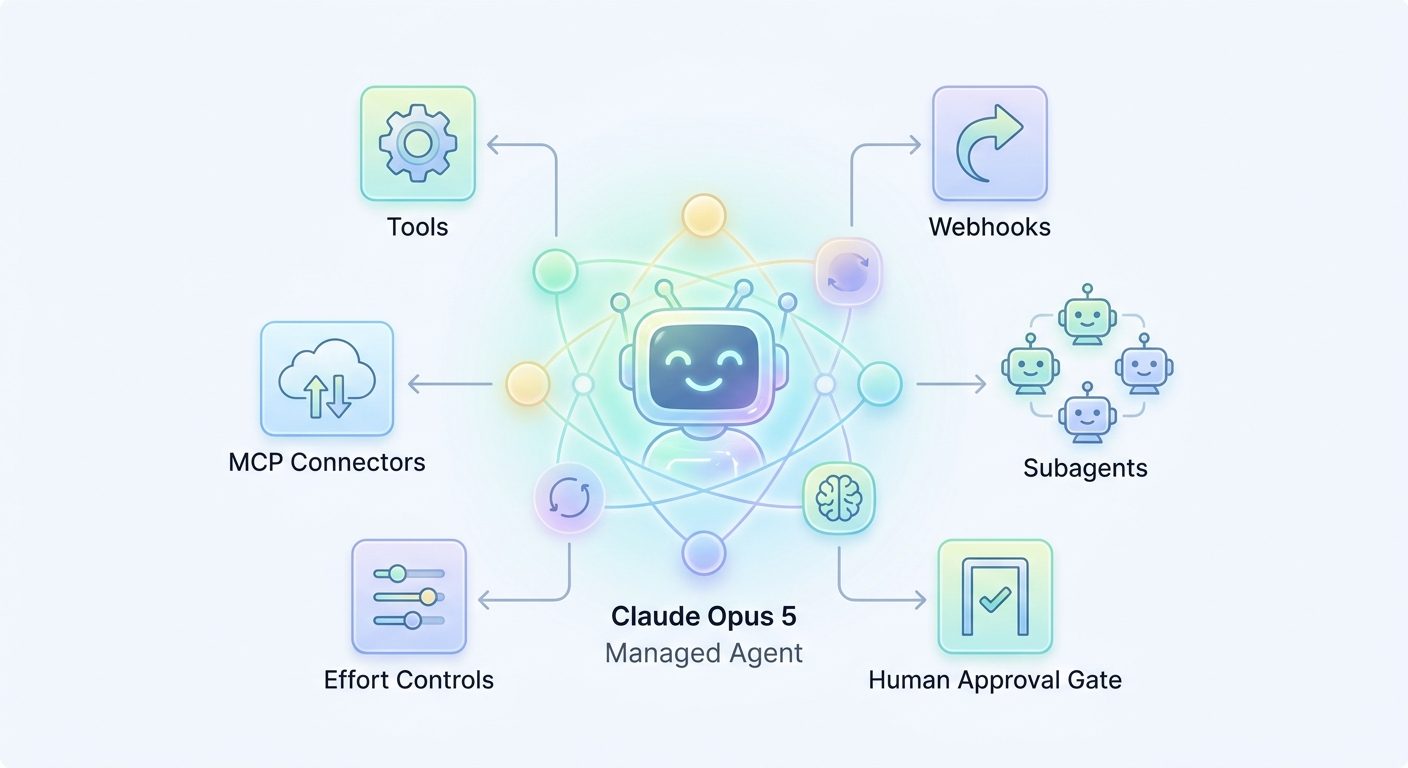
For coding teams, the meaningful shift is not one isolated number. It is the combination of bigger context, more controlled thinking, and more agent-oriented surfaces. Claude Code can run across terminal, IDE, desktop, and web. Managed Agents can package a model, system prompt, tools, MCP servers, skills, and multiagent orchestration into a reusable configuration. The effort parameter gives developers a first-class way to decide whether a request should be efficient, balanced, high-quality, extended, or maximum capability.
That creates a new kind of decision tree. Before Opus 5, many developers asked, “Can Claude solve this?” Now the better question is, “Which Claude surface, context size, and effort level should solve this with the least waste?” A coding model that can handle enormous context still benefits from smaller, cleaner context. A model that can think deeply still benefits from precise acceptance criteria. A model that can run long agentic tasks still needs human-defined checkpoints.
| Claude Opus 5 capability | What it means in practice | Risk if used casually |
|---|---|---|
| 1M token context | You can include large design docs, logs, code files, and repository context when the task truly needs it. | Large context can hide the signal, increase latency, and make review harder. |
| 128k max output | Long plans, reports, migrations, and multi-step outputs are easier to support. | Very large responses can mix useful work with unchecked assumptions if no structure is requested. |
| Thinking on by default | The model can spend reasoning effort before answering or acting. | Old max token settings may be too low because thinking and final text share the output budget. |
| Effort levels | You can choose low, medium, high, xhigh, or max depending on task complexity. | Leaving every task at high or max can waste tokens on simple work. |
| Claude Code Opus 5 support | Agentic coding work can use the newest Opus behavior inside the developer workflow. | Long agent loops still need sandboxing, tests, and review checkpoints. |
When Should Developers Use Claude Opus 5?
Use Claude Opus 5 when the value of better reasoning is higher than the cost of more compute. That sounds obvious, but it becomes clearer when you separate coding work into five buckets: tiny assistance, focused implementation, multi-file reasoning, long-horizon agent work, and high-risk review. Opus 5 belongs mostly in the final three buckets.
A useful rule: if you can solve the task with one narrow file and a small instruction, Opus 5 may be more model than you need. If the task requires choosing between tradeoffs, reading several areas of a codebase, and producing an implementation plan that a human can audit, Opus 5 becomes more attractive.
The reason this article is a pillar topic for AI Feature Drop is supported by the site’s own performance data. In the last complete 28-day analytics window, coding-agent explainers and cost/limit guides were among the strongest traffic patterns. The Codex banked resets article led page views, Google Flow and Veo credits performed well, and ChatGPT desktop app Codex coverage also drew meaningful interest. Search Console showed Claude-related impressions around permissions and domain controls, which signals that developers are actively searching for operational Claude guidance, not abstract launch coverage.
Claude Opus 5 Effort Levels Explained for Coding Work
The effort parameter is one of the most important parts of Claude Opus 5 because it turns “use the best model” into a more precise decision. Anthropic’s docs describe effort as a way to control how many tokens Claude spends while responding. It affects text, explanations, tool calls, function arguments, and thinking when active. The default is high, and setting high is equivalent to omitting the parameter.
For developers, effort should map to task shape. Low effort is for simple, high-volume, latency-sensitive work where a smaller answer is acceptable. Medium effort is the balanced setting for many agentic tasks where you want good output without unnecessary depth. High effort is the default for difficult coding and reasoning. Xhigh is for long-running agentic and coding tasks with large budgets. Max is for the rare cases where you want the deepest possible reasoning and accept the cost, latency, and review burden that comes with it.
| Effort level | Use it for | Avoid it when |
|---|---|---|
low | Formatting, small explanations, simple helper functions, lightweight subagents, and quick drafts. | The task involves risky code changes, complex diagnosis, or uncertain requirements. |
medium | Balanced implementation tasks, routine bug fixes, normal test generation, and scoped agent work. | You need deep architecture analysis or a long multi-step migration plan. |
high | Default complex coding, multi-file edits, careful reasoning, and most serious Claude Code tasks. | You are running many repetitive jobs where cost and speed matter more than maximum quality. |
xhigh | Long-horizon work, complicated debugging, major refactors, and agent sessions expected to run for a while. | The scope is vague, unreviewed, or not worth a larger token budget. |
max | Capability-critical analysis, high-stakes migration planning, difficult security reasoning, or work where evals prove a quality gain. | You are exploring casually, repeating prompts, or asking the model to inspect everything without a plan. |
In practice, start at high for hard coding work, medium for routine agent work, and low for simple helper tasks. Move up only when the task fails because it needed deeper reasoning. Move down when quality remains acceptable and you want better speed or cost behavior. Teams should write this into their internal Claude guidelines so every developer is not inventing a model policy from scratch.
How to Use the 1M Context Window Without Making a Mess
The 1M token context window is useful, but it is easy to misunderstand. A bigger context window does not mean every prompt should include the whole repository, every log file, and every design document. It means Claude Opus 5 can handle unusually large tasks when the task genuinely needs that breadth. The best users will still curate context carefully.
Think of context as evidence. You would not hand a senior engineer a pile of every file in the company and say “fix auth.” You would give them the bug report, affected modules, failing test, relevant logs, recent changes, constraints, and definition of done. Claude works the same way. The larger the context, the more important it is to label sections, rank what matters, and say what can be ignored.
A good 1M-context prompt structure
Start with the desired outcome in one paragraph. Then list constraints: files that can be edited, files that are read-only, compatibility requirements, test commands, rollout risks, and security concerns. Add the smallest relevant code and logs first. If you need broad context, group it by module or document type. End with a requested output format such as “produce a plan first, then wait for approval before editing” or “return a risk-ranked review with exact file references.”
A bad 1M-context prompt pattern
The expensive failure mode is “here is everything, improve it.” That prompt invites wandering. The agent may spend time reading irrelevant files, infer priorities you never stated, and produce a beautiful but hard-to-verify answer. Broad context can also make humans less likely to review the model’s reasoning because the evidence pile is too large. If nobody can audit the result, the workflow is not safe enough for serious code.
For long context tasks, use checkpoints. First ask Claude Opus 5 to identify the relevant parts of the context and propose a plan. Then ask it to make one slice of changes. Then run tests and inspect the diff. Then continue. This makes the large context window useful without allowing the session to become an unbounded agent loop.
What Claude Opus 5 Changes Inside Claude Code
Claude Code is where many developers will feel Opus 5 most directly. The official Claude Code overview describes it as an agentic coding tool that reads your codebase, edits files, runs commands, and integrates with your development tools across terminal, IDE, desktop app, and browser. The recent changelog says version 2.1.219 added Claude Opus 5 as the default Opus model, with a 1M context label in the model picker and fast mode applying to Opus 5 and Opus 4.8.
The changelog also includes several operational changes that matter for serious coding work. The new sandbox.network.strictAllowlist setting can deny non-allowlisted hosts for sandboxed commands without prompting. Dynamic workflows now default to a medium size guideline aiming for fewer than 15 agents, and the current default workflow size appears in the running-workflow status line. Subagents can now spawn nested subagents up to depth 3 by default, while nested subagent forwarding can expose deeper subagent text in stream-json when enabled.
These sound like implementation details, but they are exactly the details teams need. Powerful coding agents do not fail only because the model is weak. They fail because network access is too broad, subagents multiply without a clear budget, MCP config errors are hidden, model switches are confusing, or review work fills the main conversation. Claude Code’s recent changes point toward a more governed agent workflow: more visibility, stricter boundaries, better diagnostics, and more control over how many agents are involved.
What gets better
- Opus 5 becomes easier to choose for hard Claude Code work.
- Large-context coding tasks have more headroom.
- Dynamic workflows and nested subagents are easier to observe.
- Strict network allowlists help reduce risky command behavior.
- MCP diagnostics become clearer when server configs fail.
What still needs discipline
- Developers must still scope tasks before starting agents.
- Subagent depth can multiply work if goals are vague.
- Large context does not replace tests, review, and rollback plans.
- Fast or max-capability modes should not become default habits.
- Teams need shared rules for model, effort, sandbox, and network access.
Claude Opus 5 and Managed Agents: When API Teams Should Care
Managed Agents are for teams that want a reusable, versioned agent configuration instead of ad-hoc prompts. Anthropic’s docs describe an agent as a bundle of model, system prompt, tools, MCP servers, skills, and orchestration settings. That makes Managed Agents a strong fit for repeatable engineering work: triaging bugs, reviewing pull requests, updating docs, running research workflows, or coordinating specialists.
The July platform release notes added effort levels inside a Managed Agents agent’s model configuration. That matters because effort belongs to the agent definition when you want repeatability. If one agent is a cheap documentation helper, give it lower effort. If another is a senior migration planner, give it higher effort. The docs also mention lifecycle webhooks for environments and memory stores, seeding sessions with initial events, optional version handling during updates, and thread event streams for previewing subagent text.
For developers, this means Opus 5 is not only a chat model. It can be part of a production agent architecture. But the same rule applies: build guardrails before scaling. Define what each agent can do, what tools it receives, which MCP servers are allowed, how memory is handled, what counts as success, and when a human must approve the next step. If you cannot explain the agent’s permissions in one paragraph, the agent is probably too broad.
A Practical Claude Opus 5 Coding Workflow
Here is a workflow that keeps Opus 5 powerful without letting it run wild. It works for Claude Code, API sessions, and Managed Agents with small adjustments.
1. Classify the task before choosing the model
Ask whether the task is simple, focused, complex, long-horizon, or high-risk. Simple tasks do not need Opus 5. Focused tasks may use Sonnet or medium effort. Complex and long-horizon tasks are where Opus 5 earns its keep. High-risk tasks should use Opus 5 for analysis and planning, but still require human approval before execution.
2. Start with a plan-only turn
For any significant task, ask Claude to plan first. A plan-only turn is cheaper and safer than immediate editing. It reveals whether the model understood the objective, which files it thinks are relevant, what tests it will run, and where the risks are. If the plan is wrong, you have saved yourself from reviewing a large bad diff.
3. Use effort as a deliberate switch
Default to high for serious coding, medium for routine agent work, and low for simple assistance. Use xhigh or max only when the task justifies it and you can review the result. If a task requires xhigh or max, it also deserves stronger structure: acceptance criteria, limited tool access, test commands, and a stopping point.
4. Keep context staged
Give Claude the most relevant files first. Add more context only when the model asks or when the plan proves that broader context is needed. If you must include a large context bundle, add a map at the top explaining what each section is and which parts are authoritative.
5. Separate edit, test, and review
Do not ask for planning, editing, testing, and final review in one unbounded turn unless the task is small. Ask Claude to edit one slice, run or suggest the right tests, summarize the diff, and stop. Then decide whether the next slice is worth continuing.
6. Create team defaults
Teams should define default model and effort rules instead of relying on individual habits. For example: Sonnet or medium effort for routine work; Opus 5 high for cross-module refactors; Opus 5 xhigh for approved migrations; max only for named high-stakes investigations. Pair that with sandbox network allowlists and MCP server reviews.
Claude Opus 5 vs Sonnet, Claude Code, and Managed Agents
One source of confusion is that “Claude Opus 5” is a model, while “Claude Code” and “Managed Agents” are surfaces or product layers that can use models. If you blur those together, you will make poor workflow decisions. Choose the model for reasoning quality and cost profile. Choose the surface for how the work should happen.
| Option | Best for | How to use with Opus 5 |
|---|---|---|
| Claude Opus 5 API | Custom apps, developer tools, evaluations, and controlled prompts. | Use explicit effort, streaming for large outputs, prompt caching where useful, and beta headers only where needed. |
| Claude Code | Interactive coding in terminal, IDE, desktop, or web. | Use Opus 5 for hard plans, reviews, refactors, and agentic tasks; rely on sandboxing and review checkpoints. |
| Managed Agents | Repeatable workflows with tools, MCP servers, skills, memory, and orchestration. | Set Opus 5 and effort inside the agent configuration when the role deserves high capability. |
| Claude Sonnet class models | Everyday coding, faster iteration, lower cost, and routine agent work. | Use as the default for many tasks, escalating to Opus 5 when quality or context demands it. |
This is also where comparisons with other AI coding tools become useful. OpenAI Codex, GitHub Copilot, Gemini Managed Agents, and Claude Code are all moving toward more agentic work. The difference is rarely “which one can write code?” The difference is how each tool exposes context, cost, controls, permissions, review surfaces, and operational telemetry. If you liked our OpenAI Codex Skills guide or Gemini Managed Agents guide, Claude Opus 5 fits into the same bigger trend: reusable AI workflows are becoming more important than one-off prompts.
Common Claude Opus 5 Mistakes to Avoid
The first mistake is using Opus 5 as a status symbol instead of a tool. A stronger model does not remove the need for scope. The second mistake is assuming 1M context means no curation. The third is asking for code changes without tests, success criteria, or file boundaries. The fourth is leaving effort at a high setting for high-volume tasks where the marginal quality gain is not worth it.
Another mistake is hiding agent complexity from the team. If nested subagents, MCP servers, background reviews, and remote sessions are part of the workflow, document them. Developers should know which tools the agent can call, which hosts are allowlisted, what happens when MCP config fails, and when a subagent is allowed to spawn more work. Claude Code’s newer diagnostics and workflow-size cues help, but policy still belongs to the team.
Finally, do not confuse a polished answer with verified work. Claude Opus 5 can produce excellent plans and code, but correctness still depends on tests, review, production constraints, and rollback plans. The best workflow is not “trust the model more.” It is “give the model better work and inspect the result faster.”
Final Recommendation
Use Claude Opus 5 as your escalation model for serious coding work. Start with Claude Code or the API when you need interactive control. Use Managed Agents when the same workflow will run repeatedly and deserves a versioned configuration. Keep the 1M context window for genuinely large problems, not lazy prompts. Treat effort as a steering control: medium for balanced work, high for serious coding, xhigh or max only for tasks that justify the spend and review burden.
For individuals, the best next step is to create a small decision checklist before each Opus 5 session: what is the outcome, what context is truly needed, what effort should be used, what files may be changed, what tests prove success, and when should the agent stop? For teams, the best next step is to turn that checklist into a shared policy with model defaults, effort levels, sandbox rules, MCP review, and approval thresholds for long-running agent work.
Claude Opus 5 raises the ceiling for AI coding agents. The developers who benefit most will not be the ones who paste the most context. They will be the ones who design the cleanest agent workflow.
Keep Learning on AI Feature Drop
- Claude Code Permissions Guide — build safer access patterns for hooks, subagents, and statuslines.
- Claude Code Hooks Explained — automate workflow checks without creating fragile agents.
- Claude Code Statusline Guide — monitor context, cost, Git state, and agent status.
- OpenAI Codex Skills Guide — compare reusable agent instructions across ecosystems.
- GitHub Copilot Usage Metrics API Guide — track adoption and usage for AI coding workflows.
- Gemini Managed Agents Guide — compare managed-agent patterns across Google and Claude workflows.
Sources and References
- Anthropic Platform release notes
- Anthropic docs: What’s new in Claude Opus 5
- Anthropic docs: Effort
- Claude Code changelog
- Anthropic docs: Define your agent
- Claude Code overview
- Claude app release notes
Model names, pricing, beta headers, and product behavior can change. Verify the current Anthropic docs and your organization’s Claude settings before making production decisions.
FAQ: Claude Opus 5 for Coding Agents
What is Claude Opus 5 best for?
Claude Opus 5 is best for complex coding, agentic workflows, long-context analysis, difficult debugging, architecture decisions, and enterprise-grade tasks where deeper reasoning is worth the cost and latency.
Does Claude Opus 5 have a 1M token context window?
Anthropic’s docs describe Claude Opus 5 as having a 1M token context window, with 1M as both the default and maximum context size. Use that capacity carefully rather than pasting unnecessary context.
What are Claude Opus 5 effort levels?
Effort levels let you steer how many tokens Claude spends on a response, including thinking, tool calls, and text. The ladder includes low, medium, high, xhigh, and max, with high as the default.
Should I use max effort for coding?
Only for capability-critical work where the added reasoning is worth the cost and review burden. Start with high for serious coding, then move up or down based on actual results.
How does Claude Opus 5 affect Claude Code?
The Claude Code changelog says Opus 5 is now the default Opus model and adds related workflow improvements such as dynamic workflow guidance, nested subagent behavior, stricter sandbox network allowlists, and clearer model picker labeling.
Is Claude Opus 5 better than Sonnet for every coding task?
No. Opus 5 is stronger for hard reasoning and long-horizon work, but many routine coding tasks are better served by lighter, faster, or lower-effort settings.
How should teams set Claude Opus 5 policy?
Define when developers can use Opus 5, which effort levels match task types, what sandbox and network rules apply, which MCP servers are approved, and when human approval is required before edits or deployments.
Post a Comment