
GitHub Copilot Usage Metrics API Guide: Track AI Credits, Repositories, and Agent Adoption
GitHub Copilot is no longer just autocomplete. It is an agent platform with chat, CLI sessions, code review, app workflows, security autofix, and repository-level automation. The GitHub Copilot usage metrics API is how admins turn that activity into decisions instead of guessing where AI Credits are going.

Quick Answer: What the GitHub Copilot Usage Metrics API Is For
The GitHub Copilot usage metrics API helps enterprise and organization admins understand how Copilot is being used across people, repositories, products, and agent workflows. The newest updates make the API more useful because it can report repository-level pull request activity for Copilot coding agent and Copilot code review, and it can show GitHub Copilot app activity in the same reporting system that already covers IDE, chat, code review, and coding-agent usage.
That matters because Copilot usage is increasingly measured in AI Credits for organizations and enterprises. A team can no longer manage Copilot by asking only, “How many seats did we buy?” The better question is, “Which workflows are consuming credits, which repositories are benefiting, which users need guidance, and which agent sessions should be governed more tightly?”
This guide is written for engineering managers, platform admins, developer-experience teams, security leaders, and serious Copilot power users. It explains what changed, which metrics matter, what the reports can and cannot prove, and how to build a practical reporting routine without turning Copilot into a bureaucracy machine.
Why Copilot Usage Reporting Suddenly Matters More
Copilot used to be easy to describe: developers paid for AI autocomplete and chat help inside an editor. That mental model is outdated. GitHub Copilot now spans the IDE, github.com, the Copilot app, Copilot CLI, coding agent sessions, pull request review, security workflows, and enterprise governance surfaces. Some workflows are quick suggestions. Others inspect repositories, create pull requests, run analysis, or consume model context over longer sessions.
GitHub’s usage-based billing documentation explains the shift clearly: organizational and enterprise Copilot usage is measured in AI Credits, and each credit maps to a fixed dollar value. The cost of an interaction depends on the model and token consumption. A short chat answer may be tiny; a long coding-agent session across many files can cost meaningfully more. Code completions and next edit suggestions are not billed in AI Credits on paid plans, but Copilot Chat, Copilot CLI, Copilot cloud agent, Copilot Spaces, Spark, and third-party coding agents can consume credits.
AIFeatureDrop analytics also support this topic. During the last 28 complete days, the site recorded 354 active users, 465 sessions, and 735 pageviews, with Organic Search contributing 220 sessions. Practical AI-credit and usage-limit explainers were among the strongest performers: pages on Codex banked resets, OpenAI Codex pricing, Google Flow and Veo credits, and reducing GitHub Copilot AI Credits all appeared near the top of recent traffic. That pattern says readers want operational guidance, not only launch coverage.
The current search gap is that official docs explain endpoints and billing terms, while developers and admins still need a connected workflow: what to collect, which questions to ask, how to spot waste, when to restrict a feature, and how to explain Copilot usage to business leaders without oversimplifying it.
What the GitHub Copilot Usage Metrics API Shows
The usage metrics API is a reporting interface for Copilot activity. It is not a magic cost debugger, and it is not a substitute for reading your billing dashboard. Its value is that it gives teams structured data they can pull daily or across a 28-day window, then combine with their own repository, team, and cost-center context.
GitHub’s July 17 changelog says repository-level reports are generally available through enterprise and organization endpoints. These reports return a daily per-repository breakdown of pull request activity for Copilot coding agent and Copilot code review. That is a big deal because repository-level reporting moves Copilot governance from “the org used a lot of AI” to “these repositories used AI review and coding-agent pull requests.”
Another July 17 update adds GitHub Copilot app usage to the metrics API. The new fields include daily active Copilot app users and a dedicated app section with session count, request count, prompt count, and token usage breakdowns such as prompt tokens, output tokens, and average tokens per request. That gives admins a cleaner view of whether adoption is moving from IDE-only help into app-based agent sessions.
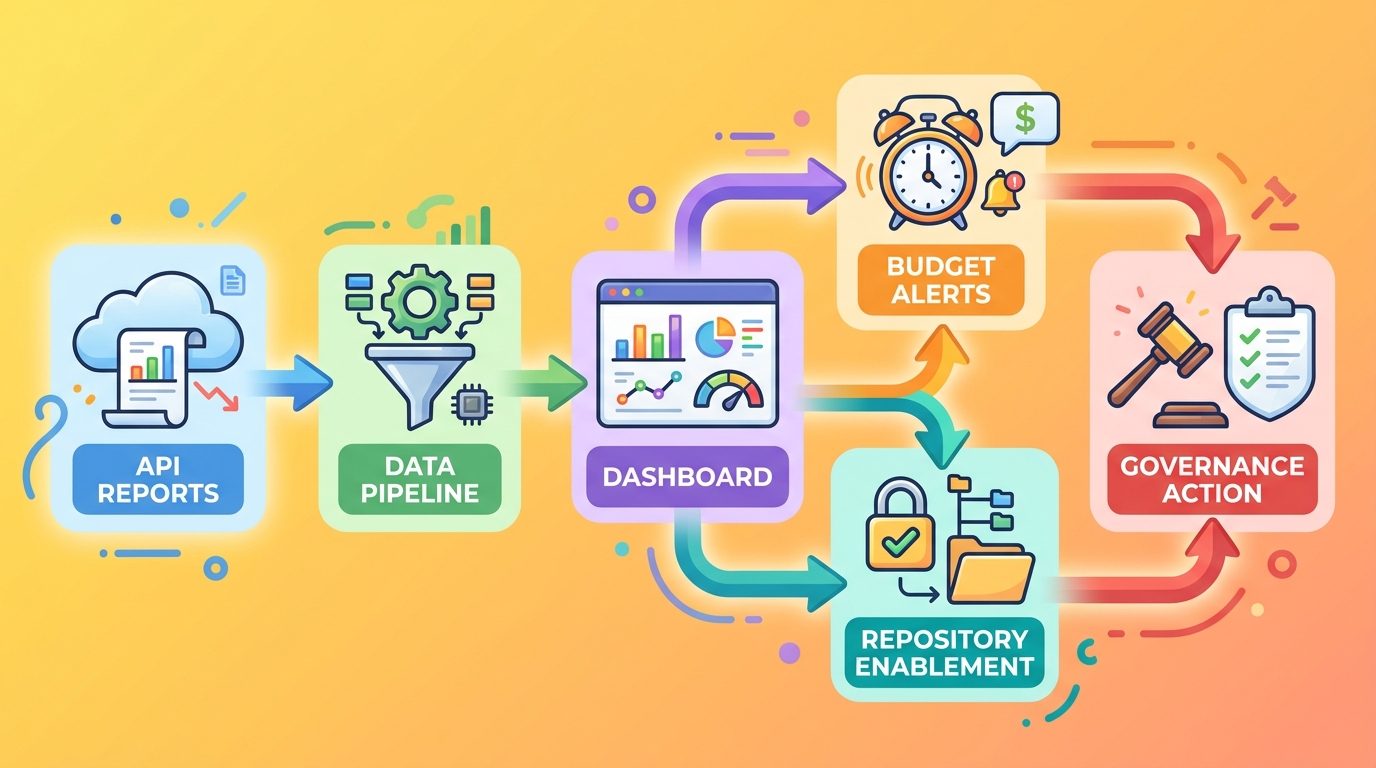
The important nuance is that metrics are evidence, not judgment. A repository with high Copilot activity may be wasteful, or it may be the exact repository where AI agents are saving expensive engineering time. Good reporting starts by asking better questions, not by punishing usage.
How AI Credits Fit Into Copilot Metrics
GitHub AI Credits are the billing unit for Copilot usage in Copilot Business and Copilot Enterprise. The official docs state that 1 AI Credit equals $0.01 USD. Each assigned Copilot license contributes included monthly credits to a pooled bucket at the billing-entity level. Published standard included amounts are 1,900 credits per Copilot Business user per month and 3,900 credits per Copilot Enterprise user per month, with higher promotional amounts for existing customers during the early usage-based billing transition.
This pool model matters because heavy users and light users offset each other. A platform engineer running coding-agent sessions all day may use more than an individual share, while a manager who uses only occasional chat may use little. That is efficient until the organization loses visibility. The metrics API gives admins a way to understand which surfaces and repositories are driving the drawdown.
| Copilot activity | Likely reporting interest | Admin question |
|---|---|---|
| IDE completions and next edit suggestions | Adoption and productivity, but not AI Credit billing on paid plans | Are developers receiving low-friction help without needing heavy governance? |
| Copilot Chat and CLI | Prompt and request activity, model use, token usage where available | Are users asking focused questions or sending broad context repeatedly? |
| Copilot app | Sessions, requests, prompts, token usage, active app users | Is app adoption replacing ad hoc IDE work or adding a new cost center? |
| Coding agent | Pull requests created/merged and repository-level activity | Which repos benefit from autonomous code changes? |
| Copilot code review | Pull requests reviewed and suggestion counts by repository | Are reviews focused on useful repos and configured with the right instructions? |
| Agentic autofix | Security workflow activity, AI Credits, Actions minutes | Which alerts are worth assigning to Copilot, and who reviews fixes? |
If you are new to the credit model, start with our GitHub Copilot AI Credits explainer, then come back to this guide. The short version: tracking credits without usage metrics tells you that money moved. Tracking metrics without credit context tells you activity happened. You need both to understand value.
The Reports Admins Should Pull First
You do not need to build the perfect observability stack on day one. Start with four views and expand only when the questions become sharper.
1. Enterprise or organization 28-day report
The 28-day report gives the trend line. It helps you see whether adoption is stable, increasing, or concentrated around a rollout. For leadership updates, this is usually the best summary view because it smooths out one-off spikes. Track total active users, feature mix, and whether usage is shifting from completions and chat toward agentic workflows.
2. 1-day report for anomaly detection
A daily report is useful when you are looking for sudden jumps: a hackathon, a new internal policy, a misconfigured agent, a large migration, or a security campaign. Do not overreact to a single day, but do investigate sudden changes that coincide with budget alerts.
3. Repository-level report
The repository-level report is the most operationally useful new piece. It tells you where Copilot coding agent and code review are creating or reviewing pull requests. Use it to find repos that deserve more enablement, repos where agents need guardrails, and repos where AI usage is high but outcomes are unclear.
4. Copilot app usage section
The Copilot app is its own adoption surface. If app usage rises, ask whether users are coordinating coding-agent sessions from the app, using it for reviews, or experimenting without clear workflow rules. The new metrics API fields make app usage visible instead of letting it hide inside generic Copilot adoption.
A Practical Dashboard Blueprint for Copilot Usage Metrics
A useful Copilot dashboard should answer a few concrete questions quickly. It should not be a wall of charts that only the platform team understands. The best first version can be simple: adoption, credit-risk signals, repository activity, app usage, code review, and budget alerts.
| Dashboard section | What to show | Action it supports |
|---|---|---|
| Executive summary | Active users, total sessions, 28-day trend, top surfaces | Explain whether Copilot adoption is healthy and controlled. |
| AI Credit risk | High-token workflows, heavy users, app sessions, agent activity | Identify where budget education or limits may be needed. |
| Repository activity | Repos with coding-agent PRs and code review activity | Target enablement and guardrails at the repo level. |
| Code review quality | PRs reviewed, suggestion types, rejected/accepted feedback if tracked internally | Decide whether review setup files and instructions are helping. |
| Security automation | Agentic autofix assignments, draft PRs, review status, Actions minutes | Keep security automation useful without uncontrolled spend. |
| Budget controls | Pool consumption, user budgets, cost-center budgets, blocks/overages | Prevent surprise charges or blocked developers. |
For the first dashboard, avoid pretending the API can answer every ROI question alone. You probably need to join Copilot data with internal signals: pull request merge time, issue cycle time, incident count, security backlog movement, developer survey results, or repository ownership. The API tells you what Copilot did. Your engineering system tells you whether the work mattered.
For example, a repository with many Copilot code review suggestions may be improving quality, or it may be noisy because the repo lacks clear review instructions. GitHub’s recent code review update now reads custom instruction files from the head branch and expands support to files such as REVIEW.md, GEMINI.md, CLAUDE.md, AGENTS.md, and agent skills. That makes experimentation easier: update review guidance in a branch, observe review behavior, then merge the rules once they work.
If your team already uses AI coding workflows, connect this dashboard to existing guidance. Our GitHub Copilot app guide covers app-based agent control, while the Copilot Agent Finder explainer helps teams think about which agents fit which tasks. Metrics are strongest when they reinforce an operating model.
Governance Rules That Actually Help Developers
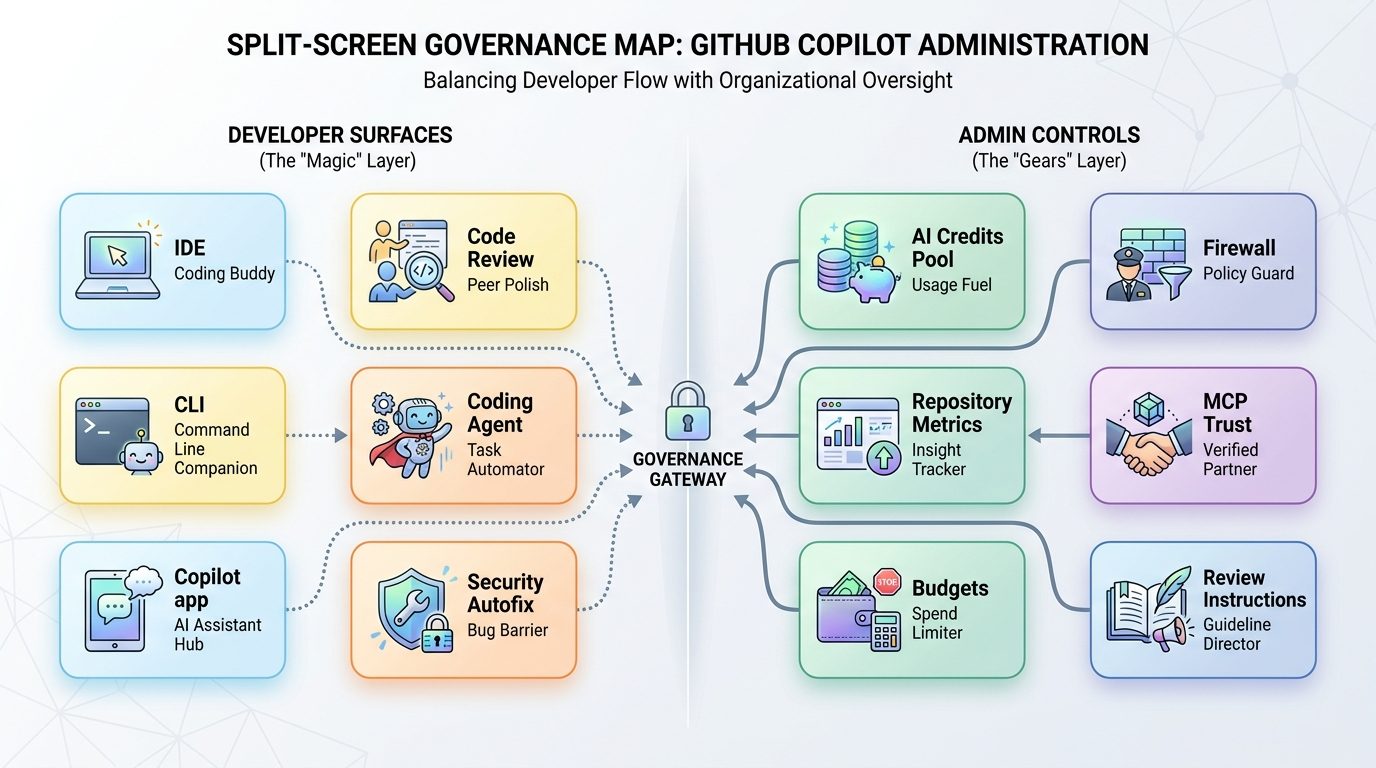
Copilot governance can go wrong in two ways. One extreme is “let everyone do anything,” which creates unclear spend and uneven quality. The other extreme is “lock everything down,” which turns AI adoption into a permission-ticket factory. The better path is a small set of rules that align heavy AI workflows with value.
Healthy governance
- Publish a short guide for which Copilot surfaces are approved.
- Set budget alerts before users are blocked.
- Use repository-level metrics to target enablement.
- Create setup files and instructions for code review.
- Review agent-created pull requests like normal code.
- Track security autofix separately from everyday chat.
Risky governance
- Only checking total spend after the month ends.
- Blaming individual users without context.
- Letting agents run broad tasks on critical repositories without owners.
- Ignoring Copilot app usage because it is outside the IDE.
- Using AI review without repository-specific instructions.
- Assuming agentic autofix is free or fully itemized during preview.
Use budgets as guardrails, not traps
GitHub’s docs describe user-level budgets, cost-center budgets, enterprise spending limits, and organization-level budgets. These controls can stop unexpected spend, but they can also halt a user’s access if configured poorly. A zero-dollar budget blocks a user immediately. If your goal is adoption, pair budgets with alerts, training, and escalation paths.
Watch agentic security workflows closely
Agentic autofix for code scanning alerts is powerful because it can explore files, propose fixes, rerun analysis, iterate, and open a draft pull request. It also draws down AI Credits during public preview, and activity can consume GitHub Actions minutes. That means security teams should define when to assign alerts to Copilot, whether to batch alerts, who reviews the pull request, and how to measure whether the backlog is actually shrinking.
Separate code review from coding-agent settings
GitHub’s code review improvements split some configuration that previously overlapped with cloud agent behavior. Code review can have custom setup steps through a copilot-code-review.yml file, firewall support, and runner configuration independent from the Copilot cloud agent. That separation is useful: reviewing a pull request and authoring a pull request have different risk profiles.
Use Visual Studio signals if your team lives there
GitHub’s Visual Studio update adds a refreshed Copilot Usage window with real-time updates and proactive alerts, plus MCP server trust validation. For Visual Studio-heavy teams, this is a useful local complement to API-level reporting. Developers can see limits and warnings in the IDE, while admins use the API for organization and repository visibility.
A Weekly Copilot Metrics Review Routine
Here is a practical routine that fits most platform teams. It is intentionally small enough to run every week without creating reporting theater.
Monday: Pull reports and compare trend
Pull the latest 28-day report and the most recent complete daily reports. Check active users, feature mix, app usage, coding-agent activity, and code review activity. Compare against the previous week. Note whether spikes came from a known rollout, incident, migration, security campaign, or unexplained behavior.
Tuesday: Review repository outliers
Look at repositories with high coding-agent or code review activity. For each one, identify the owning team, recent business context, and whether the activity produced merged pull requests, useful review suggestions, or noisy loops. If a repo appears often, consider creating repo-specific instructions or an enablement session.
Wednesday: Check budget and access controls
Review pool usage, user-level budgets, cost-center budgets, and any blocked users. If users are hitting limits, ask whether they need a better workflow, a different model choice, or a larger approved budget. Do not assume every high user is wasting credits; power users often expose where automation is most valuable.
Thursday: Improve instructions and setup
Update Copilot instructions, review guidance, or setup workflows where metrics suggest avoidable churn. For code review, experiment in a branch now that custom instructions can be read from the head branch. For agentic tasks, tighten prompts, reduce broad context, and document approved patterns.
Friday: Share one simple takeaway
Send a short update to engineering leaders: what changed, what helped, what needs guardrails, and what you will adjust next week. The report should be understandable without knowing endpoint names. Good example: “Copilot app sessions rose after the mobile agent rollout, but repository-level coding-agent PRs stayed concentrated in three repos, so we are adding repo owners and budget alerts rather than reducing access globally.”
Common Mistakes When Reading Copilot Metrics
Mistake 1: Treating high usage as bad usage
High usage may mean a team found valuable automation. Before restricting it, ask what outcome it produced. Did the coding agent open useful pull requests? Did code review catch real issues? Did app sessions reduce handoff time? The point is not to minimize AI usage; it is to maximize useful AI usage per credit.
Mistake 2: Ignoring low-usage teams
Low usage can mean a team does not need Copilot, but it can also mean poor onboarding, unsupported languages, lack of trust, or confusing access. Use metrics to find enablement gaps, not only cost risks.
Mistake 3: Mixing app usage with IDE usage in one story
The GitHub Copilot app is now separately visible in the metrics API for a reason. App sessions may represent agent orchestration, mobile checks, pull request workflows, or experimentation. Track it separately until you understand how your organization uses it.
Mistake 4: Forgetting Actions minutes and security workflow costs
Agentic autofix can consume AI Credits and GitHub Actions minutes. If security teams use it at scale, review both dimensions. A fix that closes a serious vulnerability is worth spend; a broad bulk assignment with weak review can create cost and review debt.
Mistake 5: Not updating clients
GitHub recommends keeping IDEs, clients, and extensions updated for the best usage-based billing experience. Older versions can display outdated terminology, inaccurate pricing information, or missing alerts. Metrics are easier to trust when users see consistent information in their tools.
Final Recommendation: Build the Reporting Loop Before Copilot Usage Spikes
The GitHub Copilot usage metrics API is not just an admin feature. It is the control plane for the next phase of AI-assisted software development. Once agents can review pull requests, create pull requests, fix security alerts, operate from an app, and work across repositories, teams need visibility at the same level where the work happens.
Start with the metrics that map directly to decisions: 28-day trend, daily anomalies, repository-level coding-agent and code review activity, Copilot app sessions, token usage, budget pressure, and security-agent workflows. Then connect those metrics to internal outcomes. If a repository shows heavy agent use and faster safe merges, expand the pattern. If a repository shows repeated noisy review suggestions, improve the instructions. If a team is burning credits on vague prompts, train them before blocking them.
For more Copilot cost-control context, read how to reduce GitHub Copilot AI Credits, the Copilot AI Credits calculator, and our GitHub agentic workflows guide. The winning teams will not use less AI by default. They will use visible, measurable, well-scoped AI where it produces real engineering leverage.
Sources and References
- GitHub Changelog: Repository-level GitHub Copilot usage metrics generally available
- GitHub Changelog: GitHub Copilot app now available in the usage metrics API
- GitHub Docs: REST API endpoints for Copilot usage metrics
- GitHub Docs: Usage-based billing for organizations and enterprises
- GitHub Changelog: Copilot code review customization and configurability improvements
- GitHub Changelog: Agentic autofix for code scanning alerts in public preview
- GitHub Changelog: GitHub Copilot in Visual Studio June update
- Microsoft Learn: Microsoft 365 Copilot release notes
Copilot billing, API fields, and preview feature behavior can change. Always verify current GitHub docs and your organization’s billing settings before making policy decisions.
FAQ: GitHub Copilot Usage Metrics API
What does the GitHub Copilot usage metrics API show?
It shows structured Copilot usage reporting for enterprises and organizations, including adoption, feature activity, reports over daily and 28-day windows, and newer repository-level activity for coding agent and code review.
Can I track GitHub Copilot activity by repository?
Yes. GitHub’s repository-level Copilot usage metrics reports provide per-repository pull request activity for Copilot coding agent and Copilot code review in enterprise and organization reporting.
Does Copilot app usage appear in the metrics API?
Yes. GitHub added Copilot app activity to enterprise and organization 1-day and 28-day reports, including active app users, sessions, requests, prompts, and token usage breakdowns.
Do all Copilot features consume AI Credits?
No. GitHub says code completions and next edit suggestions are not billed in AI Credits on paid plans. Features such as chat, CLI, cloud agent, Copilot Spaces, Spark, and third-party coding agents can consume AI Credits.
What is one GitHub AI Credit worth?
GitHub’s usage-based billing documentation states that 1 AI Credit equals $0.01 USD. Costs depend on model choice and token consumption.
How should admins use Copilot metrics?
Use them to monitor adoption, identify repository-level agent activity, spot budget pressure, improve instructions, tune code review setup, and decide where enablement or guardrails are needed.
Can the metrics API prove Copilot ROI?
Not by itself. It shows usage and activity. To estimate ROI, combine it with internal outcomes such as pull request cycle time, security backlog movement, developer satisfaction, merge quality, and incident trends.
Should high Copilot usage be restricted automatically?
No. High usage can signal either waste or valuable automation. Investigate the repository, user workflow, and outcome before applying restrictions.
Post a Comment