
GitHub Copilot AI Credits Explained: What Usage-Based Billing Means for Developers in 2026
GitHub Copilot AI Credits are becoming the practical language of Copilot cost control. This guide explains what is changing, which workflows are likely to consume credits, how the new model differs from premium requests, and how developers can keep agentic coding useful without losing budget visibility.

GitHub Copilot AI Credits: Quick Answer for Busy Developers
GitHub Copilot AI Credits are GitHub’s new way to connect paid Copilot usage with the compute behind modern AI coding workflows. Instead of thinking only in “premium requests,” developers now need to think about the size of a task, the model selected, the amount of context sent, the length of an agent session, and whether the workflow uses chat, code review, cloud agents, or other advanced Copilot features.
The practical takeaway is simple: inline completions and Next Edit Suggestions remain the low-friction everyday Copilot experience, while deeper agentic work needs more active cost awareness. If you use Copilot mostly for autocomplete, short chat questions, and small edits, the change may feel manageable. If you rely on long multi-file agents, repeated code review passes, large repositories, premium models, and long-running background tasks, you should start monitoring usage before the billing switch fully affects your monthly habits.
This article focuses on what normal developers, founders, engineering managers, and power users can do now: understand the new terms, identify credit-heavy patterns, set budget rules, and choose when Copilot agents are worth using compared with manual work or competing tools.
What Changed in GitHub Copilot Billing in 2026?
GitHub announced that Copilot is moving toward usage-based billing, with the transition effective June 1, 2026 according to GitHub’s community announcement. The shift is tied to Copilot’s evolution from a simple autocomplete assistant into a broader agentic coding platform. Today, Copilot can answer questions, edit files, review pull requests, work in agent mode, run longer sessions, use stronger models, and interact with larger codebases. Those workflows do not all cost the same amount to run.
Under the old mental model, developers often thought in terms of seats, subscriptions, and premium requests. A request felt easy to understand: ask Copilot something, spend a request, move on. But agentic coding complicated that model. A tiny chat question and a long repository-wide task can look similar from the user’s side even though the compute profile is very different. GitHub’s public explanation is that AI Credits better align billing with actual usage and model cost.
The controversy is not that usage-based pricing exists. Developers already understand API pricing, cloud minutes, CI minutes, and token-based LLM costs. The concern is predictability. A request-based plan is easy to reason about. A token-aligned credit model requires users to understand context size, output length, model selection, cached tokens, and tool behavior. That is why this topic has strong search demand: people want plain-English guidance, not only billing policy.
On aifeaturedrop.com, this also connects naturally with existing AI coding coverage. If you have read our OpenAI Codex pricing and usage limits guide or the Claude Code usage limits explainer, the pattern is familiar: AI coding agents are powerful, but the real product skill is learning when to delegate, when to scope, and when to stop the agent before it burns time or credits.
Copilot Premium Requests vs GitHub AI Credits
The easiest way to understand the change is to compare the old request mindset with the new credit mindset. Premium requests were closer to a count of interactions, sometimes adjusted by model multipliers. AI Credits are designed to be more closely connected to the token and model cost behind the interaction. That makes the billing model more precise, but also harder for casual users to estimate.
| Question | Premium request mindset | AI Credits mindset |
|---|---|---|
| What do I track? | How many advanced requests or prompts I used. | How much compute my Copilot workflows consumed. |
| What makes usage heavier? | More prompts, premium model multipliers, premium features. | Longer context, larger outputs, stronger models, agent sessions, code review, and repeated iterations. |
| What feels predictable? | Counting visible prompts feels simple. | Actual cost can vary by task size and model behavior. |
| Best user habit | Avoid unnecessary premium prompts. | Scope tasks clearly, choose models intentionally, monitor reports, and set budgets. |
| Biggest risk | Running out of requests. | Spending credits faster than expected on large or agentic tasks. |
Do not read this as “Copilot is suddenly unusable.” The better interpretation is that the easy parts of Copilot and the expensive parts of Copilot are becoming more separated. That separation can be good for teams that want governance, reporting, and budget controls. It can be frustrating for individuals who liked a simple subscription and do not want to estimate AI infrastructure consumption.
The most important habit is to stop treating all Copilot actions as equal. A one-line explanation, a small refactor, a multi-file migration, an agentic pull request, and an automated code review are different products hiding inside the same Copilot brand.
What Uses GitHub Copilot AI Credits?
GitHub’s docs and public discussion indicate that code completions and Next Edit Suggestions remain included, while advanced Copilot workflows are the focus of usage-based measurement. The exact details may evolve, so always verify your plan page before making billing decisions, but the general cost drivers are clear.

A useful rule: if a Copilot action touches more files, uses more context, runs longer, or delegates more autonomy to the agent, it deserves more careful credit awareness. That does not mean avoiding agents. It means assigning them work where the saved engineering time is clearly worth the spend.
How GitHub Copilot AI Credits Affect Plans and Teams
For individuals, the most confusing question is whether the plan still feels like a simple monthly subscription. GitHub has said base plan prices are not necessarily the same thing as unlimited access to every advanced workflow. The included value becomes a monthly allotment of AI usage rather than a blanket promise that every future agentic feature can run without cost sensitivity.
For teams, the question is different. Organizations need pooled usage, controls, reporting, and predictable guardrails. A single developer experimenting with an agent can be harmless. A full engineering team running large agentic tasks across many repositories can become a governance issue. Engineering leaders should define which work is appropriate for Copilot agents, which models can be used by default, who can approve overages, and what monthly reporting cadence is required.
| User type | Best default approach | Watch closely |
|---|---|---|
| Casual individual developer | Use completions, short chat, and small edits freely. | Long agent sessions and premium model experiments. |
| Power user / solo founder | Spend credits on migrations, tests, boilerplate, and debugging sessions with clear scope. | Repeated “try again” loops and vague prompts. |
| Agency or freelance developer | Track AI-assisted work per client or project so costs do not disappear into overhead. | Large client repos, ambiguous tasks, and unreviewed generated PRs. |
| Engineering team | Create team rules for models, agent use, code review, and budget thresholds. | Org-wide pooled usage and unexpected agent adoption spikes. |
| Enterprise admin | Use reporting, policy, procurement, and security review together. | Shadow workflows and tool sprawl across AI coding products. |
If you are comparing Copilot with other tools, read this alongside our Claude Code limits guide and the Codex pricing guide. The winner is not simply the cheapest monthly price. The real winner is the tool whose limits, credits, context, and workflow shape match how you actually build software.
Simple Copilot AI Credits Budget Helper
This lightweight helper is not a billing calculator and does not estimate exact dollar cost. It is a practical decision widget for classifying your workflow risk. Use it before starting a big Copilot session to decide whether the task should be scoped, split, downgraded to a lighter model, or reserved for a deliberate high-value agent run.
The important lesson is not the exact score. The lesson is that credit risk usually rises when three things combine: broad context, strong models, and repeated iterations. You can often get better results and lower usage by planning the work before delegating it.
How to Reduce GitHub Copilot AI Credit Usage Without Losing Productivity
The best way to control GitHub Copilot AI Credits is not to stop using Copilot. It is to become more intentional about the shape of each task. The same prompt can be cheap or expensive depending on how much context you attach, how many files you ask the model to inspect, how many times you ask it to revise, and which model you select.
1. Start with a plan before agent mode
Ask Copilot to outline a plan before asking it to edit. A plan is cheaper than a messy execution loop, and it gives you a chance to remove unnecessary files, clarify constraints, and spot risk before the agent writes code. This mirrors the workflow we recommend in AI coding guides: plan first, edit second, verify third.
2. Use smaller context windows intentionally
Do not attach the whole repository when the problem lives in two files. Give Copilot the relevant file, failing test, error message, and desired behavior. If the agent needs more context, let it ask. This reduces noise and usually improves answer quality.
3. Reserve premium models for hard tasks
Stronger models are valuable for architecture decisions, tricky bugs, security-sensitive code, and multi-step reasoning. They are overkill for renaming variables, writing simple boilerplate, or explaining a small function. Make the default model boring and the premium model deliberate.
4. Put a checkpoint after each agent run
After Copilot edits code, run tests, inspect the diff, and decide whether the next iteration is worth it. The expensive pattern is not one agent run. The expensive pattern is vague instruction followed by repeated “try again” prompts while the agent keeps exploring the same problem.
5. Use code review where it saves real review time
Automated code review can catch patterns and summarize risk, but it should not replace human judgment. Use it for meaningful pull requests, risky diffs, or unfamiliar code. Avoid spending advanced review usage on tiny changes where a normal review is faster.
6. Track usage weekly during the transition
GitHub has provided reporting and preview tooling around the transition. Use it. A few weeks of real data will tell you whether your workflow is low-risk or whether agentic usage needs guardrails. Teams should review usage by feature and repository, not only total bill.
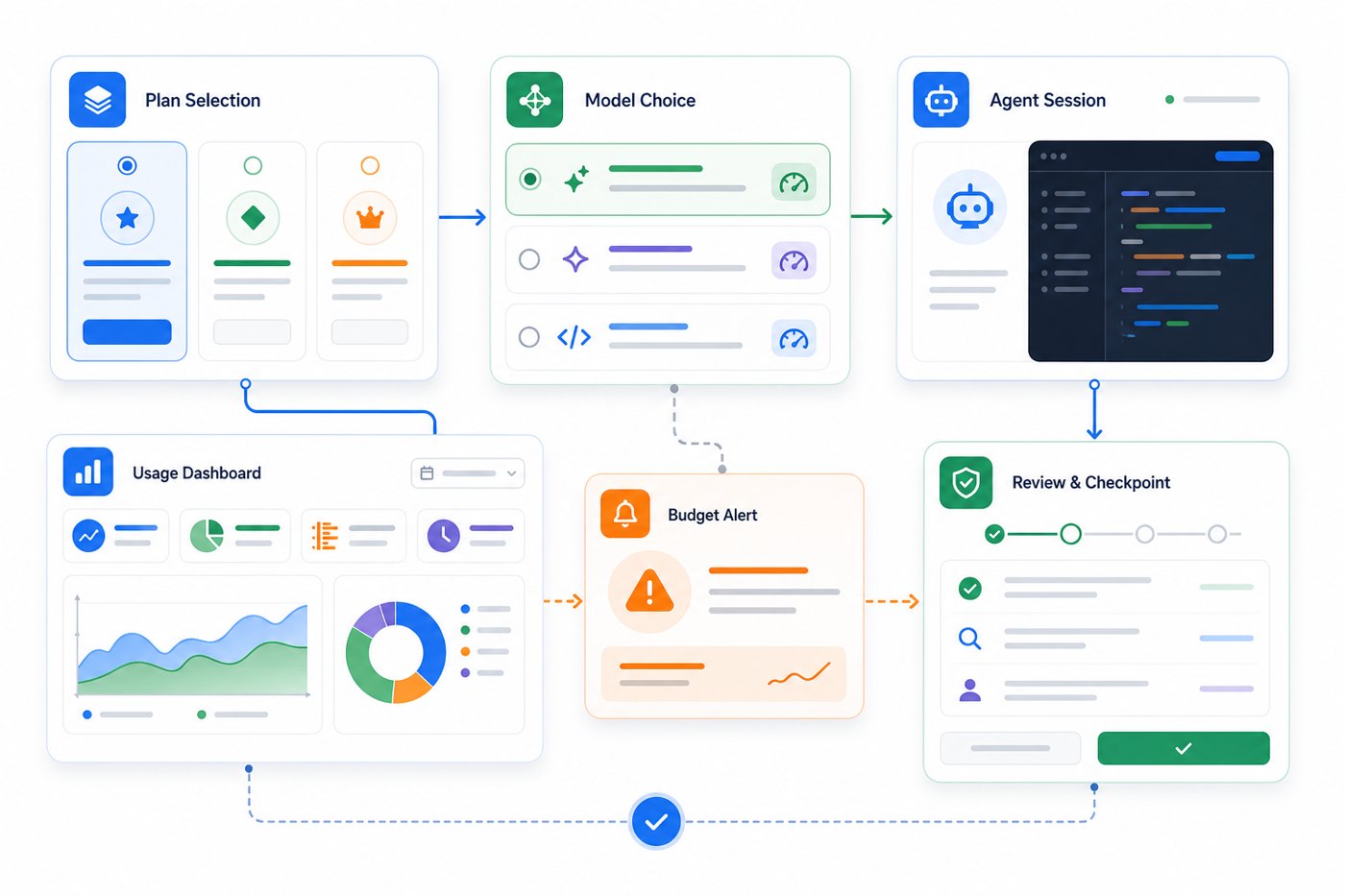
What gets better
- More transparent alignment between heavy AI workflows and cost.
- Better incentive to use agents for high-value work.
- More room for admin reporting, budgets, and governance.
- Clearer distinction between lightweight completions and advanced automation.
What gets harder
- Monthly value is harder to predict for individuals.
- Vague prompts and large context can become costly habits.
- Teams need policies instead of assuming one flat experience.
- Users must compare plan value across Copilot, Claude Code, Codex, Cursor, and local tools more carefully.
Practical Examples: When Copilot AI Credits Are Worth Spending
Credits are not bad. Credits are a way to measure value. The key is matching credit spend to work that would otherwise cost meaningful developer time.
Good credit spend: focused migration
You need to update a small library usage across six files, adjust tests, and check the diff. A scoped Copilot agent session can save time because the task is bounded, verifiable, and repetitive. Give the agent exact files, expected API changes, and test commands.
Risky credit spend: vague repository cleanup
“Clean up this repo” sounds harmless, but it invites broad exploration, uncertain edits, and repeated revisions. Instead, turn it into a checklist: remove dead imports in these directories, update these docs, or refactor this service without changing behavior.
Good credit spend: debugging with a failing test
A failing test plus the relevant stack trace is a strong Copilot use case. The model has a target and can propose a minimal fix. Keep context tight and ask for reasoning before broad edits.
Risky credit spend: comparing huge alternatives in one prompt
Asking Copilot to compare multiple frameworks, inspect your entire app, and recommend a migration can be useful, but it is better split into stages. First ask for decision criteria. Then inspect one module. Then produce a migration plan. Then run one small proof-of-concept.
Why This Topic Has a Search Gap Right Now
Search results around Copilot billing currently mix official docs, GitHub Community threads, developer press, and scattered social discussions. That is useful, but it leaves a gap for a practical guide that combines policy, user impact, workflow examples, budget habits, and comparison context. Developers do not only want to know “what did GitHub announce?” They want to know “what should I do differently on Monday morning?”
Google Search Console data for AI Feature Drop also shows early organic discovery around company and product feature terms, while GA4 top-page patterns show that practical AI feature explainers are the right content format for this site. Existing posts on OpenAI Codex, Claude Code, NotebookLM, Gemini API, and Copilot-related workflows create internal linking opportunities for a Microsoft pillar that is specific rather than generic.
That specificity matters. A broad article called “Microsoft Copilot updates” would compete with news sites and Microsoft pages. A focused article on GitHub Copilot AI Credits targets a user problem: cost predictability for AI coding workflows.
Final Recommendation: Build a Copilot Credit Routine Before June 2026
If you use GitHub Copilot lightly, do not panic. Keep using completions, keep asking focused questions, and check your usage reports. If you use Copilot as an agentic coding partner, treat June 2026 as a workflow reset. Write better prompts, scope agent tasks, choose models intentionally, and create a budget checkpoint before large sessions.
For individuals, the right question is: “Which tasks are worth spending credits on because they save me real time?” For teams, the right question is: “Which Copilot workflows should be encouraged, measured, limited, or approved?” The best teams will not simply ban AI agents or let them run wild. They will define a standard operating procedure: use agents for scoped work, require tests, review diffs, monitor usage, and decide which model tiers are appropriate for which tasks.
GitHub Copilot AI Credits are not just a billing change. They are a signal that AI coding tools are becoming closer to cloud infrastructure: powerful, scalable, and useful, but only when teams understand the cost model behind the convenience.
Keep Learning on AI Feature Drop
- OpenAI Codex Pricing and Usage Limits — compare Codex cost and credit-style constraints.
- Claude Code Usage Limits Explained — understand five-hour windows and rate-limit behavior.
- How to Reduce Claude Code Usage — practical habits that also apply to Copilot agents.
- Claude Code CLAUDE.md Template — use project instructions to reduce repeated AI context.
- Copilot Cowork Skills and Plugins — related Copilot workflow coverage.
- OpenAI AgentKit Guide — agent workflow patterns and governance.
- Gemini API File Search and Multimodal RAG — context and retrieval considerations for AI workflows.
- ChatGPT for Excel and Google Sheets — productivity automation tradeoffs.
Sources and References
- GitHub Community: Copilot is moving to usage-based billing
- GitHub Docs: Requests in GitHub Copilot
- Visual Studio Magazine: developer reactions to Copilot pricing changes
- GitHub Copilot product page
- GitHub Copilot documentation hub
- GitHub Changelog
Pricing and plan details can change. Always verify your active GitHub Copilot plan, organization policy, and billing dashboard before making purchasing or budget decisions.
FAQ: GitHub Copilot AI Credits and Usage-Based Billing
What are GitHub Copilot AI Credits?
GitHub Copilot AI Credits are the usage unit GitHub is using to connect advanced Copilot workflows with the compute they consume. They matter most for chat, agents, code review, large-context work, and premium model usage.
Are GitHub Copilot AI Credits the same as premium requests?
No. Premium requests are closer to an interaction-count model, sometimes adjusted by model multipliers. AI Credits are designed to reflect usage more directly, including task size, model choice, and token consumption.
Do code completions use AI Credits?
GitHub has said code completions and Next Edit Suggestions remain included. Advanced Copilot features are the main focus of usage-based billing. Check your plan page for the latest details.
Why are developers upset about Copilot usage-based billing?
The main concern is predictability. Developers understand paying for usage, but they worry that token-based credit consumption makes monthly value harder to estimate than request-based limits.
Which Copilot workflows are most likely to burn credits?
Long agent sessions, large repository context, code review, premium model use, repeated revisions, and broad multi-file tasks are the workflows to monitor most carefully.
How can I reduce Copilot AI Credit usage?
Use focused prompts, limit context, plan before agent execution, reserve premium models for hard tasks, check diffs after each run, and monitor usage reports weekly during the transition.
Is GitHub Copilot still worth paying for?
For many developers, yes, especially if completions and focused assistance save daily time. The value question becomes more individual for heavy agent users because actual credit consumption depends on workflow style.
Should I upgrade to a higher Copilot plan?
Do not upgrade blindly. Review your usage reports, identify which features consume credits, and compare the cost of upgrading with the engineering time saved by agentic workflows.
How does this compare with Claude Code or OpenAI Codex?
All major AI coding tools now require some understanding of limits, credits, rate windows, or plan constraints. Copilot’s advantage is deep GitHub and IDE integration; alternatives may offer different context windows, agent behavior, or pricing predictability.
Post a Comment