
NotebookLM Video Overviews vs Google Vids: Which Google AI Video Tool Should You Use?
If Google now gives you both source-grounded video summaries and a full AI video creation app, the real question is not “which one is newer?” It is “which one matches the job I need done?”
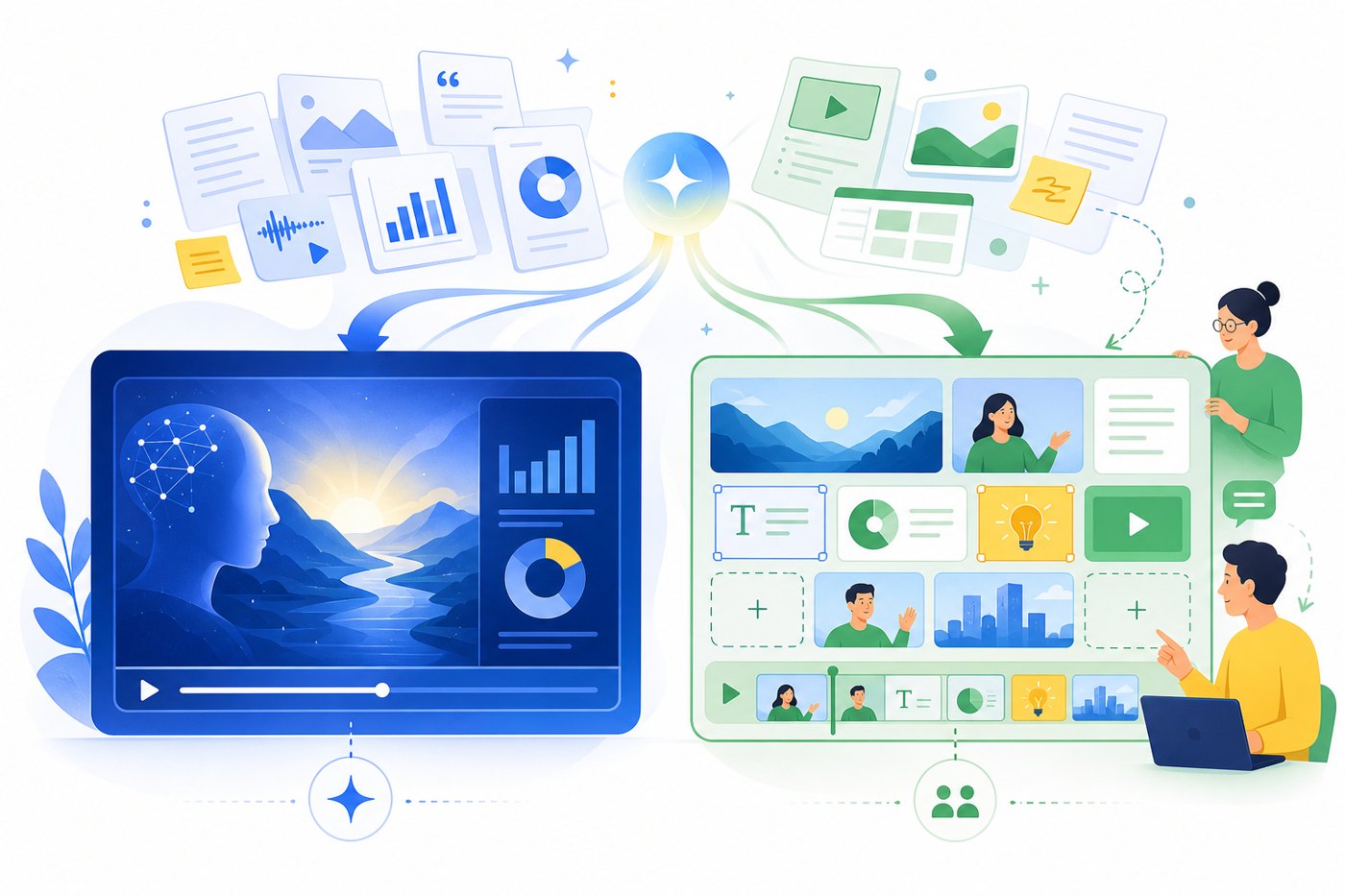
Quick answer: NotebookLM summarizes sources; Google Vids produces editable videos
Use NotebookLM Video Overviews when your starting point is a set of sources and your goal is to help someone understand them quickly. Use Google Vids when your starting point is a communication goal and your output needs editing, collaboration, recording, branding, or a more traditional workplace video workflow.
The two tools overlap enough to confuse buyers, teachers, marketers, and operations teams, but they are not designed around the same job. NotebookLM is a source-first research and learning environment. Its Video Overviews transform the material in a notebook into an explainer-style video, and Google’s own documentation frames the feature around turning notebook sources into engaging videos. The new Cinematic Video Overviews update, covered in our pillar article, pushes that idea further by using Google’s generative models to create richer visuals and more immersive narrative structure.
Google Vids, by contrast, is a Workspace video creation app. Google describes it as an AI-powered video creation and editing tool for writing, producing, editing, collaborating, and sharing videos. That means it behaves more like a lightweight workplace production studio: you can start from a prompt or file, build a storyboard, record yourself or your screen, collaborate with teammates, and shape the final result for a specific audience.
This distinction matters because many AI video comparisons focus on output quality while ignoring workflow fit. A beautiful video that misrepresents source material is a bad research deliverable. A perfectly source-grounded explainer that cannot be edited into a sales enablement clip may be a bad business deliverable. The best tool is the one that reduces the largest workflow risk for your use case.
What NotebookLM Video Overviews are best at
NotebookLM Video Overviews are best understood as a source-grounded learning layer. You add documents, notes, transcripts, links, or other allowed source material into a notebook, then ask NotebookLM to generate a video overview that explains the topic based on that source set. The value is not just that the output is a video. The value is that the video is anchored to a defined knowledge base instead of a blank prompt.
That makes NotebookLM especially useful for dense or fragmented inputs: a product requirements document, a research paper packet, meeting notes, policy documentation, a long YouTube transcript, an onboarding handbook, or a course module. Instead of asking a general-purpose model to make a video about a broad topic, you are asking a source-aware system to explain the specific material you supplied.
Google’s Cinematic Video Overviews announcement adds another layer: the system can move beyond narrated slides and make more structural and stylistic decisions about how to tell the story. The important practical implication is that NotebookLM becomes more useful for learning, training, and executive briefings where the viewer needs fast comprehension but does not necessarily need a manually edited production.
NotebookLM’s strongest jobs
Turn source packets into a guided overview for students, analysts, managers, or clients who need the main ideas quickly.
Convert SOPs, policy docs, onboarding packs, or release notes into a watchable explainer that stays close to the source material.
Create a study aid or recap video that helps beginners understand vocabulary, structure, and key relationships.
Generate a first-pass summary before deciding whether a polished video is worth producing in Google Vids or another editor.
For readers coming from the pillar article, the natural next step is this comparison: once you understand what Cinematic Video Overviews are, you need to know whether the output should remain a NotebookLM artifact or become raw material for a separate video production workflow.
What Google Vids is best at
Google Vids is built for video creation rather than source summarization. The official Workspace positioning emphasizes storytelling at work, collaborative creation, Gemini-assisted storyboards, stock media, background music, screen recording, audio recording, and AI-generated video clips. That makes Google Vids a better fit when the final artifact has to persuade, train, announce, demonstrate, or present.
The simplest way to think about Google Vids is this: it is not just generating a summary; it is helping you build a video asset. That asset might start from a Google Doc, a Drive file, or a prompt, but you still care about scene order, tone, pacing, audience, edits, collaboration, and shareability. If your manager will ask for the intro to be shorter, the brand message to be clearer, or the final call-to-action to be changed, Google Vids is the better environment.
Google Vids also fits the reality of business production. A team video often needs stakeholder review, visual consistency, and a path from draft to final. NotebookLM can help you understand the material, but Google Vids gives you more of the production surface needed to turn that understanding into a communication deliverable.
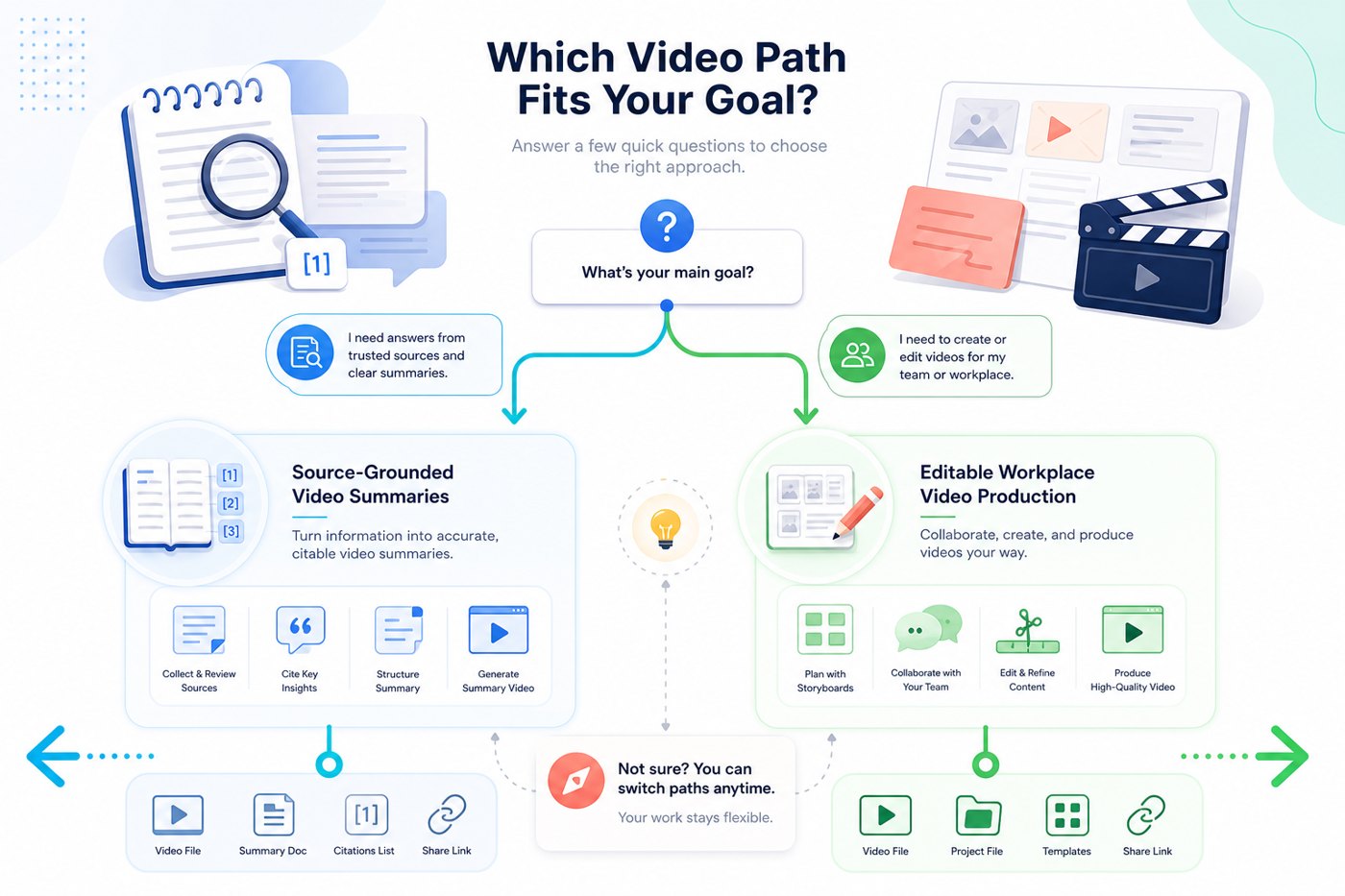
Google Vids’ strongest jobs
Make a video for a sales team, leadership update, launch recap, product walkthrough, or customer education moment.
Use AI to draft the structure, then refine scenes, scripts, media, and pacing manually.
Bring teammates into a workflow where review, recording, revision, and sharing matter.
Add screen recordings, voice, templates, avatars, generated clips, or workplace-friendly visual structure.
NotebookLM Video Overviews vs Google Vids: side-by-side comparison
| Decision factor | NotebookLM Video Overviews | Google Vids | Best choice |
|---|---|---|---|
| Primary job | Explain source material in a generated video overview. | Create, edit, collaborate on, and share workplace videos. | Depends on whether you need comprehension or production. |
| Starting point | Notebook sources such as docs, notes, transcripts, and research material. | Prompt, Drive file, script, storyboard, template, recording, or team video brief. | NotebookLM for source packs; Vids for communication briefs. |
| Source grounding | Core strength because the notebook defines the knowledge base. | Can start from files, but the workflow is not primarily a research notebook. | NotebookLM. |
| Editing control | More limited; best for generated overview artifacts. | Stronger editing, storyboard, recording, and collaboration workflow. | Google Vids. |
| Audience | Learners, researchers, analysts, students, internal readers, managers needing a fast briefing. | Teams, customers, executives, sales, training, marketing, and workplace viewers. | NotebookLM for learning; Vids for publishing. |
| Best output type | Explainer summary, study guide video, briefing video, source recap. | Launch video, training video, update video, sales enablement clip, internal announcement. | Use the output type as the deciding factor. |
| Risk reduced | Misunderstanding dense material. | Slow production and poor collaboration. | Choose based on the bottleneck. |
| Best combined workflow | Generate the source-grounded brief and capture the outline. | Turn the outline into a polished editable video. | Use both for high-stakes work. |
Choose NotebookLM Video Overviews when accuracy to sources matters most
Choose NotebookLM when the content risk is misunderstanding. This is common in research, compliance, education, policy, product analysis, and technical onboarding. In these situations, the most expensive failure is not that the video looks plain. The expensive failure is that it explains the wrong thing, skips a critical caveat, or turns a nuanced source set into generic filler.
NotebookLM also wins when the audience needs a first-pass understanding before discussion. A product manager can upload research notes and create a quick overview before a planning meeting. A teacher can turn a reading packet into a video recap before class. A founder can summarize investor update notes for a team. A support lead can convert a policy change into a simple overview before creating final training materials.
A practical NotebookLM-first workflow
- Define the learning question. Write one sentence describing what the viewer should understand after watching.
- Clean the source pack. Remove irrelevant documents, duplicate transcripts, outdated notes, and ambiguous context.
- Group sources by role. Separate background, evidence, examples, and constraints so the generated overview has a clearer path.
- Generate the Video Overview. Use custom instructions when available to specify audience, level, tone, and what not to overemphasize.
- Review against source facts. Watch for missing caveats, overgeneralized claims, and visual metaphors that could imply more certainty than the sources support.
- Decide whether to stop or move to Vids. If the overview is only for learning, you may be done. If it must become a polished stakeholder asset, treat it as the brief for Google Vids.
This workflow connects directly to our supporting guide on source preparation: better source structure usually produces better NotebookLM output. But this article’s comparison adds the next decision: once the summary exists, should you keep it as a NotebookLM overview or recreate the message inside Google Vids?
Choose Google Vids when the video needs editing, collaboration, or brand control
Choose Google Vids when the output is a deliverable, not just a learning artifact. If the video will be shared with executives, customers, sales teams, students, or public audiences, you usually need more control than a generated overview provides. You may need to trim a scene, add a call-to-action, insert a screen recording, rewrite the intro, adjust the order, align with a template, or ask teammates to review the script.
Google Vids is also better when the video has to drive action. A NotebookLM overview can explain a new policy; a Google Vids video can ask managers to complete a checklist by Friday. NotebookLM can summarize a product launch doc; Google Vids can turn that message into a sales enablement clip with a customer pain point, benefit sequence, and closing next step.
Good Google Vids use cases
- Internal launch announcements
- Customer education clips
- Sales enablement explainers
- Training modules with narration
- Team updates that need comments and revisions
- Product demos with screen recordings
Less ideal Google Vids use cases
- Unstructured research exploration
- Dense source synthesis where citations matter most
- Private study guides that do not need polish
- One-off summaries where editing overhead slows the task
- Cases where source accuracy matters more than presentation
The key question is: will a human need to revise the video after generation? If yes, Google Vids belongs in the workflow. If no, NotebookLM may be enough.
The best workflow for many teams: NotebookLM first, Google Vids second
The highest-value workflow is often not a choice between tools. It is a sequence. NotebookLM can act as the comprehension and synthesis stage. Google Vids can act as the production and collaboration stage. This is especially useful when the source material is dense but the final audience expects a polished video.
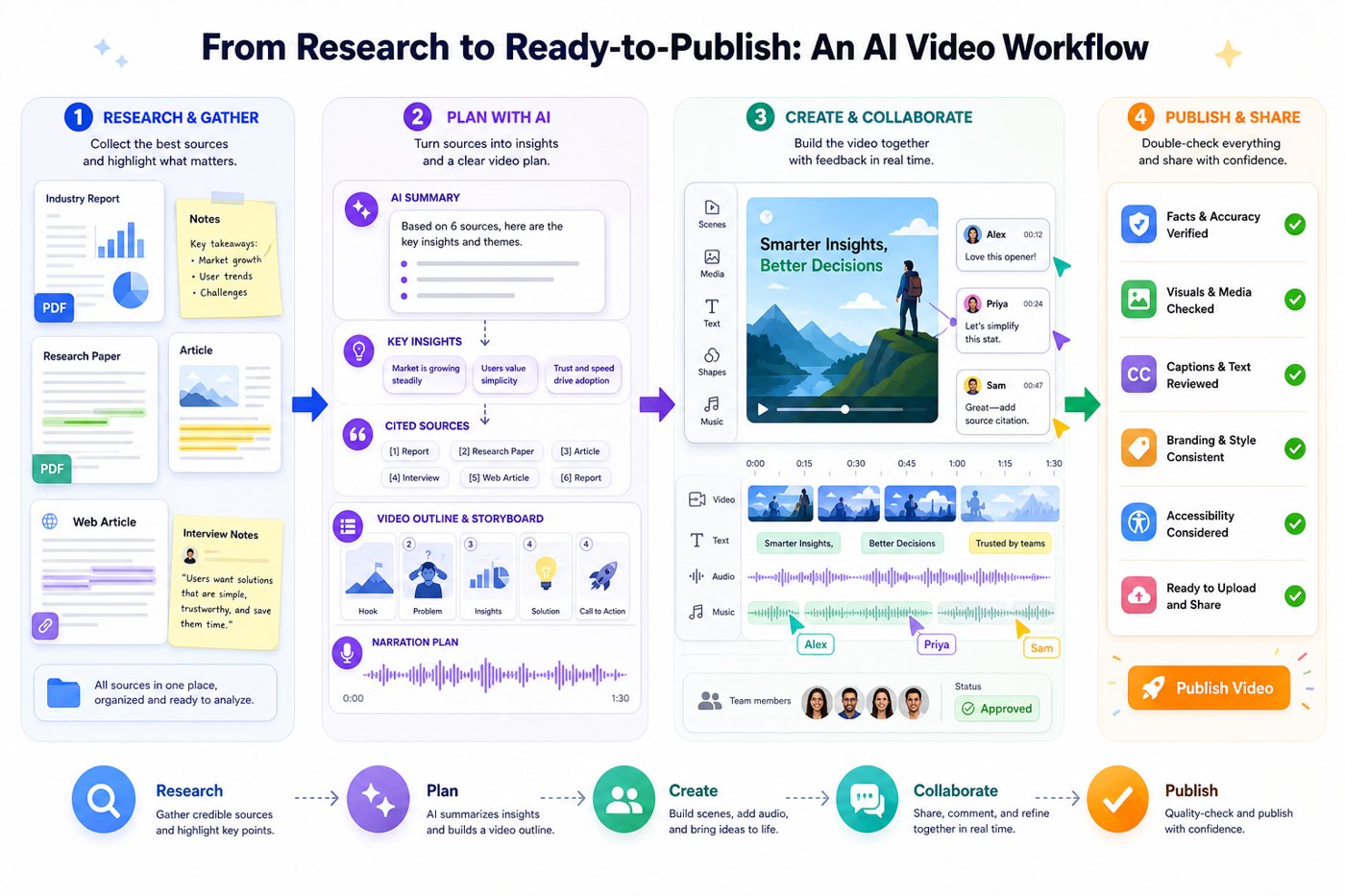
Step-by-step hybrid workflow
- Collect the source material in NotebookLM. Use the documents that define the facts, constraints, examples, and audience needs.
- Create a Video Overview or written summary. Let NotebookLM expose the main structure, confusing areas, and useful analogies.
- Extract a production brief. Capture the thesis, five key scenes, must-include caveats, and examples worth visualizing.
- Move the brief into Google Vids. Use Vids when you need storyboard control, narration, recordings, collaboration, or final polish.
- Review for source fidelity. Compare the Google Vids script against the NotebookLM summary and original sources before sharing.
- Publish according to audience. Keep the NotebookLM artifact for internal learning, and share the Google Vids output when presentation quality matters.
This hybrid sequence prevents two common mistakes. First, it prevents teams from using a production tool before they understand the material. Second, it prevents teams from treating a generated overview as a final communication asset when it still needs brand, audience, and action-oriented editing.
Use-case recommendations
For teachers and course creators
Use NotebookLM to turn reading packets, lecture notes, transcripts, or course documents into student-friendly overviews. Use Google Vids when you need a more polished lesson introduction, module trailer, or assignment explainer that includes your own narration and structure.
For product and marketing teams
Use NotebookLM to digest launch documents, customer research, competitive notes, and technical docs. Then use Google Vids to create a launch recap, demo introduction, customer-facing explainer, or sales training clip. NotebookLM helps you avoid missing the source truth; Vids helps you package the message.
For analysts and consultants
Use NotebookLM to summarize research packets and identify the narrative. Use Google Vids when the client needs a concise presentation video, executive summary, or meeting pre-read. The handoff point should be a written brief with the core claim, evidence, caveats, and recommended action.
For operations and HR teams
Use NotebookLM to explain policy documents, onboarding materials, and process changes. Use Google Vids to produce repeatable training videos that can be reviewed and updated over time. If the policy changes often, keep the NotebookLM source notebook updated and refresh the Vids script only when the audience-facing version needs revision.
Limitations and decision traps to avoid
Do not choose based only on which output looks more cinematic. A cinematic summary may still be the wrong deliverable if it cannot be edited for the audience. A collaborative video app may still be the wrong starting point if your team has not resolved the source facts.
NotebookLM Video Overviews can be constrained by feature availability, account settings, mobile limitations, language support, and generation controls. Google’s help documentation notes that Video Overviews can be generated and customized, but mobile support may have limitations. Cinematic Video Overviews, according to Google’s announcement, are available in English for Google AI Ultra subscribers aged 18+ on web and mobile. That access pattern may change, so always confirm current availability before building a workflow around it.
Google Vids has a different constraint profile. It is designed for Workspace-style creation and collaboration, so plan availability, Gemini feature availability, organizational admin settings, storage, and video generation limits can affect what a team can actually do. If you are choosing for an organization, test with the exact plan and account type your team will use.
Common mistakes
- Using Google Vids before source synthesis. This creates polished but shallow videos.
- Using NotebookLM as a final editor. This frustrates teams that need scene-level control.
- Assuming video generation equals publishing readiness. Review, permissions, and audience fit still matter.
- Ignoring plan and access details. Ultra-only or Workspace-only features can break a rollout.
- Forgetting to check facts. Even source-grounded workflows need human review for important claims.
Suggested anchor text for future internal links: “NotebookLM Video Overviews vs Google Vids,” “when to use NotebookLM for AI video summaries,” “Google Vids workflow after NotebookLM,” and “source-grounded AI video summaries.” These anchors support the pillar without cannibalizing its main keyword.
External references used
FAQ: NotebookLM Video Overviews vs Google Vids
Is NotebookLM Video Overviews the same as Google Vids?
No. NotebookLM Video Overviews are generated from notebook sources and are best for source-grounded explanation. Google Vids is a collaborative video creation and editing app for workplace storytelling.
Which tool is better for research summaries?
NotebookLM is usually better because the notebook source set defines the information base. That makes it a stronger fit for research packets, study material, documentation, and briefing notes.
Which tool is better for polished workplace videos?
Google Vids is usually better because it offers a production workflow: storyboard creation, editing, recording, collaboration, and sharing.
Can I use NotebookLM and Google Vids together?
Yes. Use NotebookLM to understand the source material and create a grounded brief. Then use Google Vids to turn that brief into an editable video for stakeholders.
Does NotebookLM replace a video editor?
Not for most professional publishing workflows. It can generate useful overview videos, but teams that need brand control, scene-level edits, recordings, or review workflows should use Google Vids or another editor.
What is the best workflow for a team?
Start with NotebookLM when the material is complex. Move to Google Vids when the message needs to be polished, revised, reviewed, or shared with a broader audience.
Conclusion: pick the tool by workflow risk, not by hype
NotebookLM Video Overviews and Google Vids both sit inside Google’s expanding AI video ecosystem, but they solve different problems. NotebookLM reduces the risk of misunderstanding complex source material. Google Vids reduces the friction of producing and collaborating on workplace videos. The more source-heavy the task, the more NotebookLM should lead. The more audience-facing and editable the deliverable, the more Google Vids should lead.
For most serious workflows, the best answer is sequential: use NotebookLM to create a grounded understanding, then use Google Vids to shape that understanding into a polished asset. That approach gives you the strengths of both tools while avoiding the biggest mistake in AI video adoption: confusing a generated artifact with a finished communication strategy.
Disclosure: Feature availability, pricing, and plan access can change. Confirm current Google AI Ultra, NotebookLM, and Google Workspace details before making purchase or rollout decisions.
Post a Comment