
Claude Code Statusline Guide: Monitor Context, Cost, Git, and Agent Workflows
Claude Code statusline turns the bottom of your terminal into a lightweight cockpit for context usage, cost awareness, model choice, git state, permissions, and agent activity. This guide explains what to display, how to set it up safely, and how teams can use it without turning the terminal into a noisy dashboard.

Claude Code Statusline: Quick Answer
Claude Code statusline is a customizable row in the Claude Code terminal interface. You configure it with the /statusline command or with a statusLine field in Claude Code settings. Claude Code runs your chosen command, passes session data as JSON on standard input, and displays whatever your script prints. In plain English: it lets you build a small, live readout for the things developers usually forget to check until a session becomes messy.
The best statusline is not the fanciest one. The best one answers four questions at a glance: Which model am I using? How much context have I used? Am I in the right project and git branch? Is this session in a safe mode for the kind of work I am asking Claude to do? If you are on a team, add one more question: is this run following our shared guardrails?
This topic has a real search gap because official documentation explains the mechanics, while community examples show many clever designs. What developers still need is a practical guide that connects statusline setup with everyday AI coding decisions: context management, cost control, permission safety, git hygiene, and team rollout.
Why Claude Code Statusline Matters for AI Coding Work
AI coding tools changed the shape of a terminal session. A normal terminal tells you a directory, branch, and prompt. An agentic coding session has more hidden state: model, context window, permission mode, long-running tool activity, subagents, cost, working directory, and sometimes remote or enterprise authentication state. If you cannot see that state, you only notice problems after the session drifts.
Claude Code statusline is useful because it keeps important session information visible without interrupting the conversation. It sits above the built-in footer badges and can show context window usage, current model, project folder, git branch, cost indicators, duration, permission mode, custom team labels, or anything your script can compute from the JSON input and local environment.
For solo developers, the main benefit is flow. You can work for longer without asking, “am I still on the right branch?” or “am I about to hit a context wall?” For teams, the benefit is consistency. A shared statusline can remind people when they are in a production repository, when a session is using a premium model, or when local policy expects tests before edits.
Analytics from AI Feature Drop supports this angle. Recent GA4 data shows practical coding-agent guides outperform generic news. Pages on Codex resets, Copilot credits, Claude Code usage limits, Claude permissions, and subagent permissions attract the most relevant traffic. Search Console also shows Claude Code permission and subagent queries gaining impressions. That means readers are not only curious about Claude as a chatbot; they want operational guidance for real coding workflows.
Statusline is a natural pillar topic because it connects multiple existing pain points. Context usage connects to limit anxiety. Git branch visibility connects to safe edits. Cost display connects to budget awareness. Permission mode connects to guardrails. Subagent and hook indicators connect to more advanced team workflows.
How Claude Code Statusline Works
Claude Code statusline works by running a command you define. The command can be a script file, an inline shell command, or a generated script created through the /statusline command. Claude Code sends JSON session data to that command through standard input. Your script reads the JSON, extracts fields, prints one or more lines, and Claude Code displays the result in the terminal.
That design is powerful because the statusline is local and flexible. It does not need to call a paid model to refresh. It can be a tiny shell script. It can use jq, Node, Python, git commands, or a team-approved helper. It can show only static session fields, or it can combine Claude Code JSON with local project data such as branch name, uncommitted file count, test status, or ticket identifier.
According to Anthropic’s statusline documentation, common display ideas include model name, working directory, context window percentage, costs, and git status. The same documentation describes useful options such as padding, refreshInterval, multi-line output, ANSI colors, and hiding the Vim mode indicator if your statusline already renders it.
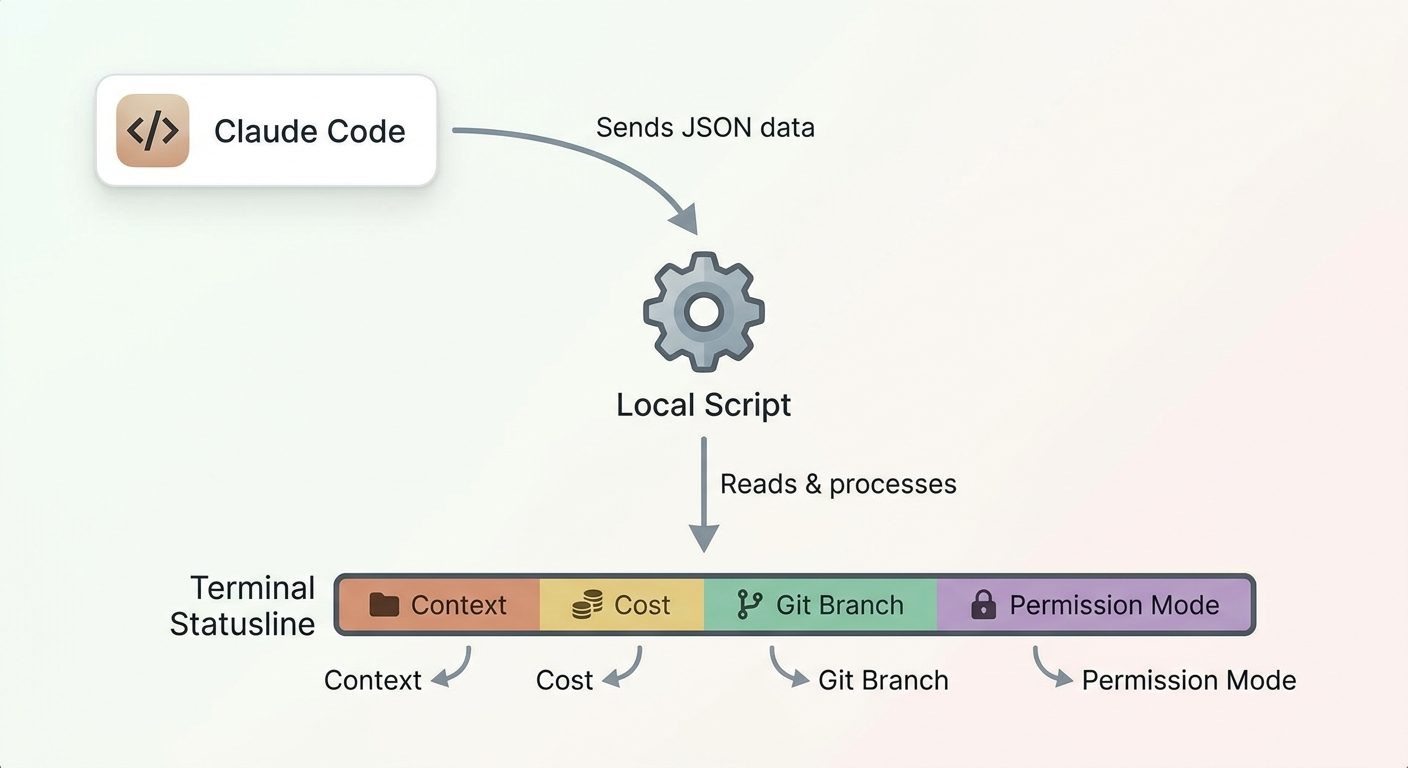
The most important mental model is this: statusline is display logic. It should not be where you enforce dangerous policies. If you want to block destructive commands, use hooks and permission rules. If you want organization-wide telemetry, use OpenTelemetry. If you want specialized behavior for repeated tasks, use subagents. Statusline can remind, summarize, and surface, but it should not become your only safety system.
What Should You Show in a Claude Code Statusline?
A useful statusline should be opinionated. If you show every possible field, you recreate the clutter you were trying to avoid. Start with the fields that prevent mistakes, then add optional fields only if they change behavior.
For beginners, a good first statusline is: model, folder, branch, and context percentage. For advanced users, add permission mode, token or cost cues, subagent activity, and a compact dirty-state marker. For teams, add a short environment label such as personal, project, or managed, but avoid leaking internal project names if screenshots might be shared.
| Field | Why it helps | When to avoid it |
|---|---|---|
| Context percentage | Shows when a session is becoming crowded and needs compaction or task splitting. | Avoid fake precision. A simple percentage or color band is enough. |
| Git branch | Prevents edits on the wrong branch and makes screenshots easier to understand. | Avoid slow git commands in very large repositories unless cached. |
| Dirty files | Reminds you that Claude has changed files or that local work exists before another agent run. | Avoid listing filenames in the statusline; keep details in normal git tools. |
| Permission mode | Clarifies whether Claude is planning, asking, or allowed to take broader action. | Do not rely on display alone for enforcement; use permission rules and hooks. |
| Cost | Useful for API users, teams, and long agent sessions. | Do not imply exact billing if the source is only an estimate. |
| Subagent signal | Useful when background exploration changes git or context state. | Avoid noisy animations or constantly changing text. |
How to Set Up Claude Code Statusline
There are two setup paths. The easy path is to run /statusline inside Claude Code and describe what you want. The manual path is to create a script and add a statusLine object to your settings file. Both are valid. Choose the easy path if you want Claude to generate the first version, and choose the manual path if your team needs code review, shared settings, or strict control over what commands run.
Option 1: Use the /statusline command
The /statusline command accepts natural-language instructions. For example, you can ask it to show model name, folder, git branch, and context percentage. Claude Code can generate the script and update settings automatically. This is the fastest way to start because it avoids schema hunting and gives you a working baseline.
The risk is that generated scripts still deserve review. Open the script, confirm it reads session JSON safely, check that it does not print secrets, and keep commands lightweight. A statusline runs often, so a slow script will become annoying quickly.
Option 2: Configure settings manually
Manual setup usually means creating a script such as ~/.claude/statusline.sh, making it executable, and adding a statusLine field to your user or project settings. Claude Code settings support user, project, local, and managed scopes. That matters because a personal statusline belongs in user settings, while a shared team default belongs in project settings or managed settings.
{
  "statusLine": {
    "type": "command",
    "command": "~/.claude/statusline.sh",
    "padding": 1,
    "refreshInterval": 5
  }
}
Use refreshInterval only when your statusline shows time-based or externally changing data. If your line only displays model, directory, and context usage, event-driven updates are usually enough. A refresh that is too frequent can make the terminal feel restless and can trigger expensive local commands if your script is careless.
Settings scope matters
Claude Code settings use priority scopes. Managed settings sit at the top for organizations. Local settings can override project and user settings for a specific repository. Project settings are useful for team-shared defaults. User settings are for personal preferences. For statusline, that means a company can standardize a safe base while individual developers can still keep harmless personal formatting where policy allows.
Claude Code Statusline Examples That Actually Help
The examples below are patterns, not mandatory templates. Treat them as design ideas. The exact JSON fields available can evolve, so verify against your Claude Code version and official docs before committing a team-wide configuration.
1. Minimal solo developer statusline
This is the best starting point for most people: model, folder, branch, and context. It answers the questions that prevent everyday mistakes without stealing attention.
[Sonnet] my-app · main · 42% contextWhy it works: it is short, readable, and easy to scan. It tells you whether you are in the expected repo and whether the session is approaching a point where you should summarize or split the work.
2. Cost-aware API user statusline
If you use Claude Code through API-based billing or team-managed infrastructure, add a compact cost cue. Avoid pretending that a statusline is a perfect invoice. It is a behavior prompt, not accounting software.
[Opus] payments-service · feature/refactor · 68% context · cost: reviewThe word “review” can be more useful than a precise-looking number. It reminds the developer to check usage before another long agent loop. For exact reporting, pair this with Claude Code monitoring through OpenTelemetry or your organization’s billing dashboard.
3. Git hygiene statusline
AI coding sessions can create a lot of local changes quickly. A git-aware statusline can show whether files are modified without dumping the whole diff into your prompt.
[Haiku] docs-site · statusline-guide · 21% context · git: cleanWhen the state changes, switch to a concise marker such as git: dirty or +5 files. Do not list every changed file in the statusline. The point is to nudge you into running normal git review commands before asking Claude to continue.
4. Team guardrail statusline
Teams can use statusline as a soft reminder for shared norms. For example, a project might show environment, permission mode, and test expectation.
team repo · ask-before-edit · tests expected · 54% contextThis does not replace hooks or permission rules. It simply keeps the current working contract visible. If the team’s rule is “run tests before committing,” the statusline can remind people, while hooks or CI enforce the rule.
5. Multi-line statusline for advanced users
Anthropic’s docs show that statusline can display multiple lines. Use this carefully. A two-line statusline can be excellent for power users: first line for model/folder/git, second line for context/cost/progress. More than two lines usually becomes a dashboard instead of a prompt helper.
[Sonnet] checkout-service · branch: claude-statusline
context: 58% · mode: plan · git: 3 changed files
Statusline vs Hooks vs Subagents vs OpenTelemetry
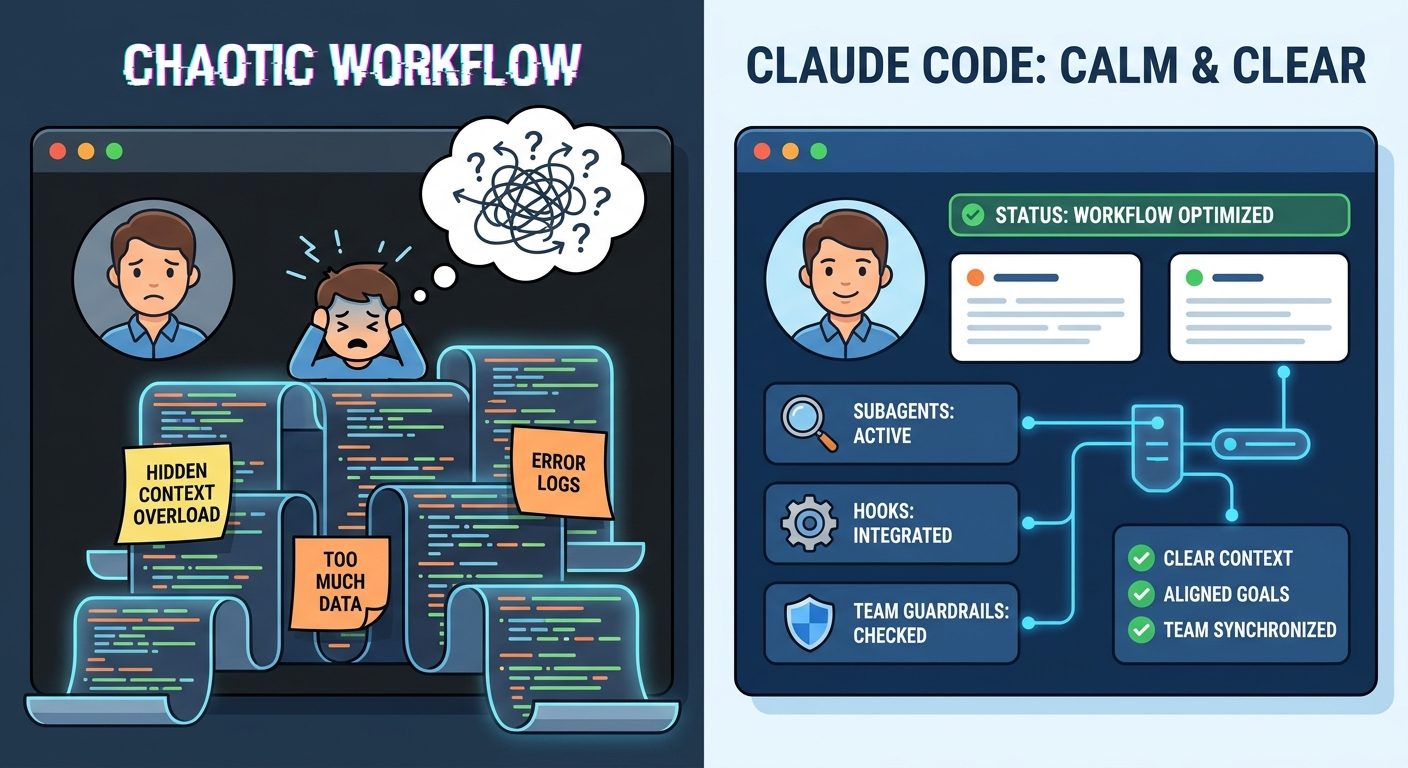
One common mistake is trying to solve every Claude Code workflow problem with statusline. It is better to use the right layer for the job. Statusline is for visibility. Hooks are for lifecycle automation and guardrails. Subagents are for context isolation and specialized work. OpenTelemetry is for organization-level metrics, logs, and monitoring.
| Layer | Best for | Example |
|---|---|---|
| Statusline | Fast human awareness inside the terminal. | Show model, context usage, branch, cost cue, and permission mode. |
| Hooks | Automated checks at lifecycle events. | Block risky shell commands, run formatting checks, or log tool activity. |
| Subagents | Separate context and specialized task behavior. | Send read-only repository exploration to a subagent so the main session stays clean. |
| Settings | Personal, project, local, or managed configuration. | Share team defaults or deploy organization policy. |
| OpenTelemetry | Team-wide usage, cost, and tool monitoring. | Export metrics and events to your observability backend. |
This layered approach also helps avoid overengineering. A solo developer may only need statusline and a few personal settings. A startup team may add project settings and hooks. A larger company may add managed settings, authentication policy, and OpenTelemetry. The statusline remains useful at every stage because it is the one layer the developer sees continuously.
How Teams Should Roll Out Claude Code Statusline
A team rollout should start with a small shared default. Do not ask every developer to design a perfect terminal dashboard. Create one recommended statusline, document what it means, and let people customize cosmetic details only after the basic workflow is stable.
Step 1: Decide what problems you are solving
If your team’s problem is surprise usage, include model and cost cues. If your problem is accidental edits on the wrong branch, include git state. If your problem is long context-heavy sessions, include context percentage and a reminder to compact or split. If your problem is safety, use statusline as a reminder and hooks as enforcement.
Step 2: Pick the right settings scope
Project settings are good when one repository needs a consistent workflow. Managed settings are better when the organization must enforce policy. User settings are better for personal preferences. Local settings are good for experiments that should not be committed. Claude Code’s scope model exists for a reason; use it rather than stuffing every configuration into one file.
Step 3: Review the script like production code
A statusline script runs often and may touch local project data. Keep it small, readable, and dependency-light. Avoid network calls. Avoid reading secret files. Avoid expensive repository scans. Handle missing tools gracefully. If the script breaks, it should fail quietly rather than interrupting the coding session.
Step 4: Pair with hooks and telemetry
For teams, statusline is the visible part of the system. Hooks can block or warn on risky tool calls. OpenTelemetry can export usage, costs, and tool activity. Authentication and managed settings can standardize access. Subagents can separate research, planning, and code changes. Together, these features make Claude Code feel less like an experimental assistant and more like a reliable part of the engineering workflow.
What statusline improves
- Context awareness during long coding sessions.
- Git and project visibility before edits happen.
- Cost and model awareness for heavy users.
- Team reminders without interrupting flow.
- Cleaner handoffs when sharing screenshots or pairing.
What it should not do
- Replace permission rules or code review.
- Expose secrets in terminal output.
- Run slow network calls every few seconds.
- Display fake precision around billing.
- Become so crowded that developers ignore it.
Claude Code Statusline Planner
Use this simple planner to choose a statusline style before you configure one. It does not generate a real script; it helps you decide what belongs in your first version.
Common Claude Code Statusline Mistakes
Mistake 1: Showing too much
A statusline should reduce cognitive load. If it becomes a wall of metrics, developers stop reading it. Start with four fields and earn every addition.
Mistake 2: Running slow commands
Git checks are useful, but expensive commands can slow down the interface. Prefer lightweight checks, caching, or event-driven updates. Avoid network calls unless you truly need them.
Mistake 3: Treating reminders as enforcement
If a command must be blocked, use hooks or permission rules. A statusline warning is easy to ignore. Enforcement belongs in the workflow layer, not only the display layer.
Mistake 4: Printing sensitive information
Terminals get shared in screenshots, recordings, livestreams, and support tickets. Keep secrets, customer names, tokens, and private issue descriptions out of the statusline.
Mistake 5: Copying community configs blindly
Community examples are useful, and recent search results show strong interest in compact and Powerlevel-style Claude Code statuslines. Still, review any script before using it. A pretty statusline is not worth running untrusted shell code.
Keep Learning on AI Feature Drop
- Claude Code Usage Limits Explained — understand context, plans, and smarter agent workflows.
- Claude Code Permission Rules Explained — pair statusline visibility with safer tool access.
- Claude Code Subagent Permissions — use specialized agents without losing control of tools and worktrees.
- Claude Code Hooks Team Rollout Guide — automate guardrails around the statusline workflow.
- Claude Code CLAUDE.md Template — reduce repeated instructions and keep project guidance consistent.
- OpenAI Codex Pricing and Usage Limits — compare cost-aware coding-agent habits across tools.
- GitHub Copilot AI Credits Explained — understand another model for AI coding cost visibility.
Sources and References
- Anthropic Claude Code docs: Customize your status line
- Anthropic Claude Code docs: Settings and configuration scopes
- Anthropic Claude Code docs: Hooks reference
- Anthropic Claude Code docs: Create custom subagents
- Anthropic Claude Code docs: Monitoring with OpenTelemetry
- Anthropic Claude Code docs: Authentication and team setup
- Google SERP observation for “Claude Code statusline reddit,” showing active community demand for examples, compact configs, Powerlevel-style statuslines, and context/cost displays.
Claude Code features and field names can change. Verify your installed Claude Code version and official docs before deploying scripts across a team.
FAQ: Claude Code Statusline
What is Claude Code statusline?
Claude Code statusline is a customizable terminal row that displays output from a command you configure. Claude Code passes session data as JSON to the command, and the printed output appears in the interface.
What should I show in my Claude Code statusline?
Start with model, current folder, git branch, and context usage. Add permission mode, dirty git state, cost cue, or team label only if those fields help you make better decisions.
Is statusline the same as Claude Code hooks?
No. Statusline is mainly for visibility. Hooks run at lifecycle events and can automate checks, warnings, or blocking behavior. Use statusline for reminders and hooks for guardrails.
Can Claude Code statusline show cost?
It can show cost-related fields or cues if the session data and your setup support them. Treat statusline cost as a quick indicator, not a final invoice. Use official billing or telemetry for exact reporting.
Can a statusline script be dangerous?
Yes, if you run untrusted code or print sensitive data. Review scripts before use, avoid network calls and secret reads, keep commands lightweight, and do not blindly paste community configs.
Should teams put statusline in user settings or project settings?
User settings are best for personal display preferences. Project settings are better for shared repository defaults. Managed settings are appropriate when an organization needs centralized policy.
Does statusline replace OpenTelemetry monitoring?
No. Statusline is a local developer-facing display. OpenTelemetry is for exporting metrics, logs, events, and optional traces to an observability backend across an organization.
How often should statusline refresh?
Use event-driven updates when possible. Add a refresh interval only for time-based or externally changing data, and keep it slow enough that your terminal remains responsive.
Post a Comment