
Claude Code Statusline Permission Alerts: Show Risk, Cost, and Git State While You Work
A Claude Code statusline should do more than look pretty. This guide shows how to turn it into a practical cockpit for permission risk, context pressure, session cost, branch state, and safer approval habits.

Claude Code Statusline Permission Alerts: Quick Answer
Claude Code statusline permission alerts are lightweight signals you add to the Claude Code statusline so you can see risk while you work: permission mode, project trust, dirty git state, current branch, context usage, session cost, and reminders about risky approvals. The statusline does not enforce security by itself. It is a visibility layer that sits beside Claude Code’s actual permission system.
The safest mental model is simple: use the statusline to make good decisions faster, and use permissions, settings, hooks, and review habits to enforce those decisions. A good statusline can warn you that a repo is dirty before approving edits, remind you that you are in a broad approval mode, show that context is getting high, and display cost before an agent session becomes too long. It should not display secrets, API keys, raw prompts, or sensitive file paths you would not want in screenshots.
This cluster article supports our broader Claude Code Statusline Guide. The pillar explains the feature as a whole. This guide narrows in on a search gap: how to combine statusline examples with Claude Code permissions so developers approve commands less blindly and avoid the common “just allow everything” trap.
Why Permission-Aware Statuslines Matter
Claude Code has become powerful enough that the interface needs small, persistent reminders. When an AI coding agent can read files, propose edits, run shell commands, use MCP tools, and work across multiple sessions, the hard part is no longer only asking a good prompt. The hard part is knowing when you are about to approve something risky, expensive, or confusing.
Official Claude Code documentation separates the major building blocks. The statusline docs explain that a configured command receives JSON session data on standard input and prints text at the bottom of the terminal. The permissions docs explain allow, ask, and deny rules, permission modes, and rule precedence. The settings docs explain managed, user, project, and local scopes. The security docs explain read-only defaults, approval prompts, prompt-injection risk, and why the user remains responsible for reviewing actions. All of that is useful, but a developer in the middle of a coding session needs the combined version.
That is where a permission-aware statusline helps. It turns dispersed safety concepts into a glanceable habit. You see that the current directory is a production repository, the branch is not a throwaway branch, git has uncommitted changes, context usage is high, session cost is rising, and you are about to approve a broad command. The statusline will not stop the command. But it can slow your thumb by one second, which is often enough to review the prompt properly.
Analytics also point toward this topic. Recent Search Console data for AI Feature Drop shows impressions for Claude permission queries such as “claude code permissions,” “claude code /permissions,” and “how to give Claude Code all permissions,” plus pages about Claude permission rules ranking in the teens with no clicks. That means users are looking for permission help, but the current discovery path is weak. A focused statusline article can link the new statusline pillar to the existing permission content and answer the practical question behind those searches: “How do I see enough context to make safer approval decisions?”
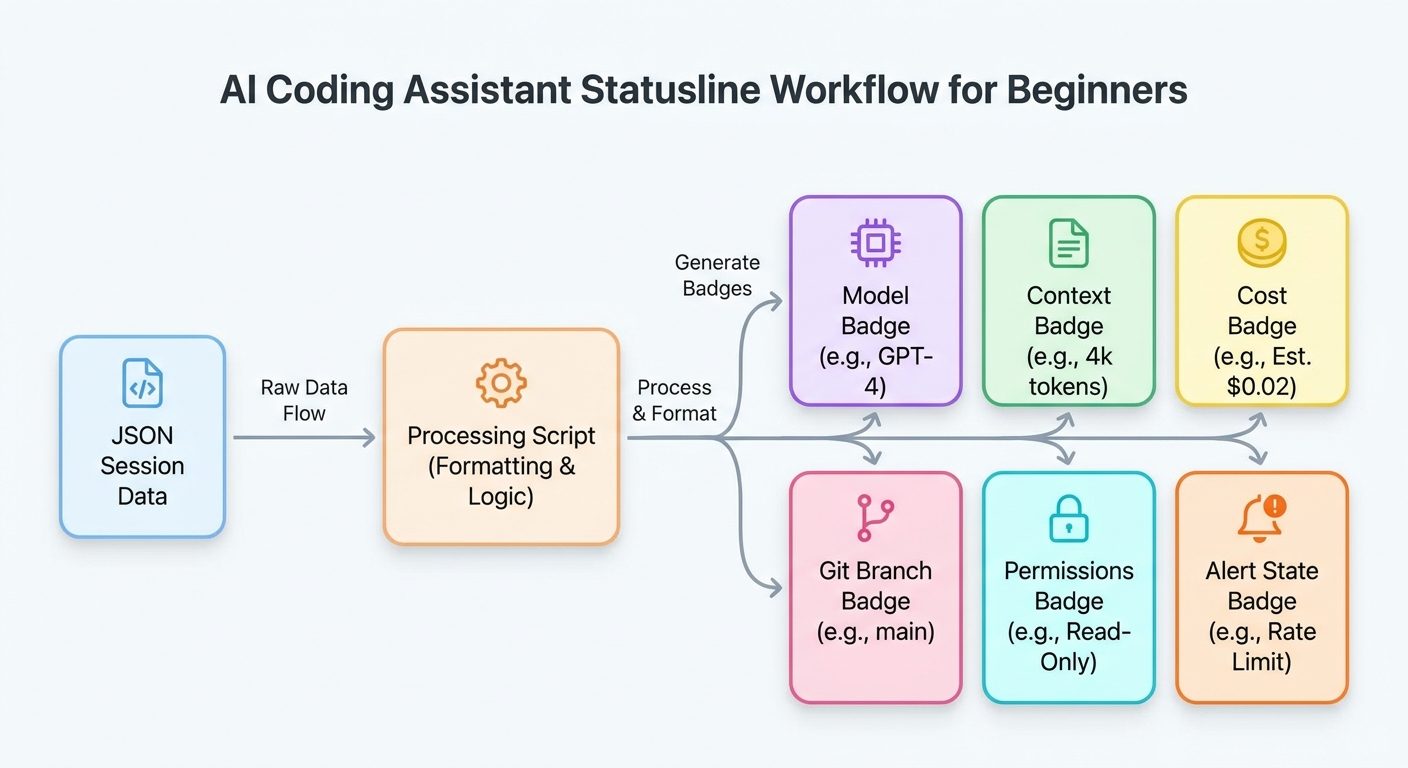
What Should a Claude Code Statusline Permission Alert Show?
The best statusline is short. If it becomes a second dashboard, you stop reading it. If it is too minimal, it becomes decorative. The sweet spot is five to seven signals that change what you do next. For permission-aware work, prioritize signals that answer these questions: Where am I? What mode am I in? Is the repo clean? Is context almost full? How much has this session cost? Which model is active? Am I in a safe branch?
Avoid stuffing the statusline with every available JSON field. A statusline that says Claude Sonnet · api-service · main +4 · 72% ctx · $1.42 · MANUAL is more useful than one that prints full paths, transcript IDs, raw session identifiers, and every counter available. The point is not maximum information. The point is maximum decision value per character.
| Signal | Why it matters | Good display | Avoid |
|---|---|---|---|
| Permission mode | Changes how carefully you review tool calls. | MANUAL, PLAN, AUTO? | Claiming enforcement your script does not provide. |
| Git branch | Prevents accidental work on main or release branches. | feature/auth-fix, main! | Huge remote URLs or secrets in branch names. |
| Dirty files | Warns before approving broad edits or tests. | +3 dirty | Printing every changed file in the bar. |
| Context usage | High usage means summarization or restart may be safer. | 68% ctx | False precision if the field is absent. |
| Cost | Helps stop unproductive loops. | $0.84 | Using cost as the only quality signal. |
| Directory | Prevents wrong-repo approvals. | billing-api | Full home directory or client path in screenshots. |
How to Set Up a Permission-Aware Claude Code Statusline
Claude Code can generate a statusline with the /statusline command, or you can configure it manually in settings.json. The manual route gives you more control, which is better for permission alerts. The core idea is to point statusLine.command at a script. Claude Code sends JSON to that script on stdin. The script reads fields, checks local git state if needed, and prints one line.
Here is the shape of the configuration. Use a user-level setting for personal habits, a project-level setting for a team convention, or a local setting while experimenting. Remember that settings scopes matter: managed settings win, then command-line overrides, then local, project, and user settings. Permission rules merge differently, so do not assume a statusline setting changes permission enforcement.
{
  "statusLine": {
    "type": "command",
    "command": "~/.claude/statusline-permission-alerts.sh",
    "padding": 1,
    "refreshInterval": 5
  }
}
The script below is intentionally conservative. It reads JSON from stdin, tries to extract model, context, and cost, checks git branch and dirty count, shortens the working directory to the folder name, and prints a compact line. It uses a static permission label because Claude Code permission mode availability can vary by version and environment. That is not a weakness. It is honest. If you cannot reliably read a mode from the JSON, do not pretend you can.
#!/usr/bin/env bash
input="$(cat)"
model="$(printf '%s' "$input" | jq -r '.model.display_name // .model.name // "Claude"')"
ctx="$(printf '%s' "$input" | jq -r '.context_window.used_percentage // empty')"
cost="$(printf '%s' "$input" | jq -r '.cost.total_cost_usd // .cost.total // empty')"
dir="$(printf '%s' "$input" | jq -r '.workspace.current_dir // .cwd // .current_dir // empty')"
repo="$(basename "${dir:-$PWD}")"
branch="$(git -C "${dir:-$PWD}" branch --show-current 2>/dev/null || true)"
dirty="$(git -C "${dir:-$PWD}" status --porcelain 2>/dev/null | wc -l | tr -d ' ')"
perm="MANUAL"
branch_part="${branch:-no-git}"
if [ "$branch_part" = "main" ] || [ "$branch_part" = "master" ]; then branch_part="${branch_part}!"; fi
ctx_part="ctx n/a"; [ -n "$ctx" ] && ctx_part="${ctx}% ctx"
cost_part="cost n/a"; [ -n "$cost" ] && cost_part="$(printf '$%.2f' "$cost" 2>/dev/null || echo cost)"
alert="OK"
if [ "${dirty:-0}" -gt 0 ]; then alert="REVIEW"; fi
printf '🛡 %s · %s · %s · +%s dirty · %s · %s · %s · %s\n' "$perm" "$model" "$repo" "${dirty:-0}" "$branch_part" "$ctx_part" "$cost_part" "$alert"Before using this in serious work, test it in a disposable repository. Run a few normal Claude Code sessions, switch branches, create an uncommitted file, and confirm that the dirty count changes. If cost or context fields show as unavailable, keep the fallback. A statusline should degrade gracefully instead of breaking your terminal flow.
Claude Code Statusline Examples for Real Permission Decisions
Examples are where the statusline becomes useful. The exact icons and colors matter less than the decision you want to prompt. Below are practical patterns for common Claude Code workflows.
Example 1: Safe refactor mode
You are on a feature branch, the repo has a small number of dirty files, context is moderate, and cost is low. This is a normal zone for a focused edit. The statusline should reinforce the workflow: approve small edits, inspect the diff, run tests, then continue.
🛡 MANUAL · Sonnet · checkout-service · feature/refactor-tax · +2 dirty · 41% ctx · $0.33 · OKThe key signal is not “everything is safe.” The key signal is “this looks bounded.” If the agent proposes a broad command anyway, the statusline gives you enough context to ask why before approving.
Example 2: Main branch warning
You are on main with no dirty files. That may be fine for reading, planning, and asking questions. It is not a great place to approve edits. A tiny exclamation mark beside main can prevent the most boring mistake in AI-assisted coding.
🛡 PLAN · Opus · payments-api · main! · +0 dirty · 28% ctx · $0.12 · READ ONLYIn this situation, ask Claude to create a plan, open a branch yourself, or switch to a safer branch before allowing edits. The statusline does not need to be dramatic. It just needs to make the branch visible.
Example 3: High context and rising cost
High context is not automatically bad, but it changes the risk profile. Long sessions accumulate assumptions. The model may be working with stale understanding. You may be close to compaction. The statusline should encourage a checkpoint.
🛡 MANUAL · Sonnet · dashboard · feature/charts · +7 dirty · 86% ctx · $3.74 · CHECKPOINTAt this point, stop and summarize. Ask for a diff review. Run tests. Commit safe work. Start a fresh session if needed. The expensive pattern is not one long session; it is a long session that keeps making broad edits after the developer has lost track of the state.
Example 4: Permission-heavy shell work
Statusline scripts cannot see every pending command before the permission dialog unless you add hooks or other tooling. Still, the bar can remind you that you are in a repo state where shell commands deserve caution. Pair it with a habit: read the command, check the working directory, and press the explanation shortcut when available if the command is unclear.
🛡 MANUAL · Sonnet · infra · release/hotfix · +1 dirty · 52% ctx · $0.91 · REVIEW BASHThat single phrase, REVIEW BASH, is often more effective than a long policy. Humans ignore walls of safety text. They notice short labels that appear at the right moment.
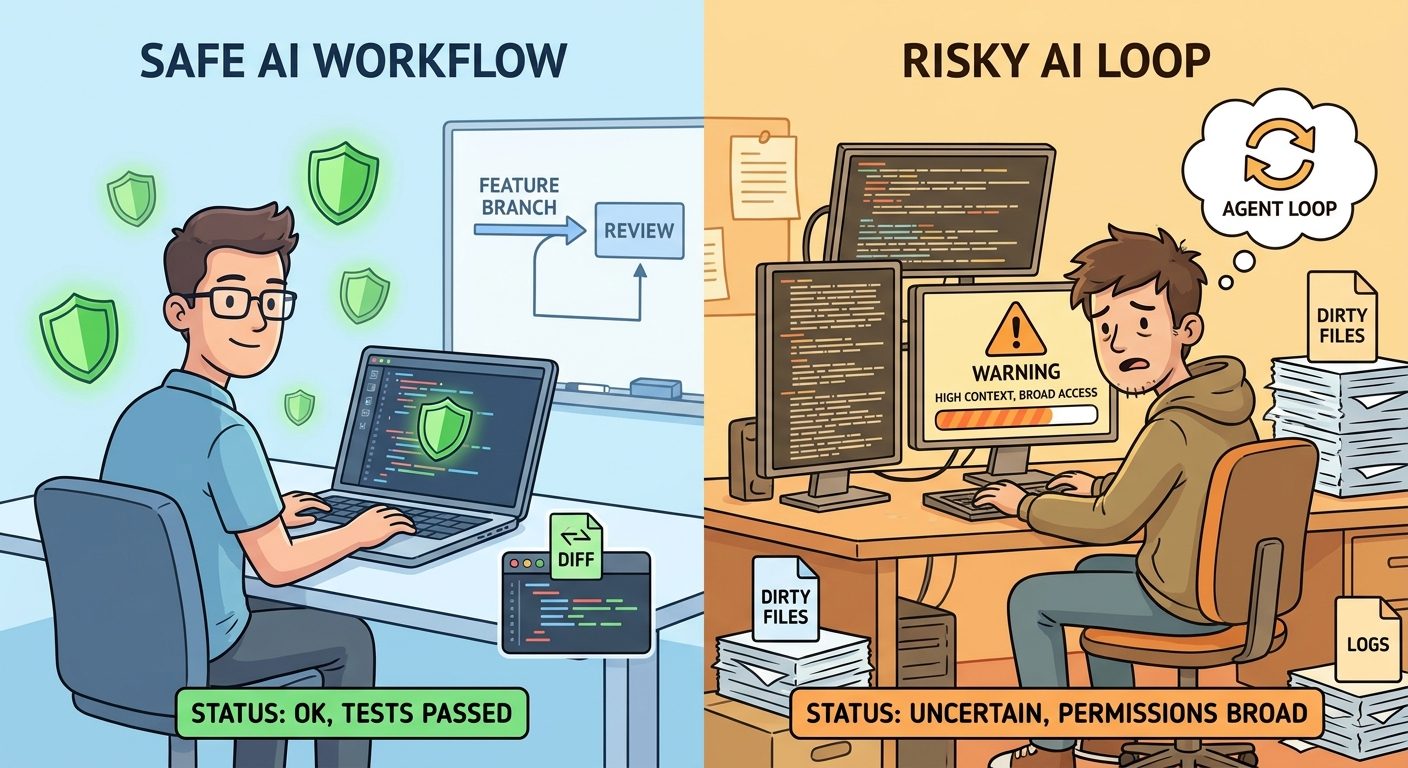
Statusline vs Claude Code Permissions: What Each One Should Do
The most important distinction in this article is enforcement versus awareness. Claude Code permissions enforce what tools can run without approval, what asks first, and what is denied. The statusline displays context so you can make better decisions. Hooks can add automated checks at lifecycle points. Settings choose how configuration is shared. These pieces work together, but they are not interchangeable.
| Tooling piece | Primary job | Use it for | Do not use it for |
|---|---|---|---|
| Statusline | Persistent visibility | Mode labels, cost, context, branch, dirty state, reminder text. | Actual command blocking or secret scanning. |
| Permissions | Access control | Allow, ask, deny rules; safer defaults; preventing broad command access. | Displaying session telemetry. |
| Hooks | Lifecycle automation | PreToolUse checks, notifications, logging, policy prompts, custom guardrails. | Replacing human review for sensitive changes. |
| Settings scopes | Configuration ownership | Personal statusline, shared project conventions, managed enterprise policies. | Assuming user settings override managed policy. |
| Git workflow | Recoverability | Branches, commits, diffs, test checkpoints, revert paths. | Treating AI output as safe because it came through a tool. |
Claude Code permission rules are evaluated in an order that matters: deny, then ask, then allow. A broad deny can block a narrower allow. An ask rule can prompt even if another allow rule exists. That is why broad “allow all” thinking is dangerous. It is tempting because it reduces prompts, but it also removes useful friction. If prompt fatigue is the problem, tune permissions narrowly. Do not erase the safety layer.
The statusline can help with prompt fatigue by making the review moment faster. If you can see repo, branch, dirty count, context, and cost at a glance, you spend less mental energy reconstructing the situation. That makes approvals less annoying without making them meaningless.
If your team already has a permission rules article or policy, link to it from your project CLAUDE.md. Then use the statusline as a reminder of the policy, not the source of truth. For example: MANUAL · no prod writes · main! is a compact reminder. The actual rule belongs in settings, managed configuration, hooks, or team documentation.
A Safer Claude Code Workflow Using Statusline Permission Alerts
The best way to use this feature is to pair the statusline with a repeatable operating rhythm. A statusline by itself is passive. A workflow turns it into behavior.
Step 1: Start in plan mode for unknown work
When the task is broad, unfamiliar, or risky, begin by asking Claude to inspect and plan rather than edit. Your statusline should make the repo and branch visible during this phase. If you are on main, keep it read-only until you create a feature branch.
Step 2: Create a bounded work unit
Good agent work has a boundary: one bug, one module, one test failure, one migration slice, or one documentation update. Put that boundary in the prompt. A statusline cannot fix vague delegation. It can only tell you when vague delegation is becoming expensive.
Step 3: Approve narrowly
Use manual approvals or carefully scoped allow rules. If Claude asks to run a command you do not recognize, read it. If an explanation shortcut is available in your client, use it. Check whether the command matches the task and whether the current directory shown in the statusline is correct.
Step 4: Stop when the statusline says checkpoint
Decide your checkpoint triggers before the session. Examples: context above 75%, cost above a personal threshold, more than five dirty files, branch is main, or tests fail twice. When a trigger appears, pause. Review the diff. Ask for a summary. Commit safe changes or revert noisy ones.
Step 5: Use hooks for enforcement when reminders are not enough
If your team repeatedly approves the same risky pattern, a statusline reminder is not enough. Use hooks or managed policy to block or warn at the right lifecycle point. For example, a PreToolUse hook can inspect bash commands and return a decision. A statusline can show “policy active,” but the hook does the blocking.
Good permission-alert habits
- Short display labels that influence real decisions.
- Friendly repo names instead of sensitive full paths.
- Branch and dirty state always visible.
- Cost and context displayed with graceful fallbacks.
- Clear checkpoint rules before long agent sessions.
- Permissions used for enforcement, not decoration.
Risky habits to avoid
- Printing secrets or client identifiers in terminal UI.
- Using broad allow rules because prompts feel annoying.
- Assuming the statusline can block dangerous commands.
- Ignoring high context and repeated failed attempts.
- Approving edits on main because the task seems small.
- Adding so many signals that nobody reads the bar.
Keep Learning on AI Feature Drop
- Claude Code Statusline Guide — the broader pillar for context, cost, git, hooks, and team rollout.
- Claude Code Permission Rules Explained — deeper guidance on allow, ask, deny, and safer rule design.
- Claude Code Subagent Permissions — how permissions behave when subagents enter the workflow.
- Claude Code Hooks Explained — when reminders should become automated checks.
- Claude Code CLAUDE.md Template — project instructions that reduce repeated context and approval confusion.
- Claude Code Usage Limits Explained — how context and long sessions affect practical usage.
Sources and References
- Anthropic Claude Code docs: Customize your status line
- Anthropic Claude Code docs: Configure permissions
- Anthropic Claude Code docs: Settings
- Anthropic Claude Code docs: Security
- Anthropic Claude Code docs: Hooks reference
Claude Code fields, UI labels, and settings can change. Verify the current documentation and your installed Claude Code version before standardizing a team rollout.
FAQ: Claude Code Statusline Permission Alerts
Can a Claude Code statusline enforce permissions?
No. A statusline displays information. Enforcement belongs in Claude Code permissions, permission modes, managed settings, hooks, and human review. Use the statusline to make those controls easier to understand during a session.
What is the best first permission alert to add?
Start with branch and dirty state. Seeing main! or +8 dirty changes approval behavior immediately, even before you add cost, context, or mode labels.
Should I show full file paths in the statusline?
Usually no. Show a friendly repository or folder name. Full paths can reveal customer names, internal project names, usernames, or private directory structure in screenshots and recordings.
How do I show Claude Code cost in the statusline?
Read the cost field from the JSON Claude Code sends to the statusline command when available, and provide a fallback when it is absent. Do not break the statusline if cost data is not present in your version.
Is it safe to use auto or bypass permission modes?
Use broad approval modes only when you understand the risk and have other guardrails. For most project work, narrower permissions, plan-first workflows, and checkpoints are safer than broad trust.
How is a statusline different from hooks?
A statusline is persistent display UI. Hooks run at lifecycle events and can automate checks, warnings, logging, or blocking behavior. Use hooks when a reminder is not strong enough.
Can teams share one statusline?
Yes, teams can use project settings for shared conventions, but keep personal paths and secrets out of the script. Enterprises may also use managed settings for policy-controlled behavior.
Why connect statusline alerts with permission rules?
Because permission prompts are easier to review when the session context is visible. Branch, dirty files, cost, context, and model help you decide whether an approval matches the task.
Post a Comment