
Gemini Managed Agents Guide: Build Background Tasks, Remote MCP, and Safer API Workflows
Gemini Managed Agents turn the Gemini Interactions API into a practical agent runtime: one endpoint can run model calls, remote sandbox work, background jobs, remote MCP tools, custom functions, and resumable state. This guide explains what changed, where the search gap is, and how to design safe production workflows without treating every task like a magic autonomous bot.
Gemini Managed Agents: Quick Answer
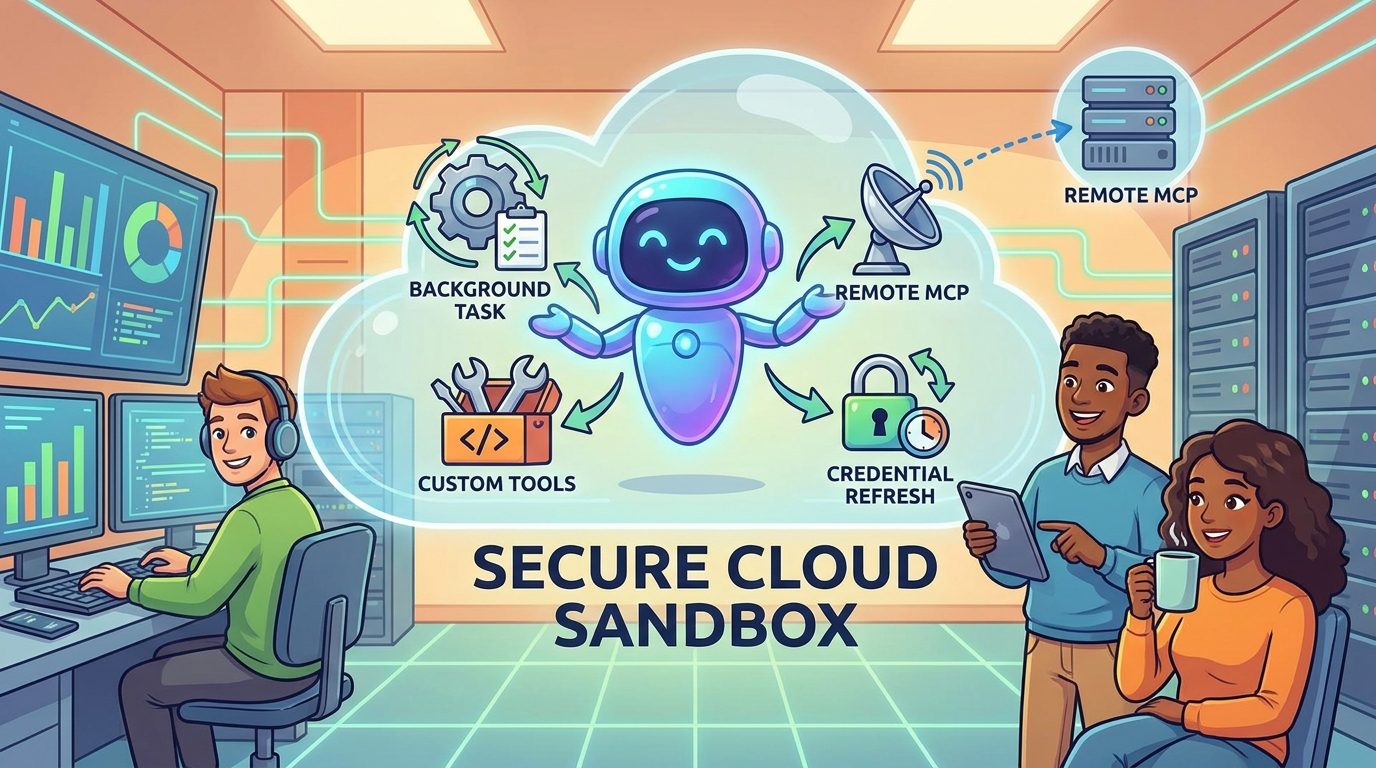
Gemini Managed Agents are Google’s managed agent capability inside the Gemini Interactions API. Instead of asking a model for one synchronous response and then building all orchestration yourself, you can create an interaction that calls either a Gemini model or an agent, run it in a remote environment, let it use approved tools, and retrieve the resulting steps and outputs later. The big shift is that agent work becomes an API resource you can observe, resume, and integrate, not only a long chat completion that may time out or hide what happened.
The newest developer-facing updates make this worth paying attention to. Google’s July announcement added or highlighted background execution, remote MCP server integration, custom function calling alongside sandbox tools, and credential refresh across interactions. The Interactions API also reached general availability as Google’s recommended interface for new Gemini applications, with server-side state, execution steps, background tasks, and paid-tier retention. For developers building real applications, this is more than a product-news item. It changes how you should design long-running AI workflows.
The search gap is clear: official docs explain the API pieces, and early news posts repeat the announcement, but many builders still need a practical decision guide. They want to know when to use managed agents instead of generateContent, how background execution changes app architecture, how remote MCP should be secured, what data retention means, and how to avoid turning every business process into an expensive autonomous loop.
Why This GoogleAI Topic Is the Right Pillar Article Now
The selected site category is GoogleAI, based on the fixed publishing sequence after the last article label was Claude. Analytics also support a developer-focused Google article. AI Feature Drop’s recent traffic is strongest around practical AI coding and workflow explainers: Codex usage, Google Flow and Veo credits, Windows setup, Copilot costs, ADK workflows, Genkit human approval, and similar specific feature topics. That pattern argues against a generic “Gemini news” article and in favor of a concrete, evergreen guide around a feature developers are actively trying to understand.
Search Console data is still young for the site, but it shows early impressions around specific AI workflow terms rather than broad brand terms. GA4 shows organic search is already a meaningful channel, while the highest-performing posts tend to answer implementation questions and limit questions. Gemini Managed Agents fit that demand profile because the announcement combines several confusing ideas: Interactions API, remote environments, agents versus models, background jobs, tool results, MCP, credential refresh, and data retention. A single guide can connect those pieces in plain language.
Recent SERP inspection through DuckDuckGo showed official Google results, a few early explainers, and short news-style rewrites for terms like “Gemini Interactions API Managed Agents remote MCP.” That is not an empty SERP, but it is still weak in practical depth. Many pages summarize the update; fewer explain production tradeoffs, setup choices, state rules, governance, and how this relates to ADK, Genkit, Antigravity, and Google’s broader agent stack. That is where this pillar can earn information gain.
There is also a useful internal-linking path. AI Feature Drop already has GoogleAI articles about Google ADK dynamic workflows, Genkit Agents API, Genkit human approval, Google Antigravity, and Gemini API File Search. This new article can act as the connective tissue between model APIs, managed agent runtimes, deterministic workflow tools, and safety patterns.
How the Gemini Interactions API Changes Agent Architecture
Traditional Gemini API projects often start with a model call: send input, get output, handle tools in client code, and manage conversation state yourself. That is still useful. The Interactions API changes the default shape by making each turn a first-class interaction resource. An interaction can include user input, model thoughts, tool calls, tool results, model output, and metadata that helps the developer debug what happened. In multi-turn workflows, the client can use a previous interaction ID rather than resending the entire conversation history.
That matters because agent applications are usually not one clean request. A useful agent may need to inspect files, search the web, call a function, wait for a remote service, install a package, generate a report, or continue work after an HTTP connection would normally be unsafe to keep open. If you force that workflow into one synchronous request, your app becomes fragile. You may hit timeouts, lose progress, duplicate work on retries, or hide tool behavior from users. A stored interaction with observable steps is a more natural fit.
Google’s docs describe the Interactions API as the recommended way to build with Gemini models and agents, including single-turn generation, multimodal tasks, structured outputs, tool orchestration, and agentic workflows. That does not mean every project must migrate immediately. The older generateContent API remains supported. But it does mean new agent-first features are likely to land in Interactions first, because the resource model supports state, steps, background execution, and agent IDs directly.
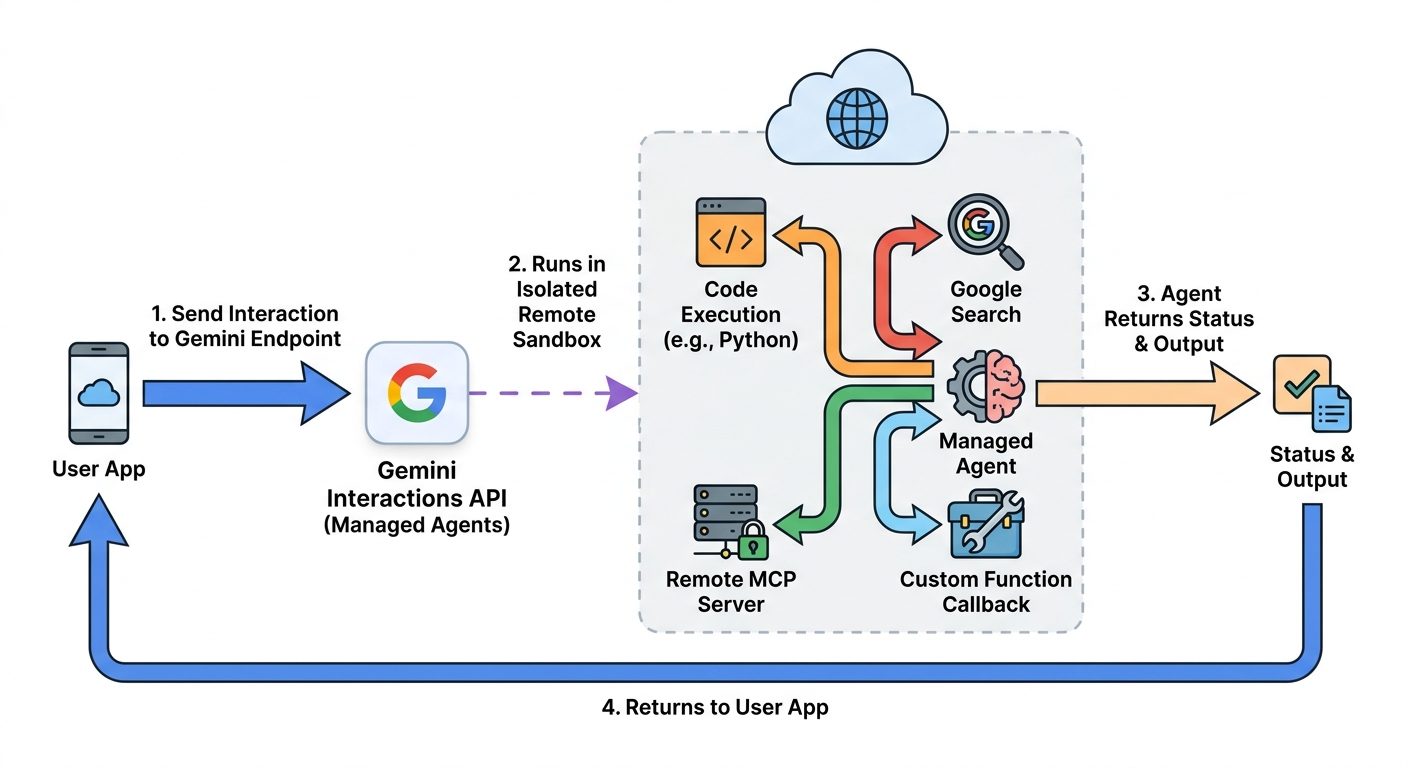
For architects, the key mental model is simple: an interaction is not just a response; it is a tracked unit of work. A model interaction is useful when you need reasoning or generation. An agent interaction is useful when you need autonomous work inside an environment. A background interaction is useful when the work may take longer than a normal request cycle. A stateful interaction is useful when the next turn should continue from the previous one without sending the entire history again.
The Core Features Developers Should Understand
The most important feature is not any single checkbox. It is the combination. A remote sandbox is useful by itself, but a sandbox plus background execution means the agent can continue after the user leaves the page. Remote MCP is useful by itself, but remote MCP plus credential refresh means the agent can work with changing authorization boundaries. Custom functions are useful by themselves, but custom functions plus observable steps make it easier to separate server-side tool execution from client-side business logic.
Background execution deserves special attention. Long-running agent jobs are a poor match for ordinary request-response UX. If your app asks an agent to audit a repository, summarize hundreds of files, correlate telemetry, or generate a report from multiple sources, it should not depend on a browser tab or a single open HTTP socket. The pattern is to create an interaction, store the returned ID, show progress, and fetch the result when the status changes. That makes agent work feel more like a job queue than a fragile chat message.
Server-side state also changes cost and context design. When you continue from a previous interaction ID, you avoid resending all history from your app and make caching more practical. But interaction-scoped parameters still matter. Tools, system instructions, and generation settings may need to be specified again for each interaction depending on your design. Developers should not assume that every runtime setting automatically persists forever just because the conversation history can continue.
Remote MCP Is Powerful, but It Needs a Security Model
Remote MCP is one of the most interesting updates because it connects managed agents to outside capabilities. In plain English, a remote MCP server can expose tools or resources that the agent may use. That might be an internal telemetry system, a database query service, a ticketing system, a document index, a cloud inventory tool, or a custom workflow gateway. Instead of building custom glue for every agent request, you can expose a controlled tool surface.
This is exactly where developers should slow down. Giving an agent tools is not the same as giving a human developer tools. Agents can misunderstand prompts, over-call tools, accept malicious instructions from untrusted content, or combine information in unexpected ways. Remote MCP should therefore be treated as an integration boundary. Design narrow tools, explicit scopes, clear descriptions, audit logs, rate limits, approval gates for risky operations, and separate read-only tools from write-capable tools.
A good remote MCP design starts with the least dangerous capability that still solves the problem. For a support-triage agent, begin with read-only ticket lookup and knowledge-base search before allowing status changes. For an observability agent, begin with query-only access to metrics before allowing alert muting or deployment actions. For a repository agent, begin with issue reading and diff generation before allowing branch creation or pull-request updates. The narrower the tool contract, the easier it is to trust the agent’s behavior.
The docs also mention a limitation worth remembering: not every model or mode supports every new capability at the same time. For example, remote MCP support may be constrained by model generation or rollout state. That is another reason to build a graceful capability layer in your app. Detect what the selected model or agent can do, show clear errors, and avoid hard-coding assumptions that every Interactions API feature is available in every environment.
Safety Patterns for Production Gemini Managed Agents
Production agent safety is not only about content moderation. It is about execution control. The riskiest managed-agent projects are the ones that start with “let the agent figure it out” and then attach powerful tools, broad network access, long retention, and vague success criteria. That combination can work in demos and still be unacceptable in a real organization. A better production pattern is bounded autonomy: the agent can reason and act, but only inside a well-defined environment with observable steps and explicit boundaries.
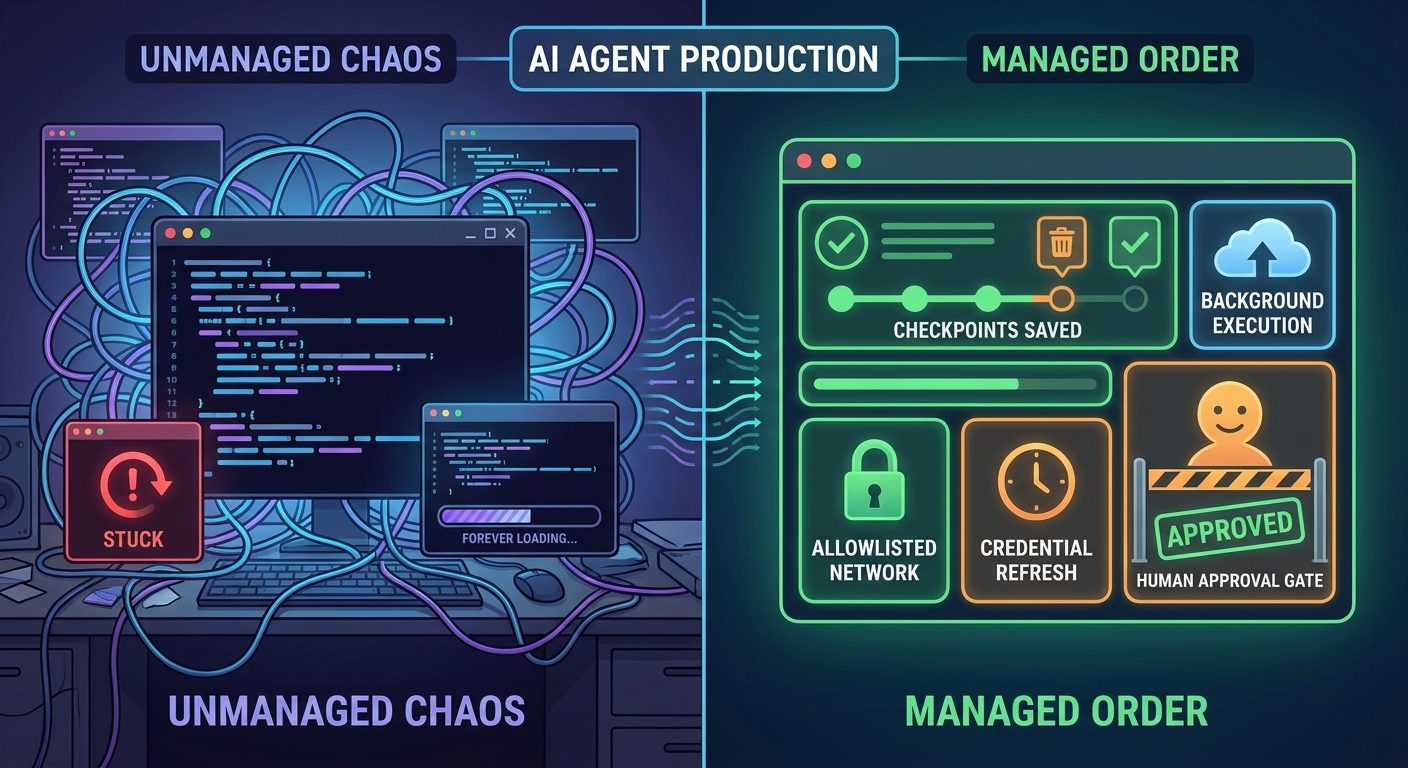
Start with environment separation. Development agents, staging agents, and production agents should not share the same credentials or tool scopes. If a task only needs sample data, do not put it near real customer records. If a task only needs to read logs, do not grant write access to deployment systems. If a task requires external web access, decide whether the web content can influence tool decisions or whether it should be summarized and validated first.
Use credential refresh intentionally. Google’s managed-agent update explains that a later interaction can pass an existing environment ID with refreshed network configuration so the sandbox keeps its filesystem state while credentials rotate. That is useful, but it also creates responsibility. Expiring credentials should be short-lived by default. Refresh events should be logged. The app should know which user or service authorized the refresh. If the agent’s work changes scope, do not silently reuse a credential meant for a narrower task.
Human approval belongs at the boundary between analysis and irreversible action. It is reasonable to let a managed agent inspect a repository, classify issues, summarize logs, or generate a migration plan in the background. It is much riskier to let it delete data, update production settings, email customers, or merge code without review. AI Feature Drop has covered similar patterns in Genkit human approval workflows, and the same principle applies here: make the agent prepare the decision, then let a trusted actor approve the action.
What gets easier
- Long-running agent tasks no longer need fragile open requests.
- Developers can observe steps instead of treating the agent as a black box.
- Remote sandboxing reduces local environment setup friction.
- MCP integration creates reusable tool interfaces.
What gets harder
- Tool permission design becomes a product requirement.
- Stored interactions require privacy and retention decisions.
- Background jobs need monitoring, retries, and user-facing status.
- Teams must distinguish safe analysis from risky execution.
Practical Workflow Examples
Example 1: Repository audit in the background
A developer portal can let a user request a repository audit. The app creates a managed-agent interaction with background execution, provides a repository URL or mounted context, and asks the agent to categorize TODOs, risky dependencies, and test gaps. The user gets a status page instead of waiting for one huge response. When the interaction completes, the app displays the output and the execution steps. The agent should not automatically open pull requests until a human reviews the findings.
Example 2: Observability assistant with remote MCP
An operations tool can expose a read-only MCP server for logs, latency charts, deploy history, and alert metadata. The managed agent receives a question like “why did checkout latency rise?” and uses remote MCP plus code execution to correlate data. The tool contract should avoid broad database access. The final answer should cite which signals were inspected, which hypothesis is most likely, and which evidence is missing. If remediation is needed, the system can hand off a proposed action to an approval queue.
Example 3: Report generation with custom functions
A SaaS company can use built-in sandbox tools for computation and file creation while keeping private CRM calls in client-side custom functions. When the interaction requires action, the app executes the function against its own backend, returns the function result, and lets the agent continue. This separation is useful because the managed sandbox does not need full direct access to every private system. It gets only the sanitized results that the application decides to provide.
Example 4: Research-to-brief workflow
An analyst tool can start with a managed agent that collects sources, extracts facts, and creates a structured brief. A normal Gemini model interaction can then rewrite the brief for a specific audience. This is where mixing agents and models through the Interactions pattern becomes useful. The agent does messy collection; the model does focused transformation. That division usually produces cleaner architecture than asking one all-purpose agent to do every step in one enormous prompt.
Example 5: Agentic prototyping before ADK or Genkit
Managed agents are also useful as a proving ground. If your team is not ready to build a full ADK workflow or Genkit application, you can prototype whether an agent should exist at all. Run the task in a remote sandbox, inspect the steps, identify which parts are deterministic, and then decide what belongs in code. If the path is predictable, consider moving that logic into ADK workflows. If the task is app-facing and needs JavaScript or Firebase-style integration, compare with Genkit Agents API patterns.
Should You Migrate from generateContent to Interactions API?
If your application only sends a short prompt and receives a short answer, you do not need to panic-migrate. The legacy generateContent API remains supported, and simple use cases can stay simple. Migration becomes more compelling when your app needs multi-turn state, background execution, agent IDs, observable steps, mixed tools, remote sandboxes, or a long-running task model. In other words, the more your app looks like an agent product instead of a model wrapper, the more Interactions API becomes the natural default.
| Use case | Better default | Why |
|---|---|---|
| One-off text generation | Plain model call | Lower complexity and easier mental model. |
| Multi-turn assistant with state | Interactions API | Previous interaction IDs reduce history handling and improve observability. |
| Long-running repo or data analysis | Managed agent with background execution | Job-style behavior is safer than holding a request open. |
| Internal tool use through MCP | Managed agent with strict tool scope | Remote MCP creates a reusable controlled integration layer. |
| Deterministic business process | ADK workflow or application code plus model nodes | Do not make an LLM route steps that code can route predictably. |
The best migration plan is incremental. Start by identifying a workflow that already has pain: timeouts, too much manually managed state, poor tool observability, or awkward retries. Move that workflow to Interactions API first. Log interaction IDs, status, completion time, failure reasons, and user-visible quality. Then decide whether the rest of the app benefits from the same pattern. A migration that starts with a real pain point is easier to justify than a broad rewrite because a new API is fashionable.
Also watch data retention. The Interactions API can store interaction objects to enable server-side state, background execution, and observability. Google’s docs distinguish paid-tier and free-tier retention windows and mention controls for deletion or shorter project storage windows. Product teams should decide what can be stored, who can view logs, how long logs are needed, and whether sensitive input should be redacted before it reaches the model. “It is convenient for debugging” is not a complete retention policy.
Search-Gap Angles This Article Covers
The content gap is not “what did Google announce?” Google already answered that. The underserved queries are more practical: how do Gemini Managed Agents work, when should I use background execution, what is remote MCP in Gemini API, how do custom functions work with sandbox tools, how does Interactions API differ from generateContent, and what safety controls should a production team use. These questions need examples, comparison tables, safety framing, and links to related Google agent tooling.
This guide also deliberately avoids two weak angles. First, it does not overpromise that managed agents replace every workflow framework. ADK 2.0 exists because deterministic execution still matters. Second, it does not treat remote MCP as a generic magic integration layer. It frames MCP as a powerful boundary that requires least privilege, auditability, and human approval for sensitive actions. That is the information gain a practical developer article can add beyond announcement rewrites.
For internal SEO, this article should link toward ADK, Genkit, Antigravity, and Gemini API File Search pages, because readers comparing Google’s agent stack will likely need those next. It should also receive links from the existing ADK and Genkit articles where the topic turns from workflow structure to managed execution. Over time, this can become a GoogleAI hub page for “Gemini API agents” rather than a one-off news post.
Implementation Checklist for Gemini Managed Agents
Before you ship, answer these questions in writing. What exact task is the managed agent allowed to do? Which environment does it run in? Which tools can it call automatically? Which tools require client-side function execution? Which external systems are exposed through MCP? Which credentials are short-lived? Which outputs are safe to show to the user? Which actions require approval? Which logs are stored? Which failures are retried? Which failures are escalated to a human?
Then test the workflow with adversarial inputs. Put prompt-injection text in a document the agent reads. Add misleading tool outputs. Simulate expired credentials. Break the MCP server. Make the background job take longer than expected. Remove network access. Ask the agent to exceed its allowed scope. A managed agent architecture is only production-ready when the boring failure states are predictable. The goal is not to prove the agent is smart; the goal is to prove the system stays safe when the agent is uncertain.
Finally, measure real usage. Track not only successful completions, but also repeated retries, average run time, tool-call counts, user edits after the agent finishes, and approval rejection rates. If users frequently reject an agent’s proposed actions, the workflow may be too broad. If background jobs frequently fail due to missing context, the input form may need better structure. If MCP tools are overused, the tool descriptions may be too vague. Agent observability is product telemetry, not only debugging data.
Final Recommendation
Gemini Managed Agents are a strong fit for developers building serious agent products on Google’s AI stack. They make the most sense when a task needs a remote sandbox, long-running background execution, observable steps, state, controlled tool use, or integration with remote MCP. They make less sense for small prompts, simple transformations, or business processes that are better represented as deterministic workflows.
If you are starting fresh, use the Interactions API for new agent-facing work and keep simple model calls simple. If you already have a generateContent integration, migrate the workflow with the clearest pain first. If you are responsible for security or platform governance, focus your review on tool scope, network access, credential refresh, retention, approval boundaries, and audit logs. Those choices will matter more than the demo prompt.
The practical future of AI agents is not “one autonomous model does everything.” It is a stack: models for reasoning, managed agents for environment-based work, MCP for controlled tools, workflows for deterministic routing, and humans for judgment at irreversible boundaries. Gemini Managed Agents are Google’s clearest move toward that stack, and builders who understand the boundaries will get more value from the feature than builders who treat it like ordinary chat completion with extra steps.
Keep Learning on AI Feature Drop
- Google ADK Dynamic Workflows — use deterministic control when business logic has predictable routes.
- ADK 2.0 Migration Checklist — compare managed-agent runtime decisions with workflow-runtime upgrades.
- Genkit Agents API Explained — understand Google’s full-stack app-agent patterns.
- Genkit Human Approval Guide — design approval gates around risky agent actions.
- Google Antigravity Explained — see how Google’s agent-first developer tooling fits into the broader stack.
- Gemini API File Search and Multimodal RAG — plan retrieval and context flows before giving agents too much data.
Sources and References
- Google Blog: Interactions API general availability for Gemini models and agents
- Google Blog: Expanding Managed Agents in Gemini API
- Google AI for Developers: Interactions API overview
- Google AI for Developers: Background execution documentation
- Google Developers Blog: Why we built ADK 2.0
- Google Cloud Blog: Gemini Enterprise Agent Platform remote MCP server
Google API features, model support, pricing, and retention behavior can change. Verify active documentation and your project settings before building production workflows.
FAQ: Gemini Managed Agents and the Interactions API
What are Gemini Managed Agents?
Gemini Managed Agents are agent runtimes available through the Gemini Interactions API. They let developers run agent tasks in a managed environment with tools, observable steps, state, and background execution patterns.
How are Managed Agents different from a normal Gemini model call?
A normal model call is best for bounded generation or reasoning. A managed agent is better when the task needs environment access, tool use, code execution, file work, long-running progress, or integration with remote services.
What is background execution in the Gemini Interactions API?
Background execution lets the server run a long task asynchronously. Your app receives an interaction ID, then checks status or retrieves output later instead of holding one fragile request open.
What is remote MCP in Gemini API?
Remote MCP lets a managed agent communicate with approved external tools or resources through a Model Context Protocol server. It is powerful, but it should be designed with narrow permissions and clear audit logs.
Do I need to migrate from generateContent immediately?
No. Simple generation workflows can stay where they are. Migration is most valuable when you need state, observable steps, background jobs, managed agents, or more advanced tool orchestration.
Can Gemini Managed Agents replace ADK or Genkit?
Not always. Managed Agents handle agent execution in a remote environment. ADK and Genkit can be better fits for deterministic workflows, application structure, human approval, and full-stack product logic.
What should I watch before using Managed Agents in production?
Review tool permissions, MCP scopes, credential refresh, data retention, network access, human approval boundaries, retries, audit logs, and whether the task should be deterministic instead of agentic.
Post a Comment