
Gemini Background Execution Guide: Run Long Agent Tasks Without Fragile Timeouts
Gemini background execution is the Interactions API pattern that lets long managed-agent work continue on Google’s servers while your app keeps a stable user experience. This cluster guide narrows the broader Gemini Managed Agents pillar into one practical question: how should developers design async agent jobs that do not time out, duplicate work, leak permissions, or confuse users?
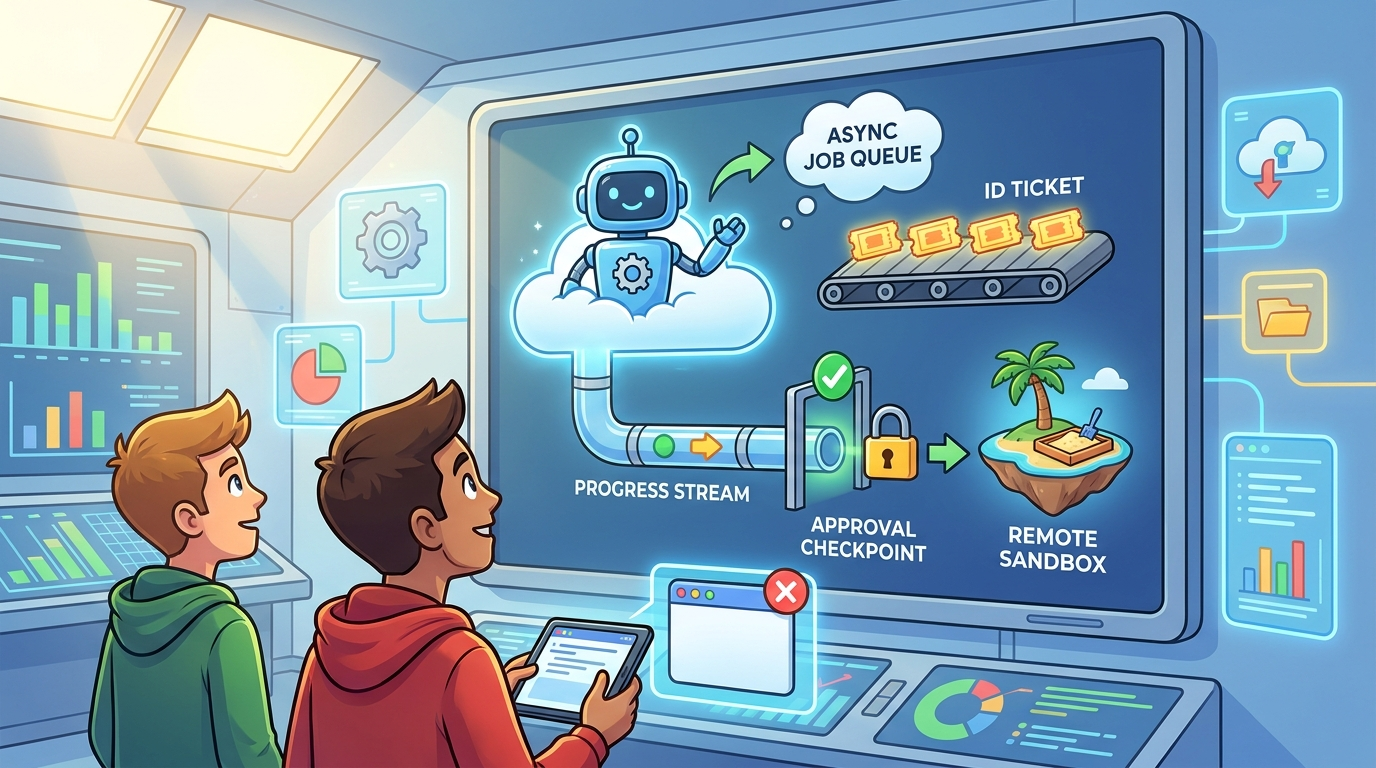
Gemini Background Execution: Quick Answer
Gemini background execution lets a Gemini Interactions API call run asynchronously. Instead of holding one fragile HTTP connection open while a model or managed agent performs a long task, your application creates an interaction with background execution enabled, receives an interaction ID, and then checks status, streams progress, reconnects, or retrieves the final output later. For developer teams building agent features, this is the difference between “a chat request that might hang” and “a trackable unit of work.”
The feature matters most when the task is longer than a normal request-response loop: repository audits, multi-file analysis, research briefs, data cleanup, report generation, remote sandbox work, code execution, or tool-heavy workflows through remote MCP. A simple prompt does not need background execution. A managed agent that may install packages, inspect files, call tools, write reports, and wait for remote services probably does.
This article supports our broader Gemini Managed Agents guide. The pillar explains the full stack: Interactions API, managed agents, remote MCP, custom functions, credential refresh, state, and retention. This cluster article goes deeper on one operational layer: how to run long agent work without creating a brittle product experience.
Why This Search Gap Is Worth Covering
Official Google pages explain that the Interactions API is now the primary interface for Gemini models and agents, and Google’s July managed-agent update specifically highlights background execution for async interactions. That is valuable, but many builders still need the practical bridge between documentation and product architecture. They are not only asking “does the API support background jobs?” They are asking how to model job status, how to prevent duplicate runs, how to show progress, how to secure remote MCP calls, when to poll, when to stream, and how to recover from failure.
AI Feature Drop’s analytics support this kind of article. In the last complete reporting window, GA4 showed 465 active users, 584 sessions, 838 page views, and a meaningful Organic Search channel with 247 sessions. The pages drawing attention are not broad AI news summaries; they are feature-specific explainers around Codex usage, Google Flow credits, Copilot credit reduction, Codex computer use, and ChatGPT/Codex workflow setup. That pattern says readers want implementation guidance, cost and limit clarity, and concrete workflow tradeoffs.
The latest pillar article is Gemini Managed Agents Guide: Build Background Tasks, Remote MCP, and Safer API Workflows. A natural supporting cluster is a focused background execution guide because it captures a narrower long-tail intent without cannibalizing the pillar. Someone searching for Gemini managed agents may want the whole architecture. Someone searching for Gemini background execution likely has a more urgent implementation problem: “my agent task is too long for a normal request, what should my app do?”
Feature research also points here. Google’s Interactions API general availability announcement describes a unified endpoint for models and agents with server-side state, background execution, tool combination, and multimodal generation. The managed-agent expansion announcement adds background tasks, remote MCP server integration, custom function calling, and credential refresh. Those updates create a cluster of practical questions that are too detailed for one broad article. Background execution is the cleanest subtopic because it touches product UX, backend design, safety, and observability at the same time.
How Background Execution Works in the Interactions API
The mental model is simple: the first request starts a job, and later requests observe or retrieve that job. Your app sends an interaction creation request for a model or agent and marks it as background work. The server immediately returns an interaction object with an ID and an initial status. The agent continues remotely. Your app stores the ID, displays a status state to the user, and checks for changes until the interaction completes, fails, or needs input.
That sounds obvious, but it changes how you design the entire product. A synchronous Gemini call can be treated like a function: input goes in, output comes back, and the UI renders the result. A background interaction should be treated more like a durable task. You need a database row, a user-visible status, a retry policy, a cancellation story, logging, permissions, and a way to resume after the user closes the browser. If the agent is allowed to call tools, you also need a decision about which tool calls can happen automatically and which require approval.
Background execution is especially useful with managed agents because the agent may run in a remote Linux sandbox. It can reason, execute code, manage files, use approved tools, and produce artifacts. Those steps can take longer than a normal API timeout. If a user asks an agent to clone a repository and categorize TODO comments, summarize a folder of PDFs, build a report, or inspect telemetry through a remote MCP server, a normal open request is the wrong product shape.
// Simplified JavaScript-style pattern
const interaction = await client.interactions.create({
  agent: "your-agent-id-or-managed-agent",
  input: "Audit this repository and produce a risk summary.",
  environment: "remote",
  background: true
});

// Save this ID in your app database
const interactionId = interaction.id;

// Later: poll, stream, or retrieve the interaction by ID
The exact SDK details may change, so always verify Google’s active documentation before coding. The architecture pattern is more durable than the code snippet: create, store, observe, display, and verify. The interaction ID becomes the handle your app uses to reconnect user intent with the agent’s remote work.
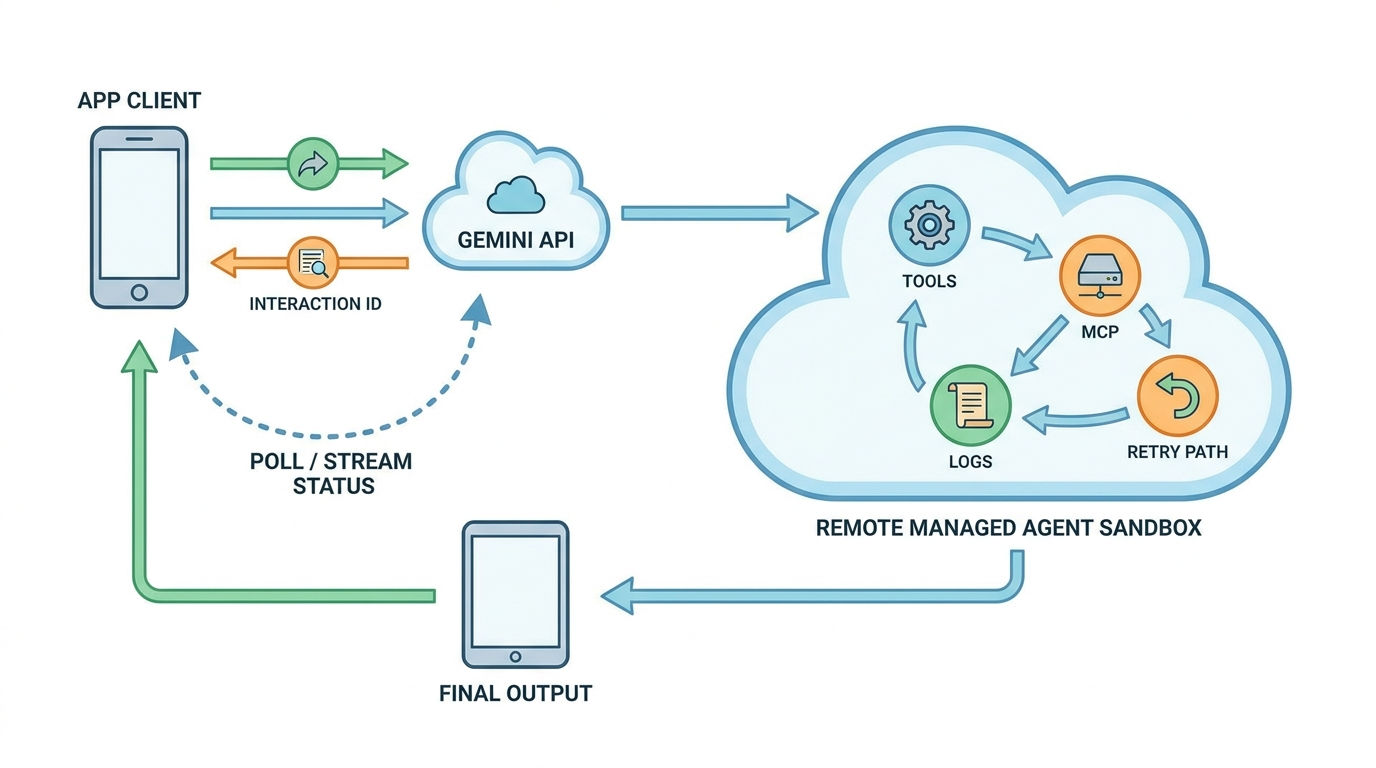
Reference Architecture for a Reliable Background Agent Job
A robust Gemini background execution workflow has five layers: the user interface, the application backend, the Interactions API interaction, the managed environment, and the observability layer. The user interface should never pretend the agent is instant if the task is long. It should show a queued, running, needs-review, completed, failed, or cancelled state. The backend should own the interaction ID and associate it with the current user, tenant, project, and permission context. The Interactions API owns the remote run. The managed environment performs the work. The observability layer records status changes, tool calls, duration, failures, and final output quality.
The backend is where many teams under-design. If the browser starts an interaction directly and only stores the ID in local state, the product becomes fragile. The user can close the tab, clear storage, switch devices, or lose network connectivity. A better pattern is to let the backend create the interaction, save the ID in durable storage, and expose a project-specific job URL. The user can return later and still see what happened. For team products, admins can audit which user started the job and what tools were available.
Design your job table before you write the UI. At minimum, store job ID, Gemini interaction ID, user ID, organization ID, feature type, input summary, status, created time, last checked time, completion time, model or agent selected, tool policy, approval policy, error message, and output location. Do not store secrets in this row. If the agent uses credentials, store only references to authorization grants or short-lived tokens in a secure system that is separate from normal application logs.
| Layer | What it should do | Common mistake |
|---|---|---|
| User interface | Show progress, reconnect state, and next action clearly. | Spinner forever with no job handle or status detail. |
| Backend | Create interactions, store IDs, enforce user and tenant permissions. | Letting the browser own the only copy of the interaction ID. |
| Managed agent | Perform bounded work in a remote environment with approved tools. | Giving the agent a vague task and broad tool access. |
| MCP/tools | Expose narrow read or action capabilities with audit logs. | Using one powerful tool that can do everything. |
| Observability | Track status, duration, retries, tool calls, failures, and user edits. | Only logging the final answer, not the path to get there. |
For multi-step workflows, do not force the managed agent to own every decision. If the next step is deterministic, use application code, ADK, Genkit, or a workflow engine. If the next step requires judgment over messy context, use the agent. Background execution is an execution pattern, not a license to replace all orchestration with a single prompt. The best architecture uses the agent where uncertainty is valuable and code where reliability is required.
Polling, Streaming, Reconnects, and Progress UX
After a background interaction starts, the user experience depends on how you observe it. Polling is the simplest option: the client or backend checks the interaction status every few seconds and updates the UI. Streaming is better when the user benefits from incremental progress, logs, or partial outputs. Reconnect is the product behavior that matters most: if the user closes the page, your app should show the same job state when they come back.
Polling is usually enough for low-volume internal tools and early prototypes. Use a modest interval, back off when nothing changes, and stop polling when the job reaches a terminal state. Avoid tight loops that hammer the API. Avoid hiding failures by endlessly retrying. If the task regularly takes several minutes, store the last observed status and let the user leave the page. A notification, email, webhook, or dashboard badge can bring them back when the result is ready.
Streaming is useful when progress has product value. A developer running a repository audit may want to see that the agent cloned the repo, scanned modules, generated a TODO inventory, and started categorizing risk. A data analyst may want partial sections of a report. An operations engineer may want to see which telemetry sources were queried. Streaming can increase trust because the user sees the work unfolding, but it can also create noise. Only stream details that help the user decide whether to wait, intervene, or cancel.
The biggest UX mistake is pretending a background agent is just a slow chat message. It is not. It is a job. Jobs need names, states, timestamps, owners, and outcomes. Label the task in human language: “Repository risk audit,” “Monthly support trend report,” or “MCP telemetry investigation.” Then give the user a clear action: wait, view details, cancel, approve next step, download output, or rerun with changes.
Safety Rules for Background Agents With Tools and MCP
Background execution adds product reliability, but it also raises the stakes. A synchronous model answer usually stops when the request ends. A background agent can continue after the user leaves. If that agent has access to remote MCP tools, custom functions, credentials, files, or network resources, your app needs a real safety model. The most dangerous design is a long-running agent with vague instructions and broad write access.
Start with least privilege. If the job is a repository audit, the agent may only need read access to code and permission to create a markdown report. It does not need permission to merge pull requests. If the job is an observability investigation, the agent may only need read-only metrics and logs. It does not need permission to mute alerts or restart services. If the job is a support trend report, the agent may need ticket summaries, not full customer PII.
Use human approval at irreversible boundaries. Background execution is excellent for analysis: inspect, summarize, categorize, draft, compare, and recommend. It is risky for unsupervised actions: delete, deploy, purchase, email, update permissions, change production config, or expose private data. Let the agent prepare the decision and show evidence. Then require a human, policy engine, or deterministic service to approve the action.
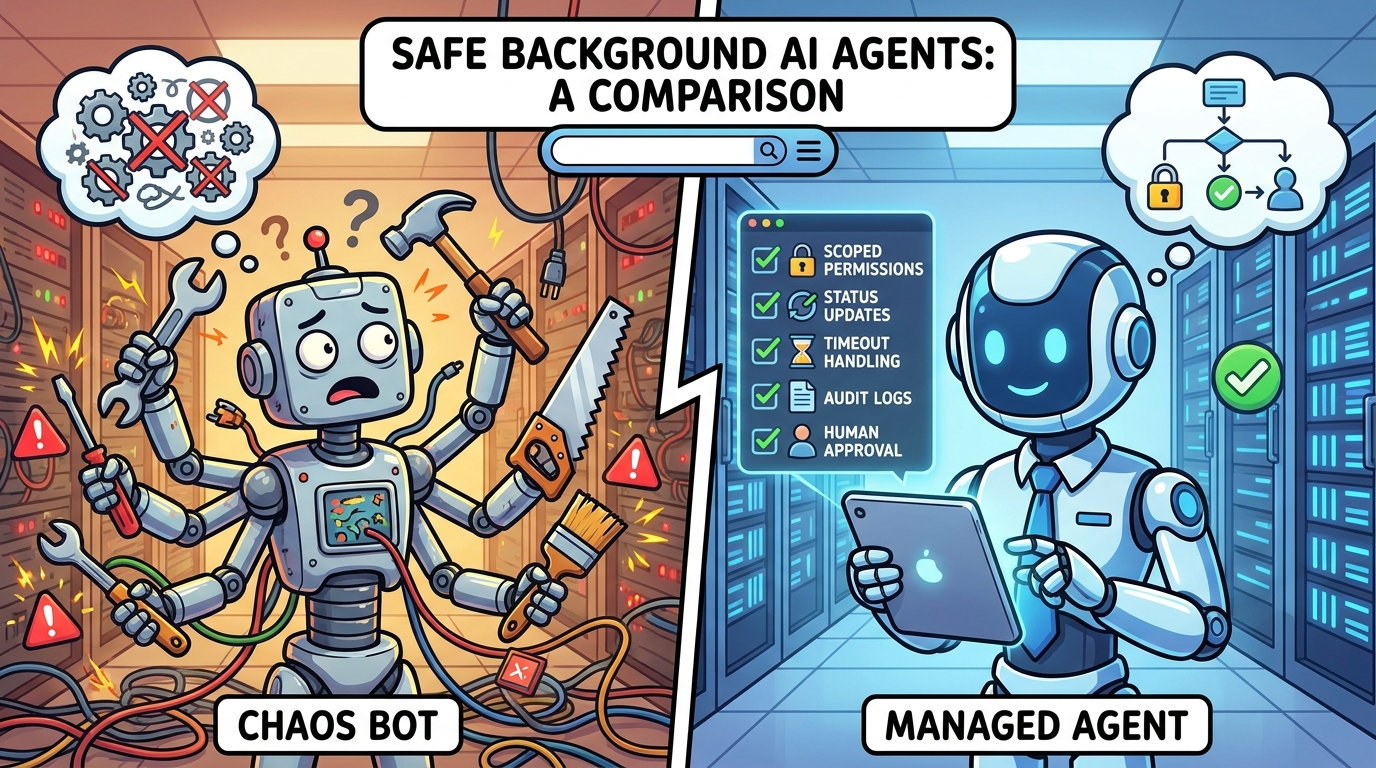
Credential refresh needs particular care. Google’s managed-agent update describes refreshing credentials across interactions while preserving environment state. That is useful for long workflows, but it can also blur authorization boundaries. A refreshed credential should still be tied to a user, tenant, purpose, scope, and expiration. Log when it happens. Do not silently expand a job from read-only to write-capable because the agent asked for it. If the task scope changes, stop and request a new approval.
Retention is another safety dimension. The Interactions API can store interaction resources so apps can use server-side state, background execution, and observability. Product teams should decide what inputs are allowed, what outputs are stored, how long logs remain, who can view them, and what must be redacted. Debuggability is valuable, but it does not override privacy. A background agent job often touches more data than a simple prompt, so its retention policy should be more explicit.
Good background-agent safeguards
- Short-lived credentials scoped to the job.
- Read-only MCP tools by default.
- Approval gates for write or external actions.
- Durable status records and audit logs.
- Clear cancellation and expiration behavior.
Risky patterns to avoid
- One broad “admin” tool exposed to the agent.
- Vague tasks such as “fix everything.”
- No owner or tenant attached to the interaction ID.
- Endless retry loops after tool failures.
- Storing sensitive logs forever for convenience.
Practical Examples: When to Use Gemini Background Execution
Repository audit
A developer asks your product to analyze a repository, list risky dependencies, categorize TODO comments, and produce a remediation report. This is a good background execution use case. The job may require cloning code, scanning files, running scripts, and generating an artifact. The user should receive a job page and be able to return later. The agent should produce a report first, not automatically open PRs unless a human approves the next step.
Internal knowledge-base report
A customer-success team wants a weekly summary of product complaints across tickets, docs, and changelogs. A managed agent can gather inputs, deduplicate themes, and draft a report. Background execution avoids fragile browser waiting. Remote MCP can expose read-only ticket search and documentation lookup. The final report should cite which sources were inspected and mark uncertain conclusions instead of pretending every theme is statistically proven.
Observability investigation
An operations assistant receives a question like “why did checkout latency spike?” The agent can query read-only metrics, deployment history, logs, and incidents through scoped MCP tools. The background job can stream checkpoints: looked at latency, checked deploys, compared region traffic, inspected error logs. If the suggested remediation is risky, such as rolling back a deployment or changing autoscaling settings, require human approval.
Research brief with artifacts
A product manager asks for a competitor feature brief with links, screenshots, and a slide-ready summary. The task may involve browsing, collecting sources, extracting facts, and creating a file. It should run in the background and produce an artifact. The system should separate collected evidence from generated commentary so reviewers can verify claims before publishing.
Data cleanup proposal
An internal admin tool asks the agent to inspect duplicate records and recommend merge candidates. The inspection can be backgrounded. The actual merge should not. The safe design is a two-phase workflow: background agent creates a proposed change list, a human reviews it, and deterministic application code performs approved changes with logs.
Across all examples, the pattern repeats: background execution is strongest for preparation, analysis, synthesis, and artifact generation. It becomes sensitive when the agent crosses into irreversible action. That is where approval, scope, and deterministic code should take over.
Implementation Checklist for Gemini Background Execution
Before shipping a background agent feature, walk through this checklist with engineering, product, and security. First, define the job. What is the user asking the agent to do? What is the expected output? What is explicitly out of scope? If the answer is vague, the job is not ready for autonomous execution. Rewrite the user request into a constrained task before sending it to the agent.
Second, define the lifecycle. What states can the job have? Queued, running, waiting for approval, completed, failed, cancelled, expired, and partially completed are common. What does the UI show for each state? What happens if the user leaves? What happens if the API returns an error? What happens if the agent needs more input? What happens if the job exceeds a duration or cost threshold?
Third, define the tool policy. Which tools are available automatically? Which tools are read-only? Which tools require approval? Which tools are blocked in production? If remote MCP is involved, define each MCP server as an integration boundary, not a casual plugin. Include rate limits, audit logs, narrow scopes, and clear descriptions. Test prompt-injection scenarios where untrusted content tries to convince the agent to misuse a tool.
Fourth, define observability. Track average duration, completion rate, failure rate, cancellation rate, tool-call count, approval rejection rate, output edits, reruns, and user satisfaction. If users frequently cancel, the job may be too slow or poorly scoped. If users frequently reject proposed actions, the agent may be overconfident. If tool calls spike unexpectedly, review prompts and tool descriptions.
Fifth, define retention and deletion. What parts of the input can be stored? Are source documents retained? Are execution steps visible to admins? Can users delete old interactions? Does your privacy policy cover this workflow? Are sensitive outputs redacted before logs? The answer should be documented before the feature reaches customers.
| Question | Good answer | Weak answer |
|---|---|---|
| What should be backgrounded? | Long, tool-heavy, reconnectable jobs with clear outputs. | Every prompt because async sounds advanced. |
| Who owns the interaction ID? | The backend stores it with user, tenant, and job metadata. | The browser keeps it in temporary state. |
| How are failures handled? | Terminal status, useful error, limited retry, user action. | Infinite polling or silent disappearance. |
| How are tools scoped? | Read-only first, narrow MCP contracts, approvals for writes. | Broad credentials and generic admin functions. |
| How is success measured? | Completed output, user acceptance, reduced manual work, safe audit trail. | The agent returned something without crashing. |
Background Execution vs Other Google Agent Patterns
Gemini background execution should not be confused with every other Google agent technology. The Interactions API is the unified interface for Gemini models and agents. Managed Agents provide a remote environment and tool-capable execution. Background execution is the async run mode that lets a long interaction continue server-side. ADK is better for explicit agent workflows, graphs, routing, and deterministic control. Genkit helps developers build app-facing AI features, especially when full-stack integration and evaluation matter.
If you are building a one-off long agent task, Gemini background execution may be enough. If you are building a product with many predictable branches, approvals, and reusable components, pair it with a workflow system. If you are building a Firebase or web-app feature, compare the Genkit path. If you are modeling multi-agent behavior, durable graph state, and human checkpoints, compare ADK. The practical answer is rarely “pick one forever.” It is usually “use the simplest layer that gives the needed reliability.”
For more context, read our Google ADK dynamic workflows guide, Genkit Agents API explainer, and Genkit human approval guide. Those articles cover adjacent parts of the same stack: deterministic routing, full-stack agent apps, and safer approval boundaries. This article’s role is narrower: making long Gemini agent tasks reliable.
Final Recommendation
Use Gemini background execution when your agent task should behave like a durable job, not a slow chat response. If the task needs a remote sandbox, files, code execution, remote MCP, long analysis, reconnects, notifications, or visible progress, background execution is the right architecture. If the task is a short answer, simple rewrite, or bounded transformation, keep it synchronous and avoid unnecessary complexity.
The strongest implementation pattern is boring in the best way: create the interaction on the backend, store the interaction ID, attach it to a user and tenant, show a clear status page, poll or stream responsibly, log tool behavior, support cancellation, require approval for risky actions, and define retention before launch. That pattern turns Gemini Managed Agents from an impressive demo into a product feature users can trust.
The broader lesson is that agent reliability is not only a model capability. It is a system design choice. Background execution gives developers the primitive; your application still has to provide scope, state, security, observability, and judgment.
Keep Learning on AI Feature Drop
- Gemini Managed Agents Guide — the related pillar article for Interactions API, remote MCP, custom functions, and safer agent workflows.
- Google ADK Dynamic Workflows — design explicit loops, branches, and resumable agent runs.
- ADK Migration Checklist — plan upgrades when deterministic workflows matter more than one agent call.
- Genkit Agents API Explained — compare full-stack app-agent patterns.
- Genkit Human Approval Guide — add human checkpoints around risky AI actions.
- Gemini API File Search and Multimodal RAG — plan context and retrieval before giving agents broad data access.
- Google Antigravity Explained — understand Google’s agent-first developer tooling direction.
Sources and References
- Google Blog: Interactions API general availability for Gemini models and agents
- Google Blog: Expanding Managed Agents in Gemini API
- Google AI for Developers: Interactions API overview
- Google AI for Developers: Background execution documentation
- Google Cloud Blog: Gemini Enterprise Agent Platform remote MCP server
- Google Developers Blog: Why we built ADK 2.0
Google API features, model support, pricing, and retention behavior can change. Verify the latest official documentation and your project settings before making production decisions.
FAQ: Gemini Background Execution
What is Gemini background execution?
Gemini background execution is an Interactions API pattern for running long model or agent interactions asynchronously. Your app receives an interaction ID and can check status, stream progress, reconnect, or retrieve the result later.
When should I use background execution instead of a normal Gemini call?
Use it for long-running, tool-heavy, or reconnectable workflows such as repository audits, research briefs, report generation, remote sandbox tasks, or managed-agent jobs. Use normal synchronous calls for short answers and simple transformations.
Is background execution only for Managed Agents?
No. Google describes background execution as part of the Interactions API, which can work across models and agents. It is especially useful for managed agents because they often perform longer tool and environment-based tasks.
How should my app store the interaction ID?
Store it on the backend with user, tenant, job type, status, timestamps, selected agent or model, permission policy, and output location. Do not rely on browser-only state for important background jobs.
Should I poll or stream progress?
Poll when status updates are enough and the job is predictable. Stream when incremental progress helps the user trust, debug, or interrupt the workflow. In both cases, support reconnects and terminal failure states.
What are the main safety risks?
The biggest risks are broad tool permissions, vague tasks, unattended write actions, unbounded retries, credential refresh without scope control, and retaining sensitive interaction logs longer than needed.
How does remote MCP change the design?
Remote MCP can expose useful tools to the agent, but each MCP server should be treated as an integration boundary with narrow scopes, rate limits, audit logs, and approvals for risky actions.
Can background execution replace ADK or Genkit?
No. Background execution is an async run pattern. ADK and Genkit can still be better for deterministic workflows, app integration, evaluations, human approval, and larger agent systems.
Post a Comment