
Genkit Agents API Explained: Build Full-Stack AI Agents With State, Streaming, and Human Approval
Google’s Genkit Agents API is not just another wrapper around Gemini. It is a full-stack agent foundation for apps that need conversation history, tool loops, streaming updates, snapshots, human approvals, long-running work, and multi-agent coordination without rebuilding the same plumbing on every project.
Genkit Agents API: Quick Answer
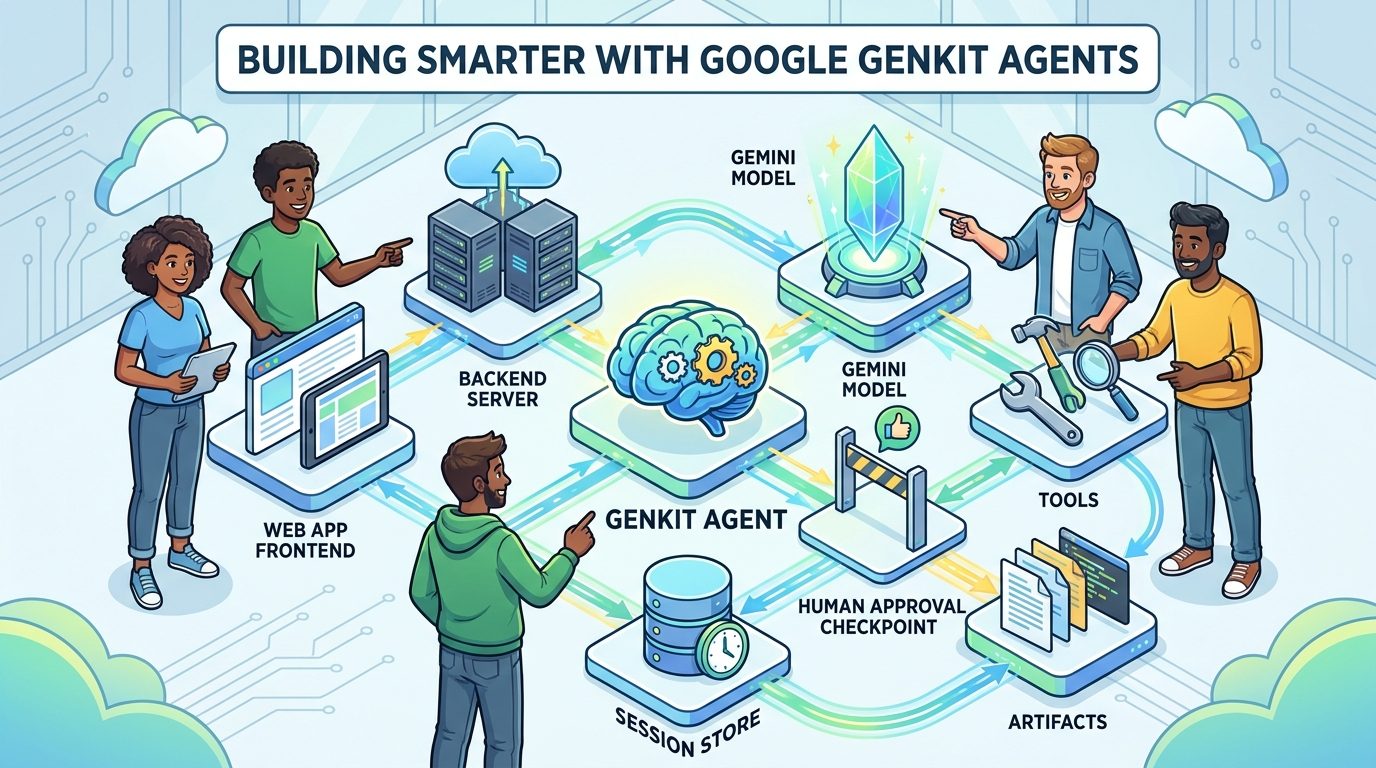
Genkit Agents API is Google’s preview agent abstraction inside the open-source Genkit framework. It lets developers define an agent on the server, add tools, persist or return conversation state, stream text and structured updates to the client, pause risky tool calls for human approval, detach long-running turns, resume from snapshots, and coordinate specialist sub-agents behind one interface.
The best way to understand it is this: Genkit Agents API turns the repetitive plumbing of conversational AI apps into a reusable foundation. A serious AI app usually needs more than generate(). It needs memory between turns, a tool loop, a way to show progress in the UI, a way to store generated artifacts, a way to recover when a browser tab closes, and a way to stop the agent before it takes a sensitive action. Genkit is trying to put those pieces into one full-stack pattern.
This matters because the agent market is moving from demos to production. A demo can survive with a prompt, a model call, and a pretty chat box. A production assistant needs state boundaries, safe tool execution, observability, recovery, and a frontend protocol that does not become custom glue code every time the feature changes. That is the gap Genkit Agents API is designed to close.
The feature is also timely. Google announced Genkit Agents on the Google Developers Blog on July 1, alongside other agent infrastructure updates such as ADK 2.0 workflows, Agentic Resource Discovery, and agent evaluation tooling. That cluster of launches shows where Google is pushing: agents are no longer only model experiences; they are application architecture.
Why Genkit Agents API Matters for Developers
Most teams underestimate how much non-model code an AI feature needs. The first version of a support assistant, research copilot, travel planner, onboarding bot, coding helper, or internal operations agent often starts with a simple chat endpoint. Then product reality arrives. Users ask follow-up questions. The app needs to remember a ticket, a cart, a document, or a project. The model needs tools. Tool calls need approval. The UI needs progress updates. A long report cannot block one HTTP request forever. The user wants to branch from an earlier answer. The business wants logs and artifacts. Suddenly the AI feature is not a prompt; it is a distributed application.
Genkit Agents API is valuable because it treats those needs as first-class. Instead of forcing every team to invent its own message format, state persistence, streaming protocol, session IDs, tool interruption rules, and artifact model, Genkit packages them into an agent interface. You still design the product. You still choose the tools, model, state store, safety checks, and UI. But the foundation is less bespoke.
That is important for both startups and enterprise teams. Startups need speed without painting themselves into an architecture corner. Enterprise teams need governance, repeatability, and clear patterns for human-in-the-loop workflows. Genkit sits in a useful middle: it is developer-friendly enough for application teams, but structured enough to support production concerns.
There is another reason this topic deserves attention: Google’s agent tooling now has multiple overlapping names. Genkit, ADK, Gemini Enterprise Agent Platform, A2A, ARD, Agent Registry, and Google AI Studio all appear in the same ecosystem. Developers are understandably confused about which tool solves which problem. A practical Genkit guide has to explain not just what the Agents API does, but where it fits.
How the Genkit Agents API Architecture Works
At a high level, a Genkit agent is a server-side definition with a name, model, instructions, optional tools, optional state store, and a runtime interface. The agent can be called directly in backend code or exposed through an HTTP route so a frontend can interact with it through a remote agent client. That means the same conceptual agent can be tested locally, run in a service, and driven from a web app without inventing a separate protocol for each environment.
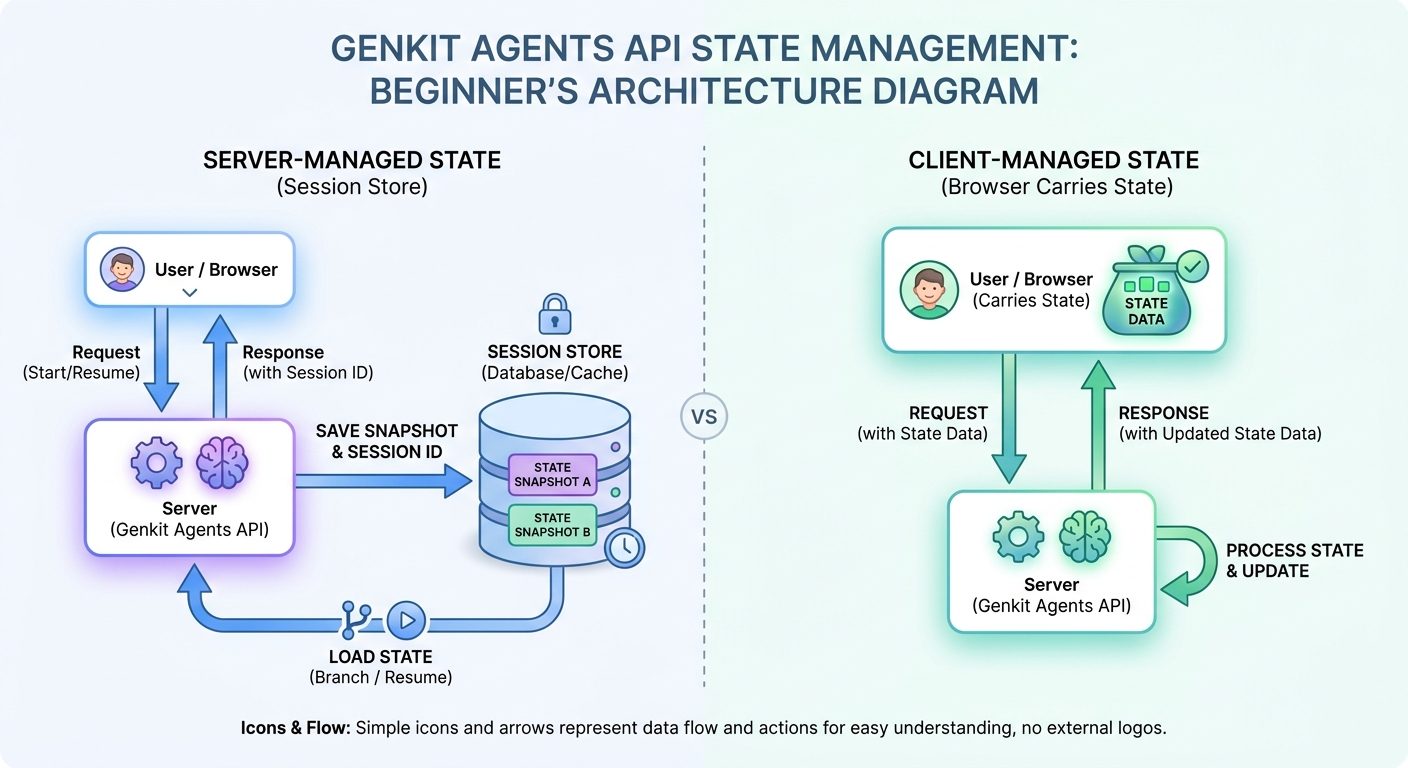
The core building blocks are simple, but the combination is powerful. A user sends a message. The agent reads the relevant state. The model decides whether to answer directly, call a tool, update custom state, create an artifact, stream a partial response, or pause for approval. The runtime records what happened. The client receives text and structured state patches. If the session is server-managed, the server can persist snapshots so the user can resume later or branch from an earlier point.
This is a much stronger abstraction than a single chat completion endpoint. A raw endpoint usually gives you a request and a response. Genkit gives you a shape for an app feature: state, stream, tools, interrupt, artifact, snapshot, resume, branch, and delegate. Those words sound like implementation details, but they are exactly where many agent products fail when they move beyond prototype stage.
The server agent
The server agent is where you define the durable behavior of the AI feature. It owns the system instruction, model choice, tools, and state strategy. This is the right place to keep privileged logic because the browser should not decide which internal tool exists or whether a risky operation is allowed. The server is also where you can connect to Firestore or another store for session persistence.
The remote client
The remote client lets a frontend talk to the agent using a chat-like interface. This matters because the UI should not need to know every internal detail of the agent loop. It should be able to send a message, receive streamed text, update status indicators, render artifacts, and continue the session. A unified wire protocol reduces custom code and makes the agent easier to evolve.
Tools and tool loops
Tools are how the agent interacts with the outside world: databases, APIs, search systems, payment services, ticketing platforms, code runners, workflow engines, or internal services. Genkit’s value is not only that tools exist. Many frameworks have tools. The value is that tool use is connected to state, streaming, approval, and session history instead of floating as an isolated model trick.
Artifacts
Artifacts are generated outputs the user may want to inspect, download, revisit, or version. A report, itinerary, patch, product brief, invoice draft, or structured plan can be an artifact. Treating artifacts separately from chat text is important because users often need more than a conversational answer; they need a durable deliverable.
Server-Managed vs Client-Managed State in Genkit
One of the most useful Genkit Agents API decisions is whether the agent state should be server-managed or client-managed. This choice affects security, scalability, frontend complexity, and user experience.
Server-managed state means the server persists messages, custom state, and artifacts in a session store. The client can continue a conversation by sending a session ID, and the server can resume from the latest snapshot or branch from a specific snapshot. This is usually the better default for serious applications where state should survive refreshes, multiple devices, team collaboration, or long-running work.
Client-managed state means the server returns the state to the client and the client sends it back on the next turn. This can be useful for stateless deployments, simple apps, privacy-sensitive experiences where the product already owns persistence, or prototypes where you want less backend infrastructure. The tradeoff is that the client now carries more responsibility and may need careful size and security handling.
| Decision | Server-managed state | Client-managed state |
|---|---|---|
| Best for | Production apps, persistent assistants, shared sessions, long tasks, multi-device experiences. | Simple prototypes, stateless services, apps that already own all persistence. |
| Recovery | Strong. Resume by session ID or snapshot ID. | Depends on the client and your app storage. |
| Security | Better for privileged state and tool context because the server owns persistence. | Requires careful client-side handling and validation. |
| Complexity | Requires a session store and backend responsibility. | Backend can be simpler, but frontend payload handling grows. |
| User experience | Supports branching, reconnecting, detached work, and durable artifacts more naturally. | Good for lightweight interactions where persistence is not central. |
The mistake to avoid is choosing state management only for engineering convenience. Choose it based on product behavior. If users expect the assistant to remember progress, recover from tab closes, produce artifacts, or continue work across devices, server-managed state is likely worth the extra setup. If the agent is a small helper embedded in a page and the app already stores everything elsewhere, client-managed state can be enough.
Human Approval and Interruptible Tools
Human approval is one of the most important pieces of the Genkit Agents API because tool-using agents can cross the line from “answering” into “acting.” An agent that reads a document is different from an agent that sends an email, deploys code, issues a refund, deletes data, or runs a shell command. Production AI apps need a safe way to pause before sensitive actions.
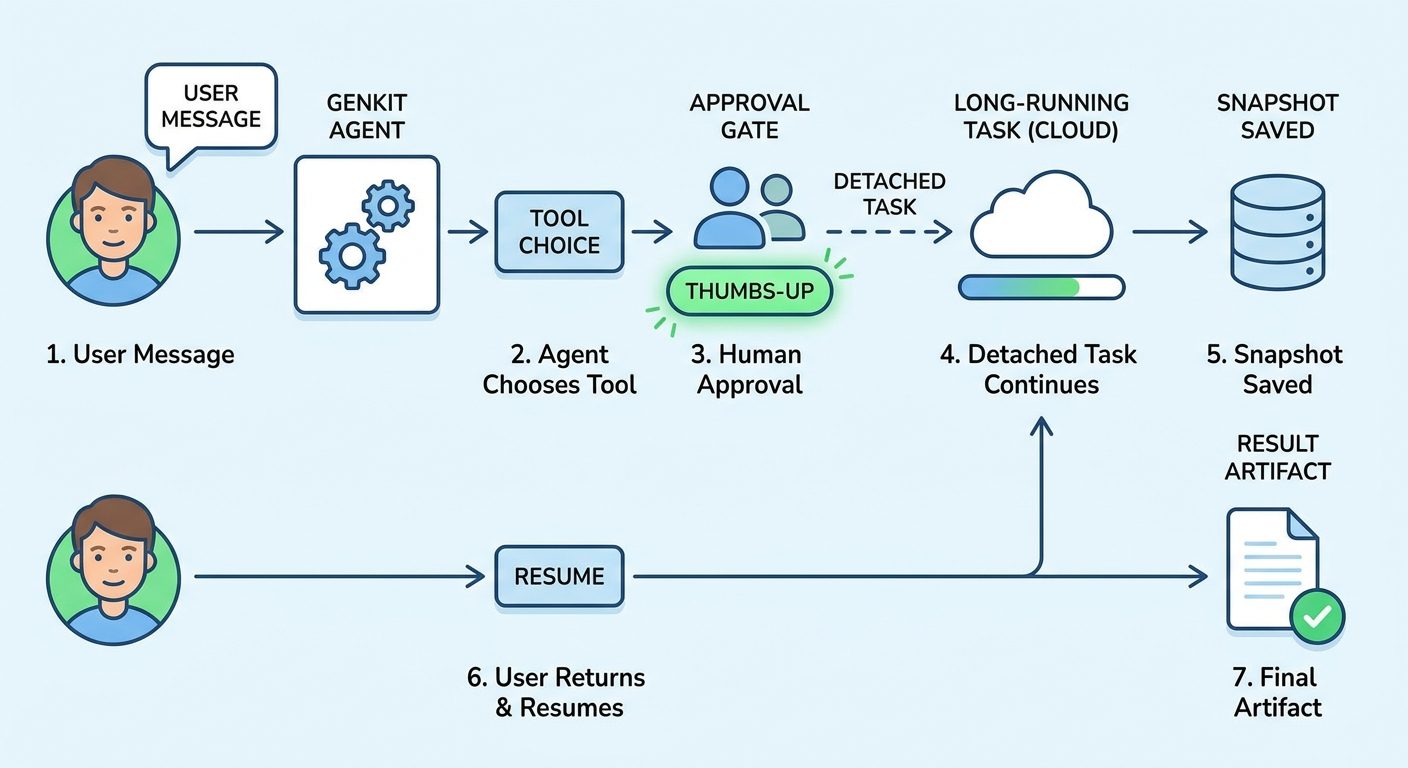
Genkit supports interruptible tools. A tool can inspect the proposed action, decide that the action is risky or requires confirmation, and interrupt the turn. The client can then show the user what the agent wants to do, why approval is needed, and what data will be used. The user can approve, reject, or provide missing information. The runtime then resumes the turn with validated input.
This pattern is much better than relying only on prompt instructions such as “ask before doing anything dangerous.” Prompts are useful, but safety-critical control should live in deterministic code. The tool knows the action. The server validates the approval. The UI shows the confirmation. The model should not be the only boundary between a user and an irreversible operation.
Good approval moments
- Sending an email, Slack message, invoice, proposal, or public response.
- Making a purchase, issuing a refund, changing billing, or moving money.
- Deleting, overwriting, exporting, or sharing data.
- Running commands that modify files or infrastructure.
- Opening support tickets, changing CRM records, or updating customer-facing systems.
- Calling tools that expose sensitive or regulated information.
Approval design also affects trust. If users can see the planned action and approve it, they are more likely to use the agent for real work. If the agent silently performs actions or asks vague confirmations, users will either avoid it or over-trust it. Neither outcome is good.
For teams building with Genkit, the best safety habit is to classify tools by risk. Low-risk tools can run automatically. Medium-risk tools can require contextual confirmation. High-risk tools can require explicit approval plus additional policy checks. Some tools should not be available to the agent at all.
Detached Tasks, Snapshots, and Long-Running Agent Work
Many useful agent tasks do not fit neatly inside a single request. A research assistant may need several minutes to gather sources and write a report. A planning agent may need to call multiple APIs. A code or data workflow may need to run checks. A document agent may need to generate a long artifact. Keeping a browser tab and HTTP connection open for the entire job is fragile.
Genkit’s detached work model is designed for these cases. With server-managed state, a client can start a task, detach from the turn, store the pending snapshot ID, and reconnect later. The agent continues on the server and writes progress to a pending snapshot. Another session can poll, wait, abort, or render the completed output when ready.
This is a big deal for real product experiences. Users are used to async work. They understand progress bars, pending jobs, resumable tasks, and notifications. AI features should behave the same way. If a task takes time, the product should not pretend it is a normal chat reply. It should show progress, preserve work, and let the user leave and return.
Where detached tasks fit
Snapshots also support branching. A user can return to a previous point and explore an alternative without corrupting the original thread. That is useful for planning, creative work, troubleshooting, and decision support. Instead of forcing the user to start over, the application can treat an earlier snapshot as a safe branch point.
The important product principle is to make the agent’s state visible. If the agent is detached, show whether it is pending, completed, interrupted, or failed. If an artifact exists, make it easy to inspect. If a branch is created, make the branch relationship clear. Users should never feel like the AI disappeared into a black box.
Multi-Agent Coordination in Genkit
Genkit Agents API also supports coordination across specialist agents. This is useful when one broad prompt becomes too messy. A research assistant, planning assistant, compliance checker, and writing assistant may each need different instructions and tools. Instead of stuffing all capabilities into one giant system prompt, you can create specialist agents and let an orchestrator delegate work.
Multi-agent design should be used carefully. It can improve modularity, but it can also create unnecessary complexity. The goal is not to add more agents because the architecture sounds impressive. The goal is to separate responsibilities when separation improves reliability, security, evaluation, or maintainability.
| Use one agent when… | Use multiple agents when… |
|---|---|
| The task is narrow and the same instruction set works throughout. | The workflow has clearly different roles, tools, or policies. |
| The agent does not need specialist knowledge boundaries. | You want a researcher, planner, executor, reviewer, or policy checker to stay separate. |
| Debugging simplicity matters more than modularity. | You need cleaner evaluation and ownership for different parts of the workflow. |
| The context is small and direct. | A single context would become bloated, conflicting, or risky. |
A good multi-agent architecture often looks boring. The orchestrator understands the user goal, delegates specific sub-tasks, receives artifacts or structured results, and produces a final answer. Specialist agents do not need access to every tool. They should receive only the context needed for their role. That helps reduce prompt noise and security risk.
This connects with a broader Google theme: agent ecosystems need coordination, discovery, evaluation, and control. Genkit handles app-level agent composition. ADK handles more deterministic agent and workflow patterns. Agentic Resource Discovery addresses how capabilities can be published and discovered across the web. Gemini Enterprise Agent Platform focuses on enterprise governance and evaluation. These are related, but not interchangeable.
Genkit Agents API vs ADK Workflows: Which Should You Use?
Google’s ADK 2.0 update appeared in the same recent window as Genkit Agents, so the comparison is unavoidable. The short version: Genkit Agents API is best for full-stack conversational and agentic app features, while ADK workflows are best when you need stronger deterministic control over an agentic process.
Genkit is attractive when your primary problem is app plumbing: frontend integration, sessions, streaming, tools, approvals, artifacts, and long-running user-facing work. ADK workflows are attractive when your primary problem is process reliability: business steps must happen in a defined order, routing must be explicit, and the LLM should only handle parts of the workflow that truly need language reasoning.
| Question | Genkit Agents API | ADK 2.0 Workflows |
|---|---|---|
| Main job | Build full-stack agent app features. | Blend deterministic workflows with agent reasoning. |
| Best fit | Chat assistants, copilots, support agents, research tools, app-embedded AI workflows. | Enterprise workflows, strict business processes, reliable routing, process automation. |
| Frontend story | Strong: remote agent client, streaming, state patches, artifacts. | More backend/process oriented. |
| Control model | Agent-centered with tools, state, interrupts, snapshots. | Workflow-centered with explicit graph/routing and agent nodes. |
| Risk reduction | Approval gates, state boundaries, server-owned tools. | Deterministic paths, explicit transitions, reduced LLM orchestration. |
If you are building a customer-facing AI assistant inside a web app, start by evaluating Genkit. If you are automating a refund workflow where purchase lookup must always precede policy check and refund issuance must only happen after a deterministic condition, evaluate ADK workflows. If your product needs both, they can be complementary: Genkit can power the user-facing assistant while deterministic backend services or workflows handle sensitive process execution.
This distinction matters because many failed agent projects use autonomy where structure would be safer. Do not ask a model to infer every execution path if you already know the required process. Conversely, do not over-engineer a workflow graph when the product needs a flexible conversation and rich frontend experience. Choose the architecture based on the shape of the problem.
Practical Genkit Agent Patterns
1. Support assistant with approval gates
A support assistant can read a ticket, inspect policy, draft a response, and ask for approval before sending. Server-managed state keeps the conversation and ticket context durable. Artifacts can hold draft replies. Interruptible tools prevent accidental customer communication. This is a strong Genkit use case because the agent is conversational, tool-using, and user-facing.
2. Research assistant with detached reports
A research assistant can collect sources, stream progress, generate a report artifact, and let the user return later. Detached tasks and snapshots are valuable because high-quality research rarely fits into one fast response. The UI can show progress while the server continues the work.
3. Internal operations copilot
An operations copilot may query observability tools, summarize incidents, draft tickets, and recommend next steps. Low-risk read tools can run automatically, while write actions require approval. Specialist agents can separate incident analysis, documentation search, and communication drafting.
4. Learning or coaching app
A tutor, coach, or onboarding assistant needs memory across sessions, user-specific state, and branchable learning paths. Genkit snapshots make it easier to resume or explore alternatives. Artifacts can store lesson plans, quizzes, or summaries.
5. Developer workflow assistant
A developer assistant can inspect files, explain errors, generate patches, and ask before running commands. This pattern overlaps with AI coding tools, but Genkit is useful when you are building the assistant into your own product rather than using a standalone coding agent.
Genkit Agents API Implementation Checklist
Before you build, use this checklist to avoid the most common mistakes. It is not a replacement for the official Genkit documentation, but it will help you make better architecture decisions before writing too much code.
Architecture checklist
- Define the user-facing job clearly before choosing tools.
- Choose server-managed state if recovery, branching, audits, or long tasks matter.
- Keep privileged tools on the server, not in the browser.
- Classify tools by risk and use human approval for sensitive actions.
- Use artifacts for durable outputs instead of burying everything in chat text.
- Use detached tasks when work may outlive a normal request.
- Split into specialist agents only when it improves reliability or security.
- Evaluate whether deterministic workflow code should handle strict business processes.
- Log enough state transitions to debug failures without exposing unnecessary user data.
- Design the UI around progress, approval, interruption, completion, and recovery states.
Why This Topic Has a Search Gap
Analytics for AI Feature Drop show that practical AI feature explainers are the site’s strongest format. Recent traffic includes strong engagement around AI coding, credit usage, Google Flow and Veo access, Copilot workflows, and GoogleAI posts. Search Console impressions are still early, but pages ranking in positions four to twenty show that specific feature guides can gain visibility faster than broad AI news.
The Genkit Agents API topic fits that pattern. It is recent, specific, useful, and connected to an official Google launch. Existing search results are likely to lean toward official documentation and announcement posts. That leaves room for a practical guide that explains the architecture, tradeoffs, state choices, approval patterns, detached work, multi-agent coordination, and the difference between Genkit and ADK workflows.
The article also supports internal topical authority for GoogleAI. It naturally links to related AIFeatureDrop coverage on Google Workspace Studio, Google AI Studio Android app builder, Google Antigravity, and Google AI Edge Gallery. That helps connect Google’s app-building, coding-agent, local-AI, and agent-framework updates into a clearer site-wide cluster.
Keep Learning on AI Feature Drop
- How to Use Google Workspace Studio — related GoogleAI workflow automation coverage.
- Google AI Studio Android App Builder Explained — app-building context for Google AI developers.
- Google Antigravity Explained — coding-agent workflow coverage with artifacts and safer execution patterns.
- Google AI Edge Gallery on Mac Explained — local Google AI model workflow context.
- Google Flow and Veo 3 Credits Explained — GoogleAI creator workflow and credit planning guide.
Sources and References
- Google Developers Blog: Build agentic full-stack apps with Genkit
- Genkit documentation: Agents overview
- Google Developers Blog: Why we built ADK 2.0
- Google Developers Blog: Announcing the Agentic Resource Discovery specification
- Google Developers Blog: Driving the Agent Quality Flywheel from Your Coding Agent
Genkit Agents API is in preview. APIs, supported languages, and production recommendations may change. Always verify the current Genkit documentation before implementing in production.
FAQ: Genkit Agents API
What is Genkit Agents API?
Genkit Agents API is a preview agent abstraction in Google’s Genkit framework for building full-stack conversational and agentic applications with tools, state, streaming, snapshots, artifacts, human approval, and long-running work.
Is Genkit Agents API only for Gemini?
Genkit is closely connected to Google AI and Gemini, but it is designed as an open-source framework for AI-powered apps. Check the current Genkit provider and plugin documentation for supported models and platforms.
Should I use server-managed or client-managed state?
Use server-managed state when sessions must be durable, resumable, branchable, auditable, or shared across devices. Use client-managed state for simpler stateless deployments or when your application already owns persistence.
What are Genkit snapshots?
Snapshots are saved points in an agent session. They can support resuming the latest state, branching from a previous point, or reconnecting to long-running work.
What are interruptible tools in Genkit?
Interruptible tools can pause an agent before a risky or incomplete action. The client can ask the user to approve, reject, or provide missing information before the tool continues.
When should I use detached tasks?
Use detached tasks when an agent turn may take longer than a normal request, such as research reports, multi-step tool workflows, code checks, or long document generation.
How is Genkit different from ADK workflows?
Genkit Agents API focuses on full-stack agent app features such as sessions, streaming, tools, approvals, and frontend integration. ADK workflows focus more on deterministic execution control for agentic processes and business workflows.
Can Genkit support multiple agents?
Yes. Genkit can coordinate specialist agents through middleware so an orchestrator can delegate tasks to the right sub-agent. Use this when role separation improves reliability, security, or maintainability.
Is Genkit Agents API production-ready?
The Agents API was announced as preview, so treat it carefully. It can be useful for serious development, but teams should expect API changes and should verify current documentation before production rollout.
Post a Comment