
Genkit Human Approval Guide: Build Safer AI Agent Actions With Interruptible Tools
Learn where to place human approval gates in Genkit Agents, how interruptible tools pause and resume risky actions, and how to design a practical approval workflow for real full-stack AI products.
Genkit Human Approval: Quick Answer for Developers
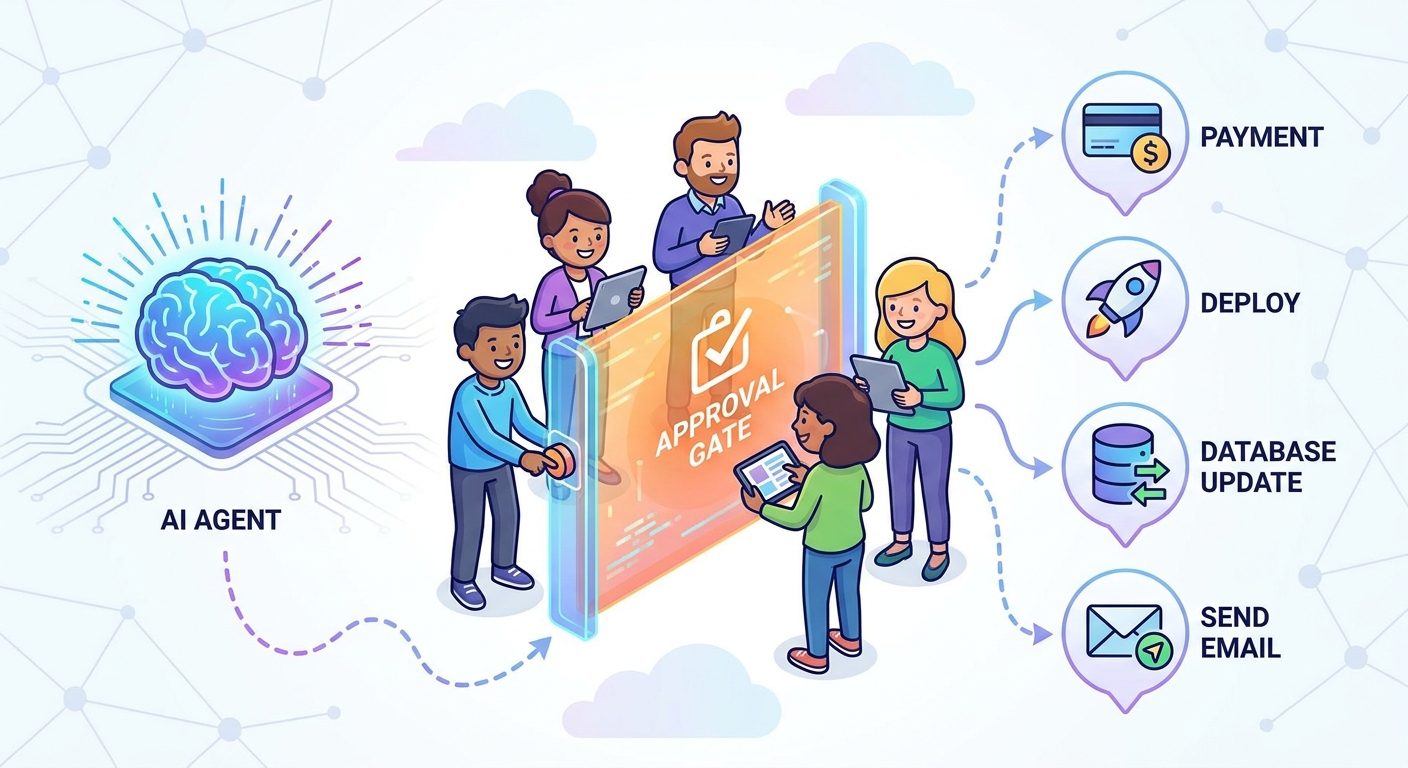
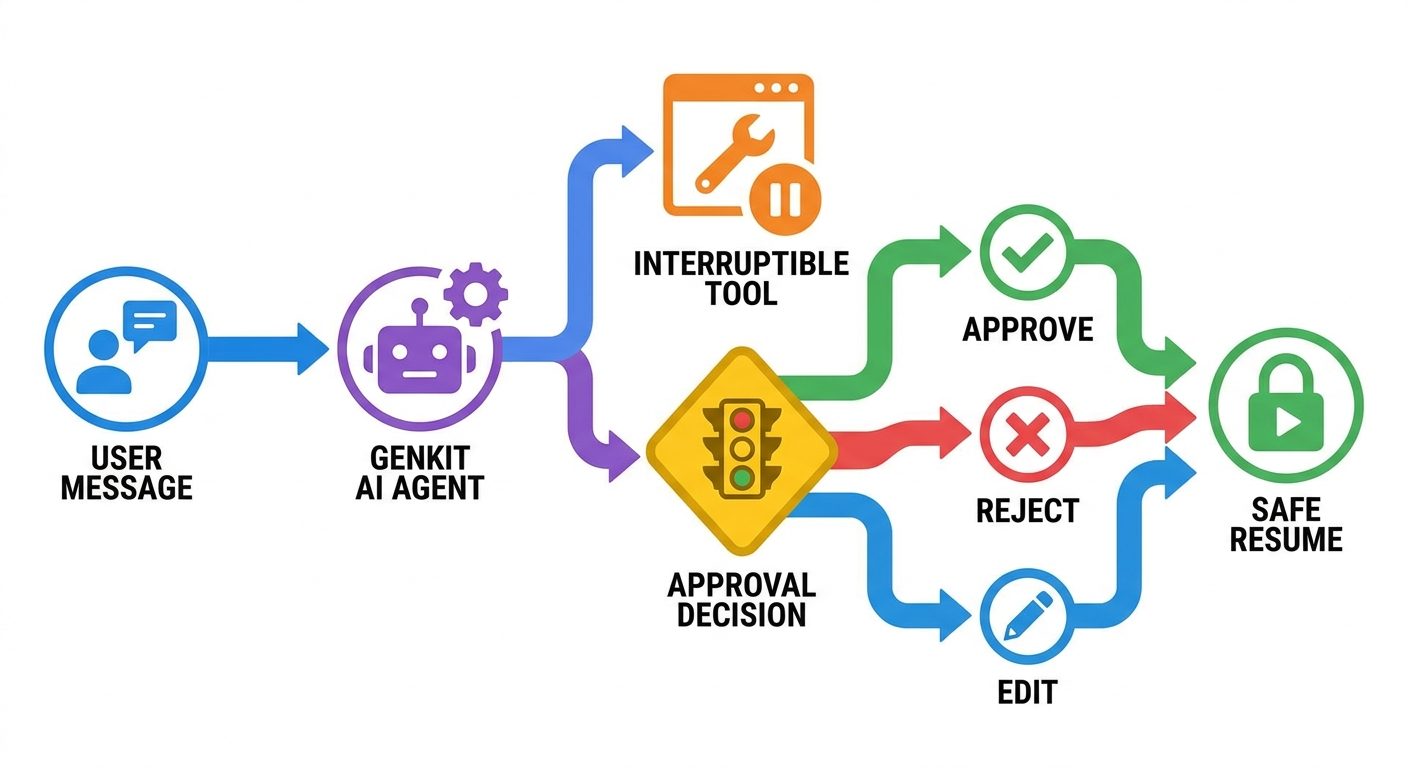
Genkit human approval is the pattern of pausing an AI agent before it runs a sensitive tool action, showing the user what the agent wants to do, then resuming only after the user approves, rejects, or supplies missing information. In the Genkit Agents API, this is handled through interruptible tools: the tool can return an interrupt, the client can show an approval UI, and the agent can continue the same turn after a valid resume payload.
This matters because full-stack agents are no longer just text generators. They can update records, call APIs, start jobs, send messages, write files, deploy code, or coordinate with other agents. The safer product design is not to let every tool run automatically. The safer design is to divide tool actions into low-risk, review-needed, and blocked categories, then make high-impact actions ask for a human decision before they execute.
The broader Genkit Agents API pillar guide explains sessions, state, streaming, snapshots, detached tasks, and multi-agent coordination. This cluster guide focuses on one practical slice: how to think about approval gates so a Genkit agent can stay useful without becoming reckless.
Why Approval Gates Matter in Full-Stack AI Agents
Classic chatbots could be wrong, but their mistakes usually stayed inside the answer. Agentic apps are different. Once a model has tools, it can affect the outside world. A support assistant may refund an order. A developer copilot may run a shell command. A sales assistant may update a CRM. A research agent may produce a downloadable report. The value is real, but so is the risk.
Genkit Agents are designed for these multi-turn, tool-using experiences. Google’s launch article describes agents that package message history, tool loops, streaming, persistence, frontend protocol, snapshots, branching, artifacts, detached turns, and human approval behind a consistent interface. That is a useful foundation because developers do not want to rebuild the same plumbing for every app. But a good abstraction does not remove the need for product-level safety decisions.
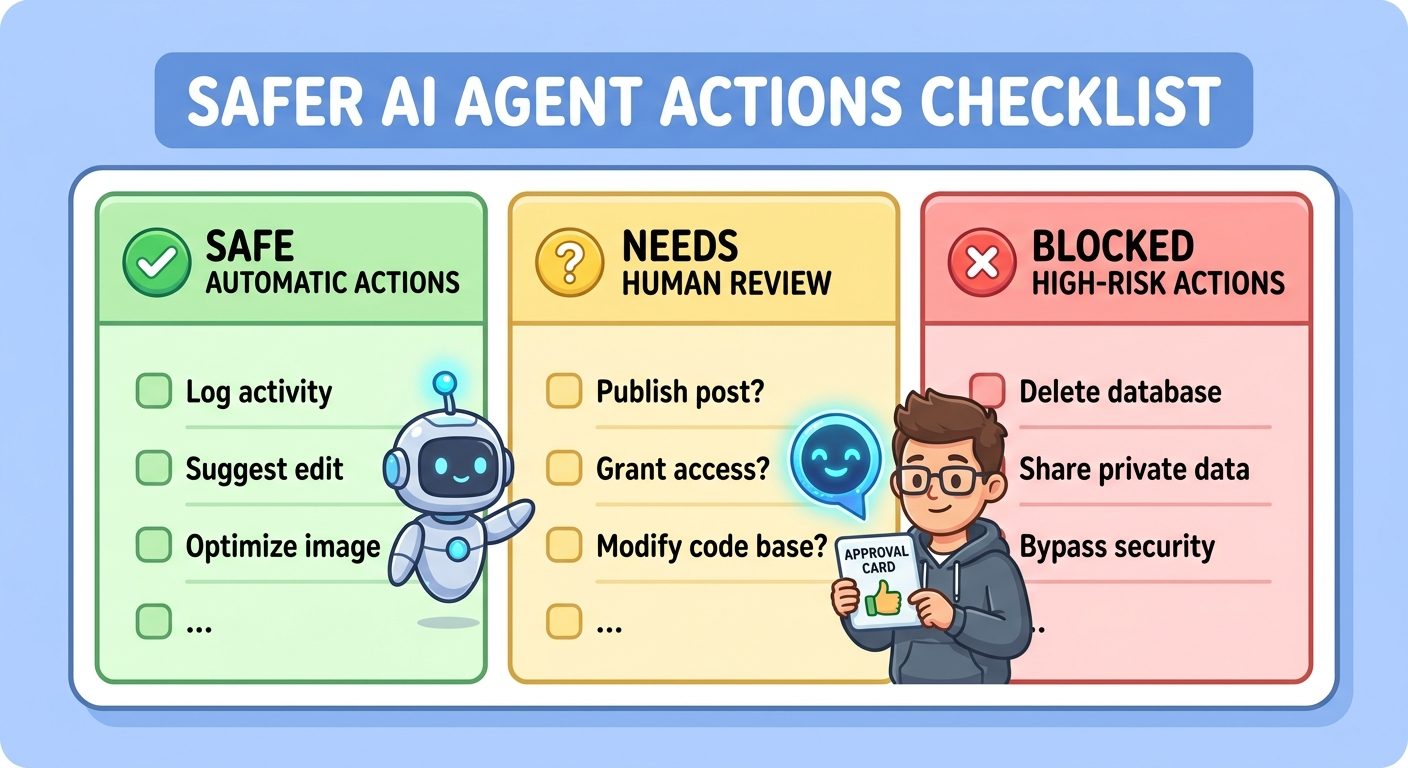
Approval gates are the product boundary between automation and authority. They answer a simple question: when should the user remain in charge? The best answer is not to interrupt everything. Too many interruptions make the agent feel slow and annoying. Too few interruptions make the agent dangerous. The right design interrupts only when the consequence of a wrong action is higher than the cost of asking.
| Agent action | Approval default | Why |
|---|---|---|
| Read public documentation | Usually automatic | Low consequence and easy to repeat. |
| Search internal knowledge base | Automatic with access controls | Useful for speed, but permission checks still matter. |
| Draft an email or support reply | Review before send | The draft is safe; sending affects a real person. |
| Run a database update | Approval required | Data changes can be hard to undo. |
| Trigger payment, refund, deploy, or deletion | Approval required plus audit log | High-impact action with financial or operational risk. |
| Run shell command that modifies files | Approval required | Can damage a workspace or leak data if badly scoped. |
How Genkit Interruptible Tools Work
In Genkit’s model, an interruptible tool is a tool that can pause instead of immediately finishing. The tool receives the proposed input. If the input is harmless, it can run normally. If the input needs human review, it returns an interrupt describing what the agent wants to do and why. The client receives the interrupted response and can render a decision screen. When the user approves or rejects, the client resumes the turn with that decision.
The key detail is that the approval flow belongs to the same agent turn. You are not starting a separate workflow from scratch. The agent keeps the relevant session history, and Genkit validates the resume payload against session history so a tool cannot simply be resumed with forged input. That does not make every app automatically secure, but it gives developers a safer primitive than inventing ad hoc approval state.
Think of the interrupt as a structured pause point. A normal tool says: ‘I ran and here is the result.’ An interruptible tool can say: ‘I need a decision before I run.’ The UI should then show the action, target, risk, reason, and possible outcomes clearly enough that a human can make a fast but informed choice.
A Practical Genkit Approval Workflow Pattern
A clean approval workflow has five parts: classify the tool, explain the request, collect the decision, resume safely, and record what happened. This is less glamorous than prompting, but it is where production agent quality is decided. The model can be brilliant and the workflow can still fail if the user sees a vague approval message like ‘Allow action?’ with no details.
Start by classifying tools before runtime. A weather lookup, product search, or read-only retrieval tool can usually run automatically. A tool that updates a customer account, sends a message, creates a resource, or executes code should have an approval policy. A tool that touches secrets, permanent deletion, payroll, medical data, or compliance records may need a stronger policy or should not be agent-triggered at all.
Next, design the approval payload. A good payload contains the tool name, proposed input, target resource, reason, risk level, expected result, and fallback option. If the action is a shell command, show the exact command and working directory. If it is a CRM update, show the fields that will change. If it is a payment action, show amount, recipient, currency, and source record. Do not ask a user to approve something they cannot understand.
Examples: Where to Use Genkit Human Approval
Customer support refunds. A support agent can summarize the customer issue, look up policy, calculate eligibility, and draft a refund reason automatically. The actual refund should pause for approval, especially if the amount is large, the order is unusual, or the customer has a fraud flag. The approval UI should show order ID, amount, policy reason, customer impact, and whether the action can be reversed.
Developer tools and shell commands. A coding assistant can inspect files and suggest commands freely, but commands that modify files, install packages, change permissions, or hit production services should interrupt. This is especially important for commands that look harmless but can delete generated files, rewrite lockfiles, or expose environment details.
CRM and sales workflows. A sales copilot can research a lead, draft follow-up notes, and recommend a next step. Updating the opportunity stage, assigning ownership, or sending an email should require review. Sales data is shared context; a wrong update can affect forecasting, commission, or customer experience.
Content and publishing workflows. An agent can generate an outline, optimize copy, and prepare metadata. Publishing live, deleting drafts, changing canonical URLs, or sending newsletters should pause for approval unless the system is explicitly designed as a trusted scheduled pipeline with strong validation.
Long-running reports. With Genkit detached tasks and snapshots, an agent can keep working after the user leaves. Approval becomes important when the long-running job reaches a point where it wants to spend external credits, email results, create files, or write to a shared workspace.
Server-Managed Approval State vs Client-Managed State
Approval workflows become much easier to reason about when you decide where state lives. In a server-managed Genkit session, the server owns message history, custom state, artifacts, and snapshots through a session store. Clients can continue by session ID or branch from a snapshot. This is usually the safer choice for approval workflows because the approval record, pending action, and resume path are not dependent on a single browser tab holding all state.
Client-managed state can still be useful when your app already owns persistence or when you want stateless server deployments. But for high-impact approval flows, ask a hard question: if the user closes the tab, switches devices, or opens the same workflow from another session, can you still prove what was approved? If the answer is no, use server-managed state or add your own durable approval store.
A practical rule: use server-managed state when approvals affect shared resources, money, customer records, production systems, or long-running tasks. Use client-managed state for lightweight experiences where the consequence of losing or replaying state is low and your app already controls persistence elsewhere.
| Choice | Best for | Approval concern |
|---|---|---|
| Server-managed state | Persistent agents, shared devices, approval logs, long-running work | Requires a reliable session store and access control. |
| Client-managed state | Stateless deployments, simple UI-owned conversations, low-risk tasks | Harder to audit and resume safely across devices. |
| Custom approval store | Regulated workflows, enterprise controls, multi-party review | More engineering work, but stronger governance. |
What a Good Approval UI Should Show
The approval interface should reduce ambiguity. Do not make the user infer what the agent is about to do from a raw JSON blob. Raw input may be available for advanced users, but the main approval view should translate the action into human-readable impact. A good UI answers: what is the action, which resource is affected, why is it needed, what could go wrong, and what happens if I reject it?
For a command-running tool, show the command, directory, files likely affected, and whether the command can access network or secrets. For a business action, show the customer, account, amount, destination, and audit trail. For a publishing action, show title, destination, status, and visibility. For an internal admin action, show permission scope and rollback path.
The approval UI should also give choices beyond yes or no. Real users often need to edit the input, choose a safer option, ask the agent to explain, or defer the action. A useful Genkit approval design can resume with approved, rejected, or modified values, as long as the tool validates those values before executing.
Genkit Human Approval Security Checklist
Approval is not a security system by itself. It is one layer in a broader design. The agent can still misunderstand user intent, the UI can still hide important context, and backend authorization can still be wrong. Treat approval as a final human checkpoint, not a replacement for authentication, authorization, validation, and logging.
Before shipping, test prompt injection scenarios. What happens if retrieved content tells the agent to ignore policy and run a tool? What happens if a user asks the agent to approve something that violates your rules? What happens if the model provides a misleading reason for the tool call? The approval payload should be built from validated tool input and policy checks, not only from the model’s explanation.
You should also separate model permission from application permission. The fact that a model asks to use a tool does not mean the current user has permission to perform that action. The backend must check user identity, role, resource ownership, rate limits, and business policy before any approved action runs.
Good approval design
- Clear action summary and exact target.
- Risk level based on policy, not vibes.
- Server-side permission checks before execution.
- Durable audit log for approved and rejected actions.
- Easy reject, edit, and explain options.
Risky approval design
- Generic “Allow?” prompts with no context.
- Trusting model-generated reasons without validation.
- Letting approval bypass backend authorization.
- No record of who approved the action.
- Interrupting every tiny action until users click blindly.
Implementation Tips Before You Write Code
First, write down your tool policy in plain language. For each tool, decide whether it is read-only, reversible, sensitive, or irreversible. Then decide whether it can run automatically, requires approval, requires a higher role, or should be blocked from agent use. This policy should exist before the prompt tries to call the tool.
Second, keep tool inputs small and explicit. A tool named updateCustomer with a vague instruction field is harder to approve than a tool with typed fields for customerId, fieldName, previousValue, newValue, and reason. Strong schemas make better approval screens and better logs.
Third, use snapshots intentionally. If a user approves an action from a saved point, you should know which conversation state produced that request. Snapshot IDs and session IDs help make resuming and branching understandable, especially when a user wants to explore an alternative without disturbing the original thread.
Fourth, test rejection paths as carefully as approval paths. Many teams design the happy path and forget what happens when the user rejects. A good agent should recover gracefully: explain what was not done, offer a safer option, or continue with read-only assistance.
Common Mistakes to Avoid
Mistake one: approving too late. If the tool has already changed the outside world, the approval screen is just a notification. Interrupt before execution, not after. Post-action confirmation is useful, but it is not human approval.
Mistake two: approving too broadly. Avoid approvals such as ‘allow this agent to manage my account.’ Prefer narrow approvals tied to one action, one target, one time window, and one session. Broad permissions are convenient until the agent makes a surprising decision.
Mistake three: hiding raw details. A friendly summary is good, but advanced users need access to exact inputs. If the action is a shell command, exact text matters. If the action is a database change, exact fields matter. If the action is a deployment, environment and version matter.
Mistake four: no audit log. If you cannot answer who approved an action and what input was approved, the workflow is not ready for serious business use. Logs are not only for compliance; they are how you debug agent mistakes.
Mistake five: interrupt fatigue. If every action asks for approval, users will stop reading. Group low-risk actions together, automate harmless reads, and reserve interruptions for meaningful decisions.
Where This Fits in the AI Feature Drop GoogleAI Cluster
This guide is a focused support article for the broader Genkit Agents API topic. Start with Genkit Agents API Explained: Build Full-Stack AI Agents With State, Streaming, and Human Approval if you need the full picture of state, streaming, snapshots, detached tasks, and multi-agent coordination.
For adjacent GoogleAI workflows, read how to use Google Workspace Studio, Google AI Studio Android app builder, Google Antigravity explained, and Google Flow and Veo credits explained. Together, these articles cover the practical side of Google’s AI app-building ecosystem rather than treating each launch as isolated news.
Sources and References
Google Developers Blog: Build agentic full-stack apps with Genkit — official announcement covering Agents API, state, streaming, interruptible tools, detached tasks, and multi-agent coordination.
Genkit documentation: Full-stack agents — official Genkit docs explaining when to choose agents, chat interface, session stores, HTTP serving, interrupts, background execution, and related APIs.
Genkit documentation: Interrupts — reference material for human-in-the-loop interrupt behavior and resume patterns.
Firebase Genkit documentation hub — broader docs for building AI-powered applications with Genkit.
Note: Genkit Agents API is described by Google/Genkit as preview or beta depending on the documentation surface. Verify the current API stability notes before shipping production code.
FAQ: Genkit Human Approval and Interruptible Tools
What is Genkit human approval?
Genkit human approval is a human-in-the-loop pattern where an agent pauses before executing a sensitive tool action, asks the user to approve, reject, or modify it, then resumes only after a valid decision.
How do Genkit interruptible tools work?
An interruptible tool can return an interrupt instead of executing immediately. The client renders an approval UI, sends back the user decision, and the agent resumes the turn with validated approval data.
When should a Genkit agent ask for approval?
Ask for approval when the action changes money, customer data, production systems, permissions, files, deployments, messages, or any state that is hard to undo.
Is Genkit Agents API stable?
Google and Genkit documentation describe the Agents API as preview or beta, so breaking changes can occur in minor releases. Check the latest docs before depending on exact APIs.
Does human approval replace backend authorization?
No. Approval is a workflow checkpoint. Your backend still needs authentication, authorization, input validation, policy checks, rate limits, and audit logging.
Can every tool call require approval?
Technically you can design that, but it is usually bad UX. Approve high-risk actions and let harmless read-only actions run automatically with normal access controls.
What should an approval screen show?
Show the action, target resource, exact input, reason, risk level, expected result, rollback option, and who is approving it.
Can Genkit approval workflows work with long-running tasks?
Yes, server-managed state, snapshots, and detached tasks can support workflows where a user leaves and later reconnects, but approval state should be durable and auditable.
Post a Comment