
Google Antigravity is not just another coding assistant in a sidebar. It is Google’s attempt to give developers an operating layer for agentic work: hands-on coding when you need control, a Manager Surface when you want agents to run tasks, Artifacts when you need proof, and safer rails for terminal, browser, and repository automation.
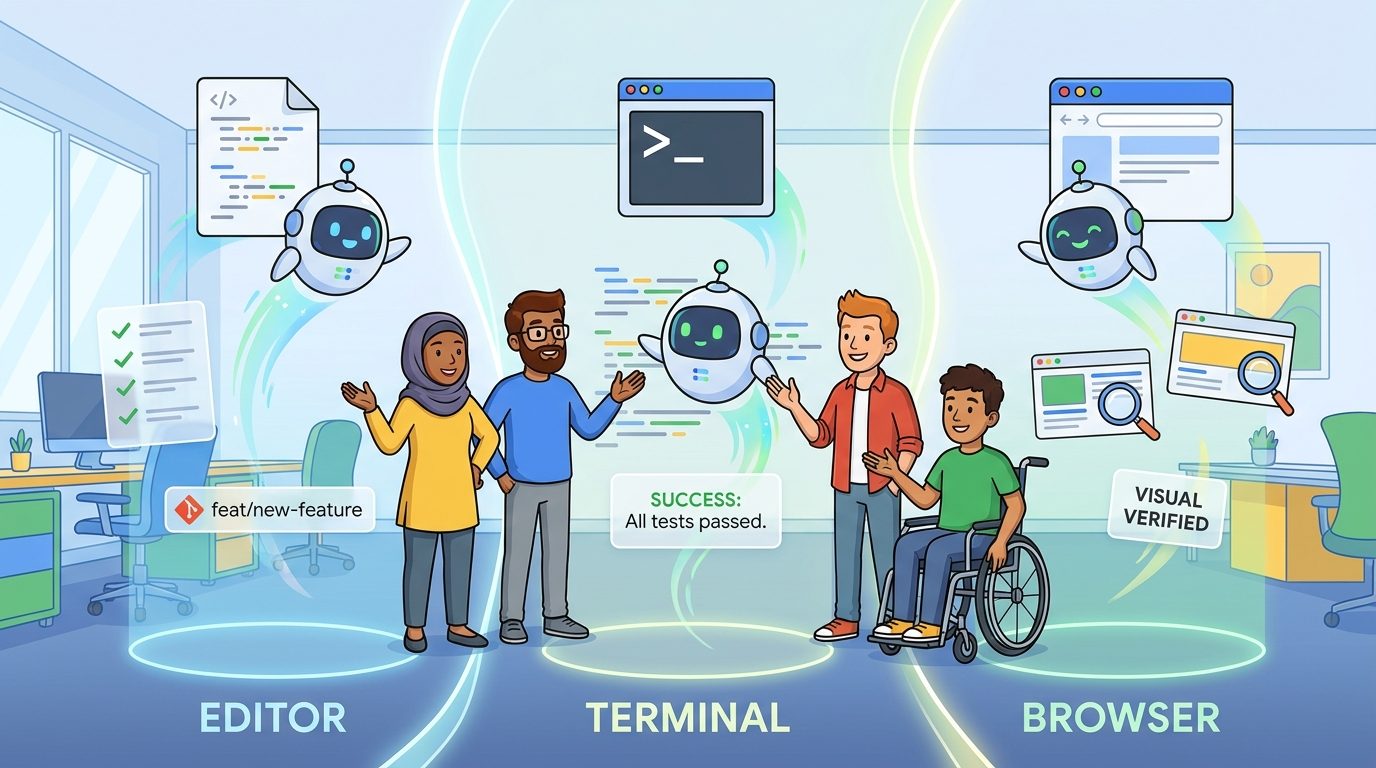
Google Antigravity: Quick Answer for Busy Developers
Google Antigravity is Google’s agentic development platform for planning, executing, and verifying software tasks across an editor, terminal, and browser. The most important idea is that it separates two developer modes. In Editor View, you work in a familiar AI-powered IDE with completions and inline commands. In the Manager Surface, you can dispatch agents to work more asynchronously on larger tasks while you supervise progress through structured deliverables.
The feature that makes Antigravity worth understanding is not only “it writes code.” Plenty of tools do that. The interesting part is the operating model: agents can produce Artifacts such as implementation plans, task lists, screenshots, and browser recordings, so the developer can review evidence instead of reading raw tool logs line by line. Google also describes Antigravity CLI, specialized subagents, terminal sandboxing, credential masking, hardened Git policies, managed agents in the Gemini API, and an Antigravity SDK for teams that want more control.
This guide explains how the pieces fit together, where the search gap is, how to use Antigravity safely, and how it compares with tools like GitHub Copilot, OpenAI Codex, Claude Code, Cursor, Gemini CLI, and Google AI Studio. It is written for developers who want the practical workflow, not just the launch headline.
What Is Google Antigravity?
Google describes Antigravity as an agentic development platform. In plain English, that means it is designed around software agents that can take a goal, inspect relevant context, plan steps, make changes, run commands, use a browser, and show you evidence that the work is moving in the right direction. The launch post framed the shift clearly: older tools helped you write code faster; newer tools need to help you orchestrate code work.
That distinction matters. A normal AI coding assistant is usually reactive. You ask for a function, an explanation, or a refactor, and the assistant responds. An agentic development platform is more task-oriented. You might ask it to reproduce a UI bug, add a missing test, update a small feature, verify the browser behavior, and return screenshots. Instead of one response, the tool performs a chain of actions under your supervision.
Google’s official materials point to several connected capabilities. Antigravity includes a hands-on editor experience for synchronous coding, a Manager Surface for dispatching and observing agents, Artifacts for review, a knowledge base so agents can remember useful project context, and model optionality. The Google I/O developer keynote expanded that picture with Antigravity 2.0, Antigravity CLI, specialized subagents, cross-platform terminal sandboxing, credential masking, hardened Git policies, managed agents in the Gemini API, and the Antigravity SDK.
For readers of AI Feature Drop, the category is familiar. We have already covered adjacent developer-agent workflows such as Codex Record & Replay, GitHub Copilot Agent Finder, and Claude Code Hooks. Antigravity belongs in the same conversation, but it uses Google’s framing: orchestrated agents, verifiable artifacts, and deeper integration with the Gemini ecosystem.
The simplest mental model
Think of Antigravity as three layers. The first layer is the editor, where you still write, review, and ask for focused help. The second layer is the manager, where you assign tasks to agents and track progress. The third layer is verification, where Artifacts, tests, screenshots, diffs, and browser recordings help you decide whether the agent’s work is trustworthy.
That mental model prevents the biggest mistake: assuming agentic tools remove developer responsibility. They do not. They move responsibility upward. You spend less time typing every edit, but more time defining goals, limiting scope, checking evidence, and deciding when to accept or reject agent output.
Editor View vs Manager Surface vs CLI vs Managed Agents
The most common confusion around Google Antigravity is that it sounds like many products at once. That is because Google is describing a platform, not a single chat box. The practical way to evaluate it is to ask which surface fits your task.
| Surface | Best for | Developer posture | Watch out for |
|---|---|---|---|
| Editor View | Hands-on coding, small edits, inline help, quick refactors, reading code | You drive; AI assists inside the IDE | Do not overuse broad prompts when a precise edit is enough |
| Manager Surface | Multi-step tasks, UI changes, bug reproduction, test creation, background work | You delegate and supervise through Artifacts | Requires clear task boundaries and review checkpoints |
| Antigravity CLI | Terminal-first developers, automation, scripted agent workflows, CI-adjacent tasks | You operate from command line and local tooling | Terminal access needs sandbox rules and command review |
| Managed agents in Gemini API | Developers who want an agent harness without building infrastructure | You call an API and receive a provisioned agent/sandbox | Define data boundaries, logging, cost controls, and environment access |
| Antigravity SDK | Teams that want customized agent harnesses on their own infrastructure | You own more of the platform behavior | More control also means more security and maintenance responsibility |
If you only want autocomplete, Antigravity may feel heavier than necessary. If you want to coordinate a task that touches code, terminal, browser behavior, and verification evidence, the Manager Surface starts to make sense. That is the search-intent gap: many developers are not asking “does Google have an AI IDE?” They are asking “when should I trust an agent to do work while I supervise?”
There is no prize for using the most autonomous mode. The best developers will use a simple mode for simple work and a managed mode for work that actually benefits from delegation.
Why Antigravity Artifacts Matter More Than Raw Agent Logs
Artifacts are the practical trust layer in Google Antigravity. A raw agent log can show every command, file read, tool call, and model step. That is useful for debugging, but it is exhausting as the main review interface. Google’s launch post positions Artifacts as tangible deliverables: task lists, implementation plans, screenshots, browser recordings, and similar proof that lets a developer verify the agent’s logic at a glance.
This matters because agentic coding fails differently from normal autocomplete. Autocomplete can be wrong in one line. An agent can be wrong across a whole sequence: it may misunderstand the goal, edit the wrong layer, run an irrelevant test, or produce a UI that looks correct only in one browser state. Artifacts help you audit the path without drowning in noise.
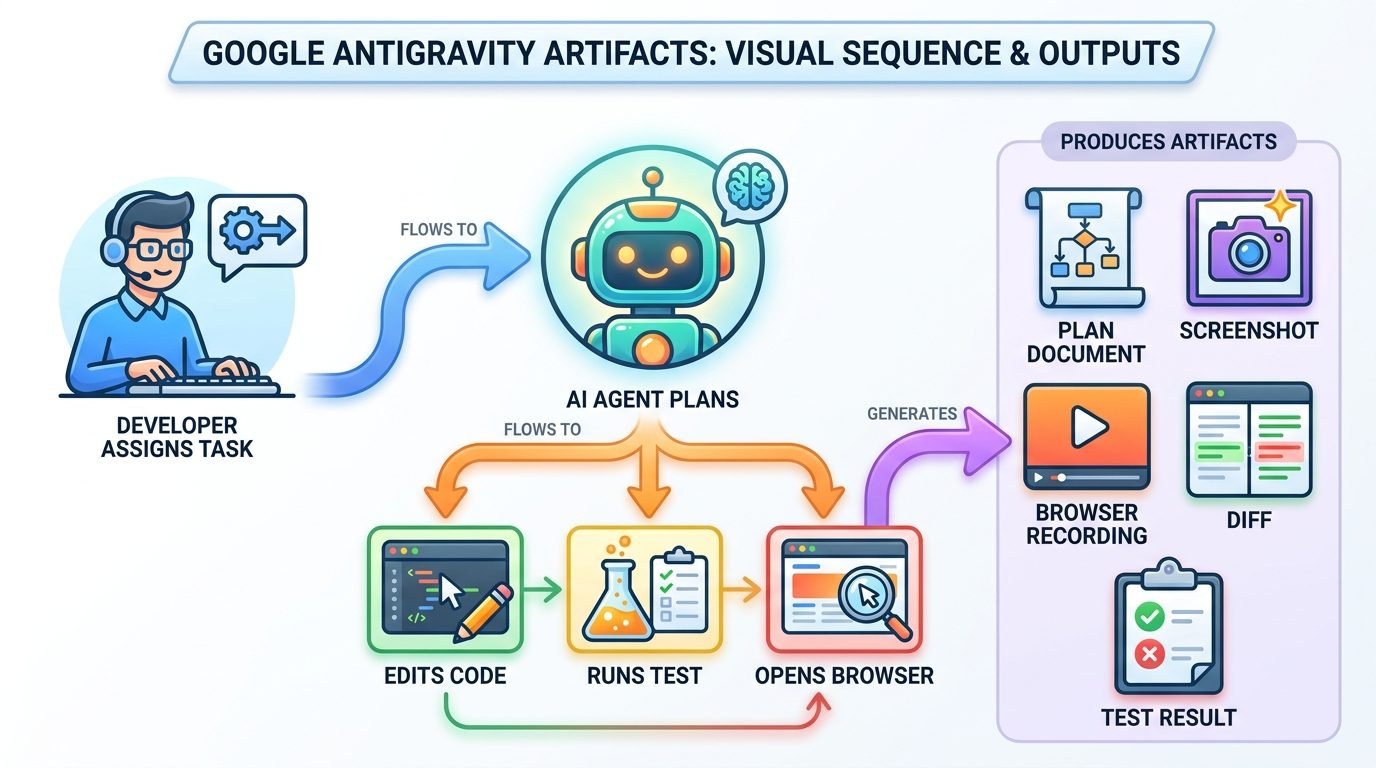
A good Artifact answers five questions
A useful Artifact should make review easier by answering: What did the agent think the task was? Which files or systems did it touch? What evidence shows the task works? What remains uncertain? What should the human reviewer inspect next? If an Artifact cannot answer those questions, it is decoration, not verification.
The feedback loop is also important. Google describes the ability to leave feedback directly on an Artifact, similar to commenting on a document, so the agent can incorporate that input. That is better than repeatedly saying “try again” in chat. The comment is anchored to evidence. It narrows the next step.
This is where Antigravity’s story overlaps with broader Google Labs research. In a June article about Jules, Google discussed proactive coding agents that move from narrow tasks toward goals and need an “insight policy”: knowing what matters, what evidence supports it, and whether to interrupt the developer. That research framing helps explain why Artifacts are not a nice-to-have. Agentic tools need better ways to show judgment.
A Safer Google Antigravity Workflow for Real Projects
The safest way to use Google Antigravity is to treat it like a junior-to-mid-level developer with strong tool access and inconsistent judgment. That sounds harsh, but it is the right mental model. Give it clear tasks, limit the blast radius, ask for a plan, inspect evidence, run tests, and keep ownership of the final decision.
Step 1: Turn vague goals into bounded tasks
Bad prompt: “Improve the dashboard.” Better prompt: “In the dashboard route, add empty-state copy for new users, keep existing styling tokens, do not change authentication code, and provide a screenshot plus the test command you ran.” The second prompt creates boundaries. It tells the agent where to work, what not to touch, and what evidence to return.
Step 2: Ask for a plan before edits
Before the agent changes files, ask it to list the files it intends to inspect, the likely implementation path, and the verification steps. This is useful even if the tool can act autonomously. Plans expose misunderstandings early, when they are cheap to fix.
Step 3: Choose the right surface
Use Editor View for a single file or a change you want to steer line by line. Use Manager Surface for work that crosses editor, terminal, and browser. Use CLI when the task belongs in a terminal-driven workflow. Use managed agents or SDK only when you are building agent capabilities into your own systems or workflows.
Step 4: Require Artifacts
For UI tasks, ask for before/after screenshots or browser recordings. For backend tasks, ask for test output, changed files, and a short risk note. For migrations, ask for a checklist of completed and skipped cases. Good Artifacts reduce review friction and make it harder for the agent to hide uncertainty behind a polished summary.
Step 5: Review the diff as if a human submitted it
Do not let agent output bypass normal engineering discipline. Review the diff, run tests locally or in CI, check sensitive files, inspect dependency changes, and reject broad edits that were not requested. If you use protected branches, keep them protected. If you use code owners, keep code owners involved.
Step 6: Save reusable context carefully
Google says Antigravity treats learning as a core primitive and can save useful context and snippets to a knowledge base. That can reduce repeated instructions, but it also creates a hygiene responsibility. Store stable project conventions, not secrets. Store testing commands, architecture notes, and style preferences. Do not store credentials, personal data, or temporary debugging assumptions as if they are permanent truth.
This workflow mirrors the pattern we recommend in other AI coding guides on the site. In OpenAI Codex Computer Use, the same idea appears as permissions and safe automation. In Claude Code Hooks, it appears as pre- and post-action guardrails. Antigravity’s version is Artifacts, manager-style supervision, and sandboxed agent work.
Safety, Sandboxing, Credentials, and Git Policies
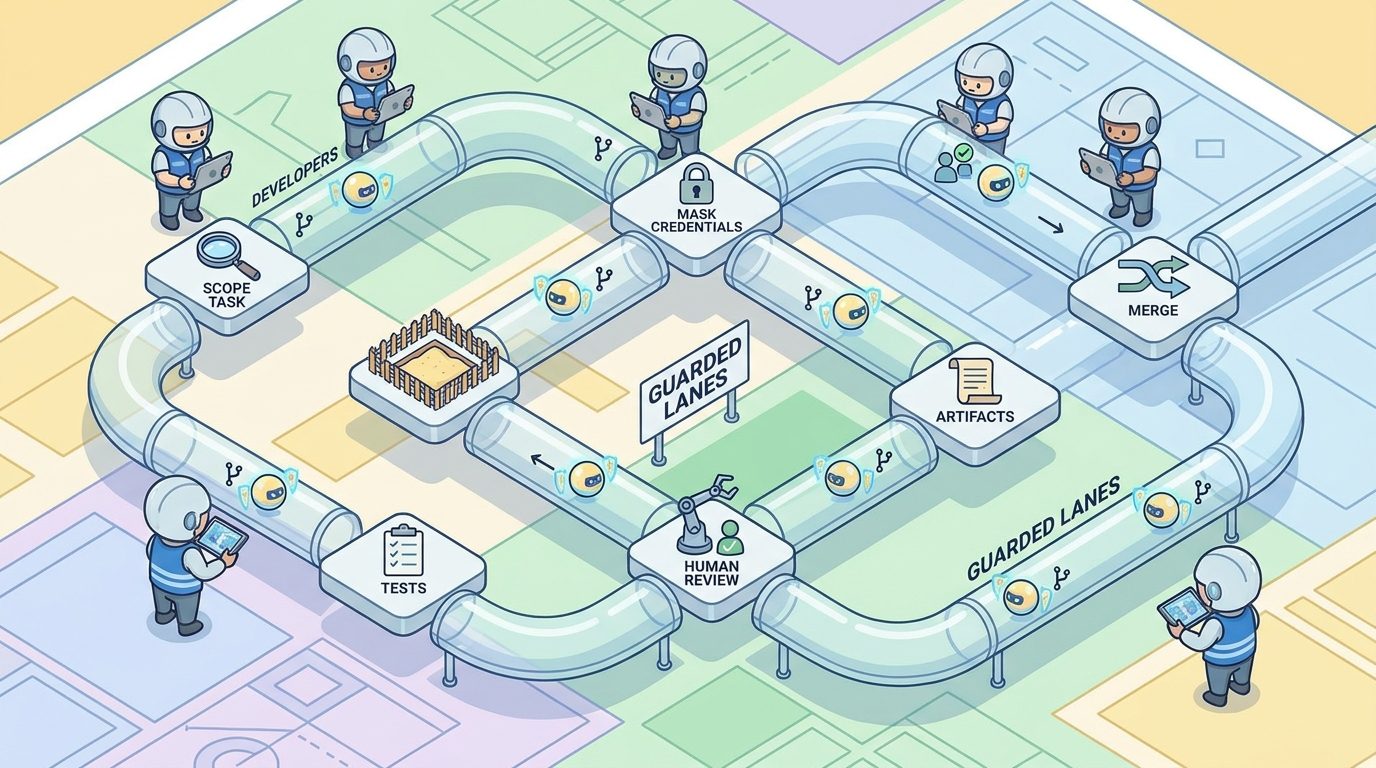
Agentic development tools become risky when they can touch terminals, browsers, credentials, repositories, issue trackers, deployment settings, and production-like data. Google’s I/O developer recap specifically mentioned cross-platform terminal sandboxing, credential masking, and hardened Git policies. Those are exactly the controls developers should look for before using a tool in real projects.
The safety question is not “can the model write good code?” It is “what can the model access when it is wrong?” A coding agent that can run shell commands, modify files, open a browser, and push branches needs boundaries. If it operates in a disposable sandbox with masked credentials and protected Git workflows, mistakes are easier to catch. If it operates in your main environment with broad permissions, one bad instruction can become a real incident.
| Risk | Why it matters | Safer practice |
|---|---|---|
| Terminal commands | Agents may run broad commands, install packages, or alter local state. | Use sandboxing, review commands, and avoid running destructive operations automatically. |
| Credentials | Secrets can leak into prompts, logs, screenshots, or generated files. | Use credential masking, least-privilege tokens, and secret scanning. |
| Git changes | An agent can edit unrelated files or rewrite work unexpectedly. | Use branches, protected main, small commits, and hardened Git policies. |
| Browser automation | Agents may click through stateful web apps or expose private data in screenshots. | Use test accounts, sanitized environments, and review browser recordings. |
| Knowledge base memory | Saved context can become stale or accidentally sensitive. | Store conventions, not secrets; audit saved memories periodically. |
If you are introducing Antigravity to a team, write a small policy before the first real project. Define which repositories are allowed, which commands require approval, where Artifacts must be attached, when agents may use browsers, how secrets are protected, and who reviews agent-generated pull requests. This does not need to be bureaucratic. A one-page checklist is enough to stop most avoidable mistakes.
What Antigravity could improve
- Less context switching between editor, terminal, and browser.
- More visible evidence through Artifacts instead of vague chat summaries.
- Better orchestration for long-running or multi-step coding tasks.
- Potentially stronger safety story when sandboxing and Git policies are configured well.
What still needs caution
- Agents can misunderstand goals and confidently produce plausible wrong work.
- Large tasks can create review debt if Artifacts are weak.
- Terminal and browser access increase the blast radius.
- Team adoption needs norms around permissions, secrets, and branch protection.
Google Antigravity vs Gemini CLI, Google AI Studio, Copilot, Codex, Claude Code, and Cursor
Antigravity is easiest to understand when compared by workflow, not by hype. Most AI coding tools now overlap on chat, code edits, terminal actions, and model selection. The real differences are where the tool lives, how it handles multi-step work, how it shows evidence, and how much control developers get over environments and policies.
| Tool | Where it feels strongest | How it differs from Antigravity |
|---|---|---|
| Gemini CLI | Terminal-first Gemini workflows, quick command-line assistance, scripting-style use | CLI is a surface; Antigravity is positioned as a broader agentic development platform with Manager Surface and Artifacts. |
| Google AI Studio | Building with Gemini models, prototypes, API experiments, app generation and deploy paths | AI Studio is closer to model/app development; Antigravity is closer to orchestrating coding agents across development workflows. See our Google AI Studio Android app builder guide. |
| GitHub Copilot | IDE integration, GitHub-native workflows, completions, chat, agent features, code review | Copilot is deeply tied to GitHub and developer flow; Antigravity emphasizes manager-style orchestration, Artifacts, and Google’s agent ecosystem. |
| OpenAI Codex | Delegated coding tasks, computer use patterns, repeatable workflows, OpenAI model ecosystem | Codex coverage on AI Feature Drop has focused on safe computer use and replayable workflows; Antigravity’s key differentiator is its Manager Surface plus Artifact review model. |
| Claude Code | Terminal coding agent workflows, project instructions, hooks, permissions, developer control | Claude Code often appeals to terminal-heavy developers; Antigravity packages orchestration into a Google development platform with editor and manager surfaces. |
| Cursor | AI-native editor experience, codebase chat, fast developer adoption | Cursor is editor-first. Antigravity is trying to be editor-plus-manager-plus-agent harness. |
The right tool depends on the task. If you live in GitHub and want pull request assistance, Copilot may be the default. If you prefer terminal-native workflows with explicit hooks and permissions, Claude Code may fit. If you want Google’s Gemini ecosystem, managed agents, and a platform that treats agent orchestration as the center of the interface, Antigravity deserves attention.
Avoid unsupported benchmark claims. Google’s Jules article shows interesting research around proactive coding agents, including exploration budgets and diagnostic insight quality, but that does not mean every Antigravity workflow will outperform every competitor. The honest evaluation is local: run your own tasks, compare quality, check review effort, and measure how much developer time actually improves.
Practical Google Antigravity Use Cases
Here are real-world task patterns where Antigravity’s Manager Surface and Artifacts can be more useful than a normal chat prompt.
1. Reproduce and fix a UI bug
Give the agent the route, bug description, expected behavior, and test account constraints. Ask it to reproduce the issue in the browser, capture a screenshot, propose the fix, implement the smallest change, and return before/after Artifacts. This is a strong fit because browser verification matters.
2. Add a small feature with tests
Example: “Add export-to-CSV for this table, keep the current design, include unit tests for empty rows and special characters, and show the changed files.” The task is bounded, testable, and easy to review. The agent can save you boilerplate time without turning into an uncontrolled rewrite.
3. Generate an implementation plan for a migration
Do not ask the agent to migrate an entire app on the first pass. Ask it to inspect the codebase and create an Artifact that groups files by risk, identifies dependencies, proposes phases, and flags unknowns. Then delegate one small phase.
4. Create regression tests for a known bug cluster
Google’s Jules research post discussed using related bug histories to reveal higher-level goals. You can apply that idea manually: collect three similar bugs, ask Antigravity to identify the shared failure mode, then generate tests that lock down the behavior. Keep the implementation separate from the diagnosis so you can review both.
5. Prepare a pull request review checklist
For a large diff, ask the agent to produce a review Artifact: risky files, missing tests, behavior changes, security-sensitive areas, and recommended manual checks. This does not replace code review. It makes review more focused.
Antigravity Task Fit Checker
Use this lightweight checker before delegating a task. It is not an official Google tool. It simply helps you decide whether a task belongs in Editor View, Manager Surface, or a more controlled manual workflow.
The key lesson is that Antigravity is most useful when delegation creates leverage without destroying reviewability. If the task is too vague to test, too risky to sandbox, or too large to inspect, improve the task before using an agent.
Why This Topic Has a Search Gap
The current search landscape around Google Antigravity is likely to be split between official Google announcements, developer reactions, and surface-level “new AI IDE” summaries. That leaves a practical gap for a guide that explains how Manager Surface, Artifacts, CLI, sandboxing, managed agents, and SDK fit into an actual developer workflow.
AI Feature Drop’s analytics support this angle. In the latest GA4 snapshot used for this article, coding-agent and workflow explainers were among the strongest posts: Copilot Cowork Skills and Plugins, Codex Computer Use on Windows, Codex Banked Resets, GitHub Copilot AI Credits Calculator, and Google Flow/Veo credits all showed meaningful activity. Organic Search was also a major channel. Search Console access was blocked by permissions during this run, so this article uses GA4, sitemap coverage, and official Google sources rather than pretending to have fresh query-level GSC data.
The internal link graph also supports a GoogleAI pillar. AI Feature Drop already has Google AI Studio, Google Workspace Studio, Google AI Edge Gallery, NotebookLM, and Google Flow coverage. Antigravity fills the agentic development gap between consumer-facing Gemini tools and developer-facing automation.
Final Recommendation: Treat Antigravity as an Agent Operating System, Not a Magic IDE
The best way to use Google Antigravity is to treat it as an operating system for agentic development. That means your job changes from “write every line” to “shape the task, choose the right surface, set boundaries, demand evidence, and review the result.” That is a real productivity shift, but only when you keep the work scoped and verifiable.
Start small. Use Editor View for focused edits. Use Manager Surface for one bounded UI or bug-fix task. Require a plan and Artifacts. Keep the agent in a branch or sandbox. Review the diff and run tests. If the workflow saves time without creating review debt, expand gradually. If it produces polished summaries but messy code, tighten the task and permissions before trying again.
Google Antigravity is important because it shows where AI coding tools are heading: away from isolated chat responses and toward orchestrated agents with their own workspaces, evidence, memory, and policy controls. That future can be useful. It can also be risky. The developers who benefit most will be the ones who learn to supervise agents as carefully as they use them.
Keep Learning on AI Feature Drop
- Google AI Studio Android App Builder — understand Google’s app-building workflow around Gemini.
- Google AI Studio Play Store Internal Testing — practical app launch workflow coverage.
- Google Flow and Veo 3 Credits Explained — another GoogleAI guide focused on access and workflow cost.
- GitHub Copilot Agent Finder Explained — compare Microsoft’s agent discovery direction.
- Codex Record & Replay Explained — compare repeatable automation patterns.
- Claude Code Hooks Explained — compare hook-based safeguards for AI coding agents.
- OpenAI Codex Computer Use Explained — compare computer-use permissions and safe automation.
Sources and References
- Google Developers Blog: Build with Google Antigravity
- Google Developers Blog: Google I/O Developer keynote recap
- Google Developers Blog: Measuring What Matters with Jules
- Google Keyword: Gemini for Science and Science Skills in Antigravity
- Google Antigravity product page
Product availability, pricing, access, model support, and safety controls can change. Always verify the current Antigravity documentation and your organization’s security policies before using agentic tools on sensitive repositories.
FAQ: Google Antigravity and AI Coding Agents
What is Google Antigravity?
Google Antigravity is an agentic development platform that combines an AI-powered editor experience with a Manager Surface for dispatching and supervising coding agents across editor, terminal, and browser workflows.
What is the Google Antigravity Manager Surface?
The Manager Surface is the interface for spawning, observing, and coordinating agents that work more asynchronously on software tasks. It is best suited for bounded multi-step work that needs verification evidence.
What are Antigravity Artifacts?
Artifacts are reviewable deliverables such as plans, task lists, screenshots, recordings, and other evidence that help developers verify what an agent did without reading raw logs line by line.
Is Google Antigravity the same as Gemini CLI?
No. Gemini CLI is a command-line surface for Gemini-powered workflows. Antigravity is broader: it includes editor, manager, Artifact, agent orchestration, and platform concepts. The CLI can be part of the Antigravity ecosystem, but it is not the whole platform.
How is Antigravity different from Google AI Studio?
Google AI Studio is mainly for building with Gemini models and prototyping apps or API workflows. Antigravity is focused on agentic software development: coordinating agents that can plan, edit, use terminals and browsers, and return verification evidence.
Is Google Antigravity safe for real codebases?
It can be useful for real codebases when used with boundaries: sandboxed environments, masked credentials, protected branches, small tasks, required Artifacts, and normal code review. Avoid broad access to sensitive repositories until your team has clear policies.
Should I use Editor View or Manager Surface?
Use Editor View for small edits and hands-on coding. Use Manager Surface for multi-step tasks where an agent can work across files, terminal, and browser while you supervise through plans, screenshots, tests, and diffs.
Can Antigravity replace a developer?
No. Antigravity can automate parts of the development workflow, but humans still define goals, review code, validate behavior, manage security, and decide what ships.
What tasks are best for Antigravity?
Good fits include bounded UI fixes, test creation, small feature implementation, bug reproduction, migration planning, and pull request review checklists. Poor fits include vague cleanup, production operations, secret-heavy workflows, and tasks with no clear verification path.
Post a Comment