
Google Agent Plugins Guide: Package Skills, MCP Servers, and Data Workflows Safely
Google is backing Agent Plugins as a portable way to package Agent Skills, MCP servers, and data workflows. This guide explains what the format does, how Google Agents CLI and Data Agent Kit fit in, when a plugin is worth using, and how to keep portable agent tooling safe instead of turning it into tool sprawl.
Google Agent Plugins: Quick Answer
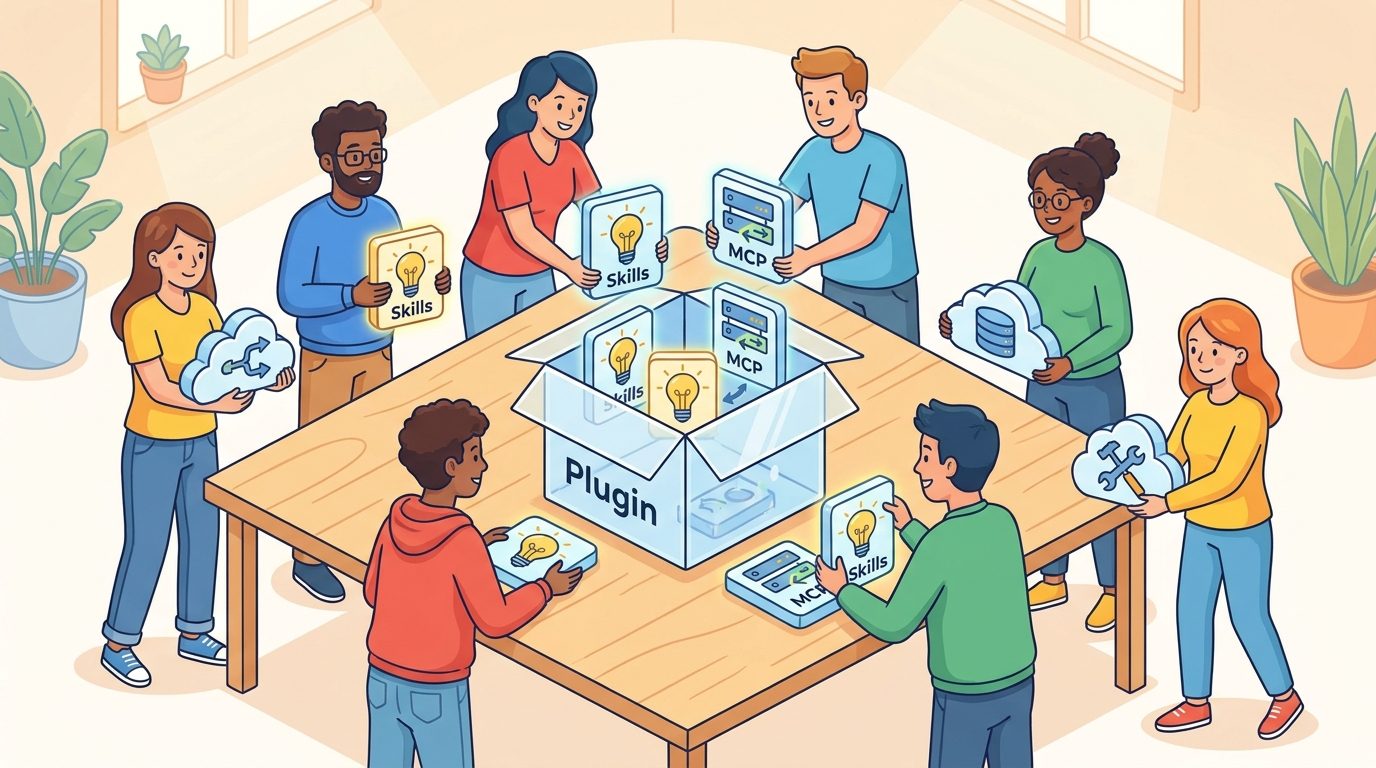
Google Agent Plugins are Google’s product-facing adoption of the open Agent Plugins specification, a small directory format for packaging Agent Skills and MCP servers into one portable unit. The core idea is simple: instead of maintaining different wrappers for every AI coding agent, CLI, IDE, or enterprise agent platform, developers can put the common parts in predictable locations and let compatible clients load them consistently.
The useful mental model is a travel case for agent capabilities. A skill tells an agent how to perform a repeatable job. An MCP server connects the agent to tools, services, or data. A plugin puts those related pieces in one portable folder with a tiny plugin.json manifest, a skills/ directory, and an optional mcp.json. Google’s announcement matters because Google joined the Agent Plugins core maintainers and said support is already shipping through Agents CLI and Data Agent Kit.
The search gap is practical. Official sources explain the specification, but developers still need a grounded workflow: when to use Agent Skills alone, when to add MCP, how Google Agents CLI and Data Agent Kit are different, what is intentionally not covered by the plugin spec, and what safety checks matter before putting a plugin near private data or production systems.
Why This GoogleAI Topic Is Worth Covering Now
The category rotation selected GoogleAI because the last live category on AI Feature Drop was Claude. The analytics signal also supports a Google developer-infrastructure topic. Recent GA4 data shows that practical AI agent workflow articles keep winning: Codex Banked Resets, ChatGPT Desktop App Codex, Codex computer use, Google Flow and Veo credits, and usage-limit explainers are among the strongest pages. Search Console is still early and low-volume, but it shows impressions around agent permissions, Codex computer use, and workflow-specific terms rather than broad product names. That points toward narrow, practical, implementation-first guides.
Google’s recent developer updates create a clear feature cluster. The Developers Blog highlighted Agent Plugins, Genkit Agent Skills, Agent Platform evaluations, model routing in API Gateway, and agent infrastructure patterns within the same period. That is not random news. It shows a coherent direction: Google wants agent workflows to become more modular, measurable, routable, and governable. A pillar article about Google Agent Plugins can connect those moving parts for developers who are confused by overlapping terms.
The topic is also differentiated from a generic “Gemini update” article. AI Feature Drop already published strong GoogleAI content around Gemini Flash routing, Gemini managed agents, Google ADK workflows, Google AI Studio, Google Flow, and Google Workspace Studio. This article adds a packaging and portability layer: how to bundle specialized instructions and tool access so they can travel across compatible agents without duplicating wrappers.
Feature discovery found several possible GoogleAI candidates: Google Cloud API Gateway model routing, Gemini Enterprise Agent Platform evaluations, Genkit Agent Skills, and Agent Plugins support across Agents CLI and Data Agent Kit. The strongest pillar angle is Agent Plugins because it touches multiple Google products, has developer demand, and sits at the intersection of skills, MCP, data connectors, and agent governance. It also has a natural comparison with existing OpenAI Codex plugin coverage while providing a Google-specific implementation story.
What Is an Agent Plugin in Google’s AI Stack?
An Agent Plugin is a directory with fixed locations for portable agent components. The Agent Plugins specification keeps the core intentionally small. A plugin has a plugin.json manifest at the root. Skills live in a skills/ folder. MCP servers can be declared in mcp.json. Client-specific extensions can live in reverse-domain directories, so a client can add its own hooks or commands without breaking the portable core.
Google’s blog makes an important point: the plugin is not the skill, and it is not the MCP server. It is the package around components that already have their own standards. Agent Skills provide reusable instructions, references, scripts, and workflow knowledge. MCP provides a way for agents to connect to tools and services. The plugin solves the packaging problem: how do you ship related skills and tools together without maintaining a different wrapper for every compatible client?
| Layer | What it does | GoogleAI example |
|---|---|---|
| Agent Skill | Reusable instructions and resources loaded only when relevant. | A Genkit skill for writing architecture decision records or running an agent-quality checklist. |
| MCP server | Tool or service connection exposed to an agent. | A data connector that lets an agent query approved BigQuery or Cloud SQL resources. |
| Agent Plugin | Portable package that bundles related skills and MCP declarations. | A Data Agent Kit plugin that ships data workflow skills plus MCP connectors. |
| Agents CLI | Google-backed command-line surface for agent building and operations skills. | Packaging expert skills for agent building, evaluation, deployment, observability, and publishing. |
| Gemini Enterprise Agent Platform | Managed platform for agent governance, evaluation, telemetry, and production operations. | Evaluate agent traces, monitor drift, and govern tool access as workflows mature. |
The restraint matters. A plugin is not a marketplace, not a permission model, not an installer, and not a trust system. The current specification leaves installation, policy, enterprise controls, sandboxing, provenance, and approval UX to the client or platform. That is a feature, not a bug, because an IDE, a terminal agent, and a managed enterprise platform have different security obligations.
How plugin.json, skills, and mcp.json Fit Together
The portable core is deliberately boring. The root plugin.json identifies the package. The skills/ directory contains one folder per skill, each with a SKILL.md file and optional scripts, references, or assets. The mcp.json file declares MCP servers with explicit types instead of forcing clients to infer transports from a configuration shape. If one MCP server fails to start, the client can skip that entry, report the failure, and still load the plugin’s usable skills.
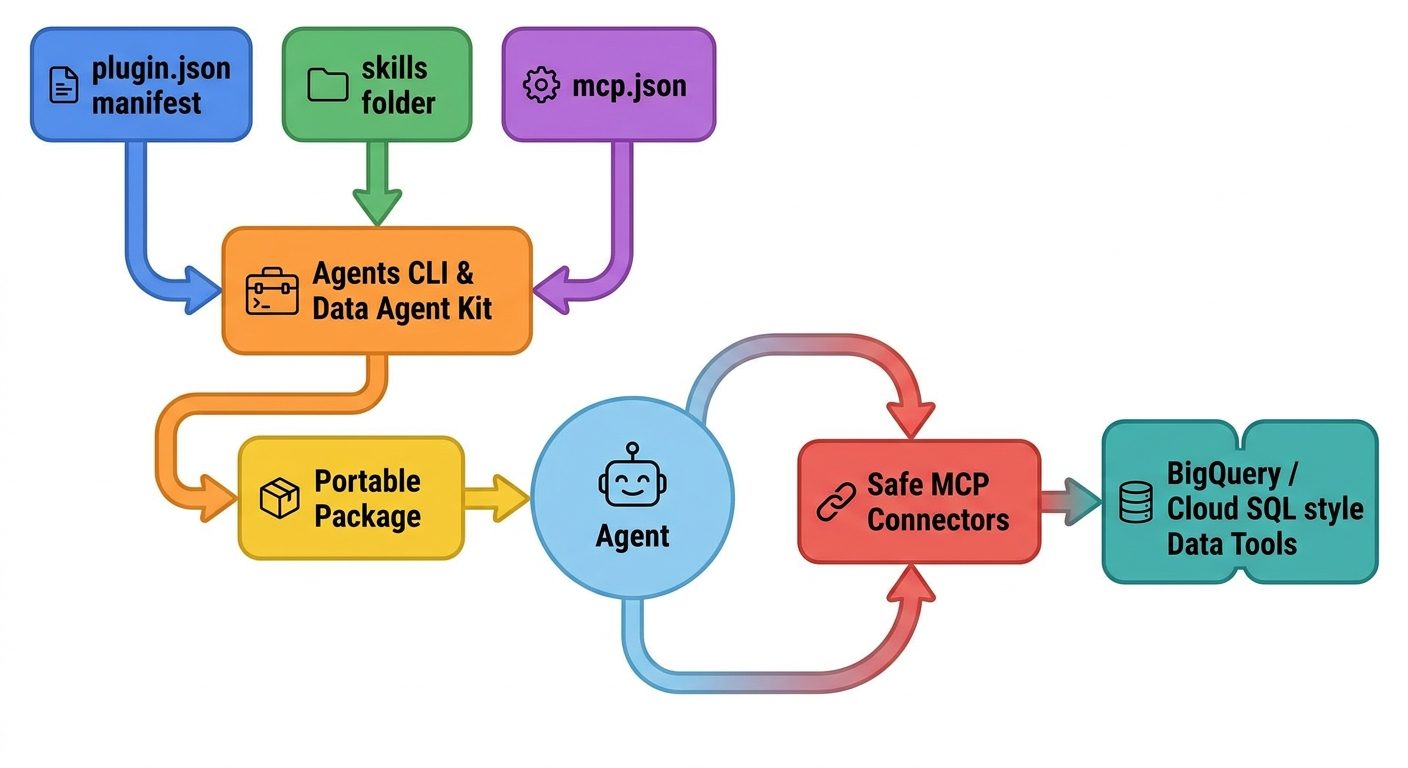
This layout helps because the agent ecosystem has been drifting toward the same pieces with different wrappers. One client may expect a skill in one directory, another may expect a manifest with extra fields, and a third may represent MCP configuration differently. Agent Plugins does not replace client innovation. It gives common components one predictable place to live and gives client-specific additions a legitimate extension namespace.
For developers, the architecture implies a useful design rule: build the workflow first, package second. If the skill is unclear, the plugin will be unclear. If the MCP server is too broad, the plugin will be risky. If the plugin mixes unrelated jobs, users will not know when to invoke it. A good plugin should feel like a named capability: “weekly data summary,” “agent evaluation flywheel,” “release notes from issues,” or “BigQuery pipeline triage,” not “everything assistant.”
Agent Skills also use progressive disclosure. The agent initially sees lightweight metadata, then loads the detailed instructions only when the task matches the skill. That is a better pattern than dumping every standard operating procedure into the always-on system context. Google’s Genkit Agent Skills post explains the same problem from a framework perspective: loading every guide into persistent context consumes tokens, dilutes focus, and increases the chance of incorrect responses.
Where Google Agents CLI and Data Agent Kit Fit
Google’s announcement names two shipping support points. Agents CLI packages Google’s expert skills for agent building, evaluation, deployment, observability, and publishing. The practical benefit is that an AI coding agent can become better at agent operations because the required procedures are packaged and discoverable instead of buried in a docs page. For builders using Antigravity, Gemini CLI, Claude Code, Cursor, or other compatible clients, the promise is portable expertise rather than vendor-specific instruction wrappers.
Data Agent Kit is more concrete for data teams. It provides plugins that bring Google Data Cloud capabilities into preferred AI coding agents or IDEs. The package can combine skills with MCP servers that connect to services such as BigQuery, Spanner, Cloud SQL, or pipeline deployment tools. A data engineer can ask an agent to inspect a query, summarize a reporting database, or help deploy a pipeline while the reusable workflow guidance and tool connections travel together.
The useful connection is maturity. Start with a skill if the workflow is only instructions. Add MCP if the workflow needs tools. Package as a plugin when related pieces need portability. Add evaluation when the workflow becomes important enough to measure. Add gateway controls when traffic, tool access, or model selection must be governed centrally.
A Practical Workflow for Building a Google Agent Plugin
Do not start by creating folders. Start by choosing one bounded job. The best first plugin is not “company knowledge assistant.” It is “summarize weekly marketing performance from approved warehouse tables,” “evaluate this ADK agent before release,” “turn support tickets into a defect triage brief,” or “review a data pipeline migration.” Narrow jobs are easier to test, easier to permission, and easier to explain to users.
Step 1: Write the skill as if no tools exist
Capture the trigger, input requirements, constraints, process, output format, and examples in SKILL.md. Include references or scripts only if they are stable and directly useful. If the skill cannot produce a helpful answer without tools, it is probably too vague. A strong skill should improve behavior even before MCP enters the picture.
Step 2: Add only the MCP server the job needs
For a data plugin, that might be a read-only query tool. For an evaluation plugin, it might be access to trace artifacts or evaluation configuration. For deployment, it might be a tightly scoped command wrapper. Avoid bundling every service the team uses. Least privilege is not just a security slogan; it also improves agent focus.
Step 3: Create the plugin wrapper
Add plugin.json, place the skill under skills/, declare tool servers in mcp.json, and keep client-specific extras in a namespaced extension directory. Keep the manifest small. Do not hide important user expectations in client-only files if the portable skill needs them.
Step 4: Test across three inputs
Use a perfect input, a messy input, and a missing-context input. The perfect input checks whether the workflow works. The messy input checks resilience. The missing-context input checks whether the agent asks for clarification instead of hallucinating data or calling the wrong tool. This simple three-test pattern catches many plugin mistakes early.
Step 5: Decide the distribution boundary
A personal plugin can be lightweight. A team plugin needs ownership, version notes, and usage examples. A workspace plugin needs permissions, review, and a rollback plan. A plugin that touches production data should also have logging expectations and an approval boundary before write actions.
Best Google Agent Plugin Use Cases
The strongest use cases are not flashy demos. They are repeatable workflows where the agent needs both specialized process knowledge and a bounded tool surface. Google’s Data Agent Kit example is useful because data work often fails when instructions and access are separated. A developer may know the right query review process but not have the right warehouse context. Or the agent may have a tool but no team-specific rule for how to summarize risk. A plugin can bring the two together.
| Use case | What the skill contains | What MCP may expose | Review checkpoint |
|---|---|---|---|
| Weekly data summary | Report structure, definitions, caveats, and plain-English writing rules. | Read-only warehouse query tool or saved metric endpoint. | Human checks anomalies and business interpretation before sending. |
| Agent evaluation flywheel | Eval setup steps, metric selection, failure taxonomy, and quality threshold rules. | Trace lookup, evaluation runner, or artifact storage access. | Developer reviews failing cases before changing production behavior. |
| Pipeline migration triage | Checklist for schema changes, rollback, dependencies, and test commands. | Metadata read access, CI status, and deployment dry-run tool. | Human approves write/deploy action separately. |
| Documentation QA | Style guide, source citation rules, and release-note template. | Docs search or repository read access. | Editor verifies claims and removes private references. |
| Model routing planning | Routing decision criteria, fallback policy, latency/cost tradeoffs. | Gateway config read access or safe config generation helper. | Platform owner reviews changes before applying. |
Notice the pattern: the plugin does not replace responsibility. It packages routine expertise so the human can review higher-level decisions. That is why plugins fit well with Google’s broader agent evaluation story. If a plugin is important enough to use repeatedly, it is important enough to test against known cases and monitor as real usage changes.
Security Rules for Google Agent Plugins
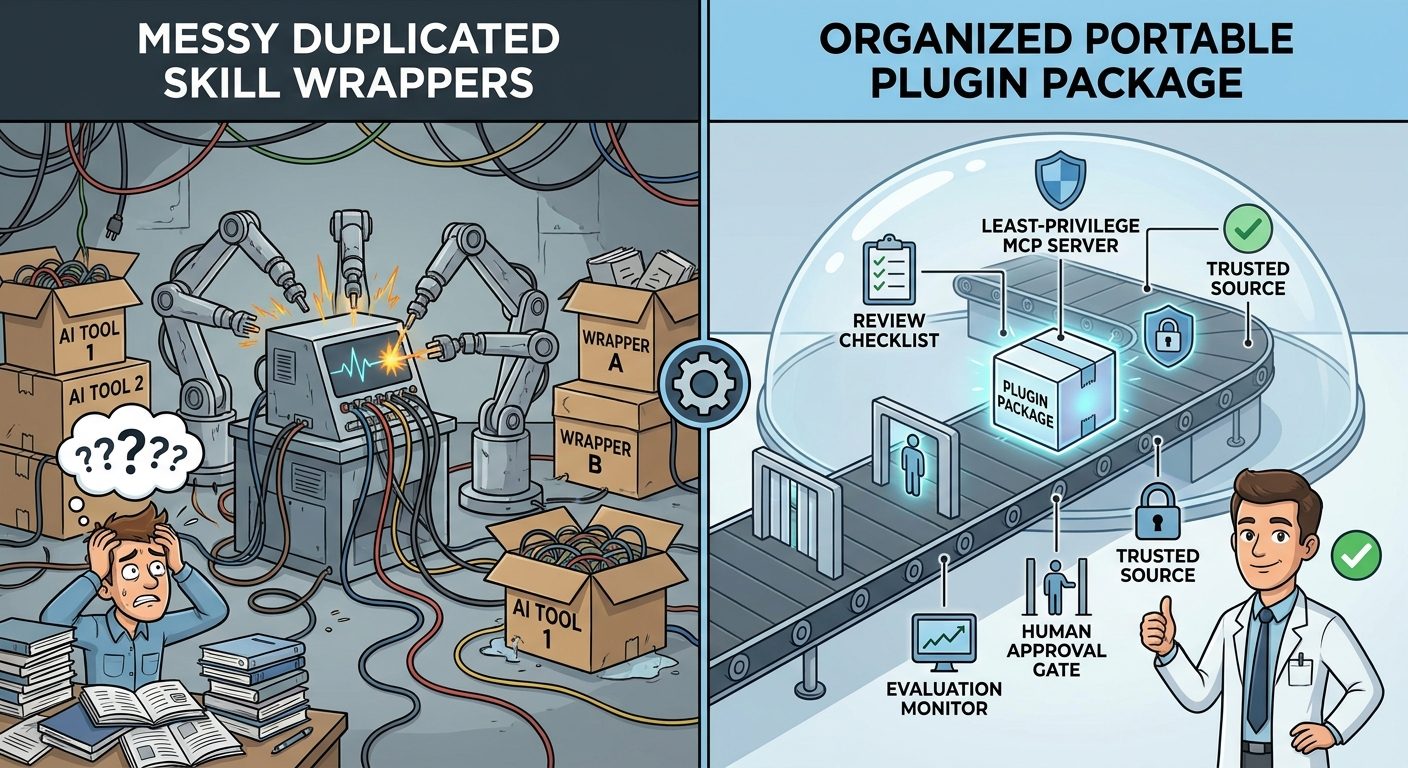
Security starts with a blunt distinction: Agent Plugins v1 is a package format, not a trust system. It does not define install safety, sandboxing, permission prompts, provenance checks, or enterprise policy. That means developers and organizations must treat plugins like code plus tool configuration, not like harmless prompt snippets. A plugin can carry instructions that influence agent behavior and MCP declarations that connect to valuable systems.
Safe plugin habits
- Install from trusted repositories or reviewed internal sources.
- Read the skill instructions before letting an agent act on private data.
- Scope MCP servers to the narrowest useful capability.
- Prefer read-only tools until the workflow proves itself.
- Keep write, deploy, send, and delete actions behind human approval.
- Use evaluation cases for important production workflows.
Risky plugin habits
- Installing unknown plugins because a catalog result looks convenient.
- Bundling unrelated skills and tools under a vague name.
- Granting broad cloud permissions to a plugin used for a small task.
- Letting agents retry tool calls without inspecting traces or diffs.
- Copying plugin folders between clients without checking extension files.
- Assuming the plugin spec itself handles security.
For teams using Google Cloud, the governance path is clearer than for hobby usage. Start with local or development workflows, then move toward Agent Platform evaluation, telemetry, and gateway controls when the workflow touches production. The Agent Platform evaluation announcement is relevant here because it gives teams a way to measure agents during development and after launch using consistent metrics, online monitors, drift alerts, and trace review. Packaging without measurement is convenient; packaging with measurement becomes operationally trustworthy.
Data access deserves special care. A Data Agent Kit plugin that helps agents query BigQuery or Cloud SQL can be extremely useful, but it must be designed around least privilege. The agent should only see the datasets, tables, or actions needed for the workflow. If a plugin can query customer data, output rules should explicitly prevent leaking private details into public summaries. If a plugin can propose changes to pipelines or configuration, it should generate a reviewable plan before any write action.
Agent Plugins vs Genkit Skills vs API Gateway Model Routing
Google’s recent AI developer updates can feel overlapping, but each solves a different layer of the agent stack. Agent Plugins solve packaging. Genkit Agent Skills solve context efficiency and reusable expertise inside an application. API Gateway model routing solves centralized traffic routing across model backends. Agent Platform evaluations solve quality measurement. Confusing those layers leads to overbuilt systems.
| GoogleAI feature | Problem it solves | Use it when |
|---|---|---|
| Agent Plugins | Portable package for related skills and MCP servers. | You need a capability to travel across compatible clients. |
| Genkit Agent Skills | Load specialized instructions only when needed. | Your application needs modular expertise without bloating context. |
| Data Agent Kit | Bring data-cloud workflows into coding agents and IDEs. | Agents need safe, repeatable access to data assets and pipelines. |
| API Gateway model routing | Centralize routing to Gemini, Claude, or OpenAI-compatible models. | Your app needs one stable endpoint and backend model flexibility. |
| Agent Platform evaluations | Measure quality, safety, grounding, tool use, and drift. | Your agent workflow is important enough to monitor before and after launch. |
The recommended path is incremental. If your only problem is prompt reuse, start with a skill. If your problem is tool access, add MCP carefully. If your problem is portability across clients, package the components as a plugin. If your problem is production quality, add evaluations and telemetry. If your problem is model routing and governance, consider gateway patterns.
Search-Gap Findings and Article Angle
The current search results around Agent Plugins are dominated by official sources, specifications, GitHub repositories, and early developer announcements. That is useful for implementers who already know what they want, but it creates a gap for practical explainers. Developers are asking simpler questions: Is a plugin different from a skill? Is it safe? Does Google support it? Does Data Agent Kit use it? Do I need MCP? Can I use one plugin across different AI coding agents?
This article targets those questions instead of repeating the specification. The primary keyword is Google Agent Plugins. Secondary terms include Agent Plugins specification, Google Agents CLI plugins, Data Agent Kit plugins, Agent Skills, MCP servers, Genkit skills, agent plugin safety, and portable AI agent workflows. The intent is informational with implementation guidance: readers want to understand the feature, decide whether it applies to their workflow, and avoid obvious safety mistakes.
AI Feature Drop’s internal link plan reinforces that intent. Readers who want Google workflow background can continue to the Google ADK workflows guide, the Google ADK dynamic workflows guide, the Gemini managed agents guide, the Gemini Flash-Lite routing guide, and the Google AI Studio Android app builder guide. Readers comparing agent packaging across ecosystems can also read the OpenAI Codex Agent Plugins guide and the OpenAI Codex Skills guide.
Google Agent Plugin Implementation Checklist
Use this checklist before you package or adopt a plugin. It is intentionally practical and conservative because most plugin failures are not caused by syntax. They are caused by unclear purpose, broad permissions, weak testing, and no owner.
- Name the job: one plugin should have one clear job family, not a grab bag of capabilities.
- Write the skill first: define trigger, inputs, constraints, output format, and examples before adding tools.
- Limit MCP: expose only the tools the skill actually needs, preferably read-only at first.
- Review the manifest: keep
plugin.jsonsmall and predictable; do not rely on hidden client-specific behavior for core instructions. - Test missing context: the agent should ask clarifying questions rather than invent facts or call random tools.
- Protect private data: write rules for citations, redaction, and what can be copied into outputs.
- Gate write actions: deploy, delete, send, update, and credential-changing steps should require human approval.
- Version changes: maintain a small changelog so users know when workflow behavior or permissions changed.
- Measure important workflows: use evaluation cases, traces, or monitoring when plugin output affects production decisions.
- Retire stale plugins: remove packages that no longer have an owner or have drifted from the current workflow.
If you are adopting a plugin created by someone else, ask three questions before installation: who maintains it, what tools can it expose, and what data could the agent access through it? If those answers are unclear, do not install it into a sensitive workspace. The convenience of portability should not outrun the review process.
Sources and References
- Google Developers Blog: Agent Plugins package your skills, tools, and more
- Agent Plugins specification
- Google Developers Blog: Enable on-demand expertise with Agent Skills in Genkit Go
- Google Developers Blog: Agent and Model Evaluations in Gemini Enterprise Agent Platform are now GA
- Google Developers Blog: Model routing with Google Cloud API Gateway
- GoogleCloudPlatform Data Agent Kit
- Google Agents CLI documentation
- Model Context Protocol documentation
Feature availability, compatible clients, and Google Cloud product names can change. Verify the active specification, repository docs, cloud permissions, and supported clients before using plugins in production.
FAQ: Google Agent Plugins
What are Google Agent Plugins?
Google Agent Plugins refers to Google’s support for the open Agent Plugins specification, which packages Agent Skills and MCP server declarations into a portable plugin directory that compatible agent clients can load.
How are Agent Plugins different from Agent Skills?
An Agent Skill is reusable task knowledge, usually stored in a SKILL.md file with optional resources. An Agent Plugin is the package around one or more related skills and optional MCP servers so the capability can travel across clients.
Does a plugin always need an MCP server?
No. A plugin can contain skills without MCP, but if you only have one simple skill and no need for portability, the skill alone may be simpler. MCP is useful when the workflow needs a tool or service connection.
What Google products support Agent Plugins?
Google says Agents CLI and Data Agent Kit support the format. Agents CLI packages expert skills for agent building and operations. Data Agent Kit provides plugins for Google Data Cloud workflows and compatible coding agents.
Are Agent Plugins secure by default?
No package format is automatically secure. Agent Plugins v1 does not define install safety, sandboxing, permission prompts, provenance, or enterprise policy. Review the source, skill instructions, MCP declarations, and client permissions before use.
When should I build a plugin instead of a normal prompt?
Build a plugin when the workflow repeats, has a clear standard, may need related tools, and should be distributed as one capability. Use a normal prompt or simple skill for one-off work or lightweight instructions.
Can Agent Plugins work across non-Google clients?
That is the point of the vendor-neutral specification. Compatibility depends on client support, but the format is designed to reduce duplicated wrappers across AI coding agents, IDEs, and CLIs.
How should teams govern Data Agent Kit plugins?
Start read-only, scope data access narrowly, document the job, test with safe examples, require human approval for write or deploy actions, and use evaluation or telemetry when the workflow affects production decisions.
Post a Comment