
Gemini Flash-Lite Routing Guide: Cut API Costs Without Breaking Agent Quality
Gemini Flash-Lite is useful when your app needs high-volume, low-latency AI work. The real win comes from routing: sending simple tasks to Flash-Lite, escalating hard reasoning to Gemini Flash, and adding quality checks so savings do not turn into unreliable automation.
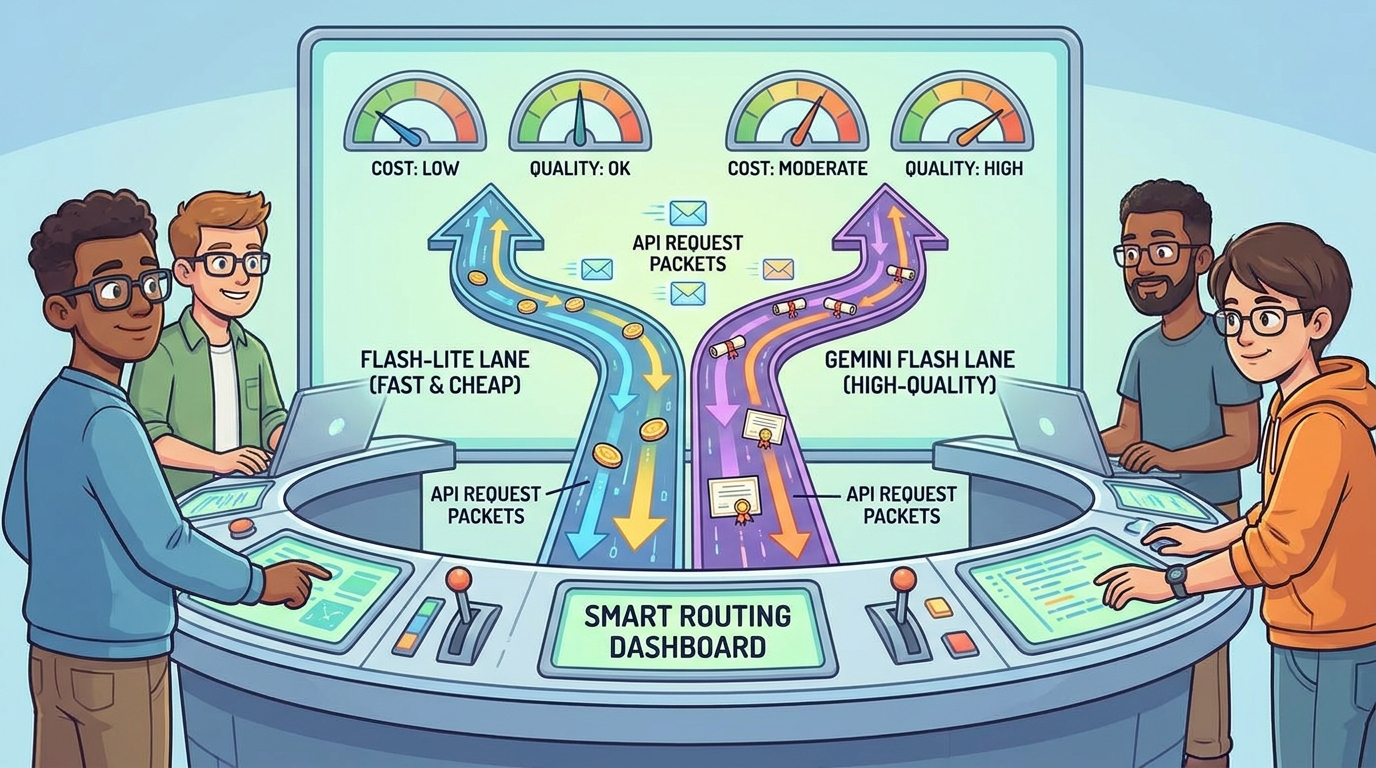
Quick Answer: Use Gemini Flash-Lite as the First Pass, Not the Only Brain
Gemini Flash-Lite routing means your application decides which Gemini model should handle each step in a workflow. Instead of sending every request to the most capable model, you route simple, repetitive, or high-volume tasks to Flash-Lite and reserve Gemini Flash for harder reasoning, agent planning, multimodal understanding, code-heavy decisions, or final answers where quality matters more than the lowest possible token price.
The practical pattern is simple: classify the task, choose the cheapest model that can safely handle it, verify the result, and escalate only when the result is uncertain, risky, long-context, or user-visible. This is especially useful for agentic products because agents often perform many small substeps before the user sees one final result. If every substep uses the same high-capability model, costs grow quietly. If every substep uses the cheapest model, quality can collapse. Routing gives you the middle path.
This cluster guide supports our broader Gemini 3.6 Flash guide. The pillar explains the model shift and why faster, lower-cost agent workflows matter. This article focuses on one tactical implementation question developers are now searching for: how do you actually route work between Flash-Lite and Flash without creating brittle AI behavior?
Why Gemini Flash-Lite Routing Matters for AI Apps
Google describes Gemini 3.5 Flash-Lite as a cost-efficient model optimized for high-volume agentic tasks, translation, and simple data processing, while Gemini 3.6 Flash is positioned as a speed-and-intelligence model for agentic and multimodal tasks. That model lineup creates a clear product opportunity. Developers do not need one model choice for an entire app. They need a routing layer that reflects the shape of each task.
The search gap is obvious in developer behavior. People ask about Gemini API pricing, Flash-Lite benchmarks, model selection, high-throughput agent workflows, and whether cheaper models are good enough for production. Official docs explain models and pricing, but they rarely show a complete routing playbook for real products: support bots, research agents, lead enrichment systems, internal search, content pipelines, coding helpers, and document automation.
Analytics for AI Feature Drop also point in the same direction. Recent GA4 data shows practical AI feature guides outperform generic coverage, with strong engagement on coding-agent cost articles and API workflow explainers. Google Search Console impressions are still modest, but pages around developer-specific workflows are already appearing for long-tail queries. That suggests the best cluster topic is not a broad “Gemini update” post. It is a narrow implementation guide that answers a concrete workflow question.
Routing is also the difference between a demo and a maintainable product. In a demo, you can call the strongest model every time and ignore unit economics. In a real app, you need latency targets, cost limits, fallback behavior, quality evaluation, logs, and escalation thresholds. Flash-Lite is valuable because many agent steps are not deep reasoning tasks. They are small operations repeated hundreds or thousands of times.
Gemini Flash-Lite vs Gemini Flash: What Each Model Should Handle
The first mistake is asking “which model is better?” That is too broad. The better question is “which model is good enough for this specific step?” A model can be perfect for one part of a pipeline and risky for another. For example, Flash-Lite may be ideal for tagging support tickets, normalizing messy names, extracting dates, or rewriting search queries. The same model may be the wrong choice for a complex legal summary, autonomous code edit, or final answer that needs careful nuance.
| Workflow step | Good Flash-Lite fit? | When to escalate |
|---|---|---|
| Intent classification | Yes. Short inputs and fixed labels are usually routing-friendly. | Escalate if the confidence is low, the label changes permissions, or the user asks a sensitive question. |
| Data extraction | Yes, especially with a strict JSON schema and validation. | Escalate when source text is ambiguous, long, multilingual, or legally/financially important. |
| Bulk document preprocessing | Often yes. It is a classic high-throughput use case. | Escalate samples or failures, not every document by default. |
| Agent planning | Sometimes for tiny plans, but be careful. | Use Gemini Flash when the plan affects tools, files, money, access, or user trust. |
| Tool-use decisions | Use cautiously for low-risk tools. | Escalate when tools write data, call external APIs, run code, or expose private information. |
| Final answer generation | Good for short, low-risk answers. | Escalate for expert advice, complex synthesis, brand voice, or user-visible deliverables. |
| Quality review | Useful as a cheap first reviewer. | Use a stronger model for final review when failure cost is high. |
Think of Flash-Lite as the efficient operations layer. It keeps the conveyor belt moving. Think of Gemini Flash as the judgment layer. It handles steps where the system must reason, combine context, or make a decision the user will care about. This split is not glamorous, but it is how AI products become affordable.
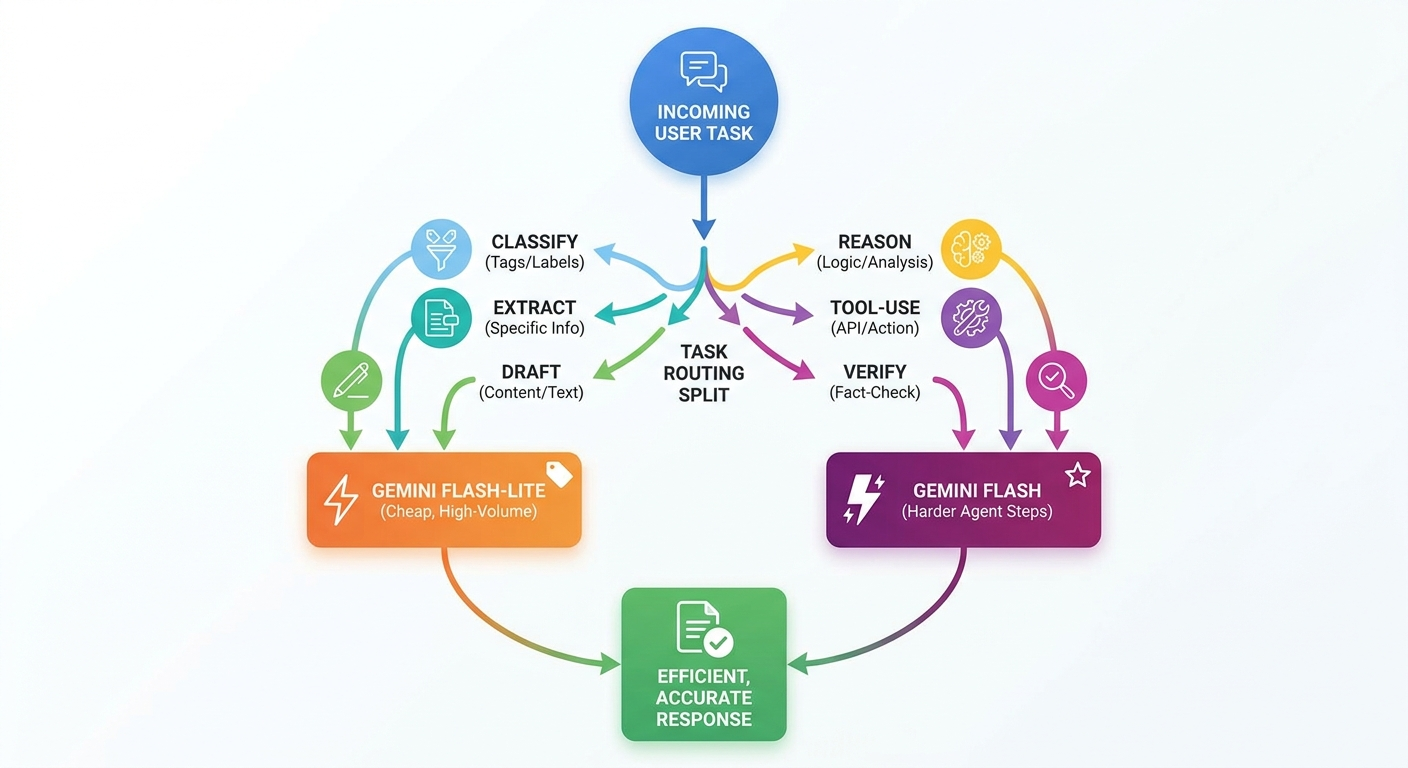
The Routing Rules That Keep Costs Low and Quality Stable
A good routing layer should be boring. It should not depend on a magical prompt that says “choose the best model.” It should be explicit, logged, testable, and easy to change. Start with rules before building fancy automation. Rules are easier to audit, easier to explain, and easier to improve when production logs show which tasks are being misrouted.
The most important rule is escalation. Cost savings are only useful if your system knows when not to be cheap. A support system that saves money but misroutes angry enterprise customers is not optimized. A document processor that saves tokens but corrupts invoice fields is not efficient. A coding agent that cheaply edits the wrong file is worse than expensive; it is dangerous. The routing layer should be cost-aware, not cost-blind.
For most applications, start with three lanes. Lane one is Flash-Lite for low-risk transformations. Lane two is Gemini Flash for complex reasoning and final deliverables. Lane three is human review for risky, irreversible, or policy-sensitive actions. This third lane is easy to forget because it is not an AI model, but it is often the guardrail that makes automation acceptable in production.
A Practical Gemini Flash-Lite Routing Workflow
Here is a routing workflow you can adapt for an AI product, internal tool, or automation pipeline. It is intentionally simple. The goal is not to build a research lab-grade router on day one. The goal is to stop sending every request to one model and start making deliberate choices.
Step 1: Define task classes
List the repeated tasks your app performs. Typical classes include classification, extraction, summarization, query rewriting, retrieval planning, agent planning, tool selection, draft generation, final answer, and quality review. Keep the list small at first. If you create twenty classes, your team will stop using the system.
Step 2: Assign a default model to each class
Choose the lowest-cost model that is likely to succeed for the class. Flash-Lite is a strong default for structured, high-volume, retry-friendly work. Gemini Flash is a better default for multi-step reasoning, context-heavy synthesis, and user-facing answers that shape trust.
Step 3: Add risk modifiers
A task class is not enough. A simple extraction from a restaurant menu is different from an extraction from a contract. Add risk modifiers such as private data, money movement, account changes, legal/medical/financial context, external tool calls, or irreversible writes. These modifiers should force escalation or human review.
Step 4: Validate output before returning it
Validation is where routing becomes reliable. For structured output, check JSON validity, required fields, enum values, confidence thresholds, and source grounding. For natural language output, check length, citation coverage, banned claims, and whether the answer actually addresses the user’s request. Flash-Lite should not get a free pass just because it is cheap.
Step 5: Retry once, then escalate
Retries can be cheaper than immediate escalation, but endless retries destroy savings. A practical rule is one cheap retry with a clearer instruction, then escalation to Gemini Flash if validation still fails. Log both attempts. If the same task fails repeatedly, update the routing rule instead of adding more retries.
Step 6: Measure the blended result
Do not judge routing only by token cost. Measure blended latency, success rate, retry rate, escalation rate, human-review rate, user satisfaction, and error cost. A routing layer that reduces model spend by 40% but doubles support tickets is not a win. A routing layer that reduces spend by 15% while keeping output quality stable is often much better.
Quality Guardrails for Flash-Lite Routing
The biggest objection to cheaper-model routing is quality. That concern is valid. Flash-Lite should not be treated as a universal replacement for larger or more capable models. It should be treated as a high-throughput worker inside a controlled system. The controls matter more than the marketing name.
Start with schema-first outputs. If your task is extraction, do not ask for a paragraph. Ask for a strict object. If your task is classification, do not ask for “what do you think?” Ask for one label from a fixed list plus a confidence score and a short reason. If your task is query rewriting, limit the number of rewrites and check that they preserve the original intent. Narrow outputs make cheaper models easier to trust.
Next, use disagreement as a signal. You can send a small sample of Flash-Lite outputs to Gemini Flash for review. You can also compare model answers on a validation set and calculate where the cheaper route fails. This does not need to be complicated. Even a spreadsheet with task type, input, Flash-Lite output, reviewer output, and error type can reveal where routing is safe and where it is not.
Finally, keep humans in the loop for high-impact decisions. The point of routing is not to remove accountability. It is to allocate model capability intelligently. A human reviewing twenty escalated cases is more sustainable than a human reviewing every low-risk classification, and it is much safer than no review at all.
What Flash-Lite routing improves
- Lower blended cost for high-volume AI workflows.
- Lower latency for simple transformations and classification.
- Better separation between cheap operations and expensive reasoning.
- More scalable agent pipelines for search, extraction, and preprocessing.
- Clearer logs for model choice and workflow economics.
What can go wrong
- Complex tasks may be routed too cheaply and lose nuance.
- Low-cost retries can quietly become expensive retry loops.
- Unvalidated outputs can corrupt downstream tools or databases.
- Teams may over-optimize token cost while ignoring support and trust costs.
- Model behavior can change, making old routing assumptions stale.
Cost Controls: How to Save Without Chasing Pennies
Google’s pricing page lists Gemini 3.6 Flash at a higher paid-tier price than Gemini 3.5 Flash-Lite, while describing Flash-Lite as the most cost-efficient GA model for high-volume agentic tasks and simple data processing. The immediate temptation is to route everything to Flash-Lite. Resist that. The right target is lower total cost per successful task, not the lowest price per token in isolation.
Successful task cost includes input tokens, output tokens, retries, escalation, failed jobs, user complaints, support time, and engineering time spent debugging bad automations. A cheaper model that needs repeated retries can be more expensive than a stronger model that succeeds once. A cheap extractor that breaks downstream billing fields can create a real business cost. So measure the full workflow.

Use a routing budget helper
This lightweight helper is not an official billing calculator. It is a planning tool for deciding whether a task should start on Flash-Lite, move to Gemini Flash, or require review.
Watch these cost metrics
- Cost per successful job: divide total model spend by validated successful outputs, not raw requests.
- Retry rate: repeated retries are often the first sign of bad routing.
- Escalation rate: too high means Flash-Lite is being overused; too low may mean the system is hiding quality problems.
- Output token length: verbose prompts and verbose outputs can erase savings.
- Cache hit rate: if your workflow uses repeated context, context caching can matter more than model choice.
- Batch suitability: background jobs may be better handled through batch-style workflows when latency is not urgent.
Practical Examples of Gemini Flash-Lite Routing
Example 1: Support ticket triage
Use Flash-Lite to classify incoming tickets by product area, urgency, language, and likely intent. Validate that the label is from an approved list. Escalate to Gemini Flash if the ticket mentions billing, account deletion, legal threats, security incidents, private data exposure, or unclear intent. The final customer reply can be drafted by Gemini Flash or reviewed by a human, while Flash-Lite handles the cheap sorting work.
Example 2: Internal document search
Use Flash-Lite to rewrite user questions into search queries, extract document snippets, and score obvious matches. Use Gemini Flash to synthesize the final answer from retrieved sources. This works because query rewriting and scoring are repetitive, while final synthesis requires nuance and source discipline. If the system cannot find strong sources, it should say so instead of inventing a confident answer.
Example 3: Lead enrichment pipeline
Use Flash-Lite for normalizing company names, extracting job titles, classifying industries, and deduping records. Escalate to Gemini Flash when the record is high value, conflicting, or being used to personalize an outbound message. Never let a cheap model hallucinate personal details. Use only provided or verified data.
Example 4: Coding assistant workflow
Use Flash-Lite to classify a bug report, summarize a small log, or generate a checklist for a known error pattern. Use Gemini Flash for code-change planning, multi-file reasoning, and final patch review. This mirrors the same cost-control logic covered in AI Feature Drop’s coding-agent posts: save the expensive reasoning for work that actually needs it.
Example 5: Content operations
Use Flash-Lite for title clustering, duplicate detection, short meta variations, and outline classification. Use Gemini Flash for final article structure, fact-sensitive sections, and editorial review. This is especially useful for teams that process many briefs but still want human-quality final publishing.
Implementation Checklist for a Gemini API Routing Layer
Before shipping, walk through this checklist. It will prevent most early routing mistakes.
| Checklist item | Why it matters |
|---|---|
| Define task classes and risk levels. | Model selection should follow product logic, not random prompt wording. |
| Set a default model for each task class. | Teams need predictable behavior and predictable debugging. |
| Create escalation triggers. | Cheap routing is safe only when the system knows when to stop being cheap. |
| Use structured output where possible. | Schemas make validation, retries, and downstream automation easier. |
| Log selected model and reason. | You cannot optimize what you do not measure. |
| Sample outputs for review. | Quality drift often appears gradually before users complain. |
| Compare blended cost, not token price only. | The business cares about successful outcomes, not only cheap API calls. |
| Keep a rollback path. | Model updates, prompt changes, or new workloads can break assumptions. |
If you already have an agent workflow, do not rewrite everything. Add routing at the edges first: preprocessing, classification, extraction, and validation. These are the safest places to start because they are structured and measurable. Once logs prove the savings are real, expand the router into drafting and review steps with stricter escalation rules.
Why This Article Fills a Current Search Gap
Search results for Gemini Flash-Lite currently lean toward pricing pages, model announcements, benchmark posts, and video commentary about API cost. Those are useful, but they leave a practical gap: developers need an implementation guide that explains how to route tasks, where Flash-Lite is safe, when to escalate, and how to measure quality. That is exactly the type of focused cluster article that supports AIFeatureDrop’s Gemini coverage without duplicating the broader pillar.
The related pillar article explains Gemini 3.6 Flash as part of a faster, lower-cost agent workflow strategy. This cluster page goes narrower. It targets the long-tail problem of building a Gemini API model router, which is more specific than “Gemini Flash guide” and more durable than a short launch-news recap. It also creates natural internal links to adjacent topics such as Genkit Agents API, Gemini background execution, and Google Workspace Studio.
Final Recommendation: Build the Router Before the Bill Surprises You
If you are building with Gemini API models, do not wait until costs become uncomfortable to design routing. Add the routing layer early, even if it starts as a simple rule table. Put Flash-Lite on the repetitive work. Put Gemini Flash on reasoning and final answers. Put humans on risky actions. Then measure the blended result.
The best AI apps will not be the ones that always use the strongest model or always use the cheapest model. They will be the ones that understand each step in the workflow and allocate capability where it matters. Gemini Flash-Lite is a strong tool for that strategy because it makes high-volume tasks more practical. But the router, validation, logs, and escalation rules are what turn a cheaper model into a reliable product architecture.
Start with one workflow this week: classify tasks, route obvious low-risk steps to Flash-Lite, validate the output, and escalate failures. Once that works, repeat the pattern across your product. That is how you cut cost without cutting trust.
Keep Learning on AI Feature Drop
- Gemini 3.6 Flash Guide — the related pillar guide for model selection and lower-cost agent workflows.
- Gemini Background Execution Guide — run long agent tasks without fragile timeouts.
- Genkit Agents API Explained — build full-stack Gemini agents with safer workflow structure.
- Google Flow and Veo 3 Credits Explained — understand credit-based AI video workflow costs.
- Gemini API File Search and Multimodal RAG — plan source-grounded Gemini workflows.
- OpenAI Codex Skills Guide — compare reusable agent workflow patterns across ecosystems.
- GitHub Copilot Localhost Testing Guide — another practical agent quality-control workflow.
Sources and References
- Google Blog: Introducing Gemini 3.6 Flash, 3.5 Flash-Lite, and 3.5 Flash Cyber
- Google AI for Developers: Gemini Developer API pricing
- Google AI for Developers: Gemini API models
- Google AI for Developers: Rate limits
- Google AI for Developers: Context caching
- Google AI for Developers: Batch API
Pricing, model availability, and rate limits can change. Always verify the active Google AI Studio or Gemini API documentation before making production cost decisions.
FAQ: Gemini Flash-Lite Routing
What is Gemini Flash-Lite routing?
Gemini Flash-Lite routing is the practice of sending simple, high-volume, or structured tasks to Flash-Lite while escalating harder reasoning, final answers, risky actions, and complex agent steps to a stronger Gemini model.
When should I use Flash-Lite instead of Gemini Flash?
Use Flash-Lite for classification, extraction, short transformations, query rewriting, simple data processing, and background jobs where outputs can be validated. Use Gemini Flash when the task needs deeper reasoning, longer context, or a trusted user-facing answer.
Is Flash-Lite safe for production apps?
It can be safe for production when paired with schemas, validation, logging, retries, escalation rules, and human review for high-impact actions. It should not be used blindly for every task.
How do I know when to escalate from Flash-Lite?
Escalate when validation fails, confidence is low, the input is sensitive, the task affects money or permissions, the answer is customer-facing, or the model needs to reason across multiple sources.
Does routing always reduce costs?
No. Routing reduces costs when cheaper-model steps succeed reliably. If Flash-Lite causes repeated retries, bad outputs, or support issues, the total cost per successful task may increase.
Should I route with prompts or code?
Use code-level rules for the first version. Prompts can help classify edge cases, but production routing should be explicit, logged, and testable.
Can I use Flash-Lite for agent workflows?
Yes, especially for agent substeps such as preprocessing, extracting, scoring, summarizing short snippets, and query rewriting. Use a stronger model for planning, tool-use decisions, and final synthesis.
What internal metric should I track first?
Track cost per validated successful job. It is more useful than raw token cost because it includes retries, escalation, validation failures, and production quality.
Post a Comment