
Gemini 3.6 Flash is not just another model name in a dropdown. It changes how developers should route everyday AI app tasks, coding-agent plans, high-volume automation, and cost-sensitive workflows. This guide explains when to use it, when to choose Flash-Lite, and how to migrate without guessing.

Gemini 3.6 Flash: Quick Answer for Developers
Gemini 3.6 Flash is Google’s stable Flash model for developers who want stronger everyday performance without treating every request like a heavyweight reasoning job. In the Gemini API changelog, Google describes it as generally available with improved token efficiency and better code and agentic planning capabilities. That makes it a strong default for production AI apps, developer assistants, workflow copilots, coding helpers, and agent plans where quality matters but cost and latency still matter too.
The companion model to understand is Gemini 3.5 Flash-Lite. Google positions Flash-Lite as a low-latency, cost-effective option for high-volume automation and subagent work. In plain English: use Gemini 3.6 Flash when the model needs to think through a task, generate a useful plan, write or revise code, or coordinate several steps. Use Flash-Lite when the task is repetitive, narrow, easy to validate, or happening at high volume.
This matters because AI app builders are moving from single-prompt demos to multi-step systems. A support bot may summarize an issue, classify urgency, retrieve context, draft a reply, call a tool, and log an action. A coding agent may inspect files, plan a patch, edit code, run tests, and explain the diff. If every step uses the most capable model, the app may be slower and more expensive than it needs to be. If every step uses the lightest model, quality may collapse at the exact point where judgment is needed. Gemini 3.6 Flash is useful because it gives developers a middle path: stronger than a tiny automation model, lighter than a premium-only architecture.
What Changed in the Gemini API Recently?
Google’s recent Gemini updates show a clear direction: Flash models are becoming the everyday workhorses for developers, while AI Studio and the Gemini API are becoming more agent-oriented. The July 21 Gemini API changelog lists Gemini 3.6 Flash and Gemini 3.5 Flash-Lite as generally available. The same note says Gemini 3.6 Flash improves token efficiency and code or agentic planning capabilities, while Flash-Lite is designed for low-latency, cost-effective high-volume automation.
That wording is important. Google is not only saying “new model available.” It is telling developers how to design systems. Token efficiency matters when your app handles long inputs, repeated interactions, or many users. Agentic planning matters when the model must break a goal into steps instead of simply writing one answer. Low-latency high-volume automation matters when you need thousands of small judgments, classifications, transformations, or subagent actions without using an unnecessarily large model for each one.
The July 6 changelog also matters because developer logs for supported Interactions API calls became viewable in the AI Studio dashboard. For real teams, logs are not a nice extra. They are how you debug bad model behavior, inspect tool calls, identify expensive steps, and prove that an agent did what it was supposed to do. A model-selection strategy is weak if you cannot observe the routes after the app runs.
Google’s I/O developer keynote adds the broader platform context. Google highlighted AI Studio integrations, one-click Cloud Run deployment, Firebase support, export to Antigravity, managed agents in the Gemini API, and developer tooling for agent workflows. That means Gemini 3.6 Flash should be understood as part of a larger shift: Google wants developers to build useful agents and AI apps, not only send isolated prompts.
temperature, top_p, and top_k are deprecated for the latest model behavior. If your app relies heavily on old tuning habits, do not blindly swap model IDs. Test output style, consistency, and cost before shipping.Gemini 3.6 Flash vs Gemini 3.5 Flash-Lite vs Older Flash Models
The most useful way to compare Gemini Flash models is not to ask which one is “best.” A better question is: what work should this part of the system perform? Model choice is architecture. It decides cost, latency, quality, failure mode, and the kind of prompt engineering you will need later.
| Model choice | Best fit | Use it when | Be careful when |
|---|---|---|---|
| Gemini 3.6 Flash | Default smart app model | You need balanced quality, coding help, multi-step planning, summarization with judgment, or agent task planning. | The task is extremely high-volume and simple enough for a lighter model. |
| Gemini 3.5 Flash-Lite | Fast automation and subagents | You need classification, extraction, routing, formatting, small transformations, or cheap helper steps at scale. | The task requires subtle reasoning, architectural judgment, or complex multi-file code changes. |
| Older Flash model IDs | Existing apps during transition | Your production system is stable and you need a careful migration plan. | You are starting a new project or relying on deprecated behavior without checking the current docs. |
| Specialized multimodal or agent endpoints | Task-specific capability | You need video, image, robotics, managed agents, file search, or other specialized Gemini API tools. | You are using them as a default just because they sound more advanced. |
For most builders, the cleanest starting architecture is simple. Put Gemini 3.6 Flash in the middle of your system as the model that handles meaningful reasoning. Put Flash-Lite around the edges for repetitive helper work. Reserve specialized models and tools for the parts of the product that truly need them. This prevents “model sprawl,” where every feature accidentally becomes a separate expensive AI experiment.
Think about a customer-support AI tool. Gemini 3.5 Flash-Lite can classify the ticket, extract product names, detect language, and draft a short internal label. Gemini 3.6 Flash can read the relevant context, produce a thoughtful answer, and decide whether the issue needs escalation. A retrieval or File Search step can bring in policy docs. A human can review edge cases. That split is cheaper and more reliable than asking one powerful model to do everything in one huge prompt.
For coding tools, the pattern is similar. Flash-Lite can label files, summarize short snippets, categorize test failures, or generate tiny boilerplate. Gemini 3.6 Flash is the better fit for planning a refactor, explaining a diff, converting a vague bug into steps, or coordinating a coding agent. If the system later needs a managed sandbox or full agent execution, that becomes a separate architectural layer rather than a hidden assumption in every request.
A Practical Routing Workflow for Gemini 3.6 Flash Apps
A strong Gemini app should not ask “which model do we like?” It should ask “what kind of work is this request?” The answer should decide the route before the prompt is sent. This is the difference between a demo and a product. Demos often send everything to one model. Products classify, route, observe, and improve.
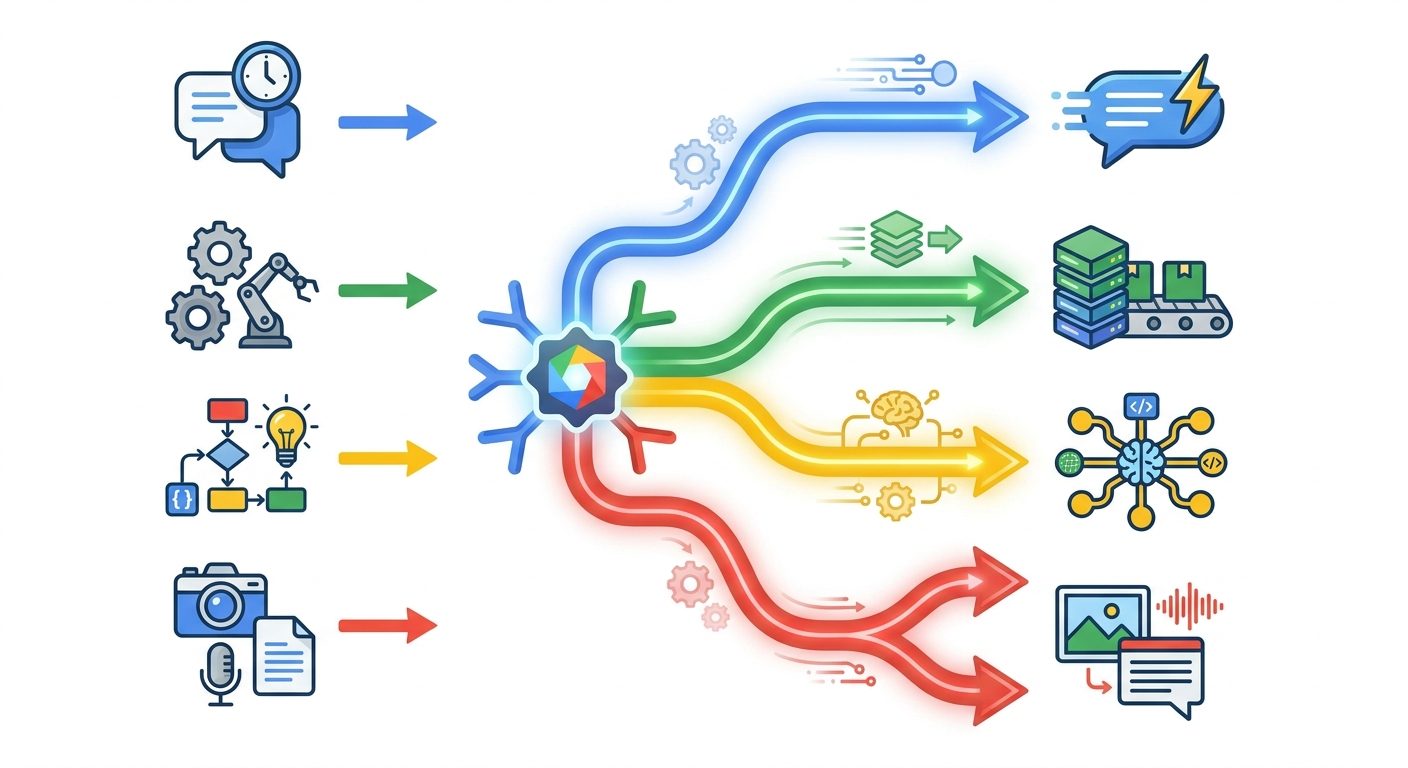
Here is a simple mental model. If the output can be checked by a regex, a schema, a short unit test, or a human glance, Flash-Lite may be enough. If the output requires a chain of reasoning, tradeoff analysis, code understanding, or careful user communication, Gemini 3.6 Flash is safer. If the output controls money, security, legal claims, medical advice, physical devices, or customer-impacting automations, route through additional review and do not let model choice be your only safety layer.
This routing approach also matches search demand around AI feature guides. Developers are not only looking for release notes. They want to know how a feature changes their work. In this case, the feature changes how you build model routers, coding assistants, support agents, internal copilots, research workflows, and SaaS automations.
How to Migrate to Gemini 3.6 Flash Without Breaking Your App
Model migration should be treated like a product release, not a find-and-replace. Even when a new model is generally available, your prompts, schemas, validation rules, and user expectations were shaped by the model you used before. A newer model may be better overall and still produce different answers, different output length, different formatting, or different refusal behavior.
Step 1: Create a migration test set
Collect real prompts from your app. Include normal requests, tricky requests, short inputs, long inputs, malformed inputs, tool-use examples, multilingual requests, and known failure cases. If your app writes code, include prompts that previously caused over-editing, missing imports, hallucinated APIs, or weak explanations. Do not test only with perfect examples.
Step 2: Compare outputs side by side
Run the same test set through your current model and Gemini 3.6 Flash. Compare correctness, length, structure, tone, schema validity, tool-call accuracy, and user-facing usefulness. For some tasks, Gemini 3.6 Flash may let you simplify prompts. For others, you may need tighter instructions because a more capable model can attempt more than you wanted.
Step 3: Review deprecated tuning assumptions
If your app depends on parameters such as temperature, top_p, or top_k, read the latest Gemini API documentation before migration. The practical advice is to move away from “magic parameter recipes” and toward task-specific prompts, schemas, examples, and validation. For structured outputs, make the structure explicit. For creative tasks, define the creative range in words. For deterministic tasks, add validation and retry logic instead of trusting one knob to control all behavior.
Step 4: Start with low-risk routes
Do not migrate every product feature at once. Start with internal tools, beta users, non-critical summaries, or tasks with strong validation. Once those routes look stable, move higher-value routes. Keep the previous model available as a fallback during the transition.
Step 5: Watch AI Studio logs and app metrics
Use AI Studio dashboard logs where supported, plus your own telemetry. Track success rate, latency, cost proxy, user corrections, schema failures, fallback frequency, and support complaints. If a model migration improves benchmark quality but increases real user corrections, the migration is not done.
Real-World Examples for Gemini 3.6 Flash and Flash-Lite
The best way to understand model routing is to map it to familiar products. Below are practical examples that show where Gemini 3.6 Flash should sit in the workflow and where Flash-Lite can reduce cost without reducing usefulness.
Example 1: AI customer support triage
A support queue receives hundreds of messages per day. Flash-Lite classifies intent, extracts product names, detects urgency, and checks whether the message needs a refund, bug report, or setup answer. Gemini 3.6 Flash writes the actual response only after retrieval brings in the right policy or product context. A human reviews sensitive cases. This gives you speed for the queue and judgment for the customer-facing response.
Example 2: Coding-agent planner
A developer asks an internal assistant to “fix flaky checkout tests.” Flash-Lite can summarize the latest test logs and categorize failure types. Gemini 3.6 Flash should plan the fix because it needs to reason about code, propose steps, and avoid over-editing. If the system uses a managed agent or sandbox, Gemini 3.6 Flash can create the plan while the agent execution layer edits and verifies in a controlled environment.
Example 3: SaaS onboarding assistant
A new user imports a messy CSV, asks questions about fields, and needs setup recommendations. Flash-Lite can normalize column names and detect missing values. Gemini 3.6 Flash can explain what the user should do next in plain language. If the assistant recommends account changes, add confirmation before taking action.
Example 4: Content research workflow
An editorial tool gathers source notes, groups them by theme, and drafts outlines. Flash-Lite can deduplicate snippets, tag sources, and format bullet lists. Gemini 3.6 Flash should create the article angle, detect contradictions, and write the final outline. This is especially relevant for AI blogs because release notes alone are not enough; readers need interpretation, examples, and limitations.
Example 5: Multimodal support or file search
If your app accepts screenshots, PDFs, or images, do not automatically push the entire multimodal payload into every step. Extract what you need, cite source context, and route only the reasoning-heavy step to Gemini 3.6 Flash. For retrieval-heavy apps, connect this with Gemini File Search or your own vector/search layer so the model sees relevant context instead of a giant pile of documents.
Cost Control and Quality Guardrails
Model cost problems rarely come from one bad request. They come from a pattern: broad prompts, unnecessary context, repeated retries, no validation, and no logging. Gemini 3.6 Flash helps because it improves the middle tier of capability, but you still need product discipline.

What gets better with Gemini 3.6 Flash
- Stronger default model for everyday AI app features.
- Better fit for coding help and agentic planning than a purely lightweight model.
- More practical routing between reasoning-heavy and high-volume tasks.
- Clearer migration path for teams building on current Gemini API features.
What still needs discipline
- Deprecated tuning habits require careful testing.
- Large context can still make workflows expensive or noisy.
- Agents need logs, checkpoints, and fallback rules.
- Flash-Lite can be misused for tasks that require judgment.
Use schemas wherever possible
For extraction, classification, routing, and tool arguments, ask for structured output and validate it. A schema gives the model less room to wander and gives your app a clear pass/fail signal. If output fails validation, retry with a narrower prompt or escalate to Gemini 3.6 Flash.
Keep prompts task-specific
A single giant system prompt that tries to handle every feature becomes hard to debug. Create smaller prompts for specific routes. A classification prompt should not contain the same instructions as a coding-agent planner. A support-answer prompt should not contain the same instructions as a data extraction prompt.
Log model routes, not only errors
Teams often log failures but forget to log successful routing decisions. Track which model handled each route, what context was sent, whether validation passed, whether a fallback happened, and whether the user accepted the output. This is how you find routes that can be downgraded to Flash-Lite or upgraded to Gemini 3.6 Flash.
Add review checkpoints to agent workflows
Agentic planning is where Gemini 3.6 Flash becomes especially interesting. Still, do not let an agent turn a broad goal into unlimited action. Ask for a plan, confirm the scope, run the minimal change, test, and summarize. This matches the pattern we recommend in our Gemini Managed Agents guide and Genkit Agents API explainer: autonomy works best when it is bounded.
Why This Topic Fits AI Feature Drop Search Demand
Analytics for AI Feature Drop show that readers respond to practical feature explainers, especially when the article connects a new AI capability with usage limits, credits, developer workflow, or setup decisions. In the last complete 28-day window reviewed for this article, high-traffic pages included guides on Codex banked resets, ChatGPT Desktop with Codex, Google Flow and Veo credits, GitHub Copilot AI Credits, and OpenAI Codex pricing. That pattern strongly favors a GoogleAI pillar that is specific and decision-oriented rather than a generic Gemini news recap.
Search Console data also shows early visibility for feature-specific AI workflow terms, especially around agent permissions, computer-use behavior, and practical setup questions. That is a useful signal even when the exact Gemini 3.6 Flash keyword cluster is newer: the site can win by explaining the concrete workflow consequences of fresh AI features faster and more clearly than broad tech news pages.
The search gap is straightforward. Official Google pages explain what shipped. Forum threads show scattered questions. Search results include some beginner AI Studio guides and news recaps. What is missing is a single practical guide that says: here is what Gemini 3.6 Flash is for, here is when Flash-Lite is enough, here is how to route requests, here is what to test, and here is how to avoid turning every AI feature into unnecessary cost.
Implementation Checklist for Developers
If you are starting a new Gemini app, use this checklist before writing too much code. It will save debugging time later.
| Decision | Recommended default | Reason |
|---|---|---|
| Default reasoning model | Gemini 3.6 Flash | Good balance for useful answers, coding help, and agent planning. |
| High-volume helper model | Gemini 3.5 Flash-Lite | Better fit for repetitive automation and subagent tasks. |
| Prompt style | Task-specific prompts with examples | Reduces confusion and makes routes easier to test. |
| Output control | Schemas, validators, and retry rules | More reliable than relying only on old sampling habits. |
| Observability | AI Studio logs plus app telemetry | Needed to debug, optimize, and control cost. |
| Agent safety | Plan, scope, execute, test, summarize | Prevents broad autonomous loops and makes review easier. |
For existing apps, create a two-week migration plan. First, gather real prompts. Second, test Gemini 3.6 Flash against your current model. Third, move low-risk routes. Fourth, introduce Flash-Lite for repetitive helper steps. Fifth, watch logs and compare user outcomes. If the migration changes tone, output length, or schema behavior, fix prompts before widening rollout.
For teams, write a short model-routing policy. It does not need to be bureaucratic. A good policy says which tasks use Flash-Lite, which tasks use Gemini 3.6 Flash, which tasks require human review, which telemetry fields are mandatory, and which model or tool calls are not allowed without approval. That policy is the difference between a maintainable AI system and a pile of clever prompts no one understands.
Keep Learning on AI Feature Drop
- Google Flow and Veo 3 Credits Explained — understand GoogleAI credit and creative workflow tradeoffs.
- How to Use Google Workspace Studio — connect Gemini-powered work apps with practical automations.
- Genkit Agents API Explained — build agentic workflows with clearer orchestration patterns.
- Gemini Managed Agents Guide — learn how managed agents fit into Gemini API architecture.
- Gemini API File Search and Multimodal RAG — improve context quality before sending prompts to the model.
- OpenAI Codex Pricing and Usage Limits — compare model-routing and cost-control habits across AI coding tools.
Sources and References
- Gemini API release notes and changelog
- Gemini Apps release updates and improvements
- Google Developers Blog: I/O developer keynote recap
- Google I/O keynote: agentic Gemini era
- Google AI for Developers
Model availability, pricing, parameters, and API behavior can change. Verify the active Gemini API documentation and your project dashboard before shipping production changes.
FAQ: Gemini 3.6 Flash for AI Apps and Agents
What is Gemini 3.6 Flash best for?
Gemini 3.6 Flash is best for balanced AI app tasks that need useful reasoning without defaulting to the heaviest model: coding help, agent planning, support replies, summarization with judgment, and multi-step workflows.
How is Gemini 3.6 Flash different from Gemini 3.5 Flash-Lite?
Gemini 3.6 Flash is the better default for reasoning-heavy work. Gemini 3.5 Flash-Lite is better for low-latency, high-volume automation such as tagging, extraction, routing, and simple subagent tasks.
Should I replace every older Flash model with Gemini 3.6 Flash?
No. Test first. Compare real prompts, output shape, latency, validation failures, and user outcomes. Migrate low-risk routes first and keep fallback options while you evaluate production behavior.
What does agentic planning mean for Gemini 3.6 Flash?
Agentic planning means the model is useful for breaking a goal into steps, coordinating context, preparing tool calls, or planning code changes. It does not mean you should let it act without scope, logs, or review checkpoints.
When should I use Flash-Lite instead?
Use Flash-Lite for repetitive tasks that are easy to validate: classification, extraction, small formatting changes, routing, short summaries, and background helper steps where speed and cost matter.
Do deprecated parameters like temperature and top_p break my app?
Not automatically, but they are a migration warning. Review the latest Gemini API docs, test your prompts, and move toward clearer instructions, schemas, examples, and validation instead of relying on old tuning recipes.
How do AI Studio logs help with Gemini 3.6 Flash?
Logs help you inspect supported Interactions API calls, debug route choices, review failures, and understand where your app may need better prompts, validation, fallback rules, or model selection.
Is Gemini 3.6 Flash good for coding agents?
It is a strong fit for coding-agent planning and code-related reasoning, according to Google’s positioning. For execution, still use scoped tasks, tests, sandboxes, and human review where needed.
Post a Comment