
OpenAI Codex Agent Plugins Guide: Package Skills, MCP Tools, and Safe Agent Workflows
OpenAI Codex Agent Plugins turn repeatable agent workflows into portable packages. This guide explains the search gap, the plugin model, how skills and MCP connectors fit together, when to use a plugin instead of a prompt, and the permission habits that keep agent automation useful without making your workspace messy or risky.
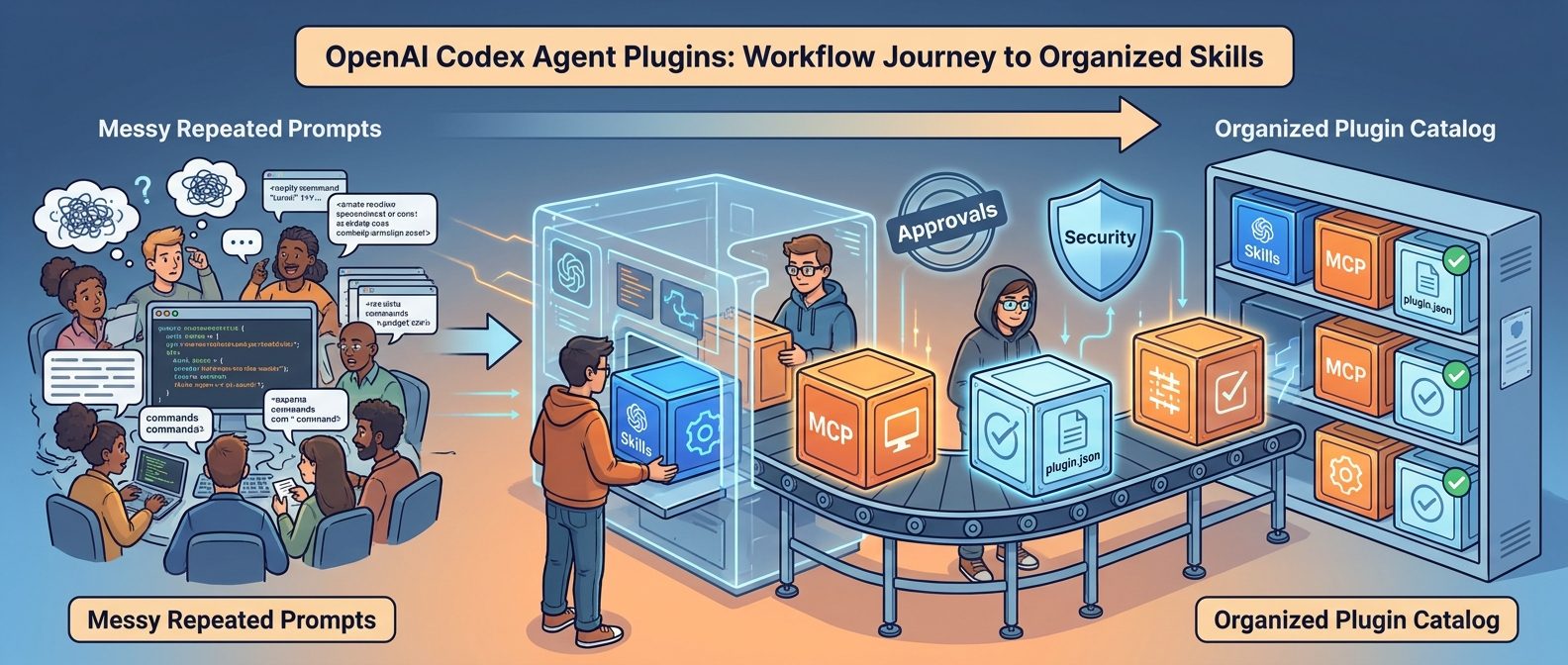
OpenAI Codex Agent Plugins: Quick Answer
OpenAI Codex Agent Plugins are installable bundles that help Codex and ChatGPT reuse workflow knowledge, approved tools, and connector setup without forcing users to paste the same instructions into every chat. A plugin can include skills, apps, app templates, and connectors backed by Model Context Protocol servers. In practical terms, plugins give teams a cleaner way to package the way they want an AI agent to work.
The short version is simple: use a skill when you only need reusable instructions; use a plugin when you want those instructions packaged with shared capabilities, approved connectors, or a workflow that other people need to install and govern. For a solo developer, that might mean a plugin that bundles API setup guidance and documentation lookup. For a team, it might mean a plugin that combines repository rules, pull request checks, internal docs, issue triage patterns, and permission boundaries.
This topic deserves a pillar guide because the search results are still fragmented. Official pages explain the components, GitHub release notes list rapid CLI changes, and community discussions ask how to actually install, trust, and use plugins. Developers need a plain-English workflow that connects all of those pieces.
Why Codex Agent Plugins Are Worth Watching Now
The recent Codex release stream shows a clear product direction: OpenAI is moving Codex from a single coding assistant toward a more portable, policy-aware agent workspace. The Codex CLI 0.147.0 release added portable Agent Plugins, plugin catalog search across local, personal, workspace, and remote sources, persistent conversation sections, the new --approve-for-me option, Cursor-managed skill imports, opt-in MCP 2026-07-28 protocol support, and security hardening around secrets, unfamiliar projects, and plugin isolation.
Those updates matter because AI coding agents are hitting a practical ceiling. Prompting alone works for one-off tasks, but it becomes brittle when the same work repeats across teams. Developers end up copying long instructions, re-explaining repository rules, reconnecting tools, and hoping the agent remembers the right standard. That pattern wastes context and creates inconsistent results. Plugins are an attempt to move from “remember to paste the mega-prompt” to “install the workflow capability once and let the agent discover the right pieces.”
OpenAI’s broader Codex positioning also reinforces this. Codex is described as a coding agent available across ChatGPT, the editor, and the terminal, with Skills used to teach team standards and workflows. The plugin directory expands that idea by making reusable capabilities easier to discover, install, and govern. The result is a natural next step for teams that already use Codex for pull requests, refactors, code review, background work, issue triage, or API development.
AI Feature Drop analytics support the topic choice. Recent GA4 data shows practical AI coding explainers remain the strongest content pattern on the site: Codex Banked Resets, ChatGPT Desktop App Codex, Codex computer use, and OpenAI usage-limit articles continue to attract visits. Search Console also shows long-tail impressions around Codex computer use, plugins, Windows setup, remote control, and agent permissions. A guide about OpenAI Codex Agent Plugins builds directly on that topical authority while filling a newer search gap.
What Is an OpenAI Codex Agent Plugin?
A Codex Agent Plugin is best understood as an installable workflow package. According to OpenAI’s plugin and skills documentation, a plugin can combine skills with connectors and related setup. Skills provide reusable instructions, prompts, resources, templates, or workflow patterns. Connectors are backed by MCP servers and can connect the agent to services, data, or actions. App templates can help admins configure the services a plugin needs.
That definition sounds technical, so here is the everyday version: a plugin tells the agent, “When a user asks for this kind of work, follow these standards, use these resources, connect only to these approved tools, and behave in a way that matches our workflow.” It turns tribal knowledge into an installable capability.
| Component | What it does | Example use |
|---|---|---|
| Skill | Reusable workflow instructions and supporting resources. | “Review this PR using our security checklist and summarize only high-signal issues.” |
| Plugin | Installable bundle that can include skills, connectors, apps, and setup guidance. | A “Release Engineering” plugin with changelog rules, issue lookup, CI checks, and release-note templates. |
| MCP connector | Tool connection exposed through the Model Context Protocol. | Read issue metadata, fetch docs, query internal search, or inspect a test dashboard. |
| App permission | Workspace-managed access and action control for connected services. | Allow read-only docs access but block write actions until an admin approves them. |
| Plugin catalog | Directory where users discover local, personal, workspace, or remote plugins. | Install an OpenAI Developers plugin or a team-maintained repository workflow plugin. |
The key distinction is that a plugin is not only the instruction file. A skill can be enough when the workflow is purely procedural. A plugin becomes useful when you need distribution, discoverability, shared installation, connector configuration, role-based access, or admin governance.
How Skills, MCP, and plugin.json Fit Together
Think of an Agent Plugin as a labeled box with three layers. The first layer is the human workflow: instructions, constraints, examples, and expected output. The second layer is the machine-readable package definition, often represented by a manifest such as plugin.json in plugin packaging discussions. The third layer is the tool layer: apps, connectors, MCP servers, authentication, and permissions.
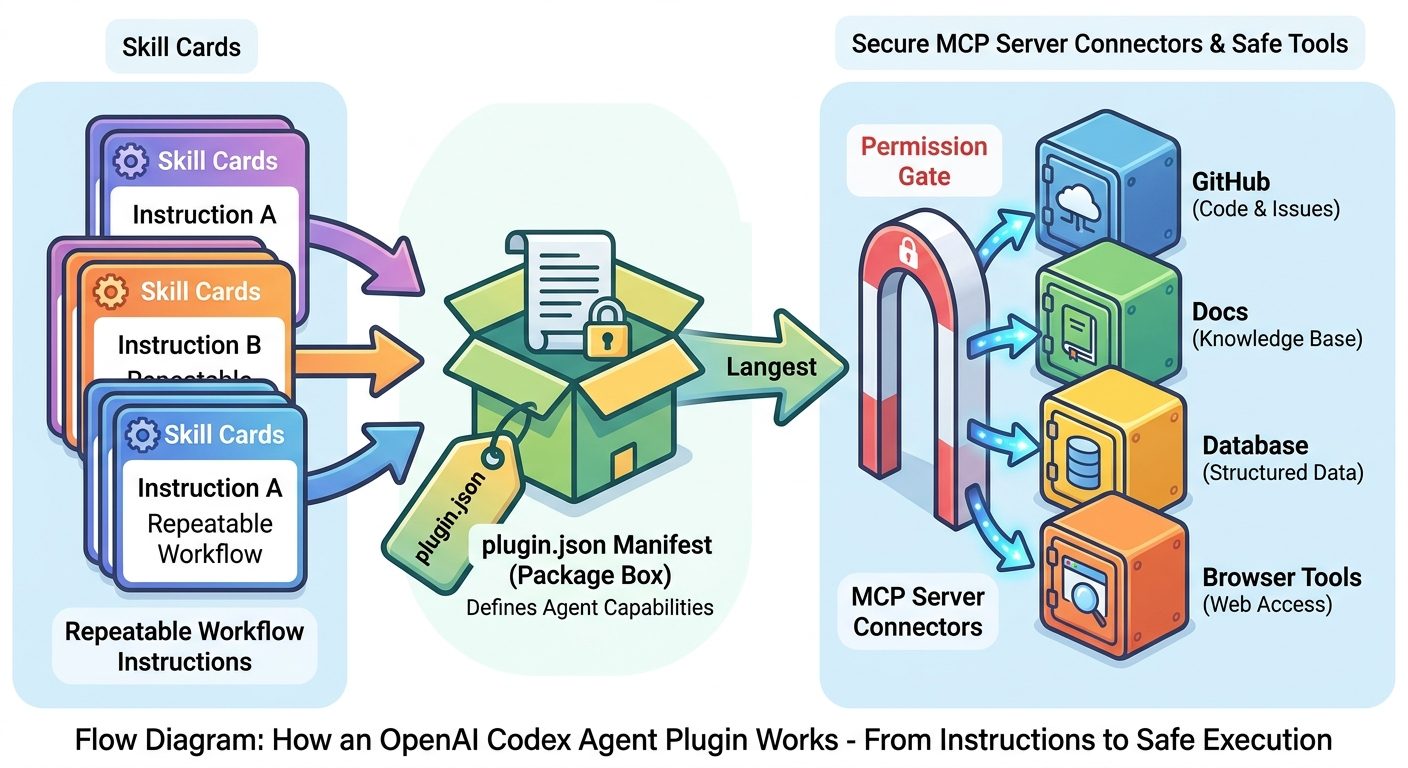
When these layers are separated, teams can improve agent behavior without rewriting every prompt. The skill can say how to perform a task. The plugin can make that capability installable. The MCP connector can expose approved tools. Workspace settings can decide who gets access and whether the plugin is available automatically. That separation is why the plugin model matters for serious agent workflows.
Consider a documentation review workflow. Without plugins, a developer might paste style rules, link a docs folder, ask the agent to inspect a pull request, and then remind it not to over-edit. With a plugin, the workflow can be packaged: the skill contains editorial rules, the connector reaches the approved docs source, the plugin listing makes it discoverable, and the permissions keep the agent away from systems it does not need.
The same pattern applies to code review, API migrations, data analysis, customer-support triage, incident response, and internal operations. Plugins are most useful when a task has repeatable rules and a bounded set of tools. They are least useful when the task is a one-off brainstorm or when the team has not yet agreed on the correct process.
How to Start With Codex Agent Plugins Without Creating Tool Sprawl
The safest way to adopt Codex Agent Plugins is to begin with one narrow workflow. Do not start by packaging every internal tool and every team habit. Start with a task that already repeats, already has a known quality standard, and already wastes time when people do it manually.
Step 1: Pick one workflow with clear boundaries
Good first candidates include API key setup guidance, documentation review, pull request summarization, issue triage, changelog drafting, test-failure diagnosis, repository onboarding, or release checklist preparation. Avoid broad requests such as “make our engineering team faster.” That is too vague for a first plugin and will likely create messy permissions.
Step 2: Write the skill before adding tools
Start by capturing the process as a skill. Define the trigger, inputs, rules, output format, and examples. If the workflow is not useful as plain instructions, adding connectors will not save it. A weak skill plus powerful tools is how teams end up with expensive and unreliable agent behavior.
Step 3: Add only the connectors the workflow actually needs
If the plugin reviews docs, it may need docs search. If it triages issues, it may need issue read access. If it proposes code changes, it may need repository access and a controlled approval flow. Do not include Slack, Drive, GitHub, database access, and browser actions just because they are available. Tool access should map directly to the job.
Step 4: Decide who can install or use it
OpenAI’s Help Center notes that workspace admins can manage plugin availability, role assignment, and underlying app permissions. That matters because plugins can package connected capabilities. Admins should decide whether a plugin is personal, team-specific, workspace-wide, or restricted to owners and maintainers.
Step 5: Test with boring examples before real work
Run the plugin on low-risk tasks first. Check whether it follows the output format, avoids unnecessary tool calls, handles missing context, explains permissions clearly, and produces results that a human can review quickly. The goal is not magic. The goal is repeatable assistance that reduces rework.
Best Use Cases for OpenAI Codex Agent Plugins
The strongest plugin opportunities are not the flashiest ones. They are the repeatable tasks where a team already knows the right process but keeps losing time translating it into prompts. Codex Agent Plugins shine when they reduce setup friction, keep standards consistent, and make tool use safer.
A practical example: suppose your team often asks Codex to review database migration pull requests. A good plugin would not simply say “review migrations carefully.” It would include the migration checklist, schema compatibility rules, rollback expectations, test commands, risk categories, and maybe read-only access to internal migration docs. It would produce a structured review with “must fix,” “should consider,” and “safe to merge” sections. That is a real workflow capability.
Another example is API setup. OpenAI’s Developers plugin documentation describes a plugin that helps build AI applications and agents with Platform access, API key setup, Agents SDK guidance, docs lookup, and troubleshooting. That is exactly the kind of workflow where a plugin makes sense: the task repeats, the information changes, users need current docs, and the setup path is easier when packaged.
Where plugins are less helpful is open-ended ideation. If you are brainstorming names, outlining a blog post, or asking a single code question, a normal chat or a lightweight skill may be enough. A plugin adds value when the task needs a reusable process or approved capabilities.
Security and Permission Rules for Codex Agent Plugins
Plugin safety is not optional. The more useful an agent becomes, the more important it is to control what it can see and do. The recent Codex changelog includes security fixes around redacting secrets, unfamiliar project trust, managed authentication restrictions, plugin isolation, and network-access behavior when policy updates fail. Those fixes point to the real risk: agent workflows can cross boundaries quickly if teams treat plugin installation like a casual browser extension.
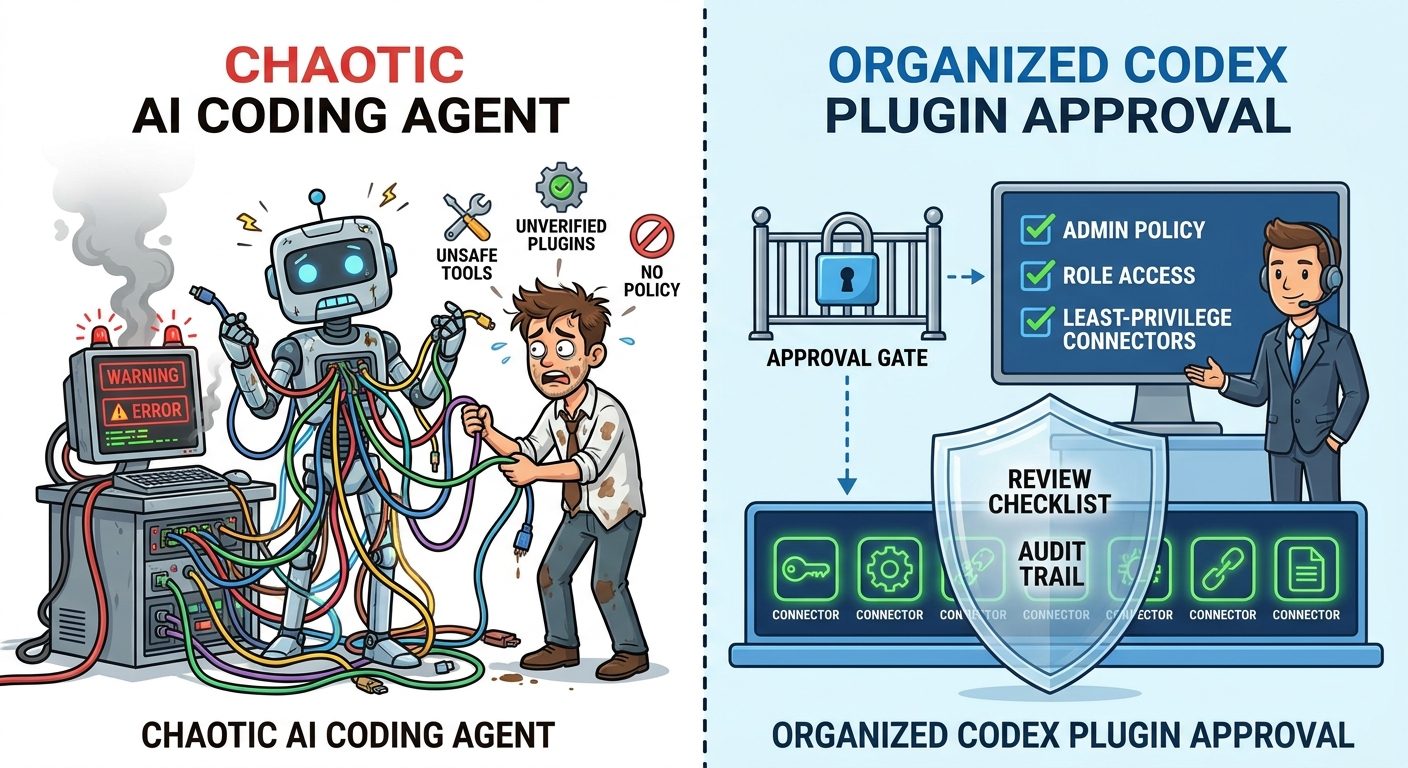
Good plugin governance
- Start read-only unless the workflow truly requires action.
- Use role-based installation for team or workspace plugins.
- Give each connector a clear purpose and owner.
- Write output formats that make human review fast.
- Test on low-risk examples before production work.
- Document what data the plugin may access.
Risky plugin behavior
- Bundling broad tools without a task-specific reason.
- Letting agents write to systems without human approval.
- Using plugins from unknown sources without review.
- Hiding permissions behind vague workflow names.
- Mixing personal, workspace, and remote catalogs casually.
- Allowing repeated agent retries without checking the diff.
A simple governance rule works well: every plugin should have a purpose, a user group, a data boundary, a tool boundary, and a review boundary. The purpose says what job it performs. The user group says who should install it. The data boundary says what it may read. The tool boundary says what it may call. The review boundary says where a human must approve the result before it becomes real.
For coding teams, the most important boundary is write access. A plugin that helps Codex summarize issues is very different from a plugin that lets Codex update branches, change configuration, or trigger deployments. Write-capable workflows can be valuable, but they should require explicit approval, strong logs, and a rollback habit.
Codex Plugins vs Prompt Libraries, Skills, and MCP Servers
Because the naming is new, many people mix up prompts, skills, plugins, and MCP servers. The easiest way to compare them is to ask what problem each layer solves.
| Layer | Best for | Limitation |
|---|---|---|
| Prompt | One-off guidance or a quick task instruction. | Easy to forget, duplicate, or drift between users. |
| Skill | Reusable task instructions and resources. | May not include installable connector setup or workspace distribution. |
| MCP server | Exposing tools, data, or services to an agent. | Does not automatically define the full workflow or user-facing package. |
| Plugin | Installable workflow capability combining skills, connectors, apps, and admin settings. | Needs governance, testing, and careful permission design. |
If you only need the agent to follow a writing template, use a skill. If you only need to connect a tool, build or configure an MCP server. If you need a workflow that includes instructions, tools, discovery, installation, and team governance, package it as a plugin. That decision tree prevents teams from overengineering simple tasks while still preparing for larger agent adoption.
Why This Is a Strong Search-Gap Topic for AI Feature Drop
The current search landscape is early. Google results surface official OpenAI docs, OpenAI Help Center pages, GitHub release notes, a recent OpenAI video, community threads, and a few third-party explainers. Those sources are useful, but they do not yet answer the practical questions in one place: what is a Codex Agent Plugin, how is it different from a skill, when should a team build one, what permissions should admins check, and how can developers avoid tool sprawl?
That gap fits AI Feature Drop’s historical performance. The site has already built topical signals around Codex usage limits, Codex computer use, ChatGPT desktop workflows, Claude Code permissions, GitHub Copilot MCP tools, and agent safety. Internal linking can connect this article to existing pages that explain Codex setup, reusable skills, pricing, and permission habits. The angle is also evergreen because the title avoids a dated release format and focuses on the durable workflow problem: packaging safe agent capabilities.
The feature-finding conclusion is that “OpenAI - Codex Agent Plugins” is stronger than a generic OpenAI update article. The feature-gap scan points to related keywords such as OpenAI Codex Agent Plugins, Codex plugins, Codex skills and plugins, plugin directory, OpenAI Developers plugin, MCP connectors in Codex, and safe agent plugin workflow. Search intent is mostly informational and implementation-oriented, with developers looking for examples, installation context, security warnings, and comparison against prompts or MCP alone.
Common Codex Plugin Mistakes and How to Avoid Them
The first mistake is turning every good prompt into a plugin. A plugin should earn its complexity. If the workflow has no shared users, no repeatable quality bar, and no connector needs, keep it as a skill or a saved prompt. The more packaging you add, the more maintenance you accept. A lightweight skill is easier to review, easier to update, and less likely to confuse people who simply need a short instruction.
The second mistake is hiding unclear work behind a polished plugin name. A plugin called “Engineering Assistant” sounds useful, but it is too broad. A plugin called “Backend Pull Request Risk Review” tells users what it does, what inputs it expects, and what output they should review. Clear names reduce accidental use and make permission reviews easier because admins can map capability to purpose.
The third mistake is mixing private and public sources without a data boundary. If a plugin can read internal docs, customer tickets, and external web pages, the skill instructions should explain how to handle conflicts, citations, and sensitive information. The agent should not quote private text into public deliverables unless that behavior is explicitly allowed. When in doubt, keep private sources in a separate plugin with a narrower user group.
The fourth mistake is skipping version notes. Plugins are workflows, and workflows change. If the skill rules, connector permissions, app templates, or supported surfaces change, users need a short changelog. A tiny “what changed” section prevents people from relying on old behavior, and it gives admins an audit trail when a plugin starts producing different outputs.
The fifth mistake is assuming the agent will ask for permission at the right moment. Permission design should not depend on vibes. If a workflow can create branches, open pull requests, write comments, modify issues, update docs, send messages, or call APIs with side effects, the plugin instructions should require a human checkpoint before that action happens. Read-only work can be more autonomous. Write-capable work should be explicit.
A practical testing checklist helps. Before rolling out a Codex plugin, run it on three safe examples: a perfect input, a messy input, and a missing-context input. The perfect input checks quality. The messy input checks resilience. The missing-context input checks whether the agent asks clarifying questions instead of hallucinating. If the plugin fails any of those tests, fix the skill instructions before adding more tools.
Finally, review whether the plugin actually saves context. One of the biggest benefits of plugins is avoiding repeated mega-prompts. If users still need to paste long explanations after installing the plugin, the package is incomplete. Move stable rules into the skill, move stable tool setup into the connector or app template, and leave only task-specific facts in the user’s prompt.
Keep Learning on AI Feature Drop
- OpenAI Codex Skills Guide — learn how reusable Codex instructions work before packaging a full plugin.
- Codex SKILL.md Template — use a practical template for workflow instructions.
- Codex Skills Troubleshooting Guide — fix discovery and context problems before building plugins.
- ChatGPT Desktop App Codex Guide — understand the desktop workflow where Codex features appear.
- Codex Computer Use on Windows — compare plugins with computer-use workflows and local permissions.
- Codex Banked Resets Explained — understand usage planning for heavier agent workflows.
Sources and References
- OpenAI Release Notes
- ChatGPT and Codex Changelog
- OpenAI Codex GitHub Releases
- OpenAI Help Center: Plugins in ChatGPT and Codex
- OpenAI Docs: Skills and Plugins
- OpenAI Developers Plugin Documentation
- OpenAI Codex Product Page
Feature names, permissions, and plugin availability can change. Always verify your active Codex version, ChatGPT plan, workspace settings, and app permissions before relying on a plugin for production work.
FAQ: OpenAI Codex Agent Plugins
What are OpenAI Codex Agent Plugins?
They are installable workflow bundles for Codex and ChatGPT. A plugin can include skills, apps, app templates, and MCP-backed connectors so an agent can follow repeatable instructions and use approved capabilities.
How are Codex plugins different from skills?
A skill is reusable guidance for a task. A plugin is an installable package that can include skills plus connectors, apps, setup guidance, and workspace-level availability controls.
Do I need MCP to use a Codex plugin?
Not always. Some plugins may be mostly skill-based. MCP becomes relevant when the plugin needs to connect Codex to external tools, services, data, or actions.
Are Codex Agent Plugins safe?
They can be safe when reviewed carefully, scoped narrowly, and governed with least-privilege permissions. The risk increases when plugins include broad connectors, private data access, or write actions without human approval.
Who should build a Codex plugin?
Build one when a workflow repeats, needs consistent standards, and may benefit from packaged instructions or connectors. Use a simple skill when the workflow does not need installation or connected tools.
What is a good first plugin idea?
A documentation review, pull request checklist, API setup assistant, issue triage helper, or release-note workflow is a good first candidate because each has clear inputs, rules, and outputs.
Can admins control plugin access?
OpenAI’s Help Center says workspace admins can manage plugin availability, role assignment, and underlying app permissions in workspace settings. Teams should use those controls before broad rollout.
Should I install every useful Codex plugin?
No. Treat plugins like workflow capabilities with permissions, not collectible add-ons. Install only the ones that map to real tasks and review their access before using them.
Post a Comment