
A reusable Codex Skill is only useful when its SKILL.md file is clear enough for humans to maintain and specific enough for the agent to select. This guide gives you a practical template, examples, trigger rules, safety checks, and testing workflow for building skills that reduce repeated prompts instead of adding more agent confusion.
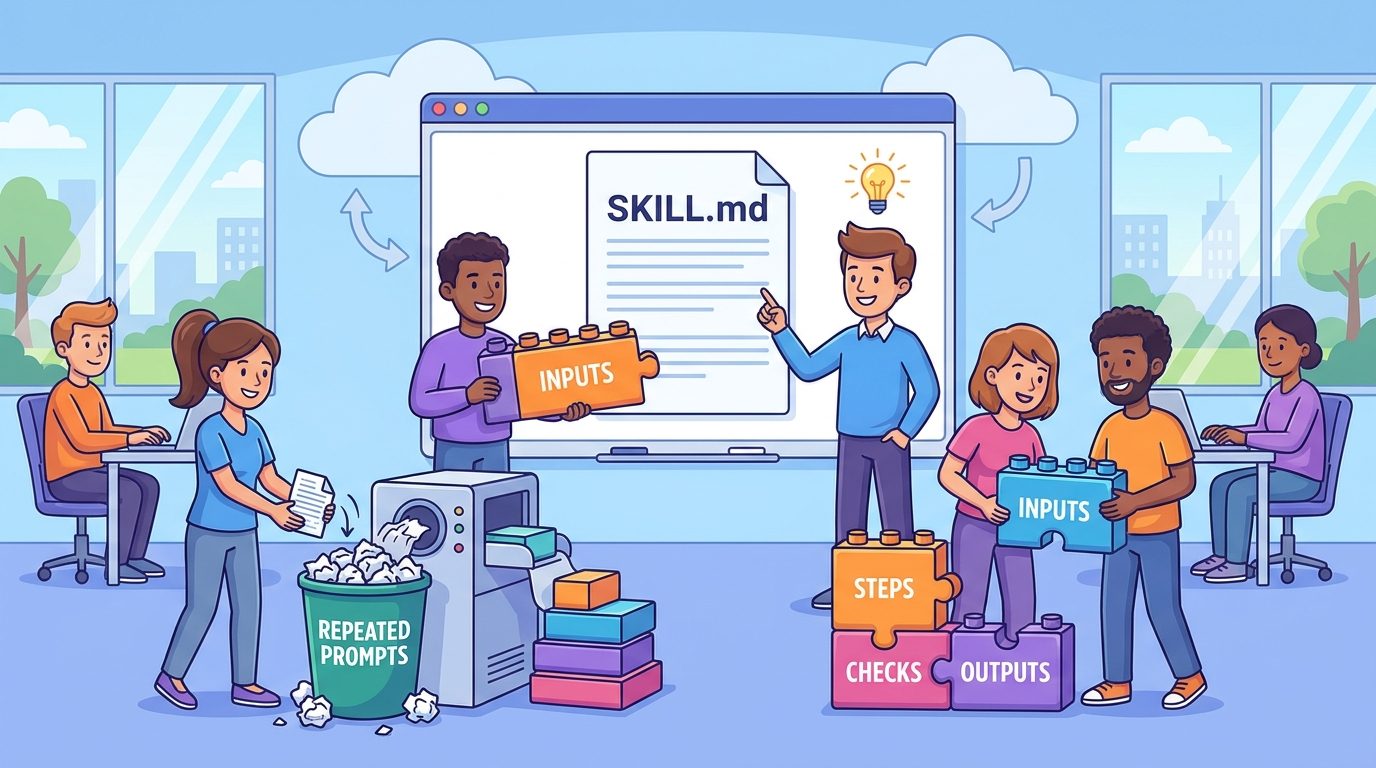
Quick Answer: What Is a Codex SKILL.md Template?
A Codex SKILL.md template is a reusable starting structure for writing the manifest and instructions that power an OpenAI Codex Skill. The file normally contains front matter with a skill name and description, followed by task-specific instructions that tell Codex when to use the skill, what inputs to collect, what steps to follow, what output to return, and what safety checks to perform before making changes.
The easiest mental model is simple: SKILL.md is the playbook Codex reads after it decides a skill is relevant. The name and description help with discovery. The body gives the agent the workflow. Optional folders can carry scripts, references, assets, examples, and metadata, but the quality of the skill still depends on whether the main Markdown file describes one clear job.
This cluster guide supports our broader pillar article, OpenAI Codex Skills Guide. The pillar explains the product concept: skills, plugins, local discovery, progressive loading, and team safety. This article narrows the search intent to the practical question developers are now asking: “What should my SKILL.md file actually look like?”
That focus matters because most weak skill examples fail in boring ways. The description is too vague, the workflow covers too many jobs, the output format is missing, scripts are added before they are needed, or the skill silently edits code when it should first report a plan. A template does not solve every design problem, but it gives you a default structure that prevents the most common mistakes.
Why Developers Need a Better SKILL.md Template
OpenAI documentation describes skills as reusable workflow packages that can include instructions, resources, and optional scripts. It also describes progressive disclosure: Codex starts with a compact list of skill names and descriptions, then reads the full SKILL.md only after it selects the skill. That design creates a practical requirement. Your description must be precise enough for selection, and the body must be useful enough after selection.
Our analytics make this a strong AIFeatureDrop cluster topic. In the last 28 complete days, GA4 showed 494 active users, 612 sessions, and 780 page views, with organic search responsible for 246 sessions. The top organic-friendly pages were practical developer guides, especially Codex banked resets, ChatGPT desktop Codex setup, Codex pricing, and Codex computer-use articles. Search Console also showed impressions around Codex computer-use and permission-style queries. In short, readers are not only looking for AI news. They are looking for concrete workflows, templates, limits, and safety decisions.
The feature research points the same way. Recent official Codex materials now emphasize skills, plugins, local discovery, .agents/skills, user and admin skill locations, implicit and explicit invocation, optional agents/openai.yaml metadata, and the difference between standalone skills and plugin distribution. Google search results show official docs, Academy pages, API examples, YouTube tutorials, GitHub links, and forum discussions. The gap is not “do skills exist?” The gap is “how do I write one that works reliably in a real repo?”
A template is valuable because skill authoring is half product design and half agent instruction design. You have to decide what the workflow is, what should trigger it, what should not trigger it, which inputs are required, how much autonomy Codex should have, how the final answer should be shaped, and how the skill should be tested. Without that structure, teams tend to create prompt dumps rather than maintainable agent workflows.
Copy-Paste Codex SKILL.md Template
Start here for an instruction-only skill. Replace the bracketed text, delete sections that do not apply, and keep the first version narrow. If you cannot explain the workflow in one sentence, it is probably not ready to become a skill yet.
---
name: [short-kebab-case-name]
description: Use this skill when [specific task trigger]. It should [primary outcome]. Do not use it for [non-goals or nearby tasks].
---

# [Human-readable skill title]

## When to use this skill
Use this skill when the user wants [specific repeated workflow].
Do not use this skill for [one-off task, unrelated workflow, or risky operation].

## Required inputs
Before acting, identify or ask for:
- [input 1]
- [input 2]
- [input 3]

If required context is missing, ask one concise clarification instead of guessing.

## Workflow
1. Restate the goal and scope in one sentence.
2. Inspect only the files, links, logs, or data needed for the task.
3. Follow this process:
   - [step A]
   - [step B]
   - [step C]
4. If edits are needed, explain the plan before making high-impact changes.
5. Run the smallest meaningful verification step when possible.

## Output format
Return:
- Summary
- Findings or changes
- Risks / assumptions
- Verification performed
- Safe next step

## Safety and boundaries
- Do not expose secrets, tokens, private keys, or personal data.
- Do not run destructive commands unless the user explicitly approves.
- Do not broaden the task beyond the stated workflow.
- Prefer small, reviewable changes over large refactors.

## Final checklist
Before finishing, confirm:
- The requested workflow was completed or marked blocked.
- Required output sections are present.
- Any code or artifact changes were verified.
- Open questions are listed clearly.
This template is intentionally conservative. It makes Codex ask for missing inputs, limits the scope, separates observation from edits, and forces a verification note. You can remove guardrails for low-risk personal workflows, but for team skills the default should be boringly safe.
The front matter description is the highest-leverage line in the whole file. A weak description says “helps with code review.” A strong description says “Use this skill when reviewing a pull request for risk, test coverage, rollout safety, and reviewer handoff. Do not use it for general code explanation.” The strong version gives Codex trigger words, an outcome, and a boundary.
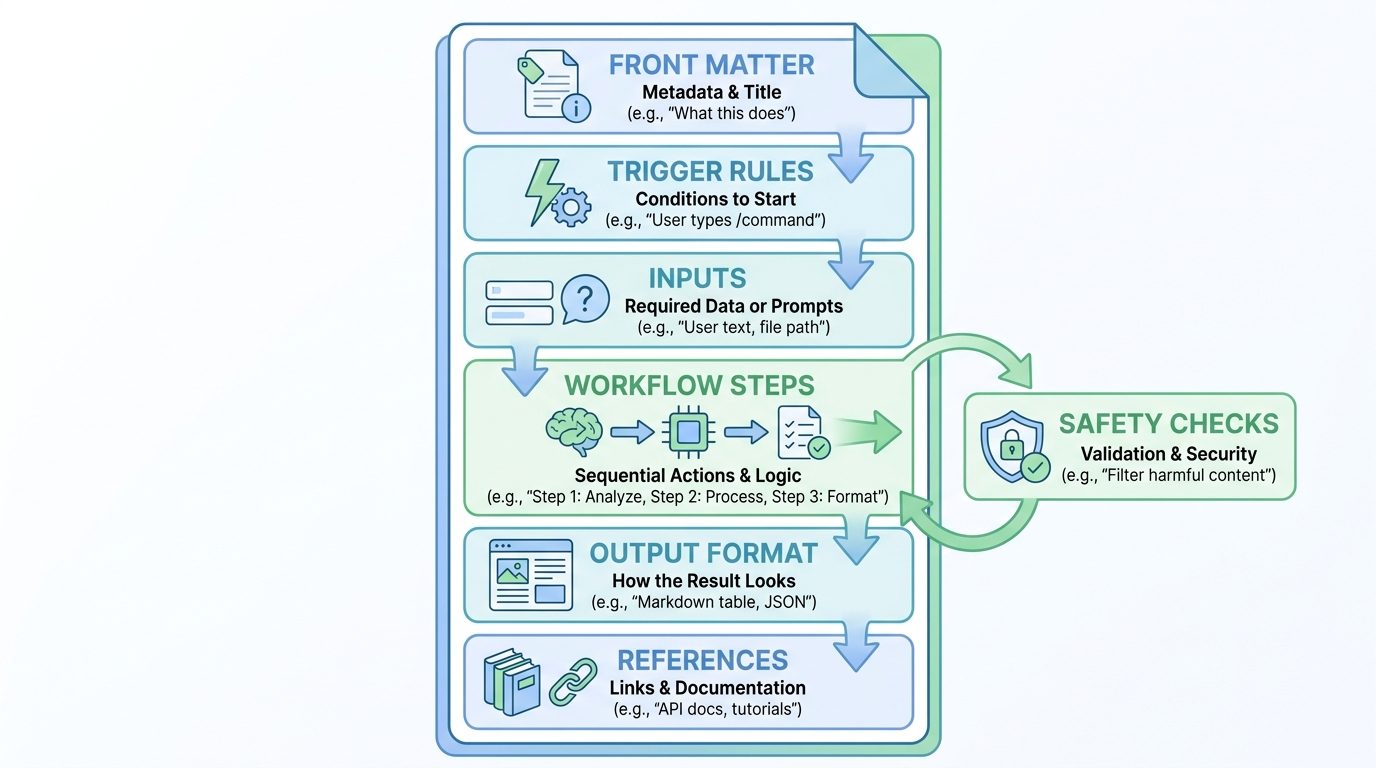
How to Write Skill Descriptions That Actually Trigger
Because Codex initially sees only compact skill metadata, the description must work like routing copy. It should be short, specific, and packed with the words a user is likely to use when they need the skill. The goal is not to sound clever. The goal is to help the agent choose the right playbook at the right moment.
| Weak description | Better description | Why it works |
|---|---|---|
| Helps with testing. | Use this skill when triaging a failing test command, stack trace, or CI failure. Return likely cause, minimal fix plan, and verification step. Do not use for writing new features. | Names the trigger, inputs, output, and non-goal. |
| Writes docs. | Use this skill when updating README, API docs, or changelog text after code changes. Compare implementation with existing docs and return changed docs, skipped docs, and uncertain docs. | Targets a specific documentation workflow. |
| Reviews PRs. | Use this skill when reviewing a pull request for risk, test coverage, rollout safety, migration concerns, and reviewer questions. Do not use for general code explanation. | Prevents over-triggering on every coding question. |
| Improves prompts. | Use this skill when converting a repeated Codex prompt into a focused SKILL.md workflow with trigger rules, required inputs, output format, safety boundaries, and tests. | Matches the exact authoring intent. |
Descriptions should also avoid inflated scope. If one skill claims to handle “all backend development,” it competes with every backend task and teaches Codex nothing useful about when to select it. Use one skill for test triage, another for release notes, another for database migrations, and another for documentation refresh. Smaller skills are easier to trigger, easier to maintain, and easier to retire.
Recommended Codex Skill Folder Structure
The simplest skill is a folder containing one SKILL.md file. OpenAI documentation also shows optional folders for scripts, references, assets, and an agents/openai.yaml file for metadata such as presentation and invocation policy. You do not need every folder on day one. Add only what the workflow needs.
| File or folder | Use it for | Beginner advice |
|---|---|---|
SKILL.md | Name, description, and main workflow instructions. | Required. Keep it focused and readable. |
references/ | Long examples, style guides, schemas, policy notes, and sample outputs. | Use when the main file is getting crowded. |
scripts/ | Deterministic helpers such as validation, formatting, report generation, or test setup. | Add after the instruction-only workflow proves useful. |
assets/ | Templates, sample files, diagrams, screenshots, or reusable resources. | Useful for writing, design, reporting, and documentation workflows. |
agents/openai.yaml | Optional display metadata, dependencies, and invocation policy. | Use when distributing or polishing a skill, not for every first draft. |
README.md | Human maintainer notes, test prompts, changelog, and ownership. | Helpful for team-reviewed skills. |
A clean folder structure helps with review. If a skill includes scripts, reviewers can inspect them separately from instructions. If it includes references, reviewers can check whether examples are stale. If it lives in a repository under .agents/skills, changes can go through normal code review and evolve with the project.
Scope the storage location to the job. Repo-specific skills belong in the repo. Personal habits belong in a user-level skills folder. Machine or organization defaults belong in an admin-managed location. If you want broader distribution or connectors, package skills as plugins after the workflow is stable.
Three Practical SKILL.md Examples
Templates become easier to understand when you see how they change by workflow. Below are three narrow examples that map to real developer tasks.
Example 1: Test failure triage skill
---
name: test-failure-triage
description: Use this skill when analyzing a failing test command, stack trace, or CI log. Return likely cause, smallest fix plan, and verification command. Do not use for unrelated feature work.
---

# Test Failure Triage

Collect the failing command, stack trace, changed files, and recent diff. If any are missing, ask for them.

Workflow:
1. Summarize the failing behavior.
2. Identify the first meaningful error, not the last noisy error.
3. Map the error to the likely file or behavior change.
4. Propose the smallest fix before editing.
5. After edits, run the smallest test command that verifies the fix.

Output: cause, proposed fix, files touched, verification, remaining risk.
Example 2: Release note skill
---
name: release-note-draft
description: Use this skill when turning merged PRs, commits, or issue notes into customer-facing release notes. Do not use for internal engineering changelogs.
---

# Release Note Draft

Inputs: merged PR list, product area, audience, and any breaking-change notes.

Workflow:
1. Group changes by user benefit.
2. Remove internal-only implementation detail.
3. Flag breaking changes, deprecations, and migration actions.
4. Write concise release notes in plain language.
5. List any changes that need product-manager confirmation.

Output: headline, highlights, fixes, migration notes, open questions.
Example 3: Documentation refresh skill
---
name: docs-refresh-check
description: Use this skill when code changes may require README, API docs, examples, screenshots, or changelog updates. Return changed docs, skipped docs, and uncertain docs.
---

# Documentation Refresh Check

Inspect the diff and existing docs. Do not rewrite unrelated docs.

Workflow:
1. Identify behavior, API, CLI, config, or UI changes.
2. Search for docs that mention the changed behavior.
3. Update only docs affected by the change.
4. Preserve existing style and examples.
5. Report docs that may need human product review.

Output: updated files, reason for each update, skipped docs, verification.
Notice that all three examples say what not to do. That is not pessimism; it is agent hygiene. A reusable skill should reduce unnecessary exploration, not give Codex permission to touch everything nearby.
How to Turn a Repeated Prompt Into a Codex Skill
If you already have a prompt you paste every week, do not copy it directly into SKILL.md. First, convert it from a one-time request into a reusable process. Prompts often include temporary context. Skills should include stable workflow instructions.
- Extract the repeated job. Write one sentence: “This skill reviews pull requests for release risk,” or “This skill converts support tickets into engineering handoffs.”
- List required inputs. Decide what the agent must know before acting: file path, diff, log, URL, ticket text, audience, output format, or approval boundary.
- Define the stopping point. Should Codex only report findings, propose a plan, edit files, run tests, or publish an artifact?
- Add the output contract. Specify sections, table columns, JSON fields, or checklist items.
- Add safety boundaries. Include non-goals, destructive-action rules, privacy limits, and approval requirements.
- Test with two real tasks. One should be a clear match. One should be a near miss. The skill should trigger for the first and not overreach on the second.
This transformation is where most of the value comes from. The agent does not become reliable because the prompt moved into a file. It becomes more reliable because you forced the workflow to become explicit, testable, and reviewable.
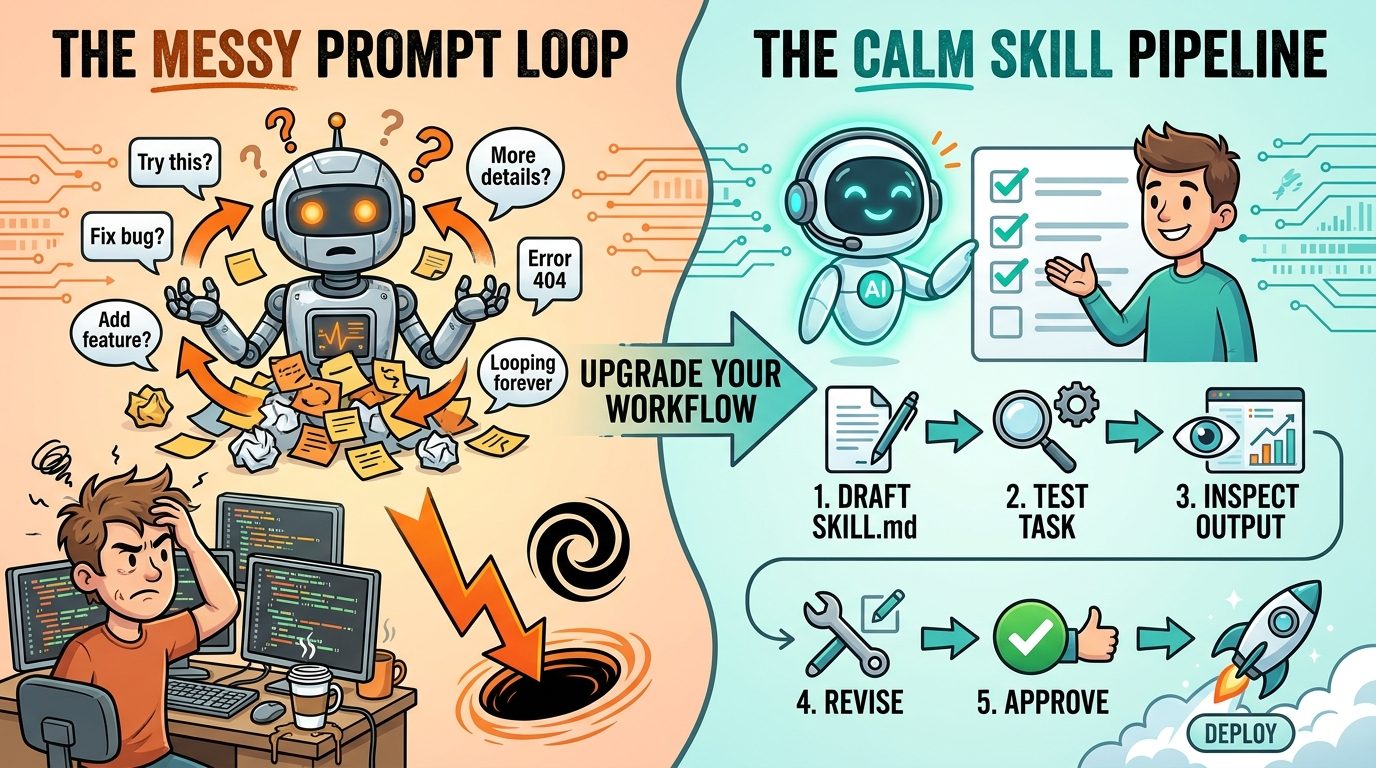
How to Test a Codex Skill Before Sharing It
Skills need testing because a skill can fail silently. It may not trigger when needed, trigger too often, ask for the wrong inputs, skip verification, or produce an output that looks polished but lacks the required evidence. Treat the first week of skill use like a beta test.
- Trigger test Ask for a task that should use the skill. Confirm Codex recognizes it.
- Near-miss test Ask for a related task that should not use the skill. Confirm it does not over-trigger.
- Missing-input test Omit a required input. Confirm it asks a concise clarification instead of guessing.
- Output test Check whether the final answer follows the required format.
- Safety test Include a risky action and confirm the skill asks before proceeding.
- Verification test For code tasks, confirm it runs or recommends the smallest meaningful verification step.
- Maintenance test Ask a teammate to read the skill and explain what it does without extra context.
Write down test prompts in a README or reference file. This is especially useful for teams because it prevents accidental regression when someone edits the description or workflow. If a skill controls release notes, migration checks, security review, or customer-facing output, it deserves the same review discipline as other small automation assets.
If the skill does not work, simplify before adding more instructions. Long instructions can make a weak workflow worse. The best fix is often a sharper description, a shorter task scope, a clearer output format, or a stronger “do not use this for” boundary.
Team Governance: Review Skills Like Lightweight Code
Skills can improve consistency, but they can also repeat mistakes at scale. A bad one-off prompt creates one bad run. A bad shared skill can influence many developers and many repositories. That is why team skills should be reviewed, versioned, owned, and retired when stale.
Good skill practices
- Keep one job per skill.
- Use precise front matter descriptions.
- Store repo-specific skills with the repo.
- Move long examples into references.
- Review scripts for writes, network calls, and secret access.
- Require explicit approval for destructive or external actions.
- Retire stale skills before they become invisible policy debt.
Risky skill habits
- Creating a giant “do everything” coding skill.
- Letting user-level skills leak client-specific conventions across projects.
- Adding scripts before the instruction-only workflow is proven.
- Using broad descriptions that trigger on unrelated tasks.
- Hiding policy decisions in private skill folders.
- Never checking whether the skill still matches current commands or repo structure.
For organization use, decide who owns each shared skill. Ownership can be light: a CODEOWNERS rule, a README note, or a release checklist item. What matters is that someone is responsible when commands change, policies change, or the skill starts producing bad outputs. Skill maintenance should feel like documentation maintenance plus automation review.
Scripts deserve extra scrutiny. OpenAI’s documentation warns that skills can introduce security risk, especially when combined with network access or executable code. Review scripts for filesystem writes, environment variable reads, network calls, secrets, destructive commands, package installation, and unexpected side effects. If a script only validates JSON or formats a report, the risk is much lower than a script that calls APIs or changes infrastructure.
Why This Cluster Topic Has a Search Gap
The search landscape around Codex Skills is fragmented. Official OpenAI pages explain the concept, the API, local skill discovery, and plugin distribution. YouTube videos show walkthroughs. GitHub links point to docs. Community threads discuss availability and examples. But many searchers are lower in the funnel: they already know a skill exists and need a working SKILL.md starter file.
That is why this article targets Codex SKILL.md template rather than another broad “what are Codex Skills?” guide. It supports the OpenAI Codex Skills pillar without cannibalizing it. The pillar handles the wide topic; this cluster article handles the hands-on template intent. It also links naturally to related AIFeatureDrop content on Codex pricing, ChatGPT desktop Codex workflows, Codex computer use, and agent governance.
The content gap is practical information gain: a copyable template, description examples, folder structure, conversion workflow, test checklist, and governance rules. Those details are what a developer needs immediately before creating a real skill in a repository.
Related AI Feature Drop Guides
- OpenAI Codex Skills Guide — the broader pillar article on skills, plugins, local discovery, and reusable workflows.
- ChatGPT Desktop App Work and Codex Guide — how Codex fits into ChatGPT desktop workflows.
- ChatGPT Desktop App Codex Setup Guide — setup, pull requests, and coding workflow basics.
- OpenAI Codex Pricing and Usage Limits — understand usage limits before long agent sessions.
- Codex Banked Resets Explained — related usage-limit context for Codex power users.
- OpenAI AgentKit Guide — broader agent workflow design and governance patterns.
Sources and References
- OpenAI documentation: Build skills
- OpenAI API documentation: Skills
- OpenAI Cookbook: Skills in the API
- OpenAI Academy: Using skills
- openai/codex GitHub documentation pointer for skills
- Agent Skills specification
Product interfaces, paths, and platform behavior can change. Verify current OpenAI and Codex documentation before distributing shared skills, enabling scripts, or creating organization-wide policy.
FAQ: Codex SKILL.md Templates
What should a Codex SKILL.md file include?
It should include front matter with a clear name and description, plus instructions covering when to use the skill, required inputs, workflow steps, output format, safety boundaries, and final checks.
What is the most important part of a SKILL.md template?
The description is the most important routing surface because Codex uses skill names and descriptions before loading the full instructions. The workflow body matters after the skill is selected.
Should every repeated prompt become a Codex Skill?
No. Turn a prompt into a skill when the workflow is repeated, structured, valuable, and clear enough to test. One-off tasks can stay as normal prompts.
Can a Codex Skill include scripts?
Yes, skills can include optional scripts, but start instruction-only unless deterministic code is necessary. Review scripts carefully for file writes, network calls, secrets, and destructive behavior.
Where should I store a repo-specific Codex Skill?
Repo-specific skills should usually live in a repository skills folder such as .agents/skills so changes can be reviewed with the project.
How is SKILL.md different from AGENTS.md?
AGENTS.md usually provides broad project-level instructions. SKILL.md describes a task-specific workflow that should trigger only when that particular job is needed.
How do I know if my skill description is too broad?
If the skill triggers for many unrelated tasks, or if you cannot name a clear non-goal, the description is probably too broad. Add trigger words, expected output, and “do not use for” boundaries.
Should teams review Codex Skills?
Yes. Shared skills should be reviewed like lightweight code or automation documentation, especially if they include scripts, security rules, release workflows, or customer-facing output.
Post a Comment