
Claude Code Auto Mode is useful only when the trust boundary is clear. This practical cluster guide shows copy-and-adapt configuration examples for trusted infrastructure, human checkpoints, deny rules, shell classification, and safer rollout across solo and team workflows.
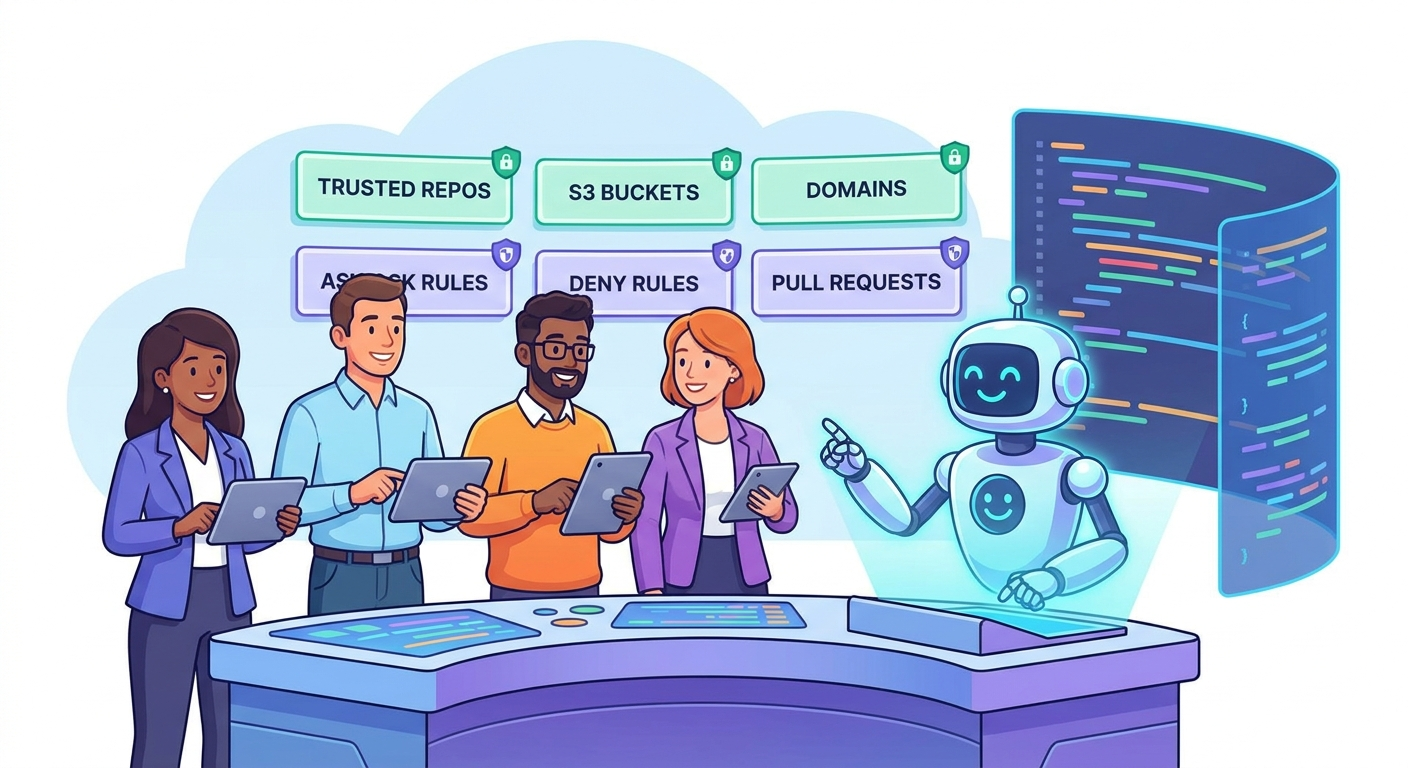
Quick Answer: What Should Go Into Claude Code Auto Mode Config?
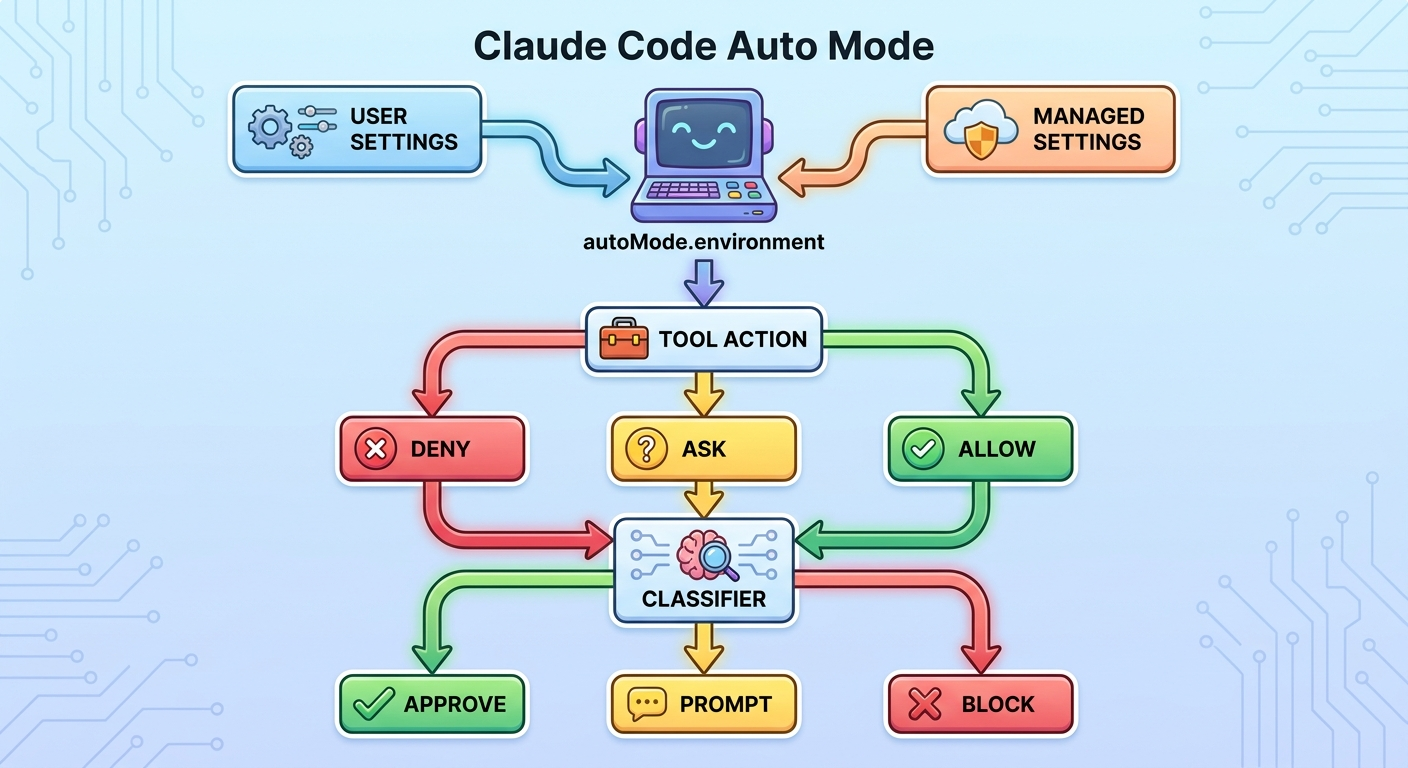
Claude Code Auto Mode config should define the infrastructure your agent is allowed to treat as normal, while keeping explicit permission rules for actions that need human judgment. In practice, that means you use autoMode.environment for trusted repositories, source-control organizations, internal documentation domains, approved staging buckets, and known development services. You use permissions.ask for pushes, pull requests, deployments, package publishing, migrations, and cloud actions that change shared state. You use permissions.deny for secrets exposure, unknown uploads, broad destructive operations, and anything your team never wants an agent to attempt.
The biggest mistake is treating Auto Mode as a single on/off switch. Anthropic’s documentation describes it as a classifier-driven permission mode: deny and explicit ask rules are evaluated before the classifier, then the classifier decides whether remaining actions look safe, surprising, external, destructive, or out of scope. That means the quality of your configuration matters. If the environment is too vague, Auto Mode may block useful internal work. If it is too broad, it may approve behavior your team expected to review.
This article supports our broader Claude Code Auto Mode guide. The pillar explains the concept and rollout strategy. This cluster article goes narrower: concrete config patterns, example boundaries, and decision rules you can adapt before enabling Auto Mode for real work.
Why This Config Topic Has a Real Search Gap
Recent Claude Code documentation updates make Auto Mode more than a convenience setting. The official Auto Mode configuration page explains that the classifier trusts the working directory and the current repository’s configured remotes by default, and that teams can add trusted repositories, buckets, domains, and organizational context through autoMode.environment. The permissions documentation explains the rule order: deny, then ask, then allow. The changelog also shows continuing work around organization policy visibility, Remote Control state, permission prompts, and classifier behavior. Those are useful official references, but they do not fully answer the practical question developers ask: “What should my settings file actually look like?”
That is the gap this article targets. The reader already understands that Auto Mode reduces prompts. They need safer examples: when to trust a staging bucket, when to ask before a pull request, how to avoid checked-in config from expanding the classifier boundary, and how to decide whether a new MCP server belongs inside the environment. Official docs are authoritative; practical examples make them operational.
Analytics also support the topic. AI Feature Drop’s most recent complete 28-day GA4 window showed 649 active users, 718 sessions, 779 page views, and 408 engaged sessions. The top pages leaned heavily toward practical AI coding workflows, especially Codex setup, usage limits, credits, Claude Code usage, permissions, subagents, and network allowlists. Search Console showed a Claude Code permission-rules page with low impressions but a strong average position around 6, which suggests Google is already testing AIFeatureDrop for permission-focused Claude Code queries. A narrower Auto Mode config guide is a logical support page rather than a duplicate of the existing permission article.
The content strategy is simple: avoid a broad “what is Auto Mode” rewrite, and publish a configuration-focused tutorial that links up to the new pillar and sideways to existing Claude safety cluster pages. That helps readers, and it strengthens topical authority around Claude Code operations.
The Mental Model: Environment Is Context, Permissions Are Boundaries
The most useful way to design Auto Mode is to separate context from boundaries. autoMode.environment tells the classifier what counts as your normal environment. Permission rules tell Claude Code what must ask or never run. Those are related, but they are not the same thing.
Think of environment entries as a map. They name your organization, source-control areas, trusted repos, approved internal domains, allowed staging buckets, common CLIs, secret-management expectations, CI/CD posture, network posture, and host containment. A good map helps the classifier distinguish “this is an ordinary internal action” from “this looks like data leaving the safe area.” But a map is not a guardrail by itself. If a command should always require a person, write an ask rule. If a command should never happen, write a deny rule.
| Configuration area | What it does | Example decision | Best use |
|---|---|---|---|
autoMode.environment | Explains trusted infrastructure to the classifier. | Your GitHub org, staging bucket, internal docs domain, and non-production API host are normal. | Reduce false blocks without silently approving everything. |
permissions.ask | Forces a prompt before matching actions. | Always ask before git push or pull request creation. | Keep accountability checkpoints for shared-state changes. |
permissions.deny | Blocks matching actions before the classifier is consulted. | Deny broad deletion, secrets printing, or uploads to unknown paste sites. | Hard security boundaries that should not be overridden. |
permissions.allow | Lets matching actions run without manual approval. | Allow a narrow test command in one repository. | Use sparingly; Auto Mode often removes the need for broad allow rules. |
autoMode.classifyAllShell | Routes shell commands through the classifier more consistently. | Useful for teams that do not want a large preapproved shell surface. | Higher scrutiny for command-heavy workflows. |
The distinction matters because many developers try to solve everything with allow rules. That can work for a personal toy project, but it scales poorly. A broad allow rule says “do this without asking.” An environment entry says “understand this as inside our boundary, then still classify the action.” For a team, the second approach is usually safer because it preserves classifier judgment and explicit ask or deny rules.
Starter Config for a Solo Developer
A solo developer usually wants fewer prompts during local development, but still wants review before code leaves the machine or touches a real service. The safest starter setup is conservative: describe the current development boundary, add ask rules for pushes and pull requests, and deny obviously risky patterns. Keep the environment small until real work reveals what needs to be added.
The following example is intentionally generic. Do not paste it blindly into a production setup. Replace the placeholder names with your own organization, repository, staging services, and documentation domains. If a resource contains customer data, production credentials, payment flows, or private user exports, do not add it just because Claude Code might need it someday.
{
  "defaultMode": "auto",
  "permissions": {
    "ask": [
      "Bash(git push *)",
      "Bash(gh pr create *)",
      "Bash(gh release *)"
    ],
    "deny": [
      "Bash(*secret*)",
      "Bash(*credential*)",
      "WebFetch(domain:paste.example-unknown.com)"
    ]
  },
  "autoMode": {
    "environment": {
      "organization": "Solo developer working on non-production app repositories",
      "primaryUse": "Software development, local tests, documentation updates, and small refactors",
      "trustedRepos": ["github.com/example-user/example-app"],
      "sourceControlOrgs": ["github.com/example-user"],
      "trustedDomains": ["docs.example.com", "api-staging.example.com"],
      "cloudProviders": ["AWS staging account only"],
      "dataRetention": "Do not upload source files, secrets, or private user data to unknown external services"
    }
  }
}
This config does three important things. First, it makes Auto Mode the default for routine work. Second, it keeps pushes, pull requests, and releases visible. Third, it gives the classifier context about what belongs inside the developer’s environment. That context can reduce frustrating blocks when Claude Code interacts with known internal docs or a staging API, while still treating unfamiliar destinations as suspicious.
There are two caveats. The first is that permissions are exact enough to matter: patterns that are too broad can block useful work or allow too much. The second is that some Auto Mode configuration belongs in user or managed settings, not project settings. Anthropic’s Auto Mode docs say the classifier does not read autoMode from project .claude/settings.json or .claude/settings.local.json, because a repository should not be able to inject its own classifier trust boundary. That is a smart design choice. Keep personal trust settings in user settings and organization trust settings in managed settings.
permissions.ask or permissions.deny.Team Config Pattern: Managed Settings, Personal Extensions, and Hard Denies
Teams need a stronger pattern than solo developers because Auto Mode becomes part of engineering policy. One developer’s “trusted bucket” might be another team’s production data lake. One project’s safe internal CLI might publish packages in another project. A team rollout should therefore separate organization-wide hard boundaries from personal convenience.
Use managed settings for the rules everyone must inherit: production deny rules, approved source-control orgs, protected deployment namespaces, sensitive data handling, and common human checkpoints. Let individual developers add environment detail for local staging services or documentation domains, but do not rely on developer-added Auto Mode entries as hard policy. According to the Auto Mode docs, entries from scopes are additive, and a developer-added allow entry can override a soft deny inside the classifier. For actions that must never run, use permissions.deny in managed settings, because permission denials happen before the classifier.
| Scope | Belongs here | Avoid putting here |
|---|---|---|
| Managed settings | Hard deny rules, organization source-control boundaries, production restrictions, required ask rules, approved data posture. | Temporary personal workflow shortcuts. |
| User settings | Personal trusted docs domains, local non-production services, preferred defaults, narrow additions that match the developer’s role. | Rules that weaken organization security expectations. |
| Shared project settings | Project conventions, allowed project commands, shared non-secret workflow preferences. | autoMode.environment trust boundaries that the classifier intentionally ignores at project level. |
CLAUDE.md | Behavioral guidance, coding style, test commands, project-specific review expectations. | Security controls that must be enforced even if the model forgets or compacts context. |
A practical team config might say: Auto Mode can read and edit within approved repos, run local tests, consult internal docs, and interact with staging-only services. It must ask before pushes, pull requests, workflow changes, package publishing, release tagging, database migrations, external uploads, and cloud writes. It must deny commands that expose secrets, bypass security checks, change protected branches directly, or target production namespaces without a dedicated approved process.
This is where Claude Code starts to look less like a chat tool and more like a developer platform. The policy should be reviewable. Security teams should understand it. Developers should know where prompts are expected. Engineering managers should be able to explain why a prompt appears before a PR but not before a local unit test. If the policy is confusing, developers will either over-approve prompts or avoid the tool. Neither outcome is ideal.
Five Claude Code Auto Mode Config Examples by Workflow
1. Local bug-fix workflow
For a local bug fix, Auto Mode should be comfortable reading files, editing a small area, running focused tests, and summarizing the diff. The environment can include the repository and internal docs, while ask rules cover push and pull request creation. This workflow is a good default because it is scoped, reversible through git, and easy to verify. The prompt should name the failing test, the suspected files, and the stopping condition.
{
  "permissions": {
    "ask": ["Bash(git push *)", "Bash(gh pr create *)"]
  },
  "autoMode": {
    "environment": {
      "trustedRepos": ["github.com/acme/web-app"],
      "trustedDomains": ["docs.acme.internal"],
      "primaryUse": "Local bug fixes and test-driven iteration"
    }
  }
}
2. Staging API integration workflow
A staging API workflow needs more care because network calls can move data. Add only the staging host, not a wildcard for every company domain. If the agent needs sample payloads, use synthetic data. Ask before creating PRs, changing environment files, or adding new third-party services. Deny unknown upload and paste destinations. This pattern gives Claude enough context to test integration code without treating the internet as trusted.
3. Documentation and internal knowledge workflow
Documentation work is usually a strong Auto Mode fit. Trusted domains can include internal docs, design-system docs, API references, and public official docs. But do not include private customer docs or support exports unless the team has explicitly approved that data scope. Ask before publishing documentation externally. This is especially important for teams using Claude Code with docs tooling, static-site generators, or knowledge-base APIs.
4. CI and GitHub Actions workflow
CI changes deserve a checkpoint. Even a small workflow edit can expose secrets, change when commands run, publish artifacts, or alter branch protections. Auto Mode may edit a workflow file locally, but the push and pull request should ask. A mature team may also add ask rules for dependency-lockfile changes, package-manager publish commands, and release-tag creation. The important distinction is not whether Claude can write YAML; it is whether that YAML will execute later with privileges.
5. Cloud bucket or artifact workflow
Cloud storage is where environment design often gets too loose. A staging bucket used for generated screenshots is different from a production bucket that stores user uploads. The config should name the allowed bucket and explain its purpose. It should ask before writes that publish publicly, deny private-data uploads to unknown domains, and require human review before changing lifecycle, ACL, or retention policy. If the bucket is production, do not treat it as routine just because it is owned by the company.
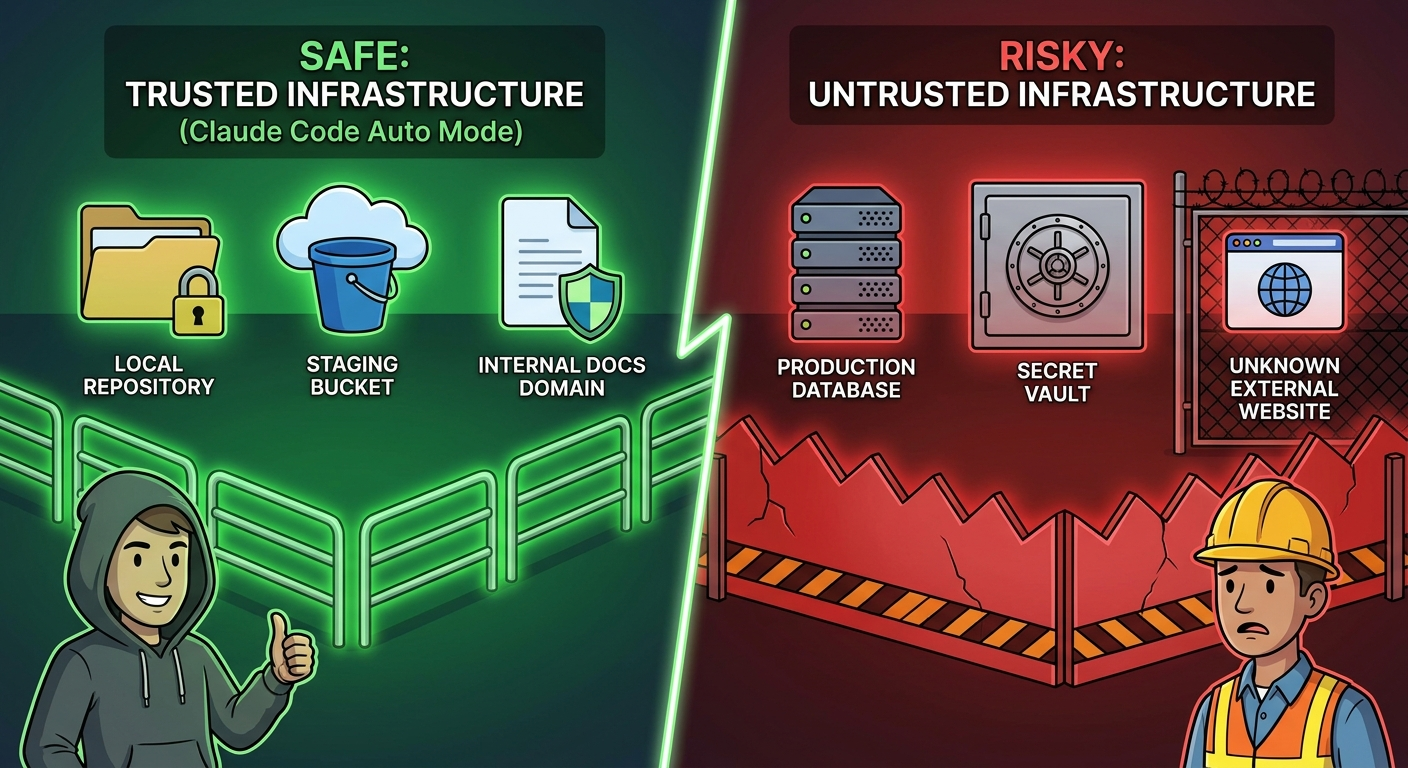
Across all five examples, the same pattern holds: trust is specific, prompts are intentional, and denials are reserved for real red lines. A config that names everything as trusted is not mature. A config that asks for everything is not useful. The goal is a middle layer where routine development feels fast and meaningful risk stays visible.
How to Review Auto Mode Denials Without Weakening Security
When Auto Mode blocks something, do not immediately add it to the environment. A denial is feedback. It might mean the config is missing a legitimate internal domain, but it might also mean Claude Code tried something too broad, the prompt was vague, or the workflow should require a person. Review denials with three questions: Was the action inside the intended task? Was the destination explicitly trusted by the team? Would approving this class of action create risk in another repository?
If the answer is yes to all three, consider adding a narrow environment entry or ask rule. If the answer is unclear, leave the block in place and improve the prompt. If the answer is no, add a deny rule or write a project convention that steers Claude away from that pattern. The goal is not to remove every block. The goal is to make the next block more meaningful.
For teams, denial review should be part of the rollout loop. During the first week, collect the top blocked actions and classify them. Some will be harmless internal resources that were not named. Some will be risky but common actions that need ask rules. Some will reveal workflow shortcuts that should stay blocked. This process is where Auto Mode becomes trustworthy: not because it never says no, but because the team learns why it says no.
Common Config Mistakes to Avoid
One subtle mistake is confusing “internal” with “safe.” Internal systems can contain secrets, customer data, regulated information, or deployment controls. A staging documentation site is usually safe. An internal admin panel may not be. A private GitHub repository can still hold credentials or sensitive architecture. Auto Mode config should reflect actual risk, not company ownership alone.
Another mistake is failing to connect Auto Mode with observability. The broader Claude Code ecosystem includes statuslines, usage views, diff views, permission prompts, hooks, and organizational policy indicators. Use those signals. If a session becomes long, expensive, or surprisingly broad, stop and re-scope. Auto Mode should reduce prompt fatigue, not hide what the agent is doing.
Copy-and-Adapt Checklist Before Enabling Auto Mode
| Question | If yes | If no |
|---|---|---|
| Can the task stay inside one repository? | Auto Mode is more likely to be appropriate. | Use Plan mode first or add human checkpoints. |
| Are the target domains, buckets, and repos explicitly named? | Add them narrowly to environment if approved. | Do not assume the classifier knows your boundary. |
| Could the action change shared state? | Add an ask rule. | Routine local approval may be fine. |
| Could the action expose secrets or private data? | Add a deny rule or require a separate reviewed process. | Still avoid unnecessary context and uploads. |
| Is the workflow repeated across a team? | Put durable rules in managed settings. | User settings may be enough for a solo workflow. |
| Will MCP, plugins, or hooks be involved? | Review their permissions and data access first. | Keep the initial rollout simpler. |
Keep Learning on AI Feature Drop
- Claude Code Auto Mode Guide — the broader pillar guide for safer permissions, faster sessions, and team guardrails.
- Claude Code Permissions Guide — how permissions connect with hooks, subagents, and statuslines.
- Claude Code Permission Rules Explained — deeper background on ask, deny, and allow rule behavior.
- Claude Code Network Allowlist Guide — stop unsafe network requests without creating prompt fatigue.
- Claude Code Hooks Permission Gates — use hooks to stop risky tool calls before they run.
- Claude Code Plugin Components Explained — understand how skills, hooks, MCP servers, agents, LSP, and monitors affect trust boundaries.
- Claude Code Statusline Guide — monitor context, cost, git state, and agent workflow signals.
Sources and References
- Anthropic Claude Code Docs: Configure Auto Mode
- Anthropic Claude Code Docs: Configure Permissions
- Anthropic Claude Code Docs: Settings
- Anthropic Claude Code Changelog
- Anthropic Claude Code Docs: Permission Modes
Claude Code behavior, supported fields, and organization policy controls can change. Verify your installed version, provider, organization settings, and current Anthropic documentation before changing real production workflows.
FAQ: Claude Code Auto Mode Config Examples
Where should I put Claude Code Auto Mode environment config?
Use user settings for personal trusted infrastructure and managed settings for organization-wide infrastructure. Anthropic’s Auto Mode docs say the classifier does not read autoMode from project settings because repositories should not inject their own trust boundaries.
What should be in permissions.ask when using Auto Mode?
Common ask rules include git push, pull request creation, releases, deployments, package publishing, database migrations, cloud writes, and any action that changes shared state or requires accountability.
What should be denied instead of asked?
Deny actions that should never run: secrets exposure, private data uploads to unknown services, broad destructive operations, security bypasses, direct production modifications, and unsafe external transfers.
Is an environment entry the same as an allow rule?
No. An environment entry tells the classifier what infrastructure is trusted context. An allow rule directly permits a matching tool action. Teams should usually prefer narrow environment context plus explicit ask/deny rules over broad allow rules.
Should I ask before every pull request in Auto Mode?
For most teams, yes. Pull requests change shared workflow state and create review obligations. You can keep Auto Mode fast for local edits while still prompting before PR creation.
Can I trust an entire company domain?
Usually no. Trust the narrow subdomains or services Claude Code actually needs. A company domain can include admin panels, production systems, private docs, or customer data that should not be routine.
How often should teams review Auto Mode denials?
Review denials frequently during rollout, then periodically after the workflow stabilizes. Denials reveal missing environment entries, risky prompts, and places where explicit ask or deny rules are needed.
Does Auto Mode replace security review?
No. Auto Mode reduces routine permission prompts. Developers still inspect diffs, run tests, review data scope, and require human approval for sensitive or shared-state actions.
Post a Comment