
GitHub Copilot Dynamic Workflows Guide: Build, Limit, Share, and Run Multi-Agent Processes
GitHub Copilot dynamic workflows turn a repeatable engineering process into code: deterministic steps handle predictable work, agents handle judgment, limits control cost, and checkpoints keep a human in charge. This guide shows how to design, run, share, and secure them without confusing a workflow with one very long prompt.

GitHub Copilot Dynamic Workflows: The Quick Answer
GitHub Copilot dynamic workflows are programs that define how a complex task should run. A workflow can execute normal code, call tools or services, start one or more AI agents, pass structured results between stages, pause for a human decision, and resume later. The process lives in a Copilot extension, so it can be reused instead of reconstructed from conversational instructions every time.
The important word is defined. A normal agent prompt describes an outcome and lets the agent decide the route. A dynamic workflow defines the route in code while still using agents where interpretation is valuable. That separation gives you repeatability without pretending model output is deterministic. The stages, branching conditions, limits, and handoffs stay stable; an agent's findings can still vary from run to run.
GitHub announced the feature for the Copilot CLI, GitHub Copilot app, and Copilot SDK. It remains in public preview, so commands and extension interfaces may evolve. In the Copilot app, workflows are available without extra setup. In Copilot CLI, the official setup currently requires experimental features through --experimental or /experimental on. Always confirm current behavior in the GitHub dynamic workflows documentation before standardizing a production process.
Dynamic workflows are timely because developers already use Copilot custom agents, plugins, MCP tools, code review, and longer agent sessions. Those components are powerful but easy to combine into a fragile prompt chain. A workflow gives the chain a named shape, clear inputs, explicit limits, visible phases, and a result that another script can consume.
The feature is not a promise that every development task should become orchestration code. It is a way to reserve engineering structure for tasks that benefit from structure. If a process changes every time and nobody needs to repeat it, a normal prompt is usually better. If a process has known stages, recurring evidence, approvals, or cost risks, a workflow can make those expectations executable.
How a GitHub Copilot Dynamic Workflow Works
A useful mental model has four layers: deterministic code, agent judgment, control boundaries, and observable results. Keep each layer distinct and the workflow becomes easier to reason about.
Suppose you want to review a pull request. The mechanical step can list changed files. Two agents can inspect implementation risk and test coverage in parallel. A deterministic validator can verify that both findings follow the required schema. Another agent can reconcile disagreements. The workflow can then pause, show the combined report, and wait for a reviewer before any fix is attempted.
That is different from asking, “Review this pull request and fix everything.” The broad prompt hides the sequence and stopping rules inside the model's choices. A workflow makes those choices inspectable. It also gives you natural places to refuse dangerous operations, cap expansion, save evidence, or require human approval.
Structured results matter more than they first appear. When one agent returns free-form prose, the next stage may misread priorities or omit a condition. A schema turns an agent response into a contract: severity must use an allowed value, every finding must cite a file and evidence, and confidence must be explicit. If the result is invalid, the workflow can ask for a correction instead of forwarding ambiguity.
State should also be designed, not assumed. Decide which results deserve saving before a pause, what can be recomputed cheaply, and what should never be reused after inputs change. A resumed workflow can reuse completed work, but stale findings are dangerous when the repository or incident state has moved on.
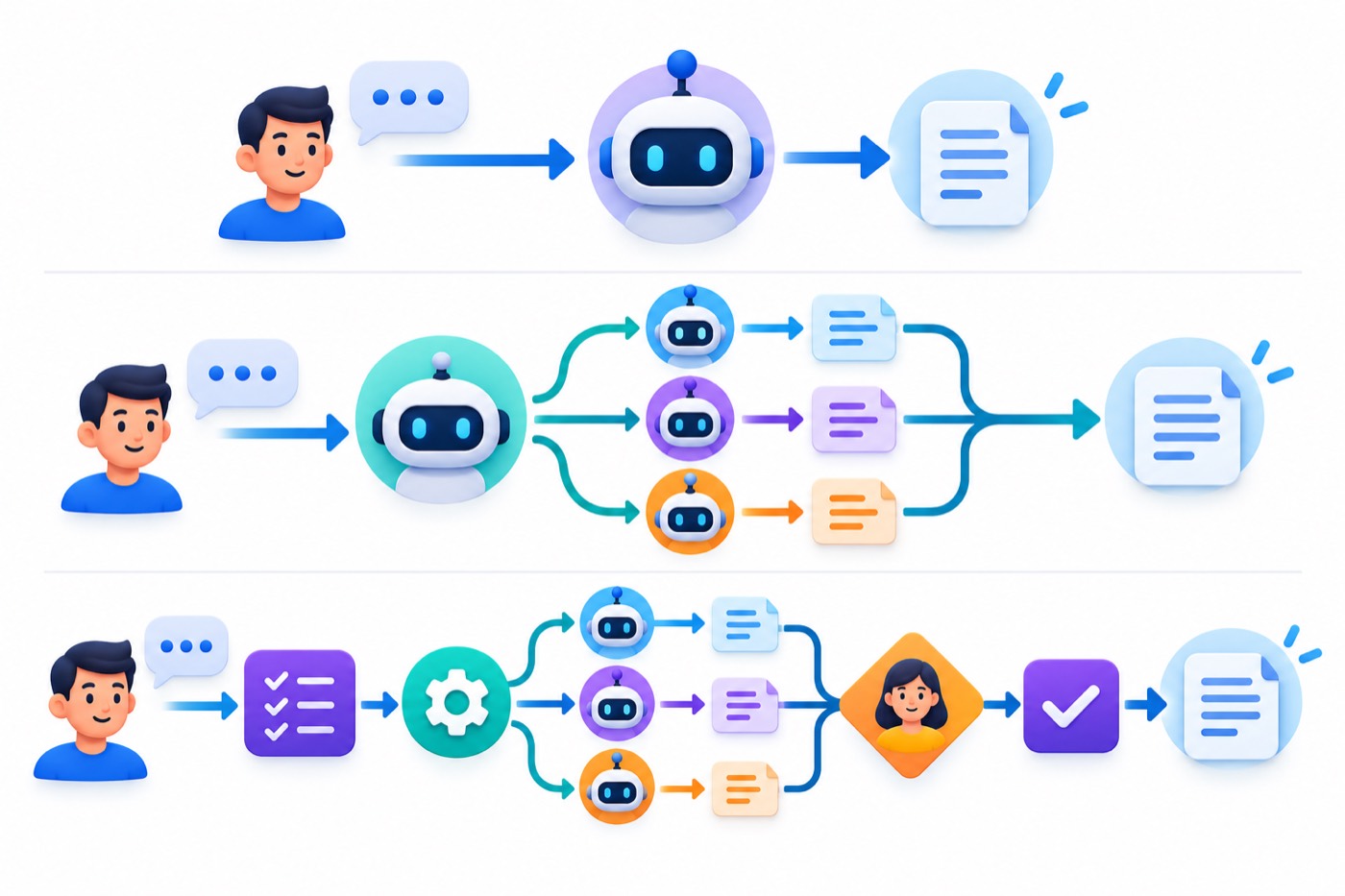
Dynamic Workflows vs Normal Prompts, Fleet, and Autopilot
The most common mistake is treating every multi-agent feature as interchangeable. They can all involve agents, but they answer different control questions.
| Mode | Who defines the process? | Best use | Main tradeoff |
|---|---|---|---|
| Normal prompt | The agent decides how to approach the requested outcome. | Questions, small changes, one-off analysis. | Fast and flexible, but the exact process is not reusable. |
| Autopilot | Copilot continues choosing and executing steps with less interruption. | A bounded task where autonomy matters more than a fixed stage map. | Convenient, but the route is agent-led and may vary. |
/fleet | Copilot decides how to divide work among parallel subagents. | Speeding up naturally separable work. | Parallelism is easy, but decomposition is decided during the run. |
| Dynamic workflow | The workflow author defines steps, conditions, handoffs, limits, and checkpoints. | Repeatable processes, team standards, controlled fan-out, CI, and audited runs. | More setup, versioning, and testing are required. |
A dynamic workflow can reproduce some behaviors associated with fleet, but “replace fleet” is the wrong first question. Fleet is a delegation strategy. A workflow is a process definition. A workflow may launch several agents in parallel, one agent at a time, or no agents in a particular branch. It can use a fleet-like fan-out, yet it also controls what happens before and after the fan-out.
Think of fleet as asking a capable coordinator to divide work now. Think of a workflow as publishing the operating procedure your coordinator must follow every time. For an exploratory audit, fleet may be enough. For a release gate that every repository must run consistently, a workflow is the stronger fit.
Autopilot solves a different problem: it reduces the need to approve or prompt every next step. A dynamic workflow can still contain a long autonomous segment, but its process remains authored. The choice is not “autonomy or workflow.” It is whether the autonomy should follow a stable, reviewable procedure.
Teams using the patterns in our GitHub Copilot custom agents guide can place specialist roles inside a more explicit orchestration. Teams distributing reusable components through the Copilot agent plugins workflow can package a proven dynamic workflow for broader installation.
A normal prompt remains the right baseline. If a one-file change can be explained, performed, and reviewed in a few minutes, workflow authoring adds ceremony. Upgrade to a workflow when the benefit comes from repeatability, controlled parallelism, evidence preservation, or organizational consistency—not because multi-agent diagrams look sophisticated.
How to Create a GitHub Copilot Dynamic Workflow
Start with a process you can describe as a short sequence, not with a vague ambition such as “automate development.” The official GitHub workflow how-to lets you ask Copilot to author a workflow in natural language. That is useful, but you still need to design the process before asking an agent to encode it.
Step 1: choose a repeatable boundary
Pick work that has a stable beginning and end. “Review changed Java files and return prioritized findings” is bounded. “Improve the repository” is not. Write down the accepted inputs, the expected result, and the conditions that should stop the run. Name excluded work too: no file edits, no pushes, no external messages, or no deployment.
Step 2: separate mechanical work from judgment
Use code to enumerate files, check file types, run a linter, or validate JSON. Use an agent to interpret an architectural risk, judge whether a test is meaningful, or explain why two findings conflict. Every mechanical task moved out of an agent step makes the workflow cheaper, easier to test, and less variable.
Step 3: define output contracts
Do not let every agent return arbitrary prose. Ask for fields such as severity, file, line, evidence, confidence, and recommendation. Validate the shape. GitHub notes that workflows can request a specified format and ask an agent to correct it when necessary. A contract lets one stage safely consume another stage's result.
Step 4: add limits before the first broad run
Set conservative maximums for concurrent agents, total agents, running time, and AI credits. A small test should process two or three files, not an entire monorepo. After it finishes, examine actual usage and revise the saved workflow definition.
Step 5: ask Copilot to author the first version
In an eligible interactive session, use a request that names the workflow and its process. A concise starting prompt could be:
Create a dynamic workflow named review-changed.
Inputs: one or more repository directories.
List changed source and test files deterministically.
Use separate agents for implementation risk and test coverage.
Require structured JSON findings and combine duplicates.
Pause for human review before suggesting fixes.
Allow no more than 2 concurrent and 4 total subagents.
Use a 20 minute active timeout and 250 AI-credit limit.
Do not modify files, push code, or create pull requests.
Creating the workflow does not run it. After authoring, ask Copilot which workflows are available and confirm that the new name appears. Then run it on a narrow fixture. Inspect stage order, permission prompts, output schema, limit behavior, cancellation, and any result saved before the pause.
Step 6: revise the saved definition
If the workflow launches too many agents or returns uneven findings, revise the workflow rather than compensating with a different ad hoc prompt on every run. A saved correction becomes part of the reusable process. Keep changes in version control when the workflow is shared with a project.
Step 7: write a small test plan
Test the happy path, empty input, malformed input, permission denial, one failing agent, a timeout, a credit stop, cancellation, pause, resume, and changed inputs after a pause. A workflow is not ready simply because one impressive demo completed. It is ready when its failure modes are understandable and recoverable.
Permissions and Security Boundaries
A reusable workflow is executable code plus agent activity. Treat both parts as software you are choosing to trust. The agent permission system does not automatically constrain every line of extension code, and a project extension can be changed through a normal repository commit. Review workflow code before loading it from an unfamiliar source.
According to GitHub's concept documentation, workflow subagents inherit permissions already granted to the session that starts them. If a subagent needs something new in an interactive CLI session, the request appears as a normal approval prompt. A session-wide grant can then apply to other subagents requesting the same permission. This is convenient, but it means one broad approval can widen the whole workflow.
Direct command-line execution behaves differently. When you run copilot workflow run, permission approval prompts are not displayed. You must grant required access in advance, and unapproved requests are denied. This is a healthy default for automation because a headless process should not wait for an invisible confirmation dialog.
| Risk | Safer default | Reason |
|---|---|---|
| Broad shell access | Allow exact commands or narrow command families. | A workflow that only runs tests does not need arbitrary shell execution. |
| Repository writes | Begin read-only; add specific write paths later. | Review and discovery workflows often need no write access. |
| Network access | Allow known domains and deny everything unrelated. | Prevents accidental calls to unreviewed services. |
| MCP tools | Allow specific server tools, not an entire server by default. | One read tool should not grant create, update, or delete actions. |
| Project extension loading | Load only from trusted folders and reviewed commits. | Extension code runs as part of your local or automated environment. |
| Secrets in logs | Use secret-variable redaction and minimize transcript sharing. | Structured results and traces can still reveal sensitive context. |
GitHub's programmatic CLI reference documents controls such as --allow-tool, --deny-tool, --allow-url, --deny-url, and --add-dir. Prefer those to --allow-all for a reusable workflow. If you connect external services, pair this section with our GitHub Copilot MCP allowlists guide and MCP tools setup guide.
Local sandboxing is useful defense in depth, but it does not replace a permission design. A sandbox can reduce the blast radius of local execution; a workflow still needs narrowly defined tools, credentials, paths, URLs, and business actions. Never assume that “running in a sandbox” makes an unreviewed extension trustworthy.
Separate technical permission from business approval. Permission to call a messaging tool does not mean the workflow should send a customer message without review. Permission to write a repository does not mean it should merge. Place an explicit checkpoint before actions that affect people, production systems, money, access control, publication, or deletion.
Finally, consider instruction injection. A workflow that reads issues, web pages, logs, or repository files may encounter text that tries to redirect the agent. Treat external content as data, isolate untrusted instructions, and require workflow code—not retrieved text—to determine permissions and stage transitions.
How to Limit Agents, Time, and AI Credits
Dynamic workflows expose four practical limit types: maximum concurrent workflow-owned agents, maximum total workflow-owned agents, maximum active running time, and an approximate maximum number of AI credits. These limits answer different failure modes.
Credit limits are approximate rather than a hard real-time ceiling. Usage is reported after it occurs, so in-flight work can take a run beyond the configured number before new work stops. Treat the setting as a guardrail, not a guaranteed billing cap. If exact spend is critical, reduce concurrency, use lower-cost models for simple stages, precompute context deterministically, and make the initial scope smaller.
Limits can come from the run prompt, workflow code, or personal settings. Prompt limits take priority, then workflow limits, then personal defaults. This hierarchy is helpful for one unusually sensitive run, but it can also let a caller override a carefully chosen default. Document which limits may be changed and which require a workflow revision or peer review.
The most reliable budgeting method is empirical. Run the workflow against a small, representative fixture. Record files processed, agents launched, active duration, model choices, and credits used. Expand gradually. Do not multiply one small result blindly across a monorepo because context size, retries, and branch behavior can change nonlinearly.
Use concurrency as a quality choice as well as a cost choice. Parallel agents are valuable when tasks are truly independent. If every branch needs the result of another branch, concurrency adds coordination noise. A sequential workflow can be cheaper, easier to observe, and more accurate.
If you need broader usage reporting, the GitHub Copilot usage metrics API guide explains how to move beyond one run and observe repository-level adoption and AI-credit patterns.
Running Dynamic Workflows From the CLI and CI
An existing workflow can run directly with copilot workflow run WORKFLOW-NAME. This is more automation-friendly than asking an interactive chat agent to start it, because inputs and outputs can be explicit.
copilot workflow run java-security-checks \
  --args @workflow-input.json \
  --result-file security-results.json \
  --allow-tool=read
Arguments can be inline JSON or an @-prefixed file. A result file contains only the returned value, not the progress stream. GitHub documents an important safety property: an existing result file is replaced only after a new successful completion returns a result. A paused, failed, or interrupted run does not overwrite the previous file.
For scripts, use JSON output and inspect both the process exit code and final status. A completed run normally exits with zero. Paused, limited, cancelled, or failed runs use a nonzero status, while workflow-not-found or invalid-input errors use a distinct code. Do not consume an old result file merely because it exists.
copilot --allow-tool=read workflow run java-security-checks \
  --args @workflow-input.json \
  --silent --output-format json
Project extensions require trust. In automation, the documented GITHUB_COPILOT_PROMPT_MODE_EXTENSIONS=true setting can allow a project extension to load, but it does not grant tools. Enable it only for reviewed repository code, and grant minimum tools and URLs separately.
For CI, pin versions where practical, use a dedicated identity, restrict tokens, redact secret environment variables, store workflow inputs and outputs as reviewable artifacts, and keep mutations in a separate approved job. A safe pattern is analysis first, human review second, write or merge action third.
Monitoring can extend beyond console output. GitHub documents workflow run details in the CLI and app, including elapsed active time, phases, active and total agents, and credits used. If OpenTelemetry is enabled, a run creates an invoke_workflow span with linked agent activity. That makes workflows suitable for the same observability discipline applied to build systems and internal automation.
Scheduling deserves the same caution. A recurring workflow can amplify a harmless inefficiency into a daily bill or a repeated false alarm. Add deduplication, a stable input snapshot, bounded retries, and a silence policy when nothing actionable changed. Avoid giving a scheduled workflow authority to publish or merge merely because it runs unattended.
Practical GitHub Copilot Dynamic Workflow Examples
1. Pull-request review with independent verification
Start by listing changed files and excluding generated artifacts. Send production code to a defect-review agent and test files to a coverage agent. Require structured findings. A reconciliation stage removes duplicates and flags disagreements. Pause before creating comments. This pattern is useful because deterministic stages constrain scope while agents focus on judgment.
2. Release readiness check
Run tests, linting, dependency checks, and changelog validation as deterministic steps. Only when a check fails should an agent analyze logs and suggest a next action. Pause with a report rather than automatically deploying. This keeps ordinary successful releases cheap and predictable while preserving expert help for failures.
3. Incident timeline and root-cause hypothesis
Collect approved logs and telemetry from known sources. Divide services among agents, require each to return events in a shared timeline schema, then ask another agent to reconcile clocks and competing hypotheses. Preserve evidence links. Never let the summarizer rewrite raw evidence, and keep remediation outside the evidence-gathering stage.
4. API deprecation sweep
Use code search to identify candidate usages across directories. Partition the file list, let agents classify true and false positives, and merge results. A human reviews the migration plan before edits begin. This is a strong workflow because search is deterministic, classification benefits from reasoning, and implementation deserves a separate approval gate.
5. Research-to-implementation pipeline
One stage gathers official documentation from an allowlist. Another summarizes requirements in a strict schema. A planning agent creates a change plan. A checkpoint asks the user to approve it. Only then does implementation begin. If sources conflict, stop and surface the conflict instead of letting the agent choose silently.
6. Multi-repository standards audit
Run the same versioned workflow against a list of repositories, but keep each repository's input and output isolated. Cap concurrency to protect cost and service capacity. Aggregate only normalized findings. This creates an auditable organization-wide view without allowing one repository's instructions to influence another.
7. Documentation drift detector
Use code to extract CLI flags, configuration keys, or API schemas from the current product. Compare them with documentation examples. Ask an agent to judge whether each mismatch is a true documentation defect or an intentional abstraction. Return a proposed edit list, but require a writer or maintainer to approve changes.
8. Security review with disagreement handling
Assign independent agents to examine authorization, secret handling, and dependency risk. Require every high-severity claim to include evidence. A final stage should not average disagreement away; it should expose conflicting conclusions and request human review. Confidence is not a substitute for evidence.

What dynamic workflows improve
- Repeatable stage order and handoffs
- Explicit cost, time, and concurrency guardrails
- Structured results for scripts and CI
- Human review at meaningful checkpoints
- Versioned team processes instead of prompt folklore
What they do not solve
- Agent answers remain probabilistic
- Extension code still needs security review
- AI-credit limits are approximate
- Preview interfaces can change
- Poor process design becomes reusable poor automation
Troubleshooting Dynamic Workflow Runs
The workflow does not appear
Confirm Copilot CLI experimental features are enabled, the extension is in the correct session, personal, or project location, and the current folder is trusted. Reload the extension or begin a new session after copying a workflow. Ask Copilot to list available workflows before assuming the run command is broken.
The workflow stops on a permission request
In interactive mode, answer the surfaced request only after checking the exact tool, path, or URL. In direct CLI mode, prompts are not shown, so supply narrow permissions before starting. A denied operation may be the intended security outcome rather than an error to bypass.
The run reaches an agent or credit limit
Inspect saved results before resuming. Increase only the limit that actually blocked progress. A resumed limit is a total for the run, including prior usage, not a fresh allowance. If the same step repeatedly consumes the budget, redesign the stage instead of raising the ceiling indefinitely.
The result file is missing
A result file is written only after successful completion when the workflow returns a value. Check exit code, final JSON status, and standard error. A paused or failed run intentionally leaves an existing file unchanged.
The workflow is expensive
Reduce agent fan-out, use deterministic preprocessing, shrink file scope, request shorter structured output, choose a lower-cost model for simple classification, and stop agents from re-reading the same context. Compare actual usage by stage before optimizing blindly. Our guide to reducing Copilot AI-credit usage provides complementary habits.
Team members see different behavior
Check extension revision, CLI version, model availability, personal limits, granted permissions, and repository trust. A shared workflow definition does not guarantee identical model output, but the process and controls should match. Record the workflow revision and client version with important results.
A project extension changed unexpectedly
Stop loading it, inspect commit history and diff, and review any new tool, URL, write path, or secret access. Do not approve broader permissions simply to restore old behavior. Roll back to a trusted revision and investigate the update like any other executable dependency.
A resumed run uses stale evidence
Compare saved input identifiers with current repository commits, incident timestamps, or API versions. If material inputs changed, start a new run or invalidate dependent stages. Resume is a convenience, not proof that earlier evidence remains valid.
A Safe Rollout Checklist for Teams
✓ Name one owner for the workflow and its permission model.
✓ Document inputs, returned result, stages, stop conditions, and expected side effects.
✓ Move deterministic operations out of agents wherever practical.
✓ Validate agent outputs against a schema before later stages consume them.
✓ Start read-only and grant specific tools, paths, and domains.
✓ Set conservative concurrent-agent, total-agent, time, and credit limits.
✓ Test cancellation, pause, limit-stop, resume, and failure behavior.
✓ Run a representative small fixture and record actual credit use.
✓ Place a human checkpoint before external or irreversible actions.
✓ Version the extension, review updates, and preserve a rollback path.
✓ For CI, use a dedicated identity and check exit code plus final run status.
✓ Monitor phases, agents, time, credits, and traces after rollout.
If you are new to the desktop control surface, first read our GitHub Copilot app guide. For browser-based validation stages, the Copilot browser tools guide explains how to keep checks focused and reviewable.
For an organization rollout, begin with volunteers and a low-risk repository. Compare workflow findings with the existing manual process. Measure false positives, missed issues, reviewer time, credits, and failure recovery. A workflow should graduate because it improves a real operating measure, not because it completed an elaborate run.
Final Recommendation
Build your first dynamic workflow around a read-only process that already has a clear manual checklist. A pull-request review, release-readiness report, or dependency audit is better than a full autonomous development pipeline. Keep the first version small: two agent roles, one schema, one human checkpoint, and tight limits.
When the small run is useful, move the extension into the appropriate scope, add tests, write an operating note, and collect usage data. Only then expand file set, agent count, tools, or automation surface. The goal is not maximum autonomy. The goal is a process repeatable enough to trust, observable enough to debug, limited enough to budget, and reviewable enough to share.
GitHub Copilot dynamic workflows are most valuable when they turn a good engineering habit into a reusable system. They are least valuable when they preserve an unclear prompt in code. Design the process first; let Copilot help implement it second.
Continue Learning on AI Feature Drop
- GitHub Copilot App Guide — manage agent sessions, credits, and cloud work.
- GitHub Copilot Custom Agents — define specialist roles for repeatable tasks.
- Copilot Agent Plugins Guide — package and distribute reusable components.
- GitHub Copilot MCP Allowlists — control which agent tools developers can call.
- Copilot Usage Metrics API — monitor adoption, credits, and repository activity.
- GitHub Copilot AI Credits Explained — understand the underlying usage model.
- Reduce GitHub Copilot AI Credits — improve prompts, scope, and model choices.
- Copilot Browser Tools Guide — verify web behavior with controlled agent checks.
Sources and References
- GitHub Changelog: Dynamic workflows in Copilot CLI and the Copilot app
- GitHub Docs: Dynamic workflows concepts, permissions, limits, and controls
- GitHub Docs: Using dynamic workflows
- GitHub Docs: Copilot CLI programmatic reference
- GitHub Docs: Copilot CLI command reference
- GitHub Docs: Creating a plugin for Copilot CLI
Dynamic workflows are in public preview. Plan eligibility, commands, client support, model availability, and pricing can change. Verify current GitHub documentation and account settings before relying on a workflow for production operations.
FAQ: GitHub Copilot Dynamic Workflows
What is a GitHub Copilot dynamic workflow?
It is a code-defined orchestration that can combine deterministic operations, agents, tools, service calls, structured handoffs, limits, and human checkpoints. The workflow lives in a Copilot extension and can be reused.
Are dynamic workflows the same as Copilot fleet?
No. Fleet lets Copilot decide how to delegate work among parallel subagents. A dynamic workflow follows steps, conditions, and handoffs defined by the workflow author. A workflow may still run multiple agents in parallel.
How are dynamic workflows different from autopilot?
Autopilot emphasizes continued agent autonomy. Dynamic workflows emphasize a code-defined process. You choose stages, branches, limits, and checkpoints, while agents handle selected judgment-heavy work.
Which Copilot clients support dynamic workflows?
GitHub documents support in Copilot CLI, the GitHub Copilot app, and the Copilot SDK. CLI access currently requires experimental features. The feature is in public preview.
Do dynamic workflows use AI credits?
Agent and subagent activity can consume AI credits. You can set an approximate maximum credit limit, but in-flight usage may take the final total beyond that number before new work stops.
Can I limit how many agents a workflow launches?
Yes. You can limit concurrently active workflow-owned agents and the total number launched during a run. You can also limit active running time and approximate AI credits.
Can a workflow pause and resume?
Yes. Workflows can pause at a designed checkpoint or stop when certain limits are reached. Saved results from completed work may be reused when the run resumes, though unsaved work may need to run again.
How do permissions work for workflow subagents?
Subagents inherit permissions already granted to the starting session. New requests can surface in interactive CLI use. Direct workflow commands do not show approval prompts, so required permissions must be granted in advance.
Can I share a workflow with my team?
Yes. Move its extension into a repository's project extension directory and review it like executable code. A workflow can also be packaged in a Copilot plugin for broader distribution.
Can I run a dynamic workflow in CI?
Yes. The Copilot CLI can run a named workflow with JSON inputs and structured output. Configure authentication and narrow tool permissions beforehand, inspect exit codes, and load only trusted project extensions.
When should I use a normal prompt instead?
Use a normal prompt for a quick answer, one-file change, or one-off task that does not need a reusable process, structured stages, explicit limits, or team distribution.
What is the safest first workflow?
Start with a read-only review or report that operates on a small fixture, uses one or two agents, returns structured findings, has tight credit and time limits, and pauses before any mutation or external action.
Post a Comment