
GitHub Copilot Custom Agents in Visual Studio: Build Team Coding Workflows That Stay Consistent
Visual Studio now makes GitHub Copilot feel less like one generic chat box and more like a set of specialized teammates. This guide explains how custom agents work, how organization-level agents help teams standardize development workflows, and how to design agent files that improve code reviews, migrations, testing, and daily AI-assisted coding without creating new governance problems.

Quick Answer: What Are GitHub Copilot Custom Agents in Visual Studio?
GitHub Copilot custom agents in Visual Studio are reusable agent definitions that tell Copilot how to behave for a specific development workflow. Instead of asking a general AI assistant to “review this code” and then repeatedly explaining your standards, a team can create a dedicated reviewer, tester, modernization helper, migration planner, documentation assistant, or architecture guide with its own role, boundaries, and instructions.
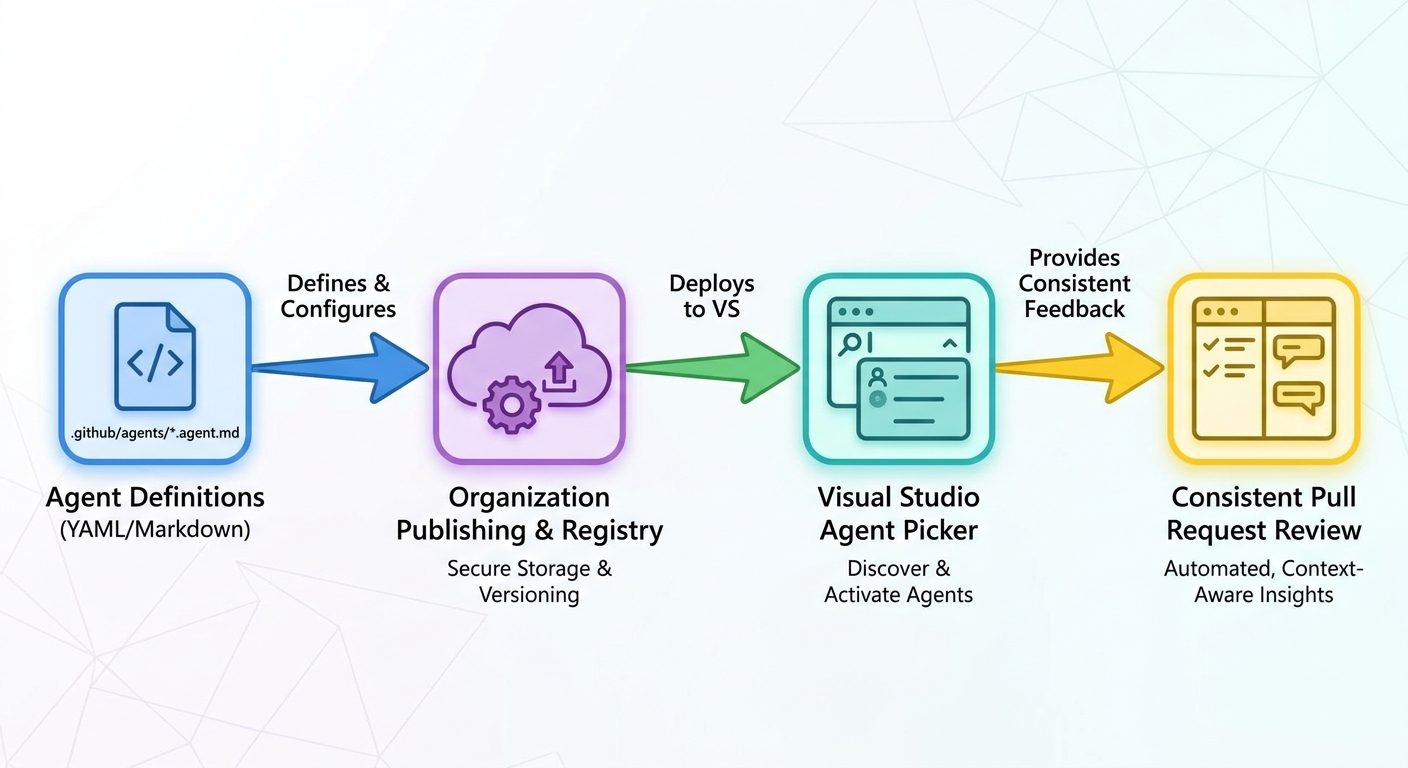
The important update is that Visual Studio supports these agents inside the Copilot Chat experience, and Microsoft’s latest Visual Studio guidance says GitHub organization and enterprise owners can publish organization-level custom agents for use across repositories in a GitHub organization. When a developer opens an eligible repository, Visual Studio can detect those agents and show them in the agent picker with descriptions and the organization source.
For AI Feature Drop readers, this fits a larger pattern across AI coding tools. OpenAI Codex, Claude Code, Gemini agent workflows, and GitHub Copilot are all moving from single prompts toward governed agent systems. The winners are not the teams that write the longest prompts. The winners are the teams that turn repeatable decisions into small, auditable workflow assets.
Why This Update Matters for Real Development Teams
Copilot started as a productivity assistant for inline suggestions and short code questions. That experience is still valuable, but modern Copilot is doing more: reviewing changes, planning work, running agent sessions, using different models, surfacing usage details, and working with local Git context. Once an AI assistant can affect real code, the problem changes from “Can it answer?” to “Can it follow how this team works?”
That is the reason custom agents deserve attention. A generic coding assistant is flexible, but flexibility often turns into inconsistency. One developer asks for security-focused review. Another asks for performance review. A third forgets to mention the team’s logging conventions. A fourth pastes a giant prompt into every session and hopes Copilot follows it. This works for experiments, but it becomes messy when multiple engineers, repositories, languages, and review standards are involved.
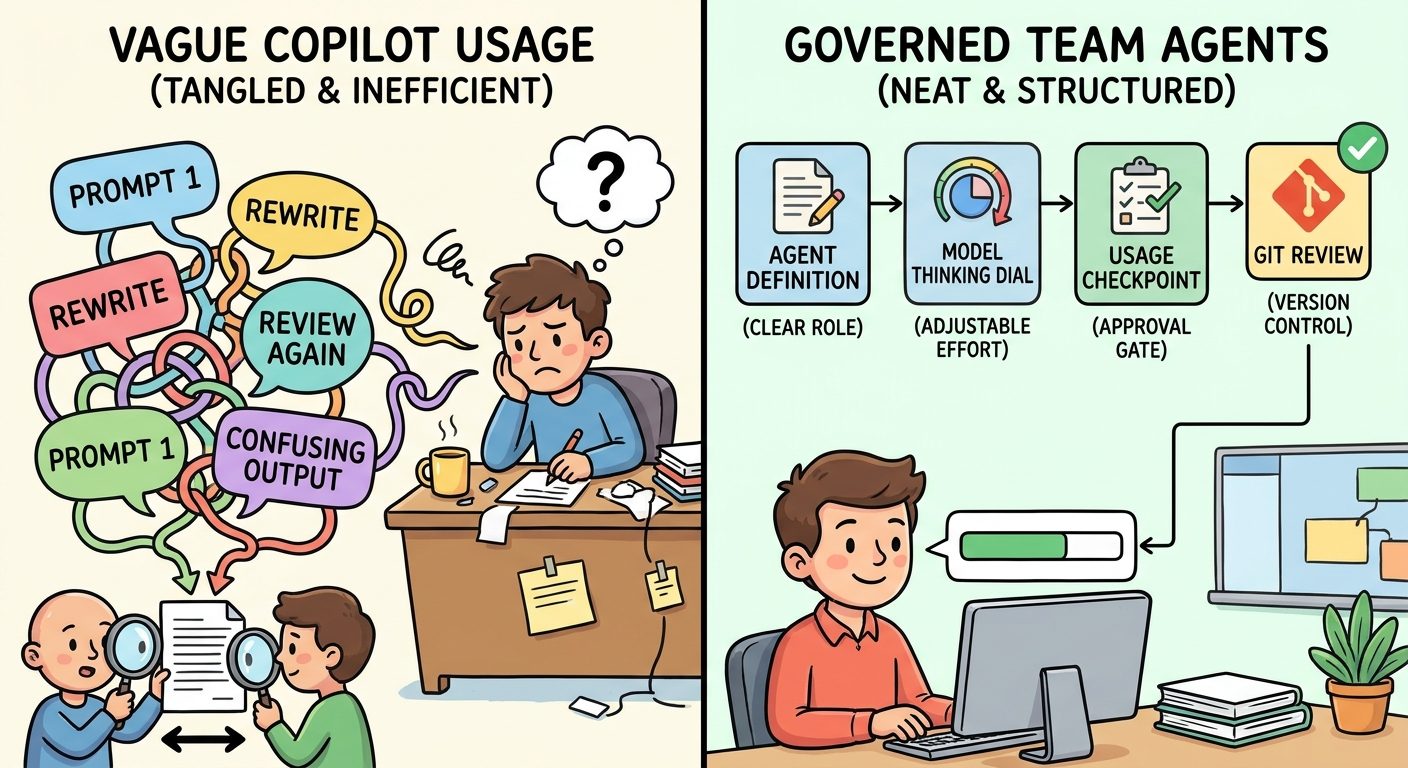
Custom agents give teams a middle layer between one-off prompts and full platform automation. They are lightweight enough for normal developers to understand, but structured enough to be reviewed, versioned, shared, and improved. If an agent is stored as a file in a repository or user directory, the team can inspect it like any other development artifact. If an organization publishes a shared agent, developers can discover it in Visual Studio instead of asking around for the latest “good prompt.”
The timing also matters because Microsoft’s Visual Studio August update connects custom agents with two other practical controls: model thinking effort and usage visibility. Supported models can use Low, Medium, or High thinking effort, which helps developers balance depth, speed, and token usage. Visual Studio also makes Copilot usage easier to access from the prompt area. Custom agents become much more useful when paired with those controls: a review agent can say when deeper reasoning is justified, and a team can monitor whether expensive agent habits are actually saving engineering time.
Analytics from AI Feature Drop also supports this direction. Recent site traffic is strongest on practical AI coding workflow topics, especially Codex setup, pricing, usage limits, and safe agent workflows. That tells us readers are not only searching for announcement summaries. They want operational guidance: how to set things up, what to avoid, which limits matter, and how to turn a new AI feature into a repeatable workflow.
How GitHub Copilot Custom Agents Work in Visual Studio
Visual Studio includes built-in agents for common developer jobs, including debugging, profiling, testing, Git review, and modernization workflows. These are not just different names for the same chat assistant. The point is specialization. A debugging agent can use debugging context. A Git agent can review uncommitted changes and commit-specific changes. A test agent can focus on unit tests and project conventions. A modernization agent can reason about framework upgrades and dependency changes.
Custom agents extend that idea. Microsoft’s documentation describes custom agents as agent definitions that can be stored as .agent.md files. Repository or workspace-specific agents can live under .github/agents/. User-level agents can live in a user agent directory. Organization-level agents are made available by GitHub organization or enterprise owners and can appear to developers working in repositories that belong to that organization.
In practice, a custom agent file should answer five questions:
A good agent is not a giant instruction dump. It is a focused workflow contract. The narrower the job, the easier it is for developers to trust the output and improve the agent over time.
How to Set Up a Useful Custom Agent Without Overcomplicating It
The safest way to start is with one agent that solves a frequent pain point. Do not begin by creating twenty agents. Do not turn every style preference into a separate personality. Pick one workflow where Copilot’s generic behavior currently wastes time: reviewing pull requests, creating tests, upgrading old APIs, checking accessibility, writing release notes, or enforcing project-specific architecture boundaries.
For a repository-level agent, create a directory such as .github/agents/ and add a file with a clear name like code-reviewer.agent.md, test-writer.agent.md, or migration-planner.agent.md. The exact capabilities available to your IDE and plan can change, so verify the current Visual Studio and GitHub Copilot documentation before rolling this into a team workflow. The pattern, however, is straightforward: keep the file short, make the agent role explicit, and document how developers should invoke it.
# Code Reviewer Agent

You are the team's focused code review assistant.

Review goals:
- Look for correctness, security risk, test gaps, edge cases, and maintainability.
- Respect existing architecture and naming conventions.
- Prefer small actionable comments over broad rewrites.
- Do not request style-only changes unless they affect clarity or consistency.

When reviewing:
- Start with the highest-risk findings.
- Explain why each issue matters.
- Suggest a minimal fix when possible.
- If the diff is too large, ask to review one subsystem at a time.

Do not:
- Approve code as production-ready.
- Invent project requirements.
- Recommend dependencies without justification.
This is intentionally boring. Boring is good. The agent has a job, clear boundaries, and a predictable output style. It does not pretend to replace human review. It reduces the repetitive setup work before human review begins.
Use organization-level agents when the workflow is truly shared
Organization-level custom agents are most useful when the same standards apply across many repositories. Examples include secure coding review, privacy checks, documentation style, accessibility review, release readiness, dependency upgrade planning, and common platform migration guidance. They are less useful for highly specific experiments that only one repository needs.
Before publishing an agent organization-wide, treat it like a lightweight internal tool. Give it an owner. Add a version note. Explain which repositories it supports. Test it against sample changes. Ask a few developers to use it on real work and report confusing instructions. If the agent produces noisy comments, vague advice, or excessive rewrites, fix the file before expanding adoption.
Pair agents with custom instructions, not instead of them
Custom instructions and custom agents solve related but different problems. Custom instructions provide broad context, such as code style or team preferences. Custom agents provide a specific role and workflow. A team might use organization-level custom instructions to say “we prefer explicit error handling, use structured logging, and avoid broad catch-all exceptions,” then use a security review agent to apply those standards in a focused review flow.
Do not stuff every instruction into every agent. That creates stale duplication. Put broad standards in shared instructions where possible, then keep each agent focused on its job.
Practical Custom Agent Ideas for Visual Studio Teams
If you are not sure where to start, choose a workflow where developers already ask Copilot similar questions every week. The following agent ideas are deliberately concrete because broad agents tend to become weak agents.
1. Pull request pre-review agent
This agent reviews local uncommitted changes or a specific commit before a pull request is opened. It should prioritize correctness, missing tests, obvious security issues, and maintainability risks. It should avoid rewriting the author’s code unless asked. It should produce concise review comments that a human reviewer can quickly accept, reject, or discuss.
This pairs naturally with Visual Studio’s Git agent review capability. The value is not replacing code review; it is catching obvious issues earlier, before a teammate spends attention on them.
2. Test gap finder
A test gap agent inspects a change and asks: what behavior changed, what edge cases are untested, and what minimal tests would raise confidence? The best version understands the project’s existing test framework and avoids generic test boilerplate. It should suggest test names, arrange-act-assert structure, and fixtures that match the codebase.
3. Migration planner
A migration planner is useful for framework upgrades, dependency replacement, API migrations, and older code modernization. It should avoid editing code immediately. First, it should map the affected areas, identify breaking changes, rank risks, and propose a staged plan. Only after a developer approves the plan should it help implement a narrow slice.
4. Accessibility reviewer
For frontend teams, an accessibility agent can check UI changes for keyboard navigation, labels, contrast assumptions, focus order, error messaging, and screen reader implications. It should cite the relevant component or file instead of making broad accessibility claims.
5. Release notes assistant
This agent turns merged changes into user-facing release notes. It should separate bug fixes from improvements, avoid internal jargon, and flag items that need product manager confirmation. This is a great low-risk starting point because the output is text and humans naturally review it before publication.
6. Architecture boundary checker
Some repositories have rules that humans forget: controllers should not call persistence directly, UI components should not import server-only modules, internal APIs should not leak into public SDKs, and generated files should not be hand-edited. A boundary checker agent can scan diffs for those patterns and explain violations.
Each of these examples has a clear job. That is the design principle. If an agent needs a paragraph to explain when it is useful, it may be too broad.
Governance: How to Keep Custom Agents Helpful Instead of Chaotic
Custom agents are powerful because they make AI assistance repeatable. That also means bad instructions can become repeatable. A sloppy organization-wide agent can spread noisy reviews, outdated standards, or unsafe suggestions across many repositories. Treat agent governance seriously, but keep it lightweight enough that teams actually use it.
What gets better
- Teams can share coding standards without pasting the same prompt into every chat.
- Specialized agents can reduce context setup time for reviews, tests, migrations, and documentation.
- Agent definitions can be inspected and improved like normal project files.
- Organization-level agents improve discoverability for developers across repositories.
- Model thinking effort and usage visibility make agent work easier to control.
What needs care
- Overly broad agents can produce vague advice.
- Outdated instructions can encode old architecture decisions.
- Too many agents make the picker confusing.
- High-effort reasoning on routine tasks can increase token usage unnecessarily.
- Developers may over-trust agent output if the file sounds authoritative.
Create a simple review process for agent files
An agent file does not need the same process as production code, but it should not be edited casually without review. At minimum, require a second developer to review organization-level agents. Ask whether the agent has a clear role, whether it avoids unsafe instructions, whether it respects project boundaries, and whether it tells developers when human judgment is required.
Use usage visibility as a feedback loop
Visual Studio’s newer usage visibility is especially useful for teams adopting agents. If a custom agent becomes popular but consumes a lot of premium model usage, that is not automatically bad. It might be saving hours of review time. But the team should know. Track whether the agent reduces review cycles, catches defects earlier, or creates too many false positives. Usage data should lead to workflow decisions, not panic.
Define when to use Low, Medium, and High thinking effort
Thinking effort controls are a practical way to avoid using maximum reasoning for every task. A documentation agent probably does not need deep reasoning for a small changelog. A security review agent may need higher effort for authentication, authorization, cryptography, or data-handling changes. A migration planner might start at Medium and move to High only when the dependency graph is complex.
| Workflow | Suggested default | When to increase effort |
|---|---|---|
| Release notes | Low | Large cross-product releases or customer-impact wording. |
| Test suggestions | Medium | Complex state, concurrency, distributed systems, or flaky tests. |
| Code review | Medium | Security-sensitive diffs, payment flows, auth logic, data migrations. |
| Architecture planning | High | Multi-service changes, unclear ownership, or difficult tradeoffs. |
| Modernization | Medium | Major framework upgrades or large dependency replacement. |
Write agents that stop safely
A useful custom agent knows when not to continue. Include instructions such as “ask for clarification if the goal is ambiguous,” “do not modify generated files,” “do not recommend secret-handling changes without human review,” or “summarize risks before editing.” These guardrails make the agent feel less magical and more dependable.
Custom Agents vs Custom Instructions vs Agent Plugins
GitHub’s agent ecosystem is becoming broader, so it is easy to mix up terms. Custom agents, custom instructions, and agent plugins are related, but they are not the same thing.
| Capability | Best for | Typical mistake |
|---|---|---|
| Custom instructions | General preferences that should influence many Copilot interactions. | Putting task-specific workflow steps into global instructions until every response becomes bloated. |
| Custom agents | Specialized roles such as reviewer, tester, migration planner, or accessibility checker. | Making one mega-agent that tries to do everything. |
| Agent plugins | Portable packages of skills, MCP configuration, and tool capabilities across Copilot surfaces. | Using plugins before the team has decided the workflow and permission model. |
| Built-in agents | IDE-native jobs like Git review, debugging, profiling, testing, and modernization. | Ignoring built-in agents and rebuilding weaker versions manually. |
A smart team uses these layers together. Start with built-in agents because they are already integrated with Visual Studio. Add custom instructions for broad standards. Add custom agents when a repeatable role emerges. Consider plugins when the workflow needs portable tools or deeper integration across Copilot surfaces.
This is also where internal AI Feature Drop coverage can help. If you are thinking about portability and permissions, read our GitHub Copilot Agent Plugins guide and the GitHub Copilot MCP allowlists guide. If cost visibility is the bigger concern, our GitHub Copilot usage metrics API guide and Copilot AI credits checklist are natural next reads.
A Practical Rollout Plan for Your First Team Agent
Here is a simple rollout plan that avoids both extremes: ignoring custom agents completely or launching an overengineered internal AI platform.
Step 1: Pick one repeated workflow
Look for a task that happens often and has clear success criteria. Code review, test generation, release note drafting, migration planning, and architecture boundary checks are good candidates. Avoid vague goals like “make our code better.”
Step 2: Write a small agent file
Keep the first version under a few screens of text. Include the role, the review priorities, output format, and stop conditions. Use plain language. If a new teammate cannot understand the agent file quickly, it is too complicated.
Step 3: Test it on real changes
Run the agent against three to five recent changes: one small, one normal, one complex, one known-buggy, and one where the right answer is “no meaningful issues.” This reveals whether the agent is helpful or just confidently noisy.
Step 4: Add examples
Examples make agents easier to use. Include a few prompts in your team docs, such as “@reviewer review my uncommitted changes for test gaps” or “@migration-planner assess this project and produce a staged plan before editing.”
Step 5: Publish more broadly only after feedback
If the agent works well in one repository, then consider organization-level publishing. Do not skip the pilot. A local pilot catches stale assumptions before they become everyone’s problem.
Step 6: Measure value
Ask lightweight questions after two weeks: Did this reduce review back-and-forth? Did it catch issues earlier? Did it produce too many false positives? Did developers understand when to use it? Did usage rise in a way that still feels worth it?
This rollout approach is not glamorous, but it is resilient. It treats AI workflow design as product work: ship a small version, observe behavior, improve the experience, and scale when the value is proven.
Why This Topic Has a Strong Search Gap
Search results around this feature currently skew toward official release notes, Microsoft documentation, and short announcement coverage. Those sources are useful, but they do not fully answer the practical questions developers and engineering managers ask after reading the announcement: What should we build first? How do custom agents differ from custom instructions? When should an agent be repository-level instead of organization-level? How do thinking effort controls and usage visibility fit into the workflow? How do we keep agent instructions from becoming stale?
That leaves room for a practical pillar guide. The official pages explain availability and mechanics. A useful independent guide turns those mechanics into team decisions, example agent designs, rollout steps, and governance patterns. This article is written for that search gap: developers who have seen the feature and need an actionable way to use it without creating AI chaos.
The category selection also fits the site’s publishing sequence. The previous pillar article used GoogleAI, so the next label is Microsoft. Within Microsoft, GitHub Copilot remains one of the highest-intent content areas for AI Feature Drop because readers already engage with Copilot credits, MCP tools, browser testing, usage metrics, and agent plugin topics.
Common Mistakes to Avoid
Mistake 1: Building a personality instead of a workflow
A custom agent is not mainly a character. It is a workflow asset. “Be a senior engineer” is weaker than “review uncommitted changes for correctness, security risk, test gaps, and architecture boundaries, then return prioritized comments with minimal fixes.”
Mistake 2: Making every agent edit code by default
Some agents should plan before editing. Reviewers, migration planners, architecture checkers, and security agents should often start with findings and recommendations. Automatic edits are best when the scope is small and easy to verify.
Mistake 3: Duplicating the same instructions everywhere
If the same rule appears in five agents and three instruction files, it will drift. Put broad rules in shared instructions. Put role-specific behavior in the agent file.
Mistake 4: Forgetting plan and token limits
Custom agents can make advanced Copilot workflows easier to use, which can also make heavy usage easier to trigger. Pair agents with usage visibility, model management, and thinking effort defaults.
Mistake 5: Treating agent output as approval
Copilot can help find issues, explain code, and propose fixes. It does not own production responsibility. Human review, tests, security checks, and deployment controls still matter.
Final Recommendation
GitHub Copilot custom agents in Visual Studio are worth adopting when your team already has repeated AI-assisted workflows. They are especially useful for code review, tests, migrations, release notes, and architecture checks. The key is to keep the first agent narrow, readable, and reviewable.
If you are an individual developer, start with user-level or repository-level agents that save you from rewriting the same prompt. If you are a team lead, pilot one repository-level agent before publishing anything organization-wide. If you are an engineering manager, pair agent adoption with usage visibility, model effort guidance, and a simple owner for each shared agent.
The best custom agents will not feel magical. They will feel boringly reliable: clear job, clear boundaries, clear output, clear handoff back to the developer. That is exactly what makes them valuable.
Keep Learning on AI Feature Drop
- GitHub Copilot Agent Plugins Guide — understand portable plugin structure and governance.
- GitHub Copilot MCP Tools Guide — connect controlled external tools to Copilot workflows.
- GitHub Copilot MCP Allowlists Guide — manage tool permissions safely.
- GitHub Copilot Usage Metrics API Guide — track usage before agent habits become expensive.
- GitHub Copilot Browser Tools Guide — test web workflows with better context and guardrails.
- How to Reduce GitHub Copilot AI Credits — practical habits for keeping agentic coding efficient.
Sources and References
- GitHub Changelog: GitHub Copilot in Visual Studio August update
- Visual Studio Blog: Work smarter across models and branches
- Microsoft Learn: Visual Studio release notes
- Microsoft Learn: Use custom agents in GitHub Copilot
- Microsoft Learn: Customize chat responses in Visual Studio
Feature availability, plan rules, and interface details can change. Verify your active Visual Studio version, GitHub Copilot plan, organization policy, and official documentation before making team-wide decisions.
FAQ: GitHub Copilot Custom Agents in Visual Studio
What are GitHub Copilot custom agents in Visual Studio?
They are reusable agent definitions that specialize Copilot for a specific development workflow, such as code review, testing, migration planning, documentation, or architecture checks.
Where do custom agent files live?
Microsoft’s Visual Studio documentation describes custom agents as .agent.md files. Repository-specific agents can be stored under .github/agents/, while user-level and organization-level options depend on your Visual Studio and GitHub Copilot setup.
What are organization-level custom agents?
Organization-level custom agents are shared agents that GitHub organization or enterprise owners can publish for members to use across repositories in that organization. Visual Studio can detect them in eligible repositories and show them in the agent picker.
Do custom agents replace custom instructions?
No. Custom instructions are better for broad preferences and standards. Custom agents are better for a specific role or workflow. Most teams should use both, but avoid duplicating the same rules everywhere.
Are custom agents available on every Copilot plan?
Feature availability can vary by plan, organization settings, Visual Studio version, and rollout stage. The GitHub changelog says the August Visual Studio update is available across Copilot plans, but organization-level capabilities require a GitHub organization and should be checked against current documentation.
Can a custom agent review uncommitted changes?
Visual Studio includes a Git agent that can review uncommitted changes and commits. A custom review agent can complement that workflow by adding team-specific review priorities and output rules.
How long should a custom agent file be?
Short enough to review and maintain. A focused agent with a clear role, priorities, output format, and stop conditions is usually better than a long prompt that tries to encode every possible scenario.
How do model thinking effort controls relate to agents?
Thinking effort lets supported models use lower or higher reasoning depth. Teams can define when an agent should default to lightweight help and when deeper reasoning is justified for complex reviews, migrations, or architecture decisions.
What is the biggest risk of custom agents?
The biggest risk is scaling bad instructions. If an organization-level agent is vague, outdated, or overly aggressive, it can spread noisy AI behavior across many repositories. Review and pilot shared agents before broad rollout.
Post a Comment