
GitHub Copilot Agent Plugins Guide: Package Skills, MCP Servers, and Team Workflows Safely
GitHub Copilot Agent Plugins turn scattered agent instructions, skills, hooks, and MCP server setups into reusable packages. This guide explains what changed, how the package model works, when plugins are worth using, and how developers and teams can adopt them without turning Copilot into an unmanaged toolbox.

GitHub Copilot Agent Plugins: Quick Answer
GitHub Copilot Agent Plugins are installable packages that extend Copilot with reusable capabilities such as custom agents, agent skills, hooks, MCP server configurations, and other client-specific behavior. The practical idea is simple: instead of copying the same instructions, runbooks, server configuration, and project rules into every repository or every developer machine, you package the reusable parts once and let compatible Copilot clients discover them.
The important update is that Agent Plugins 1.0 gives developers and teams a more portable way to package agent behavior. GitHub’s August changelog says support is generally available in VS Code, Copilot CLI, the GitHub Copilot SDK, and the Copilot app, and that the format can bundle skills with MCP server configuration. For a team already experimenting with Copilot agent mode, MCP tools, custom instructions, and repository-level rules, that is a meaningful shift: the question moves from “how do we configure one agent session?” to “how do we ship a safe, repeatable agent capability across the organization?”
This article is written for three readers at once. Developers need a plain explanation of what plugins do. Staff engineers need a pattern for packaging repeatable workflows. Engineering managers and admins need a governance checklist for marketplaces, MCP allowlists, team overrides, and plugin review. If you only want the short version: a plugin is the package, skills are reusable instructions/capabilities inside the package, MCP servers are tool connections the package can describe, and enterprise settings decide which packages are allowed to appear in real developer workflows.
Why Copilot Agent Plugins Matter Now
GitHub Copilot has moved far beyond autocomplete. Modern Copilot workflows include chat, agent mode, pull request help, terminal sessions, cloud agents, repository instructions, MCP-connected tools, and specialized model choices. That power creates a new operational problem. Every team starts to accumulate small pieces of agent behavior: a deployment runbook here, a code review checklist there, a database inspection MCP server, a security triage skill, a documentation agent, a framework-specific helper, and a set of approval rules that only one senior developer remembers.
Manual configuration works when one person is experimenting. It breaks down when ten teams need the same workflow and each team copies a slightly different version. One repository uses an old MCP server name. Another forgets a safety instruction. A third has a good custom agent but no clear update path. A fourth exposes a tool too broadly because installation was treated as a convenience step rather than a governance decision. Plugins exist to reduce that sprawl.
The feature is also timely for AI Feature Drop’s audience. Recent analytics show that practical AI coding workflow guides are the site’s strongest pattern: Codex setup, usage limits, computer-use workflows, and Copilot-related agent topics consistently outperform generic AI news. Search Console also shows early impressions around permissions, agent scope, and computer-use questions, which suggests readers are not only chasing launches; they are trying to understand operational boundaries. Copilot Agent Plugins fit that exact demand because the feature is about making agent behavior repeatable without losing control.
This is not just a developer convenience story. It is part of a larger shift in AI tooling: agents are becoming configurable products rather than one-off chats. The same trend appears in OpenAI Codex Agent Plugins, Google Agent Plugins, and agent workflow standards across the ecosystem. Microsoft and GitHub’s advantage is distribution through the editor, CLI, GitHub app, and enterprise management surface where developers already work.
What Can a GitHub Copilot Plugin Contain?
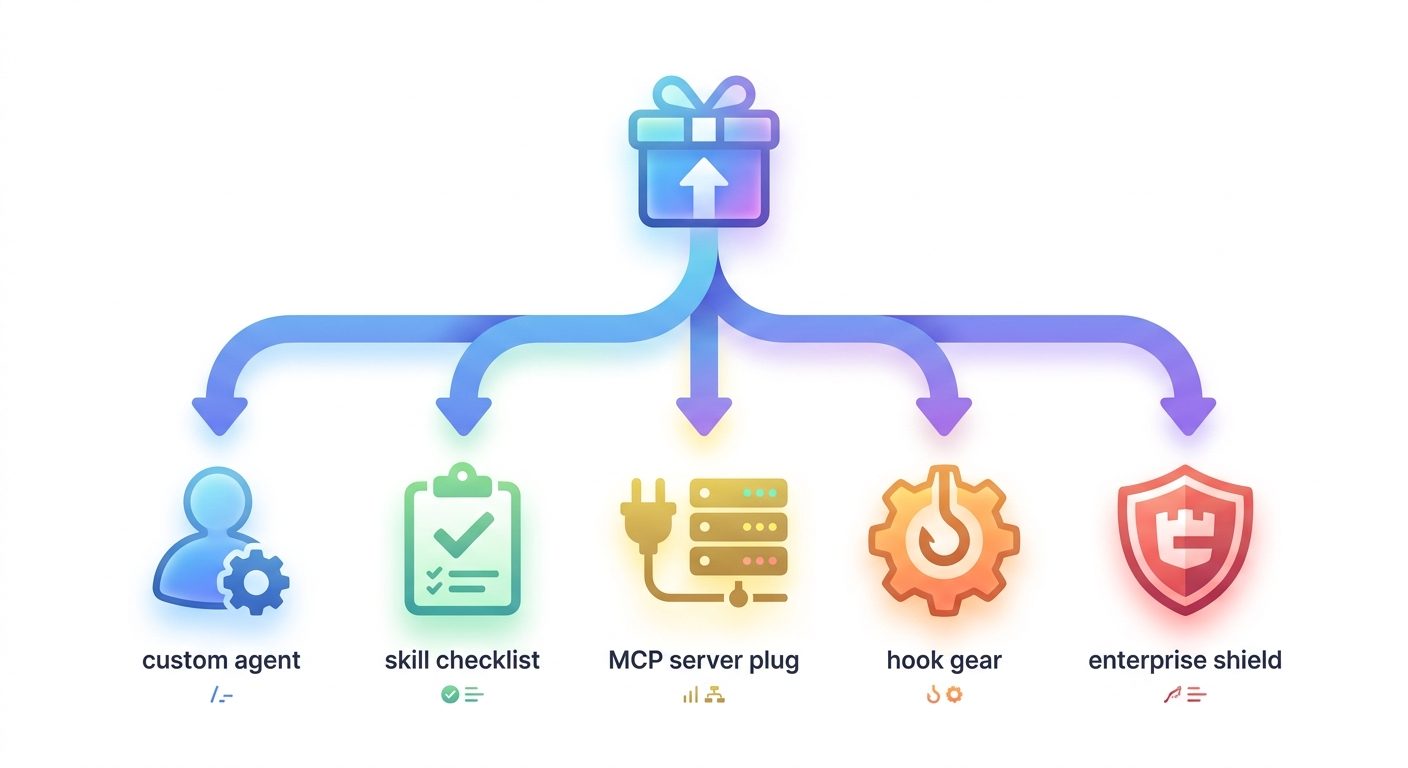
A Copilot plugin is best understood as a bundle. The bundle may be tiny, or it may contain several pieces that work together. GitHub’s docs describe plugins as installable packages that can include custom agents, skills, hooks, MCP server configurations, LSP server configurations, and related metadata. You do not need every component for every plugin. In fact, the safest first plugin is usually small: one clear skill, one narrow purpose, and no broad tool access.
The distinction matters because “plugin” can sound like a single magical object. It is better to think of a plugin as a shipping box. The box can carry a skill, a server connection, a custom agent, and client-specific extras. The box also includes a manifest that tells compatible clients what is inside. That structure helps teams separate reusable guidance from live tool access, which is essential for safe agent adoption.
For example, a deployment plugin might include a skill that explains the release checklist and an MCP server configuration that points to a deployment status tool. The skill can be useful by itself because it teaches the agent the right sequence. The MCP configuration is more sensitive because it may connect to systems that expose real environment information. Packaging both together is convenient, but governance must still decide who gets the plugin, whether the server is approved, and what actions the agent can take.
GitHub Copilot Agent Plugins vs MCP Servers
The most common confusion is the difference between a Copilot plugin and an MCP server. They are related, but they are not the same thing. MCP is a protocol pattern for connecting models and agents to external tools or data sources. A plugin is a package that can include an MCP server configuration along with skills, agents, hooks, and client-specific behavior. In plain English: MCP is often the tool connection; the plugin is the installable package that can carry that connection and the instructions for using it responsibly.
| Layer | What it does | Example question | Risk to manage |
|---|---|---|---|
| Skill | Gives Copilot a repeatable method, checklist, or domain procedure. | “How should the agent triage a flaky test?” | Outdated guidance or overly broad instructions. |
| MCP server | Connects the agent to tools, files, services, or data through an approved interface. | “Can the agent inspect issue data or deployment status?” | Tool permissions, data scope, secrets, and unsafe actions. |
| Plugin | Packages skills, MCP configuration, and optional client-specific behavior into one installable unit. | “How do we distribute this workflow across VS Code, CLI, and app users?” | Unreviewed dependencies, marketplace trust, and version drift. |
| Enterprise settings | Controls which plugins and marketplaces are available to users and teams. | “Which plugins are allowed by default?” | Too-open marketplaces or missing team-specific exceptions. |
If you want a deeper MCP-focused walkthrough, read our GitHub Copilot MCP tools guide. The short version is that MCP tool access should always be treated as a permissioned integration, not a decoration. A plugin that only packages instructions is low-risk. A plugin that connects to ticketing systems, production dashboards, customer data, cloud accounts, or deployment scripts deserves a stricter review.
This is also why the new plugin model is useful. Without packaging, teams may paste MCP snippets into different repositories with inconsistent naming, server URLs, and approval expectations. With plugins, the team can publish a reviewed package and then use managed settings and allowlists to decide where that package may run. The goal is not to make agents more powerful for its own sake. The goal is to make useful power easier to repeat and easier to audit.
How the Agent Plugins Package Model Works
The Agent Plugins specification defines a portable package model. At the simplest level, a plugin is a directory with a plugin.json manifest at the root. Skills live under a fixed skills/ directory. MCP server configuration can live in mcp.json. Client-specific behavior can be namespaced so that Copilot-specific features do not break other clients that understand the same portable specification.
release-helper-plugin/
├── plugin.json
├── skills/
│   └── release-checklist/
│       └── SKILL.md
├── mcp.json
└── com.github.copilot/
    ├── agents/
    ├── hooks.json
    └── rules/
The exact files you include depend on the client and the workflow. The principle is what matters: keep the portable contract clear, keep client-specific extras separated, and do not blur instructions with tool permissions. The public Agent Plugins author guide shows an even smaller package with only plugin.json and one skill, which is a good starting point for teams that are new to this model.
A healthy plugin should answer five questions before anyone installs it. First, what job does the plugin help with? Second, what components does it contain? Third, does it connect to any tools or data sources? Fourth, who maintains it and how are updates reviewed? Fifth, what should a developer do if the plugin produces unsafe or irrelevant behavior? If the plugin cannot answer those questions in its README or marketplace entry, it is not ready for broad team adoption.
The specification also includes package-boundary rules. Files supplied by the package should resolve inside the plugin root, and plugin-relative paths should not escape the package. This matters because agent plugins are not just text prompts; they can carry configuration that clients discover and execute. A clean package boundary reduces accidental access to files that were never meant to be part of the plugin.
Where GitHub Copilot Agent Plugins Are Actually Useful
Plugins are not necessary for every prompt. If you ask Copilot to explain a function once, a plugin is overkill. The value appears when a workflow repeats across projects, involves domain knowledge, or needs a standard safe path. The more often developers copy the same instructions into chat, the more likely that workflow belongs in a skill or plugin. The more often developers manually configure the same MCP server, the more likely the connection belongs in a reviewed package.
1. Release and deployment runbooks
A release plugin can teach Copilot how your team prepares release notes, checks migration risks, reviews feature flags, and summarizes deployment status. If it also includes an MCP server for release data, keep the server read-only unless there is a strong reviewed reason for write access. The plugin should help the agent gather context and prepare a checklist, not silently push production changes.
2. Framework-specific project helpers
Teams often have house rules for Next.js, Django, Rails, Laravel, Spring Boot, Terraform, Kubernetes, or internal frameworks. A plugin can package those conventions so the agent stops giving generic advice. This pairs nicely with repository instructions because the plugin carries reusable expertise while the repo keeps project-specific constraints.
3. Code review and pull request preparation
A review plugin can standardize what Copilot checks before a pull request: tests, security-sensitive files, database migrations, API compatibility, observability, and documentation. The article you are reading is not claiming plugins will replace human review. They are better used as a repeatable first pass that makes human review less random.
4. Incident response and debugging workflows
A debugging plugin can guide Copilot through a safe triage process: gather symptoms, identify recent changes, inspect logs that are approved for the agent, propose hypotheses, and avoid destructive commands. If the plugin connects to observability data through MCP, the scope of that tool matters. Read-only access to non-sensitive metrics is very different from access to customer records or production shells.
5. Documentation and onboarding
New team members ask the same questions repeatedly. A documentation plugin can package the accepted explanation style, glossary, and “where to look first” skill. This can be especially useful in organizations with many internal platforms because Copilot can guide developers without every team rebuilding the same onboarding prompt.
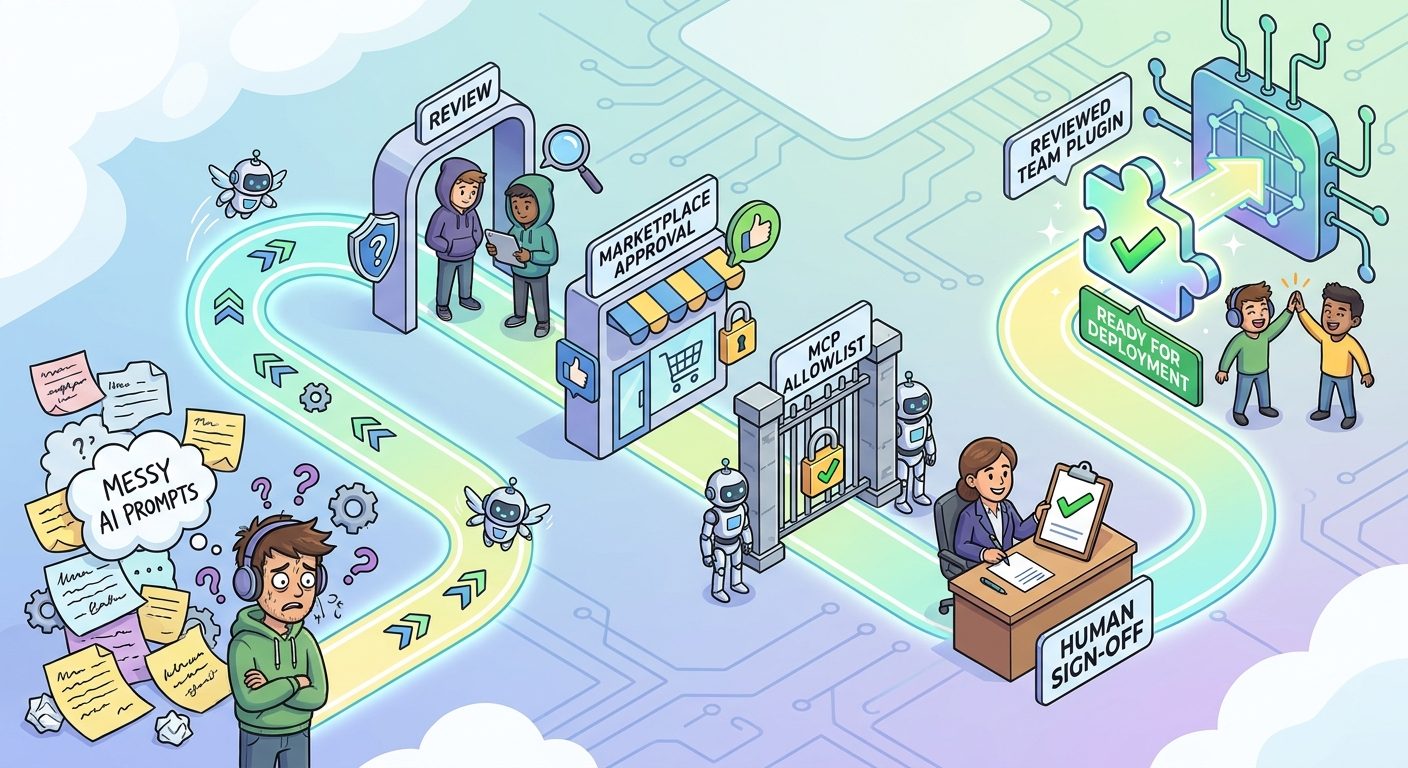
The strongest plugin candidates usually have one more trait: they are easy to verify. A plugin that generates a changelog draft, release checklist, or review summary can be reviewed by a human before action. A plugin that performs broad autonomous changes across systems is more dangerous. Start with workflows where the agent helps prepare, explain, check, or summarize; move toward action-taking only after the team has reliable controls.
How Teams Should Govern Copilot Plugins
Governance sounds boring until an agent connects to the wrong tool. The good news is that Copilot Agent Plugins are designed to work with management surfaces teams already need. GitHub’s changelog notes that Copilot Business and Enterprise customers can use managed settings across VS Code, Copilot CLI, the GitHub Copilot app, and Copilot cloud agent. It specifically calls out settings such as enabledPlugins, extraKnownMarketplaces, strictKnownMarketplaces, and MCP allowlists.
A practical governance model has four layers. The first layer is marketplace trust: where can developers discover plugins? The second is plugin approval: which exact plugins are enabled by default or blocked? The third is tool approval: which MCP servers are allowed by command, URL, or name? The fourth is team override: what exceptions are allowed for a team with a legitimate different workflow?
| Control | Use it to answer | Recommended default |
|---|---|---|
| Approved marketplaces | Where may plugins come from? | Start narrow. Add trusted internal or reviewed marketplaces deliberately. |
| Enabled plugins | Which plugins should be automatically available? | Enable only reviewed, maintained, low-surprise plugins. |
| Blocked plugins | Which plugins should never be installed? | Block untrusted, abandoned, or over-permissioned packages. |
| MCP allowlists | Which tool connections can run? | Prefer read-only, scoped, auditable servers first. |
| Team overrides | Who needs a different rule? | Allow documented exceptions with owner and expiry date. |
Do not make the mistake of approving a plugin only by its name. Review the contents. A harmless-sounding plugin can include an MCP configuration that points to a sensitive tool. A useful marketplace can still contain individual plugins that do not meet your organization’s requirements. Governance needs to inspect both the package and the live capabilities it enables.
Good signs
- Clear README, owner, purpose, and supported clients.
- Minimal component set for a specific job.
- Readable skills and manifest files.
- Scoped MCP configuration with obvious permission boundaries.
- Version history and a review process for updates.
Warning signs
- Vague “productivity booster” claims without a concrete workflow.
- Requests for broad tool access that the workflow does not need.
- Unknown marketplace or maintainer with no review trail.
- Instructions that encourage bypassing approvals, tests, or security review.
- No rollback path if the plugin behaves badly.
A Practical Adoption Plan for Developers and Teams
If you are an individual developer, start by identifying one repeated Copilot workflow. Maybe you always ask Copilot to produce a migration plan, write tests before changing code, summarize a pull request, or follow a particular API style. Turn that workflow into a small skill first. Keep it text-only until the value is obvious. Then decide whether it belongs inside a plugin.
If you are a team lead, do not begin with a giant “company agent” plugin. That usually becomes too broad to maintain. Instead, create small plugins around jobs: release helper, incident triage helper, documentation helper, framework migration helper, test-generation helper, and security review helper. Each plugin should have an owner, a review cadence, and a narrow reason to exist. Smaller plugins are easier to approve, easier to update, and easier to remove if they become stale.
If you are an enterprise admin, run a pilot before broad rollout. Choose one team, one marketplace source, and two or three reviewed plugins. Turn on reporting and ask developers what the plugin changed in their workflow. Did it reduce repeated setup? Did it improve review consistency? Did it create confusion? Did the plugin request tool access that developers did not understand? The answers are more useful than a policy written in isolation.
The best adoption pattern is boring in the right way: package one repeated workflow, review it, enable it for a small group, measure whether it helps, and then expand. Plugins should make Copilot more predictable. If the plugin makes the agent feel mysterious, harder to review, or more likely to take unexpected actions, the package needs redesign.
Common Mistakes to Avoid
Mistake 1: Packaging everything into one mega-plugin
A huge plugin is hard to understand and harder to govern. Separate workflows by job. A release plugin, test plugin, and documentation plugin can evolve independently. This also lets teams enable only what they actually need.
Mistake 2: Confusing installation with trust
Just because a plugin can be installed does not mean it should be installed. Treat plugins like developer dependencies. Review them, pin versions where practical, and avoid unmanaged sources for sensitive work.
Mistake 3: Giving MCP servers too much access
MCP connections are useful, but they are also where risk concentrates. Prefer read-only access, narrow scopes, explicit approvals, and clear logging. If a plugin only needs status information, do not give it write access to operational systems.
Mistake 4: Forgetting the human review loop
Plugins should make agents more consistent, not unsupervised. Keep the human in the loop for code changes, deployments, security-sensitive decisions, and anything that affects customers or production systems.
Mistake 5: Letting plugin knowledge go stale
A stale skill is worse than no skill because it sounds authoritative while encoding old assumptions. Assign owners and expiration reviews. If a plugin represents a runbook, update it whenever the runbook changes.
Why This Is a Strong AI Feature Drop Topic
The opportunity here is not a generic “Microsoft Copilot news” article. The stronger angle is a practical guide to a specific new workflow layer. Official documentation explains the pieces, but busy developers need a connected explanation: what the feature is, how it differs from MCP, what the package layout means, when a plugin is useful, and how teams should govern the rollout. That is exactly the type of information gap AI Feature Drop can fill.
Analytics support the direction. In the latest 28-day GA4 window, AI Feature Drop recorded 616 active users, 713 sessions, and 802 page views. Direct and organic search were the main channels, while the top pages were practical AI coding explainers such as ChatGPT Desktop App Codex, Codex banked resets, Codex computer use, and AI workflow pricing/limits articles. Search Console volume is still early, but the visible impressions skew toward agent permissions, computer-use setup, and workflow questions. That suggests the site should keep publishing specific, practical AI-agent guides rather than broad AI news summaries.
The internal linking map is also strong. Readers who land here can naturally continue to the Copilot MCP tools guide, the OpenAI AgentKit guide, the OpenAI Codex Agent Plugins guide, and the Google Agent Plugins guide. That creates a useful topical cluster around agent packaging, tool connections, and safe workflow design.
Final Recommendation
GitHub Copilot Agent Plugins are worth paying attention to because they turn repeated agent setup into a distributable workflow layer. For individual developers, the immediate benefit is less copy-pasting and more consistent Copilot behavior. For teams, the bigger benefit is standardization: reviewed skills, known MCP connections, approved marketplaces, and clear plugin ownership. For enterprises, plugins become part of the same governance conversation as AI credits, data access, model choice, and agent permissions.
The safest path is to start small. Package one repeated workflow. Keep tool access narrow. Review the manifest, skills, and MCP configuration. Use managed settings to control distribution. Measure whether the plugin actually improves work. Then expand only when the team can explain what the plugin does and why it is safe.
Copilot plugins are not a shortcut around engineering judgment. They are a way to encode good judgment so developers do not have to rebuild it every time they open a new agent session. Used well, they make AI coding workflows more reusable, more explainable, and easier to govern. Used carelessly, they become another unreviewed dependency. The difference is whether your team treats plugins as part of the software supply chain.
Keep Learning on AI Feature Drop
- GitHub Copilot MCP Tools Guide — understand how Copilot connects agent mode to external tools safely.
- OpenAI Codex Agent Plugins Guide — compare the plugin trend across OpenAI coding workflows.
- Google Agent Plugins Guide — see how portable skills and MCP servers fit Google’s agent ecosystem.
- OpenAI AgentKit Guide — learn broader agent workflow planning and governance ideas.
- Claude Code CLAUDE.md Template — use project instructions to reduce repeated AI context.
Sources and References
- GitHub Changelog: Agent Plugins 1.0 in VS Code, Copilot CLI, and the Copilot app
- GitHub Docs: About GitHub Copilot plugins
- VS Code Docs: Agent plugins in VS Code
- Agent Plugins: Build an Agent Plugin
- Agent Plugins Specification v1.0.0
- GitHub awesome-copilot marketplace repository
Feature availability, client support, and enterprise controls can change. Always verify your active Copilot plan, client version, organization policy, and plugin source before enabling plugins in production workflows.
FAQ: GitHub Copilot Agent Plugins
What are GitHub Copilot Agent Plugins?
GitHub Copilot Agent Plugins are installable packages that extend Copilot with reusable capabilities such as custom agents, skills, hooks, MCP server configurations, and client-specific behavior.
Are Copilot Agent Plugins the same as MCP servers?
No. An MCP server is a tool or data connection. A plugin is the package that can include MCP configuration along with skills, custom agents, hooks, and other components.
Do Agent Plugins work in VS Code and Copilot CLI?
GitHub’s August changelog says Agent Plugins 1.0 support is generally available in VS Code, Copilot CLI, the GitHub Copilot SDK, and the Copilot app.
What is plugin.json?
plugin.json is the root manifest that identifies the plugin and helps compatible clients discover the package and its components.
Should every team create Copilot plugins?
No. Create plugins for repeated workflows that benefit from packaging, standardization, or governance. One-off prompts do not need plugins.
Are Copilot plugins safe to install?
They can be safe when reviewed, scoped, and governed. Do not install unknown plugins blindly, especially if they include MCP servers or broad tool access.
How should enterprises manage Copilot plugins?
Use approved marketplaces, enabled or blocked plugin lists, MCP allowlists, team-specific overrides, version review, and clear plugin ownership.
Can existing Copilot plugins still work?
GitHub’s changelog says existing GitHub Copilot plugins that do not target Agent Plugins 1.0 remain supported, with no migration required.
Post a Comment