
Google Data Agent Kit MCP vs Skills: Choose the Right Plugin Setup for BigQuery and Cloud SQL Agents
Google Data Agent Kit now sits at the busy intersection of Agent Plugins, Agent Skills, and MCP servers. This guide explains which layer to use for BigQuery, Cloud SQL, Spanner, and data-agent workflows so teams can package expertise without accidentally over-granting tool access.
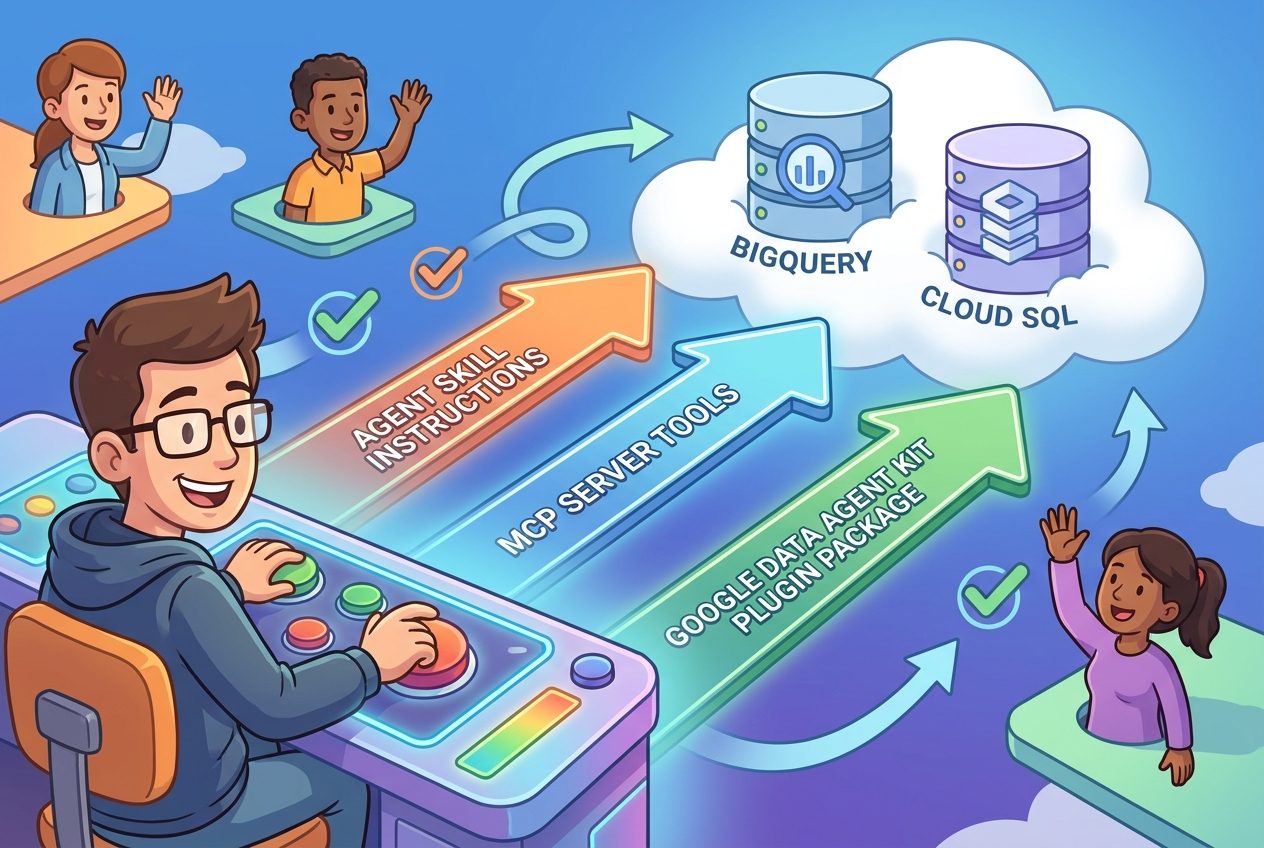
Quick Answer: Skill, MCP Server, or Full Data Agent Kit Plugin?
Use an Agent Skill when the agent mainly needs instructions: how to write safer SQL, how to investigate a metric, how to explain a dashboard, how to follow your team’s naming rules, or how to turn a vague business question into a reproducible data task. A skill is the guidance layer. It teaches the agent how to think and what process to follow, but it does not itself grant live access to BigQuery, Cloud SQL, Spanner, AlloyDB, or Cloud Storage.
Use an MCP server when the agent needs live tools or resources: list datasets, inspect schemas, run read-only queries, fetch table metadata, create a job, or connect to a specific Google Cloud service through a controlled interface. MCP is the connection layer. It is where permissions, identities, transport choice, quotas, logs, and write boundaries start to matter.
Use a Google Data Agent Kit plugin when the capability needs both pieces to travel together: a workflow skill plus the MCP server declarations that make the workflow useful. The plugin is the package layer. It gives supported clients one predictable directory with plugin.json, optional skills/, optional mcp.json, and client-specific extension space.
This cluster article supports our broader Google Agent Plugins guide. The pillar explains the format and why Google adopted it. This page focuses on the narrower question that builders, data engineers, and AI platform teams are likely to ask next: “For this data-agent task, what should I actually ship?”
Why This Search Gap Exists Right Now
Google’s announcement made the packaging story clearer, but it also created a new decision problem. Official sources explain that Agent Plugins package Agent Skills and MCP servers into portable plugins. That is useful, but many teams do not begin with the packaging format. They begin with a real job: “Let an agent answer revenue questions from BigQuery,” “Help analysts investigate a Cloud SQL issue,” “Let a coding agent prepare a dbt change,” or “Give the assistant enough data-platform knowledge to avoid dangerous queries.”
Those jobs can look similar in a demo. In production, they are different. A read-only analytics assistant, a schema-inspection helper, a deployment agent, and a database administration workflow deserve different access. If the team treats every use case as “install the data plugin,” it can blur instruction, access, permission, and accountability. If the team treats every use case as “just write a skill,” the agent may still lack the live tool context needed to do useful work.
Analytics data for AI Feature Drop shows that readers respond to practical AI feature explainers, especially posts about coding agents, usage limits, MCP, and permission boundaries. Recent site traffic is strongest around OpenAI Codex banked resets, ChatGPT desktop Codex workflows, Google Flow credits, and developer-focused agent guides. Search Console is still young for the site, but the impressions that do appear are clustered around exact feature questions such as computer use, permissions, and specific agent capabilities. That makes this long-tail Google Data Agent Kit topic a good cluster fit: it is specific, new, practical, and tightly connected to an existing pillar rather than a generic news recap.
The information gain is the decision framework. Instead of repeating “Agent Plugins are portable,” this article maps the three layers to concrete Google Cloud data tasks, names the failure modes, and gives a checklist for choosing the smallest safe package.
The Three Layers: Package, Instructions, and Live Tools
Agent Plugins can feel confusing because people use “plugin” as a shortcut for everything the agent can do. The specification is narrower. A plugin is a directory with a required plugin.json manifest and optional standardized components. Skills live in a fixed skills/ directory. MCP server configuration lives in a root-level mcp.json. Client-specific extras belong in clearly separated extension namespaces instead of becoming new portable top-level fields.
Google’s Data Agent Kit matters because data workflows often need both knowledge and tools. A BigQuery assistant should know how your team handles cost controls, joins, partition filters, and result explanations. It may also need a way to inspect datasets or run a query. Those are related, but not identical. The skill says, “use partition filters and show the query before running expensive scans.” The MCP server is the thing that can actually list datasets, submit a job, or fetch query results.
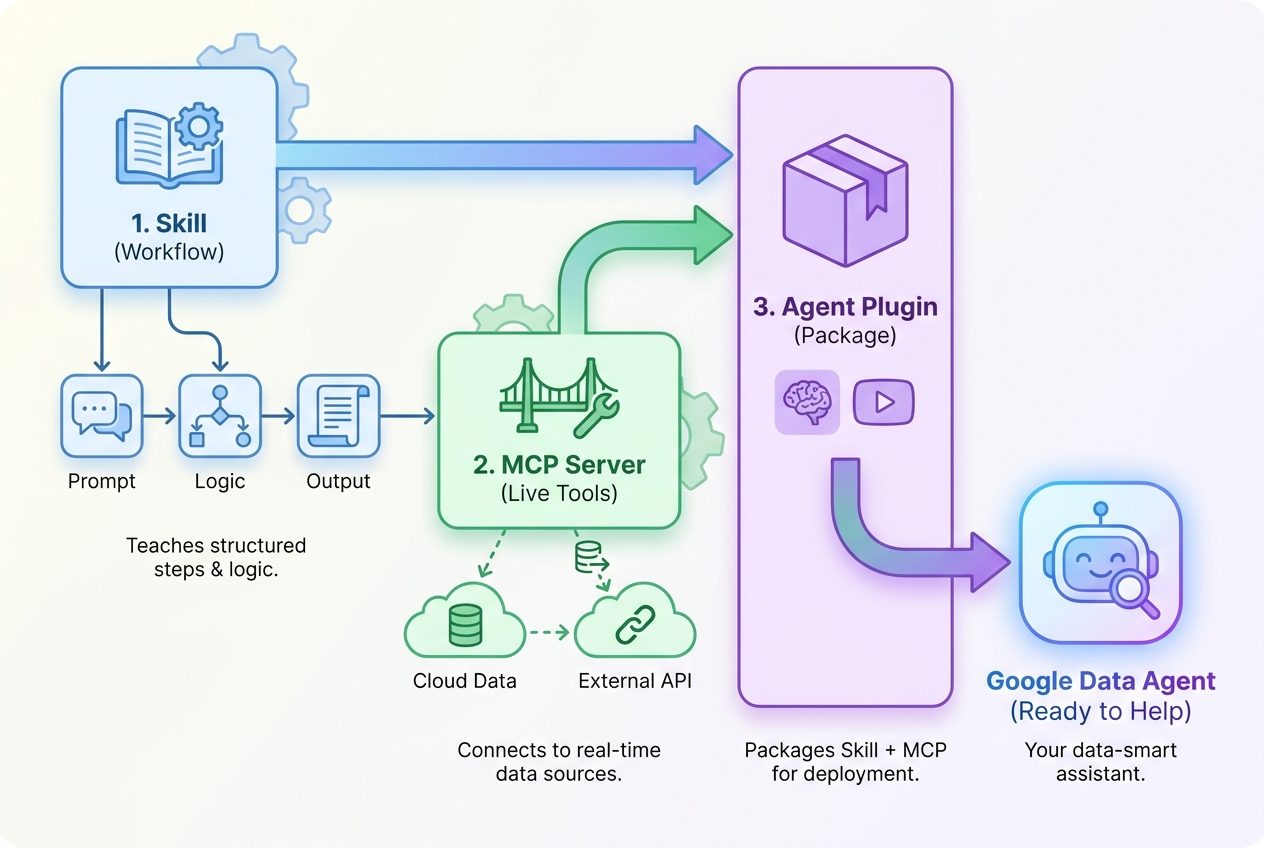
This separation is what keeps the system understandable. When a query fails, you can ask whether the skill gave bad instructions, whether the MCP server had the wrong permission, whether the plugin package was invalid, or whether the client loaded only part of the package. Without layer separation, every bug becomes “the plugin is broken,” which is not specific enough to fix.
The official specification also includes important containment rules. Plugin-relative paths must stay within the plugin root, and clients should reject paths that escape the package. That matters for data teams because a plugin may ship scripts, references, or a local stdio server. Portability should not mean “let arbitrary package paths wander around the developer’s machine.” It should mean the component is discoverable and inspectable in a predictable place.
A Practical Decision Framework for Google Data Agent Kit
Before packaging anything, name the job. Is the agent advising, querying, administering, deploying, or auditing? The right layer depends on the risk profile of that job. A read-only helper that teaches SQL style is very different from an agent that can create datasets, modify schemas, or deploy a pipeline.
| Job you want the agent to do | Best starting layer | Why | What to watch |
|---|---|---|---|
| Explain a team SQL convention or dashboard workflow | Agent Skill | The agent needs rules and examples, not live credentials. | Keep examples anonymized and avoid embedding sensitive business logic unnecessarily. |
| Inspect BigQuery schemas or run read-only exploratory queries | MCP server plus a narrow skill | The agent needs live metadata and guardrails for query behavior. | Use least-privilege identity, query limits, logging, and confirmation for expensive scans. |
| Package a repeatable data investigation workflow for multiple IDEs | Agent Plugin | The skill and MCP declaration belong together and need to travel across clients. | Document which clients load which parts and how credentials are supplied outside the package. |
| Allow DDL, deployment, migration, or write operations | Separate controlled MCP path with approvals | This is no longer just assistance; it is operational change. | Require explicit approval, environment separation, audit logs, rollback, and dry-run modes. |
| Share data-platform expertise without granting access | Agent Skill | Instruction reuse is valuable even without tools. | Do not wrap a simple skill as a plugin merely because plugins are new. |
The strongest rule is “smallest safe package.” If a skill alone solves the problem, stop there. If the agent needs a tool, add MCP. If the tool and skill must be installed together across clients, package them as an Agent Plugin. This sequence prevents plugin enthusiasm from becoming access sprawl.
That rule also helps with internal review. A platform team can review a skill for content quality, review an MCP server for security and permissions, and review a plugin package for structure and portability. The review conversation becomes sharper because each artifact has a different job.
BigQuery and Cloud SQL Examples
Example 1: Average order value investigation
Imagine a product manager asks, “Why did average order value drop last month?” A skill can teach the agent the investigation pattern: define the metric, identify the date range, check segmentation, compare B2B and consumer cohorts, show SQL before execution, explain uncertainty, and avoid drawing conclusions from partial data. That skill is useful even when a human analyst runs the SQL manually.
If the agent should inspect BigQuery tables and run safe read-only queries, you need MCP. The MCP server can expose controlled tools for listing datasets, reading schemas, running queries, and returning results. The skill should then tell the agent when to use those tools and how to interpret the results. A Data Agent Kit plugin becomes attractive when the organization wants to distribute that exact investigation pattern and tool connection as one portable capability.
Example 2: Cloud SQL troubleshooting assistant
A Cloud SQL assistant might only need instructions at first: collect symptoms, check recent changes, ask for error messages, and produce a safe triage plan. That is a skill. If the assistant can inspect instances, read logs, or query a database, the task becomes a live-access workflow. Now the MCP server needs explicit limits: which project, which instance, which database, which operations, which identity, and which actions require confirmation.
Example 3: dbt or pipeline deployment workflow
Deployment is where teams should slow down. A skill can define the release checklist, test sequence, naming conventions, rollback expectations, and review steps. MCP tools may help fetch metadata or run validation. But deployment or schema-changing operations should sit behind explicit approvals and environment separation. Do not let a portable plugin become a quiet path around change management.
Decision pattern:
1. Can instructions solve it? Use a Skill.
2. Does the agent need live data or tools? Add MCP.
3. Do the Skill and MCP setup need to travel together? Package as a Plugin.
4. Can it write, deploy, or delete? Add approval gates before use.
Permissions and Safety Boundaries
Agent Plugins do not define a permission model. That is not a weakness; it is a scope decision. Installation, approval UX, sandboxing, enterprise policy, credential binding, and trust verification are client and platform responsibilities. For Google Data Agent Kit, that means teams should never assume portability grants safety. The plugin package may be portable, but the cloud permissions are still real.
For data work, separate permissions into at least five buckets: discovery, read, query execution, write or mutation, and administration. Discovery might list datasets or schemas. Read might fetch sample rows or metadata. Query execution might create jobs and incur cost. Write operations can change data. Administration can change infrastructure. A single “data access” label is too vague for agent workflows.
Good boundaries
- Read-only service accounts for exploratory assistants.
- Project, dataset, instance, and region scoping.
- Query cost limits, timeouts, and cancellation rules.
- Explicit confirmation before writes, DDL, deployment, or cross-project access.
- Logs that identify agent-initiated operations separately from human actions.
Risky shortcuts
- Bundling credentials or secrets inside the plugin package.
- Using broad owner roles because setup is faster.
- Letting a skill imply permission that the MCP server actually controls.
- Assuming every compatible client has the same approval UX.
- Skipping failure tests for denied paths and invalid server entries.
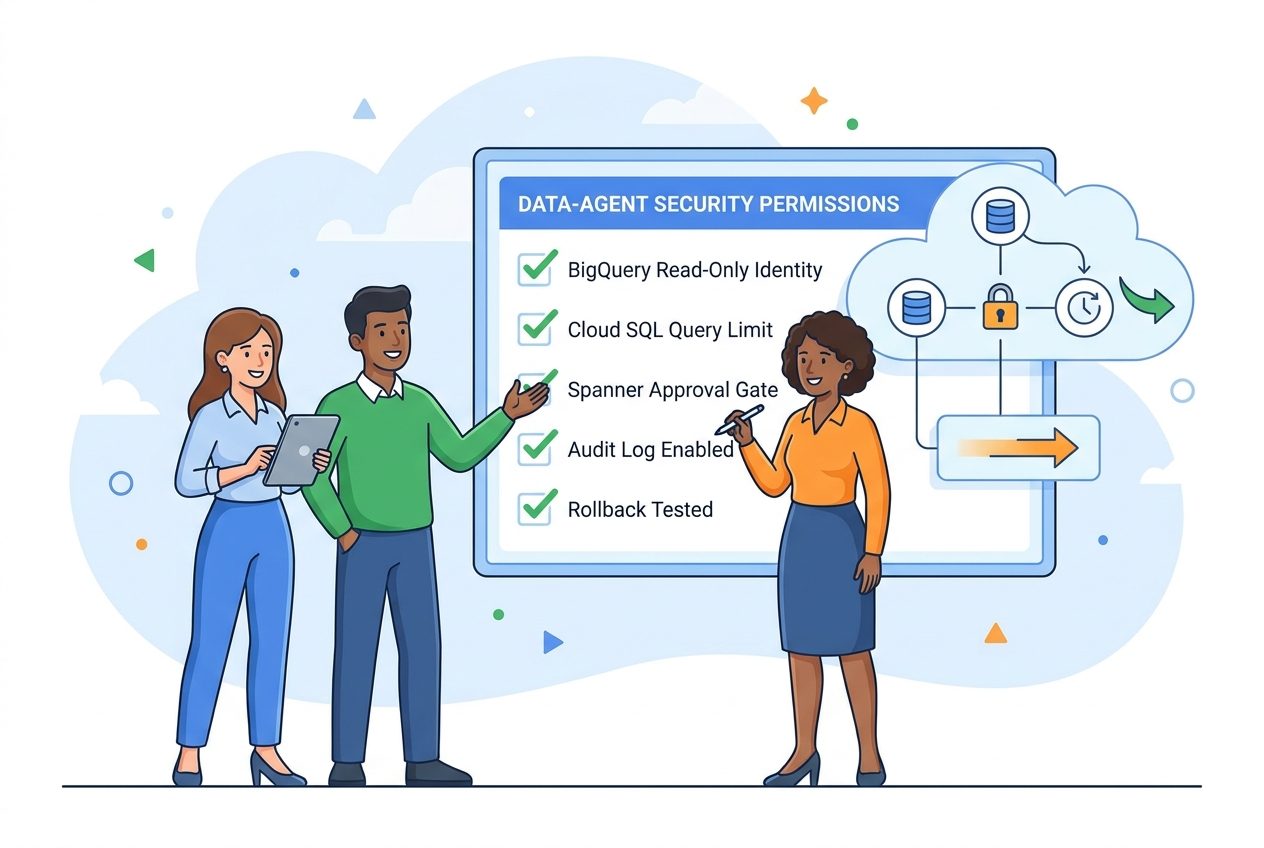
The safest rollout is staged. First, publish a skill that documents the workflow. Second, test MCP access in a disposable or low-risk environment. Third, package the combined capability only after the team knows which permissions are required. Fourth, test the plugin in every target client because “supports Agent Plugins” does not guarantee identical install flows, prompts, or policy controls.
Google Data Agent Kit Setup Checklist
Use this checklist before turning a data workflow into a reusable plugin. It is intentionally practical, because most failures happen in ordinary details: the wrong project, an overbroad service account, a query with no cost guard, or a plugin package that works in one client but silently skips a component in another.
1. Define the capability in one sentence
Write the job as a narrow promise: “Investigate monthly revenue changes in BigQuery,” “Explain Cloud SQL schema drift,” or “Prepare a read-only data quality report.” If the sentence contains five unrelated verbs, split it into separate capabilities.
2. Choose the smallest artifact
If the capability is knowledge, create a skill. If it needs live tools, configure an MCP server. If the skill and server must travel together, package a plugin. Avoid wrapping every small instruction set as a plugin just to look modern.
3. Keep credentials outside the package
The plugin should describe components, not carry secrets. Bind credentials through the target client, environment, workload identity, or platform-specific secret management. Document the required scopes without embedding them.
4. Inspect plugin.json and mcp.json
Confirm the schema identifier, plugin name, optional metadata, fixed component locations, MCP transports, commands, working directories, and extension namespaces. Treat stdio servers as executable software and remote servers as data boundaries.
5. Test negative paths
Try the wrong project, wrong dataset, wrong region, denied operation, invalid server entry, missing skill, and failed server start. A robust setup should fail narrowly. A broken MCP server should not erase the value of a valid skill, and a denied operation should not encourage the agent to invent results.
6. Create a human review point
For read-only workflows, review generated queries before expensive execution. For writes and deployments, require approval. For production systems, log every agent-initiated action and keep rollback instructions close to the workflow.
7. Link the cluster to your broader plugin policy
For AIFeatureDrop readers building a broader agent strategy, this article should be read with the Google Agent Plugins pillar, the Google Agent Plugins permission checklist, the GitHub Copilot MCP allowlists guide, and the Codex plugin permission boundaries guide. The patterns are consistent: package narrowly, grant least privilege, test denied paths, and keep humans in the approval loop for risky actions.
How This Differs From Plain MCP Setup
A plain MCP setup can be enough. If a team only needs to connect one client to one tool server, a standalone MCP configuration may be simpler than a full plugin package. Agent Plugins become valuable when distribution and component pairing matter. The plugin gives the team a standard place to put the skill, a standard place to declare MCP servers, and a standard manifest for clients to discover the package.
That distinction prevents a common mistake: treating Agent Plugins as a replacement for MCP. They are not. MCP remains the protocol for tools and resources. Agent Skills remain a format for reusable expertise. Agent Plugins package those components. Google Data Agent Kit uses that packaging layer to make Google Cloud data capabilities easier to bring into compatible coding agents and IDEs.
The key comparison is not “plugin versus MCP.” It is “package versus protocol.” If you need the agent to call a BigQuery tool, you need MCP or an equivalent tool integration. If you need to distribute the BigQuery investigation workflow plus the MCP declaration together, you need a plugin. If you only need instructions, a skill is lighter and safer.
Limitations to Mention in Team Docs
First, compatible clients may not behave identically. The portable structure is shared, but install UI, approval prompts, policy controls, logs, environment variables, and extension support can differ. Always test in the actual clients your developers or analysts use.
Second, the Agent Plugins specification is a package format, not a marketplace or trust system. A plugin may have metadata, but metadata is not provenance. Review source, ownership, license, update process, and executable components before use.
Third, data cost is still your problem. A skill can tell an agent to use partition filters, but the MCP server and the target service enforce what actually happens. Put query limits and review steps where they cannot be bypassed by better wording.
Fourth, portability does not eliminate platform-specific controls. Google Cloud IAM, project boundaries, organization policy, VPC controls, audit logs, and client-level approvals still matter. The plugin should fit into those controls, not replace them.
One more practical point: write down the ownership model before people start sharing the package. Someone should own the skill content, someone should own the MCP server runtime, and someone should own the cloud permission review. In small teams that may be one person, but the responsibilities are still separate. If a business metric definition changes, update the skill. If a Google Cloud API changes, update the MCP integration. If a new client loads the plugin differently, update the package notes and test matrix. Treating all three as one blob makes maintenance messy and makes security review slower than it needs to be.
Also decide how success will be measured. A good Data Agent Kit workflow should reduce repeated setup, improve query quality, and make investigations easier to audit. It should not merely make an agent more powerful. If analysts still copy unsafe SQL, if engineers still grant owner roles to make demos work, or if nobody can explain which component caused a result, the plugin is not ready for broader rollout. Portability is valuable only when the underlying workflow is disciplined enough to deserve being portable.
Final Recommendation
For most teams exploring Google Data Agent Kit, the best first move is not a giant plugin. Start by writing the skill that captures the workflow. Make the process explicit: what question is being answered, what data may be touched, what the agent should show before acting, and when a human must approve. Then add MCP access only where live data actually improves the result. Package the two as an Agent Plugin once the workflow is stable enough to share across clients.
This approach gives you the benefit of Google’s Agent Plugins direction without losing control of the hard parts: credentials, data scope, approvals, and operating discipline. It also makes your agent capabilities easier to debug. When something goes wrong, you can inspect the skill, the MCP server, and the package separately.
The future of data agents will not be won by the broadest plugin. It will be won by the clearest boundary: small reusable expertise, narrowly scoped tools, portable packaging, and human-visible control points for anything that can change data or cost money.
Keep Learning on AI Feature Drop
- Google Agent Plugins Guide — the broader pillar for Agent Plugins, Agents CLI, Data Agent Kit, Skills, and MCP servers.
- Google Agent Plugins Permission Checklist — safety checks for packaging MCP servers and skills.
- Gemini Flash-Lite Routing Guide — model routing patterns for lower-cost agent workflows.
- GitHub Copilot MCP Tools Guide — related MCP workflow coverage for coding agents.
- Codex Plugin Permission Boundaries — permission scope patterns that also apply to portable plugin ecosystems.
Sources and References
- Google Developers Blog: Agent Plugins package your skills, tools, and more
- Agent Plugins Specification
- GoogleCloudPlatform/data-agent-kit on GitHub
- google/agents-cli on GitHub
- Google Cloud Tech: Data Agent Kit walkthrough
Product support, compatible clients, and cloud permissions can change. Verify current Google Cloud, Agent Plugins, and Data Agent Kit documentation before granting production access.
FAQ: Google Data Agent Kit MCP vs Skills
Is Google Data Agent Kit an MCP server?
Not exactly. Google Data Agent Kit includes plugins that can combine agent skills with MCP server integrations for Google Data Cloud workflows. MCP is the connection layer; the plugin is the package that can carry MCP declarations and skills together.
When should I use an Agent Skill instead of MCP?
Use an Agent Skill when the agent needs reusable instructions, examples, rules, or workflow guidance but does not need live access to a tool or data service.
When should I use MCP in a data-agent workflow?
Use MCP when the agent needs controlled live access to tools or resources, such as listing schemas, running read-only queries, or interacting with a Google Cloud data service through a defined interface.
Does an Agent Plugin replace permissions?
No. Agent Plugins standardize packaging. They do not define a universal permission model, sandbox, trust system, or approval UX. Cloud IAM, client policy, review gates, and logging still matter.
Can a plugin contain only a skill or only MCP?
Yes. In the Agent Plugins model, skills and MCP server declarations are optional standardized components. A package may include one, both, or neither, though a plugin is most useful when related components need to travel together.
Should I package every Google Cloud data workflow as a plugin?
No. Start with the smallest safe artifact. Use a skill for instructions, MCP for live tools, and a plugin when the instruction and tool setup must be distributed together across compatible clients.
Post a Comment