
PortfolioVideo is an AI video creation platform built around professional proof: video resumes, portfolio stories, personal-brand clips, and narrated pitch decks. This complete review explains what the platform does, how its workflow fits real hiring and founder use cases, what to verify before spending credits, and when a broader AI video editor may be the better choice.

PortfolioVideo Review: The Quick Verdict
PortfolioVideo is most compelling when your source material already exists but needs a guided, watchable layer. A job seeker has a resume and project links. A consultant has a case study. A founder has a pitch deck. A creator has expertise scattered across a profile, notes, and examples. The platform’s value proposition is not simply “generate a video with AI.” It is “turn professional evidence into a structured video without requiring a camera shoot or a conventional editing timeline.”
That narrower positioning separates PortfolioVideo from general-purpose avatar platforms and text-to-video generators. The public product pages describe a workflow that accepts resumes, documents, scripts, photos, slides, and PDFs; organizes them into scenes; adds AI narration or an optional talking avatar; and produces an HD video or shareable link. It also offers Presenter Mode for synchronized supporting material and Vibe Motion for short cinematic profile hooks.
Choose PortfolioVideo when you want a repeatable, camera-free path from a professional document to a narrated video. Choose a larger creative suite when you need advanced manual editing, a massive template library, enterprise localization, complex team approval, or cinematic text-to-video generation. The best PortfolioVideo output is concise, evidence-led, visibly reviewed by a human, and shared beside—not instead of—the original material.
This is a source-led review, not a claim of hands-on benchmark testing. Capabilities and pricing were checked against PortfolioVideo’s current public pages, privacy policy, and terms. Competitor positioning was checked against official product pages. Where independent performance data is missing, this guide says so rather than inventing a score.
What Is PortfolioVideo?
PortfolioVideo is a browser-based AI video maker for professionals who need to explain work, experience, or an idea. Its homepage positions the product for creators, job seekers, founders, consultants, freelancers, and sales teams. The three clearest lanes are an AI video resume builder, a personal branding video maker, and an AI pitch deck generator.
The common input is professional source material: a resume, profile, script, document, presentation, PDF, image, or rough idea. The common output is a scene-based video with narration, visuals, optional avatar delivery, and a link or downloadable file. The workflow is designed to reduce the production work between “I know what I need to communicate” and “I have something watchable that I can send.”
That makes PortfolioVideo different from a model such as Veo or Sora. A generative video model creates visual footage from prompts. PortfolioVideo is closer to a communication-production system: it organizes existing facts, creates a narrative structure, combines presenter-style delivery with scenes, and packages the result for a professional review moment. If you want a cinematic eight-second clip, a text-to-video model may be the right tool. If you want a recruiter to understand which project proves your fit, the job is narrative and evidence, not spectacle.
The name can also be misleading if read too broadly. It is not only a “portfolio video” tool for designers or actors. The product pages show use cases for engineers explaining projects, founders narrating market and traction slides, consultants presenting frameworks, job seekers introducing role fit, sales teams walking through proposals, and creators turning expertise into repeatable profile content.
PortfolioVideo Features That Matter Most
1. Resume, document, script, slide, and PDF inputs
The platform begins with material users already have. For a video resume, that may be a conventional resume, profile image, and portfolio links. For a founder pitch, it can be slides, a PDF deck, or a script. For personal branding, it can be a profile, case study, framework, service explanation, or rough outline.
This is strategically useful because strong professional video rarely begins with a blank prompt. The best source is verifiable material: a shipped project, a measurable result, an original framework, a deck with defensible assumptions, or a resume whose dates and responsibilities have already been checked. Starting from that evidence gives the AI less room to fabricate a polished but empty story.
2. AI-powered scene generation
PortfolioVideo says its system can break source content into six structured sections with visuals, voice-over, and titles. Scene generation solves a common beginner problem: deciding where one point should end and the next should begin. Instead of dropping a long paragraph into a talking head, the platform encourages a sequence.
A good sequence normally has a hook, context, proof, explanation, outcome, and next step. The generated draft should still be treated as an outline. Remove duplicated points, shorten any scene that sounds like resume narration, and make every visual earn its place. AI scene generation saves setup time; human editing creates credibility.
3. AI voice, voice cloning, and talking avatars
Users can choose AI narration, use an optional talking avatar, or record a voice sample for voice cloning according to the public site. This makes camera-free production possible and can keep delivery consistent when several versions are needed. For example, a job seeker might tailor the opening and featured project for different role families without recording a fresh performance every time.
Voice cloning and synthetic presenters introduce an obligation, not just a convenience. Use only a voice and likeness you are authorized to use. Keep the script truthful. Do not imply that an AI avatar personally performed work it did not perform. If the synthetic nature of the presenter could affect trust—for example in a job application, investor pitch, testimonial, or regulated context—disclose it plainly.
4. Scene editing and reusable versions
The product pages emphasize that scripts and scenes remain editable. That matters because the highest-value workflows are rarely one-and-done. A founder updates traction. A consultant changes the call to action for a prospect. A candidate selects a different project for a new role. A creator converts one case study into a profile introduction, a LinkedIn clip, and a website explainer.
Reusability is where an AI-assisted workflow can outperform a filmed take. The responsible approach is to preserve one verified source of truth, then create audience-specific versions from it. Do not let versioning create conflicting numbers, outdated job titles, or inconsistent claims.
5. Presenter Mode
Presenter Mode and Interactive Decks place the video presenter beside synchronized slides, images, links, webpages, or other supporting material. That is a stronger format than a full-screen avatar when the viewer needs to inspect evidence while listening.
Presenter Mode fits technical portfolios, design case studies, sales proposals, training, and pitch decks. A developer can speak while a live product or architecture diagram appears. A founder can explain a chart while the viewer sees the underlying slide. A consultant can narrate a framework and then direct the viewer to a case study. The presenter supplies context; the adjacent material supplies proof.
6. Vibe Motion
Vibe Motion is a shorter format. The product page describes a five-second VFX-style motion clip generated from a professional document and a front-facing photo, with Professional, Casual, or Funny themes. Its best role is a “micro-hook”: a profile header, social opener, portfolio transition, or attention cue that leads into substantive material.
A five-second effect cannot communicate a career narrative or investment case. Treat it as packaging. If the motion clip is memorable but the next page contains no proof, the effect becomes decoration. If it opens a well-organized portfolio or concise founder story, it can improve the first impression without carrying more weight than it should.
7. HD export and shareable links
The public FAQ says finished videos can be downloaded as HD MP4 files or shared through a link. Export matters for platform independence; a direct link matters for fast iteration and easy distribution. Before sending a link in a high-stakes context, test it while logged out, on mobile, on a slow connection, and with captions enabled if available.
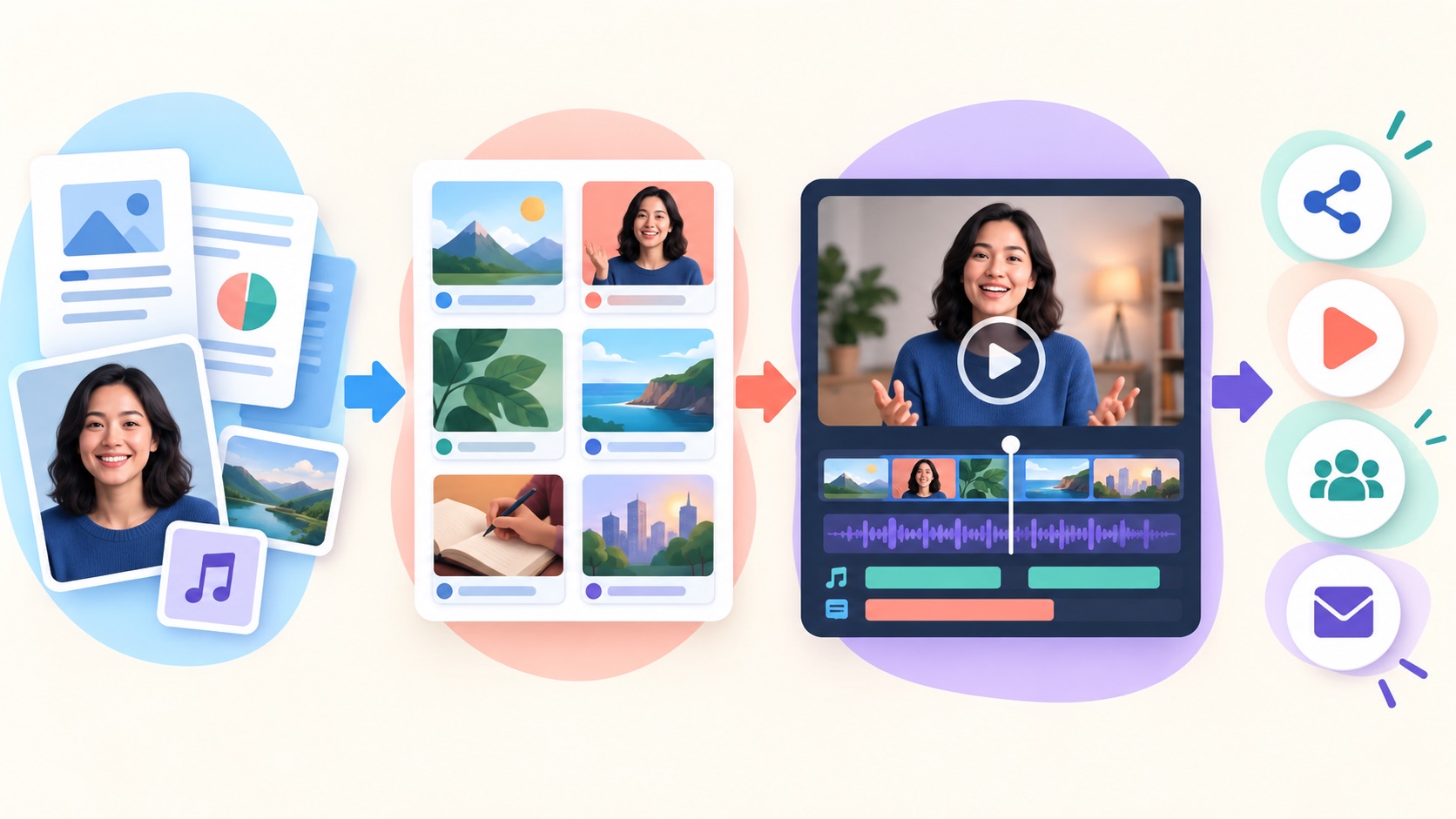
How PortfolioVideo Works: A Practical Start-to-Finish Workflow
1. Choose one review moment. Decide whether the video is for a recruiter opening an application, a hiring manager reviewing a project, an investor previewing a deck, a client evaluating a proposal, or a LinkedIn visitor deciding whether to follow you. One video should serve one primary audience.
2. Prepare the source material. Upload the resume, deck, document, profile image, or script that contains your verified facts. Remove confidential information, private customer data, unreleased financials, personal addresses, phone numbers, and material you do not have permission to share.
3. Select the proof. Choose two or three points the viewer must remember. A candidate might use role fit, one project, and one outcome. A founder might use problem, differentiated solution, traction, and ask. A consultant might use audience problem, method, result, and next step.
4. Generate the scene draft. Let the platform structure the material, but expect to edit. Check that the opening earns attention, transitions make sense, visuals match the narration, and the final action is obvious.
5. Choose delivery. Use your own voice when personal trust matters and you are comfortable recording. Use an AI voice for consistent narration. Use an avatar when camera-free presence helps, but avoid making synthetic delivery the entire value proposition.
6. Edit for spoken language. A resume bullet is not a script. Rewrite dense phrases into short sentences. Replace jargon with specific examples. Read every scene aloud. If a sentence is difficult to say, it will be difficult to follow.
7. Match visuals to evidence. Show the product, chart, code, design, customer workflow, or original document when relevant. Do not use generic stock imagery where the viewer expects proof.
8. Generate and inspect. Look for pronunciation errors, cropped text, awkward pauses, avatar artifacts, mismatched visuals, unsupported claims, inaccessible contrast, and captions that change names or technical terms.
9. Share with context. Do not send a naked video link. Tell the recipient what it is, how long it is, and why it is relevant. Keep the resume, deck, or portfolio available beside it.
10. Measure the next action. The useful result is not “a video was generated.” It is whether the right viewer understood the work and took the intended next step: inspect a project, read the deck, reply, schedule a call, or visit the portfolio.
Best PortfolioVideo Use Cases
AI video resumes for job seekers
A video resume should add communication and context, not duplicate the written resume. The platform’s own video-resume guidance makes the correct distinction: keep the conventional document for ATS screening and add a short video where a human can choose to watch it. Good placements include a portfolio header, LinkedIn Featured section, application field, cover letter, or thoughtful follow-up.
The strongest candidate script names the target role, selects two relevant proof points, explains one decision or outcome, and directs the viewer to inspect the supporting work. It should not recite education, every job, every skill, and every responsibility. In a hiring market already saturated with polished AI text, specificity matters more than cinematic presentation.
Developer and design portfolio walkthroughs
Technical work is often hard to evaluate quickly. A repository may be impressive but poorly introduced. A frontend screenshot can hide accessibility or state-management quality. A backend project may have no obvious visual layer. A concise walkthrough can show the result, state what you owned, explain one important decision, and point to code or documentation.
AI Feature Drop’s guide to design-to-code workflows makes a related point: generated polish is not the same as verified implementation. In a developer portfolio video, show actual behavior, tradeoffs, tests, performance, or architecture. Do not let the avatar become a substitute for technical evidence.
Founder and investor pitch videos
PortfolioVideo’s pitch-deck workflow is built around keeping the original deck available while adding narration and pacing. That is the right model. A video can control the first pass through the story, but it should never prevent an investor from checking market assumptions, unit economics, traction, team claims, and the ask.
Use a pitch video before a meeting to create context, after a warm introduction to make the narrative easier to forward, after a call to recap the argument, or inside a data room as a guided overview. Keep it concise. If every slide needs a three-minute explanation, the deck and the story both need editing.
Personal-brand and LinkedIn content
Consultants, creators, and founders can turn a framework, case study, profile, or rough idea into a repeatable content series. The benefit is not merely posting more often. It is consistency: the same audience, visual identity, structure, and next step can carry across profile videos, thought-leadership clips, service explainers, event promos, and outreach.
Use AI assistance to reduce production drag, then add an unmistakably human point of view. Generic advice delivered by a realistic avatar is still generic. A specific framework, original example, carefully stated disagreement, or transparent case study gives the viewer a reason to remember the creator.
Sales proposals and asynchronous presentations
Sales teams and agencies can convert proposal decks into guided videos for buying committees. Presenter Mode is particularly relevant because the viewer can hear the explanation while seeing scope, proof, process, and next steps. This is a different job from quick screen recording. A tool such as Loom is ideal for a spontaneous walkthrough; a structured PortfolioVideo presentation is more suitable when the message needs repeatable delivery across multiple reviewers.

Which PortfolioVideo Workflow Fits Your Goal?
PortfolioVideo Pricing and Credits Explained
PortfolioVideo’s public homepage currently describes a pay-as-you-go credit model rather than a mandatory subscription. It says users can purchase credits and use them for video generation, mentions a $10 starting point for multiple professional or Vibe Motion videos, and advertises 100 credits—described as a $10 value—for new users. Elsewhere on the same public FAQ, it says paid options start at around $5. Because those statements are not perfectly aligned, treat the live purchase screen as the authority for the exact price, credit package, taxes, and feature cost at the moment you buy.
The PortfolioVideo Terms of Use confirm that credits may be sold as one-time purchases and may also support auto-replenishment where offered. The terms say pricing, subscriptions, billing practices, and available features can change. They also advise users to review the corresponding purchase page before buying.
| Pricing question | What the public information says | What to verify in your account |
|---|---|---|
| Is a subscription required? | The homepage promotes credit purchases without subscriptions or upfront commitments. | Whether your region offers only one-time credits, optional subscriptions, or both. |
| Is there a free trial? | The homepage advertises 100 free credits for new users. | Eligibility, expiry, watermark, export, and feature restrictions. |
| What does one video cost? | No single universal per-video cost is stated across all formats. | Credits used by duration, scene count, avatar choice, voice, regeneration, Vibe Motion, or premium effects. |
| Do credits expire? | The public marketing page does not clearly answer this. | Expiry, rollover, refund rules, and what happens after account closure. |
| Can charges repeat? | The terms describe optional auto-replenish and possible recurring plans where offered. | Whether auto-replenish is enabled and how to cancel it before another charge. |
How to evaluate the real cost
Do not compare only the sticker price. Run one complete project from import to final export and record how many credits were spent on the first draft, narration, avatar generation, scene changes, failed generations, and final versions. The real unit is not “cost per generated clip.” It is “cost per approved, usable asset.”
This is also why different tools should not be compared by monthly price alone. HeyGen and Synthesia package large avatar libraries, localization, team controls, and enterprise features inside subscription and credit systems. Canva combines templates, design, recording, and generative media. Loom focuses on recording and asynchronous collaboration. PortfolioVideo’s credit model can be attractive for occasional professional projects, but a high-volume team should calculate actual monthly output and revision costs before choosing it.
For readers already learning how AI media credits behave, AI Feature Drop’s Google Flow and Veo 3 credits guide explains the same budgeting principle: test a representative workflow and include failed or repeated generations in the estimate.
PortfolioVideo Privacy, Voice, and Trust Questions
PortfolioVideo can process sensitive professional material: resumes, profile images, voice samples, scripts, pitch decks, portfolio artifacts, prompts, and generated content. That makes privacy review part of the creation workflow, not a box to check afterward.
The current PortfolioVideo Privacy Policy says the service may collect registration information, user content, images, prompts, payment-related transaction records, device and usage information, and correspondence. It states that full payment-card details are handled by third-party processors rather than stored by PortfolioVideo. It also describes service-provider sharing, cross-border processing, retention, security measures, account controls, and rights such as access, rectification, erasure, portability, withdrawal of consent, and objection where applicable.
The policy also discloses the use of Microsoft Clarity and Microsoft Advertising for behavior metrics, heatmaps, session replay, optimization, security, and marketing. Users handling confidential job, client, or investor information should review those details and the current settings before upload.
✓ Redact before upload. Remove home addresses, private phone numbers, personal IDs, salary history, customer records, access keys, confidential roadmaps, unreleased fundraising numbers, and protected health or employment information.
✓ Confirm content rights. Make sure you can upload every photo, voice sample, logo, slide, screenshot, testimonial, music track, customer name, and project artifact.
✓ Use your own identity responsibly. Never clone someone else’s voice or likeness without explicit permission. Do not simulate endorsements.
✓ Check sharing defaults. Open the finished link in a private browser window. Confirm whether it is public, unlisted, restricted, downloadable, indexable, or reusable.
✓ Plan deletion and retention. Know how to delete source uploads, generated assets, and the account, and what data may remain for legal, billing, or security reasons.
✓ Disclose synthetic media when material. If a viewer could reasonably believe the presenter is a live recording, add a short disclosure, especially in recruitment, fundraising, testimonials, education, or public-interest contexts.
For a wider framework on local versus cloud processing and sensitive inputs, see AI Feature Drop’s guide to evaluating privacy claims in AI apps and its data-scope checklist. The products are different, but the decision habit is identical: identify what leaves your device, who can access it, how long it is kept, and how to revoke access.
PortfolioVideo vs HeyGen, Synthesia, Canva, and Loom
No single AI video tool is “best” outside a use case. PortfolioVideo is optimized around professional proof assets. HeyGen is a broader avatar and localization platform. Synthesia is oriented toward business video, training, enterprise collaboration, and multilingual production. Canva is a general visual-design suite with recording, templates, talking avatars, and generative video. Loom is a screen-recording and asynchronous communication product with AI cleanup.
| Tool | Best starting point | Where it is stronger | Where PortfolioVideo may fit better |
|---|---|---|---|
| PortfolioVideo | Resume, portfolio, profile, case study, script, or pitch deck. | Professional proof workflows, document-to-scenes, Presenter Mode, video resumes, founder pitches, and pay-as-you-go positioning. | It is the reference point: choose it when the job is turning existing professional material into a guided video. |
| HeyGen | Avatar video, digital twin, translation, marketing content, or interactive video. | Large avatar range, extensive language support, 4K options, business collaboration, integrations, localization, and advanced avatar models. | PortfolioVideo has a narrower resume/portfolio/pitch workflow and may be easier to justify for occasional, purpose-specific projects. |
| Synthesia | Training, internal communication, explainers, localization, and enterprise video operations. | Enterprise controls, shared workspaces, brand kits, APIs, guest collaboration, and mature business-video packaging. | PortfolioVideo is more directly positioned for individuals, job seekers, founders, consultants, and professional proof assets. |
| Canva | Template-led design, presentations, social graphics, recorded presentations, and mixed-media editing. | Huge design ecosystem, templates, drag-and-drop control, collaboration, recording, and many output formats. | PortfolioVideo offers a more opinionated path from professional documents to narrated avatar or presenter-style videos. |
| Loom | Fast screen-and-camera recording for demos, feedback, support, and async updates. | Speed, authenticity, screen capture, comments, cloud library, and AI removal of pauses or filler words. | PortfolioVideo avoids repeated recording and creates a reusable, scene-based presentation from source material. |
Official pages support these distinctions. HeyGen’s pricing page lists stock avatars, custom avatars, voice cloning, many languages, team collaboration, and interactive video on higher tiers. Synthesia’s plans emphasize avatars, dubbing, brand features, editors and guests, enterprise workspaces, and shared credit usage. Canva’s video presentation maker combines templates, recording, editing, and AI features. Loom’s AI screen recorder focuses on recording, sharing, trimming, captions, summaries, chapters, and asynchronous feedback.
PortfolioVideo vs a cinematic video model
Do not confuse professional presenter video with cinematic generative footage. Veo, Sora, Runway, and similar models are useful for B-roll, visual concepts, ads, and short generated scenes. PortfolioVideo is useful when words, proof, narration, and viewer action matter more than cinematic novelty. You can combine the two, but every generated visual should be accurate and clearly supporting the story.
AI Feature Drop’s NotebookLM cinematic video overview guide and video overview comparison explore a related shift: AI video becomes more useful when it is grounded in source material instead of being treated as decoration.
PortfolioVideo Pros and Cons
Pros
+ Clear focus on video resumes, portfolio stories, personal branding, and pitch decks.
+ Starts from existing professional documents instead of a blank editing timeline.
+ Camera-free delivery through AI voice, voice cloning, and optional avatars.
+ Editable scenes support role-, investor-, client-, or platform-specific versions.
+ Presenter Mode can keep evidence visible beside narration.
+ Pay-as-you-go positioning can suit occasional projects better than a permanent subscription.
+ HD MP4 export and shareable links support several distribution paths.
Cons and open questions
- Independent, test-based reviews and public benchmarks are limited; many search results are vendor pages or software directories.
- The public site’s pricing language is not perfectly consistent, so live credit costs require verification.
- Resume, voice, photo, and deck uploads can contain sensitive or confidential information.
- Avatar-led output can feel generic or synthetic if the script lacks specificity.
- Credit-based generation can make revision cost less predictable than manual editing.
- A general creative suite may offer more templates, fine-grained editing, integrations, languages, or enterprise controls.
- No video can compensate for weak evidence, inaccurate claims, or a poor underlying resume or deck.
PortfolioVideo Limitations You Should Plan Around
AI structure is not fact-checking
A model can turn a resume or deck into fluent narration without knowing whether a number is current, whether a project belongs to you, or whether a customer quote is approved. Review dates, job titles, metrics, client names, market data, citations, and claims before generation and again after the final render.
A synthetic presenter can reduce trust
Some audiences welcome avatar-led video; others prefer a real recording or no video at all. In recruitment especially, a highly polished synthetic introduction can trigger skepticism if the viewer wants evidence of real communication. Consider using your own voice, a brief disclosure, or a screen-and-voice walkthrough when authenticity is more important than visual consistency.
Optional video is safer than mandatory video
A video resume may introduce visual, voice, accent, age, disability, or identity information before the hiring team evaluates qualifications. Candidates should be able to keep video optional and lead with an accessible written resume. Employers should follow applicable employment and anti-discrimination rules and avoid treating presentation style as a proxy for job performance.
Generated visuals can misrepresent the work
A beautiful scene can imply a product, customer, result, or scale that does not exist. Use real screenshots, diagrams, approved charts, and portfolio evidence when claims matter. If a generated image is illustrative, do not frame it as a real customer dashboard or finished product.
Sharing can create unintended exposure
A convenient link may be forwarded, indexed, downloaded, or viewed outside the intended context. Check access controls. Avoid putting confidential or personally sensitive information into any version intended for public sharing.
Automation does not guarantee attention
PortfolioVideo’s pages make strong marketing claims about speed, professionalism, and standing out. Those are product claims, not universal outcomes. A recruiter may not click. An investor may prefer the deck. A client may watch only the first twenty seconds. The correct goal is to remove friction for the right viewer—not assume that video automatically improves conversion.
How to Get Better Results From PortfolioVideo
Start with a one-sentence promise
Write what the viewer will understand after watching. For a candidate: “In ninety seconds, you will see the product I built, what I owned, and the engineering decision I would discuss in an interview.” For a founder: “In three minutes, you will understand the customer problem, our wedge, the evidence behind demand, and the round we are raising.”
Keep one idea per scene
Do not ask a scene to explain the audience, problem, process, three achievements, and call to action. Give each scene one job. This improves narration, visual selection, captions, and mobile comprehension.
Show proof early
Many videos delay evidence until the end. Reverse that habit. Show the finished product, strongest project, most useful chart, or clearest result in the opening third. The viewer can then decide whether the explanation is worth continuing.
Write for the ear
Use short sentences, concrete nouns, and active verbs. Replace “leveraged cross-functional stakeholder collaboration” with what happened: “I worked with design and support to reduce failed onboarding.” Avoid claims that sound impressive but cannot be checked.
Use captions and visual contrast
Assume the video may start muted. Caption important narration. Keep captions large enough for mobile screens. Avoid placing text over busy images. Do not communicate an essential distinction through color alone.
Choose the avatar deliberately
An avatar is useful when it improves consistency, accessibility, or production speed. It is not mandatory. Use voice-over with project visuals when the work should remain central. Use Presenter Mode when the viewer needs to inspect supporting material. Use your real recorded presence when relationship and authenticity outweigh repeatability.
Create a review checklist
Before publishing, verify names, pronunciation, dates, URLs, claims, captions, music rights, slide order, mobile layout, link permissions, download behavior, disclosure, and the next action. Ask someone unfamiliar with the project to watch once and summarize what they learned. If their summary is wrong, fix the story.
Pair the video with a durable page
A video is difficult to skim and update compared with text. Embed or link it from a page that includes the summary, transcript, evidence, and contact action. This improves accessibility, search visibility, and review speed. For technical guidance on keeping media-rich pages usable, the broader principle appears in AI Feature Drop’s AI video workflow review: creative effects should support the message and loading experience, not overwhelm them.
Budget one revision cycle
Do not spend every credit on the first generation. Preserve enough for pronunciation fixes, a stronger opening, one visual correction, and a final audience-specific version. A slightly simpler approved video is more valuable than a spectacular draft with an obvious error.
Who Should Use PortfolioVideo—and Who Should Skip It?
| User | Use PortfolioVideo when... | Consider another workflow when... |
|---|---|---|
| Job seeker | You have strong resume and project proof but need a concise, optional introduction without repeated filming. | The employer does not invite additional material, the role does not benefit from presentation, or privacy and bias concerns outweigh the value. |
| Developer or designer | You need to guide a reviewer through a project, decision, and evidence quickly. | A live demo, repository README, case study, or simple screen recording explains the work more directly. |
| Founder | You have an established deck and need a repeatable narrated first pass before or after meetings. | The underlying deck, market evidence, or ask is not ready; video will amplify confusion rather than solve it. |
| Consultant or agency | You want reusable proposal, case-study, service, or framework videos tied to source material. | You need complex collaborative editing, a large asset ecosystem, or enterprise approval features. |
| Creator | You have expertise and examples but camera setup is blocking a consistent professional series. | Your audience primarily values spontaneous, live, or deeply personal on-camera delivery. |
| Enterprise team | A focused pilot proves the document-to-video workflow for a specific use case. | You require SSO, SCIM, extensive localization, formal approvals, centralized brand governance, or guaranteed enterprise support not confirmed for your plan. |
Why a Complete PortfolioVideo Review Is Useful
Search results for PortfolioVideo currently lean heavily toward the vendor’s own product pages, its blog, and directory listings. There is limited independent long-form coverage that brings the product’s separate features into one decision guide. That leaves practical questions unanswered in one place: Is this a resume tool or a general video editor? Does the written resume still matter? How do credits work? What does Presenter Mode change? What privacy checks are needed for voice, photos, resumes, and pitch decks? How does the product differ from HeyGen, Synthesia, Canva, and Loom?
The search gap is not a lack of promotional descriptions. It is a lack of a consolidated, source-led evaluation that distinguishes verified capabilities, vendor claims, open questions, and workflow recommendations. That is also why this article avoids invented callback rates, investment outcomes, engagement lifts, render benchmarks, or quality scores.
Recent community discussion about AI-assisted resumes reinforces the need for proof. Recruiters and hiring managers frequently complain that polished AI-written applications sound alike and make claims harder to verify. The lesson is not that candidates should add more synthetic polish. The lesson is that a video is useful only when it makes specific work easier to inspect.
Final Recommendation: Use PortfolioVideo as a Guided Proof Layer
PortfolioVideo has a coherent product idea. It is not trying to be every kind of AI video generator. It takes the professional material people already use—resumes, portfolios, case studies, scripts, slides, and pitch decks—and turns it into a structured, narrated video that can be revised and shared.
That idea is strongest in three situations. First, the viewer needs context before inspecting the source. Second, the creator cannot or does not want to record every version on camera. Third, the message will be reused enough that scene editing and consistent delivery save meaningful time.
The right standard is not whether the avatar looks impressive. Ask whether the output makes the evidence easier to understand, preserves accuracy, respects privacy, and gives the viewer an obvious next step. Keep the original resume or deck. Disclose synthetic delivery when it matters. Review every claim. Test the share link. Reserve credits for revision. Use a broader creative platform when you need deeper editing or enterprise operations.
Related AI Feature Drop Guides
- Google Flow and Veo 3 Credits Explained — understand how generation credits affect real media-production cost.
- NotebookLM Cinematic Video Overviews — see how source-grounded video can turn documents into a guided explanation.
- NotebookLM Video Overviews Comparison — compare video formats by source, workflow, and audience need.
- Videopopy AI Video Workflow Review — explore another specialized AI video creation workflow.
- Claude Design-to-Code Workflow — learn why generated polish still needs inspectable implementation evidence.
- Is Google AI Edge Gallery Private? — use a practical framework for evaluating data handling.
- Claude Code Data Scope Guide — apply data-minimization habits before sending sensitive material to AI tools.
- Google Antigravity Artifacts Workflow — see how structured artifacts can keep AI output reviewable.
Sources and References
- PortfolioVideo AI Video Resume Builder
- PortfolioVideo AI Pitch Deck Generator
- PortfolioVideo Personal Branding Video Maker
- PortfolioVideo Interactive Deck and Presenter Mode
- PortfolioVideo Privacy Policy
- HeyGen official pricing and feature comparison
- Synthesia official pricing and plans
Product features, free credits, prices, credit consumption, limits, and policies can change. Verify the live PortfolioVideo product, checkout, terms, and privacy settings before uploading sensitive material or purchasing credits.
PortfolioVideo FAQ
What is PortfolioVideo?
PortfolioVideo is an AI-assisted video platform that turns resumes, portfolios, scripts, documents, slides, and pitch decks into scene-based professional videos with narration, optional talking avatars, editing, and shareable output.
Is PortfolioVideo a video resume builder?
Yes. Its AI video resume workflow is designed to turn an existing resume and supporting proof into a concise video introduction. The written, ATS-friendly resume should remain the primary application document, with the video used as an optional supporting asset.
Can PortfolioVideo turn a pitch deck into a video?
Yes. The pitch-deck workflow accepts slides, PDFs, scripts, and source documents, adds scene-level narration, and can use AI voice or avatar delivery. Keep the original deck available so investors or buyers can inspect the underlying evidence.
Do I need to record myself on camera?
No. PortfolioVideo supports AI narration, optional talking avatars, and voice cloning. However, a real voice or screen recording may be more appropriate when authenticity is more important than repeatable camera-free production.
What is PortfolioVideo Presenter Mode?
Presenter Mode is an interactive presentation format that synchronizes the presenter video with supporting slides, images, webpages, links, or other visuals. It is useful when the audience needs to see evidence while hearing the explanation.
What is Vibe Motion?
Vibe Motion is a short cinematic-motion feature generated from a professional document and front-facing photo. It is best used as a visual hook or profile asset that leads into more substantive resume, portfolio, or pitch material.
How much does PortfolioVideo cost?
The public site currently promotes credit-based, pay-as-you-go usage, mentions a $10 entry point and 100 free credits for new users, while another FAQ says paid options start around $5. Check the live purchase screen for the exact package, taxes, credit costs, expiration, and regional availability.
Is PortfolioVideo better than HeyGen or Synthesia?
It depends on the job. PortfolioVideo is more narrowly focused on professional proof assets such as resumes, portfolios, personal-brand content, and pitch decks. HeyGen and Synthesia provide broader avatar, localization, team, and enterprise-video capabilities.
Is PortfolioVideo safe for confidential resumes or pitch decks?
Treat uploads as sensitive. Read the current privacy policy and terms, redact unnecessary personal or confidential information, confirm sharing permissions, understand retention, and avoid uploading material you are not authorized to process.
Can a PortfolioVideo replace a resume, portfolio, or pitch deck?
No. The video should guide the viewer toward the source material and make it easier to understand. A recruiter still needs the written resume, a technical reviewer needs inspectable work, and an investor needs the underlying deck and evidence.
Can I edit a PortfolioVideo after the first draft?
The product pages say scripts and scenes can be edited and reused. Review the exact editor and regeneration costs in your account, because changes may consume additional credits depending on the feature.
Who should not use PortfolioVideo?
Skip it when the audience does not want extra material, when the source evidence is weak, when the content is too sensitive for cloud processing, when a quick screen recording is clearer, or when you need advanced enterprise controls and editing features that are not confirmed for your plan.
Post a Comment