
This VideoPopy review explains what the focused AI video generator actually does, how its pay-as-you-go credits work, who benefits from its 3D breakout workflow, and where a broader editor or production platform makes more sense.

VideoPopy Review: The Quick Verdict
VideoPopy is a specialist AI video generator for making short 3D breakout clips in which a product, object, or character appears to move out of a vertical or social-media frame. Its clearest advantage is focus. Instead of handing you an open-ended cinematic generator and expecting you to design the entire production workflow, it combines prompt enhancement, image upload, platform framing, Auto or Director controls, captions, hashtags, previews, and downloadable exports around one recognizable visual outcome.
That narrowness is also the main limitation. VideoPopy is not positioned as a full timeline editor, a long-form video maker, a social scheduler, an ad analytics suite, or a replacement for a production team. If you need scene-by-scene editing, broad camera experimentation, avatar-led ads, recorded-footage transformation, or a large library of design templates, a more general tool may fit better.
The economics are easy to understand at the headline level. VideoPopy's current pricing page says $1 buys 10 credits, new accounts receive 10 free credits, and a typical five-second clip costs about four credits. That makes the nominal generation price roughly $0.40 for that typical configuration. Real project cost can be higher because duration, resolution, optional AI steps, remixes, rejected generations, and human review all matter.
This review is intentionally evidence-led. We evaluated the public product workflow, current price packs, example gallery, terms, privacy disclosures, content policy, security page, and competitor positioning. We did not run a controlled set of identical prompts across multiple tools, so we do not assign a pseudo-precise score for realism, prompt adherence, or product accuracy. Vendor claims about speed and output should be tested with your own brief.
What Is VideoPopy?
VideoPopy describes itself as an AI 3D breakout video generator. The core effect makes a subject appear to cross the boundary of the video frame and move toward the viewer, creating a sense of depth and motion parallax. Think of a sneaker launching out of a billboard, a skincare bottle pushing through a phone screen, or a mascot reaching beyond a poster. The visual language is designed to create an immediate short-form hook.
The important word is focused. Many AI video products begin with a broad text box and a choice of models. VideoPopy wraps generation in a marketing workflow: supply an idea or product photo, choose a destination format, decide how much control you want, preview the social context, generate, then leave with a video plus supporting copy. The service's how-it-works page says it uses multi-model routing among providers including Grok Imagine, Veo 3.1, Kling, Seedance, and Runway.
That model-routing claim matters because buyers are not necessarily choosing a single underlying video model. They are choosing VideoPopy's orchestration, prompting system, breakout effect, platform packaging, credit layer, and user experience. The value proposition is convenience and a repeatable social format—not exclusive ownership of a foundational video model.
If you want a deeper explanation of the visual technique itself, AI Feature Drop's earlier complete VideoPopy 3D breakout guide covers prompt structure, content strategy, and the effect in detail. This review takes the next step: deciding whether the product belongs in your workflow.
What VideoPopy is not
Clear boundaries make software easier to buy. VideoPopy should not be mistaken for a traditional nonlinear editor such as a desktop timeline application. Public materials do not position it as an automatic social publisher, ad-buying platform, or performance analytics system. Feed previews are planning context, not proof that a clip already earned views. Captions and hashtags are useful drafts, not guaranteed growth tactics.
It is also not a magic product-fidelity engine. Generative video can modify labels, geometry, colors, textures, proportions, hands, reflections, or background details. A focused workflow may reduce decision friction, but it does not remove the need for human review. Ecommerce teams must compare every important frame with the approved product source before publishing.
VideoPopy Features That Matter in Practice
The signature 3D breakout effect
The effect is the product's strongest differentiator and the easiest reason to choose it. A broad video generator can create almost any scene, but that flexibility adds prompt and production decisions. VideoPopy starts with a specific motion grammar: establish a frame, keep a main subject readable, create forward depth, cross the boundary, and finish on a strong visual payoff. This is well suited to product reveals, launch hooks, offer announcements, branded mascots, and short educational openings.
The downside is creative repetition. If every post uses the same pop-out gesture, novelty fades. The effect should be one format in a varied content mix, not the entire brand strategy. Change the buyer question, product benefit, source image, ending, background, and platform context—not only the object that flies toward the camera.
Auto mode versus Director mode
Auto mode is the sensible first choice for people testing whether the basic concept works. It reduces the number of decisions before the first render. Director mode is more useful when the creative has a defined ending: a bottle must finish centered, a shoe must preserve its side profile, or a mascot should move forward without covering a key visual area. Neither mode eliminates generative uncertainty; Director mode simply gives the brief more structure.
Platform-aware planning
The platform step helps users decide composition before generation. A 9:16 Reel or Short needs different safe areas from a square feed post, a 4:5 LinkedIn asset, or a 16:9 preview. This is not a trivial convenience. Cropping a finished horizontal video into a vertical asset can remove the subject, distort the intended breakout path, or hide the product at the decisive moment.
Captions, hashtags, and exports
VideoPopy's supporting copy can reduce blank-page friction, but marketers should edit it. Replace vague hype with a real product benefit, remove claims that lack evidence, match the brand voice, and align the call to action with the destination page. Hashtags should be treated as discovery metadata, not a substitute for relevance or a strong hook.
How the VideoPopy Workflow Works
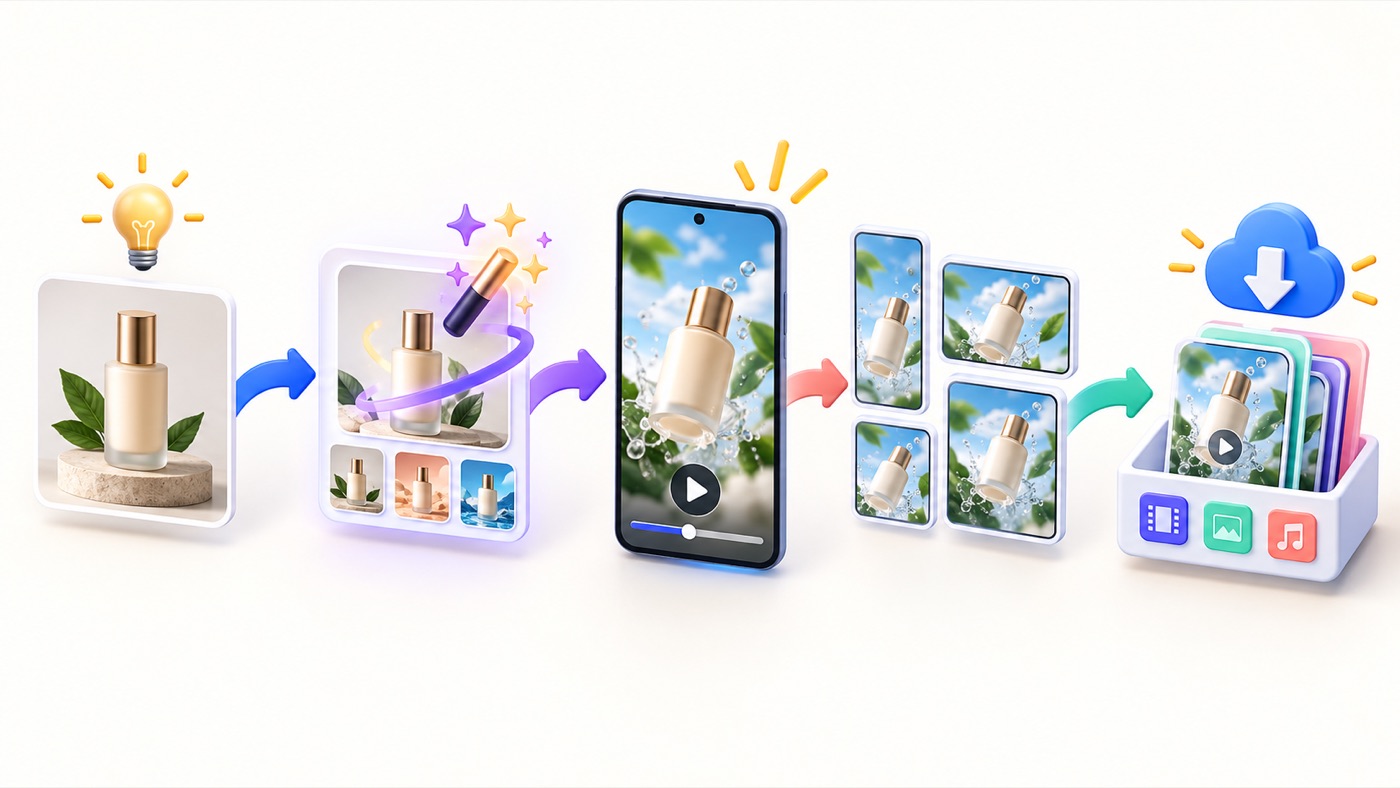
The public workflow has four stages. It is simple enough for a beginner, but the quality of the starting brief still controls how easy the result is to approve.
1. Describe or upload. Begin with one visual subject and one marketing job. A strong product photo on a clean background gives the generator more reliable information than a crowded lifestyle image. If you start from text, name the subject, environment, movement toward the camera, frame-breaking moment, and final pose.
2. Choose a platform and layout. Decide where the creative will appear before rendering. Protect space for captions, interface overlays, buttons, and safe zones. A product that looks large enough on desktop may become unreadable inside a mobile feed.
3. Craft the breakout. Use Auto mode for quick ideation or Director mode for a more explicit motion plan. The official workflow says users can choose one, two, or four outputs at no extra cost, but you should confirm the live credit estimate shown in the application before generating.
4. Download, review, and reuse. The official page lists an original MP4, platform-oriented exports, a thumbnail, captions, hashtags, and remixing. Downloading is not the end: compare the output with the approved product, inspect individual frames, edit the copy, and document what changed between variants.
A prompt structure that reduces ambiguity
A practical prompt can follow this order: subject, product truth, scene, motion, camera, breakout moment, ending, and negative constraints. For example: “Use the approved matte-blue insulated bottle as the exact reference. Preserve its cylindrical body, cap, blue color, and blank label area. Place it on a clean icy surface. The bottle rises, moves straight toward the camera, crosses the edge of a vertical frame, and finishes centered. Do not invent text, badges, prices, people, medical claims, or extra products.”
This cannot guarantee exact preservation, but it creates a reviewable contract. The team can compare the result with explicit requirements instead of judging only whether the video looks exciting. For more prompt-planning techniques, see AI Feature Drop's multimodal prompt guide and scene-extension workflow. The models differ, but the discipline—clear subject, continuity constraints, motion, and ending—transfers well.
VideoPopy Pricing: Credits, Packs, and Real Cost
VideoPopy uses prepaid credits rather than a required monthly subscription. At the time of this review, its public pricing page lists the following packs. Prices and credit costs can change, so check the live page before purchasing.
| Pack | Price | Credits | Approximate typical 5-second clips | Best planning use |
|---|---|---|---|---|
| Free starter | $0 | 10 | About 2 | Test whether your product and motion idea survive generation. |
| Starter | $5 | 50 | About 12 | One small product-hook experiment with several variants. |
| Creator | $10 | 100 | About 25 | A short campaign burst or multiple prompt families. |
| Pro | $25 | 250 | About 62 | Ongoing testing across products or clients. |
| Studio | $50 | 500 | About 125 | Higher-volume concepting with a defined review process. |
The estimates above use the vendor's typical four-credit figure for a five-second clip. They are not a promise. The pricing page says actual usage can vary with settings, duration, resolution, and optional AI steps. A longer or higher-resolution clip may consume more. If a generation fails because of the service's error, the terms page says associated credits are restored. Purchased credits are generally non-refundable after consumption.
Why cost per approved draft is the useful metric
The nominal $0.40 figure is only the cost of one typical generation. A business needs to know the cost of a clip it can actually publish. Suppose a team spends 40 credits on ten typical attempts and approves two. At the public rate, the generation spend is about $4 and the raw cost per approved draft is about $2. Add staff review time, copy editing, any downstream video editing, and the cost rises again.
A simple formula is: approved-draft cost = all credits spent on the brief divided by the number of outputs that pass product, claim, brand, platform, and rights review. Track this by product and prompt family. A tool that creates a cheap render but requires many retries may cost more than a seemingly expensive workflow with a higher approval rate.
The pay-as-you-go model is most attractive for irregular demand: product launches, seasonal offers, client pitches, campaign bursts, or occasional creator assets. A monthly subscription may be better for users who need a wide editing suite every week. AI Feature Drop's Google Flow and Veo credit guide provides useful context for thinking about usage units, model choices, and iteration costs in another AI video environment.
Who Is VideoPopy Best For?
Strong fit
- Ecommerce sellers with approved product images who need short launch hooks.
- Creators who want an object, mascot, or visual metaphor to break out of a social frame.
- Agencies building quick concept variations before a larger production commitment.
- Founders and small teams that prefer credits over another recurring subscription.
- Marketers who value guided platform framing, captions, hashtags, and exports in one flow.
Weak fit
- Editors who need frame-accurate timeline control and multi-scene storytelling.
- Teams seeking automatic posting, campaign management, or performance analytics.
- Long-form educators who need narration, chapters, slides, and sustained visual continuity.
- Brands that cannot tolerate any product or label drift without extensive review.
- Users who want one tool for every cinematic, avatar, editing, and design workflow.
Ecommerce and product launches
This is the clearest use case. A seller can test several opening motions for a known product without arranging a shoot for each concept. The goal should be a hook—not a synthetic demonstration of a claim the real product cannot support. Avoid inventing performance results, before-and-after evidence, certifications, customer reviews, prices, ingredients, or physical behavior.
Creators and personal brands
A creator can use the effect to introduce a newsletter topic, show a book or prop, reveal merchandise, animate a mascot, or add a visual opening before a conventional talking-head segment. The breakout should support the message. If the visual has no relationship to the topic, it may attract a moment of attention without building trust.
Agencies and in-house teams
VideoPopy can be useful during concepting because a moving example communicates more than a static mood board. Agencies should label speculative concepts clearly and avoid presenting AI-generated details as approved product truth. Before a client review, create a simple change log: source asset, prompt, negative constraints, generated variations, issues, and recommended next step.
Short-form educational assets
The product can turn a symbolic object or simple product visual into an opening hook for an explanation. It is not a replacement for a complete lesson-production system. If you need narrated, research-grounded video overviews, AI Feature Drop's NotebookLM cinematic video overview guide and video-overview comparison cover a different class of workflow.
How to Review VideoPopy Output Before Publishing
AI video quality is not only sharpness or cinematic motion. For commercial work, a visually impressive clip can still fail if it changes the product, implies a false benefit, hides a required disclosure, or sends viewers to a mismatched page. Review every output in layers.
✓ Source rights: confirm that you own or can use every uploaded product photo, character, logo, and reference.
✓ Product fidelity: inspect shape, color, label area, proportions, materials, included accessories, and packaging.
✓ Frame continuity: scrub the full clip for sudden geometry changes, duplicated objects, disappearing details, and unstable reflections.
✓ Motion clarity: make sure the viewer can understand the subject and breakout moment on a phone without pausing.
✓ Claim accuracy: remove invented results, unsupported superlatives, medical or financial claims, and fake social proof.
✓ Platform fit: verify aspect ratio, safe zones, captions, audio rights, file limits, and any synthetic-media label required by the destination.
✓ Landing-page match: the product, price, offer, availability, and benefit shown in the creative should match the destination page.
✓ Accessibility: add useful captions, avoid essential meaning conveyed only by sound, and do not use flashing motion that can harm viewers.
The VideoPopy AI content policy places responsibility on the user to review generated output and comply with laws and platform rules. It prohibits public-figure deepfakes, non-consensual imagery, rights infringement, hate, fraud, and other harmful uses. The policy also encourages disclosure where platforms or jurisdictions require it.
Advertising standards still apply to AI-assisted creative. The US Federal Trade Commission's advertising guidance emphasizes truthfulness, non-deception, and evidence for material claims. A dramatic synthetic visual does not create an exception. If a generated scene implies that a bottle is waterproof, a cream changes skin instantly, or a device performs a function it does not have, the creative can mislead even without an explicit sentence.
Privacy, Ownership, and Security: What Uploaders Should Know
Product-video workflows often begin with unreleased packaging, campaign assets, prototypes, or client material. Read the policies before uploading anything sensitive. VideoPopy's privacy policy says the service collects account data, prompts, uploaded images, generated videos, captions, billing records, and usage information. It routes the data required for a generation request to third-party AI providers.
The policy names OpenAI for prompt enhancement and captions and refers to video providers such as Grok Imagine, Veo, Kling, Seedance, and Runway. It says private content is not used to train VideoPopy's own models without consent. That statement is useful, but it is not the same as keeping every input inside VideoPopy's infrastructure; third-party processing is part of the service.
If material is confidential, regulated, embargoed, or restricted by a client contract, get approval before upload. Review both VideoPopy's policy and any relevant provider terms. Strip unnecessary personal information and metadata. Use a sanitized product image when possible. Delete individual videos or request account deletion when the work no longer needs to remain in the service, while recognizing that retention and legal obligations can vary.
Who owns the output?
The public terms say users retain ownership of their inputs and, to the extent allowed by law and applicable AI-provider terms, generated outputs. That qualification matters. AI-output copyright and commercial-use rules are not identical in every jurisdiction, and ownership does not give a user rights to someone else's trademark, photograph, face, voice, or protected character.
Security claims and practical precautions
The security page says browser traffic uses HTTPS/TLS, uploaded images and videos use encrypted cloud object storage, passwords are salted and hashed, payment-card details are handled by a PCI-compliant processor, and production access follows need-to-know controls. These are platform statements, not an absolute security guarantee.
Users should still choose a unique password, avoid shared credentials, sign out on shared devices, and treat unexpected login or billing emails carefully. For agency use, maintain a client-approved list of uploadable assets and a record of who generated, reviewed, downloaded, and published each output.
VideoPopy Alternatives: Which Workflow Fits Better?
Choose alternatives by job, not by the length of the feature list. A dedicated breakout generator can be more efficient for one social hook, while a broad platform can be better for cinematic exploration, editing, avatars, or design-led campaigns.

| Tool or workflow | Best starting job | Why choose it | Main tradeoff |
|---|---|---|---|
| VideoPopy | Short product or creator clip with a 3D breakout hook | Guided effect, platform framing, copy support, downloadable exports, and no required subscription | Narrow visual format and limited evidence from independent benchmarks |
| Runway | Broader cinematic generation or editing existing footage | Wide model and editing toolset; official documentation covers generation, transformation, and production workflows | More choices, a steeper production workflow, and subscription or credit planning |
| Pika | Playful effects, scene transformations, and general creative experimentation | Many effect-oriented tools and broad generation options | Less opinionated around an ecommerce approval workflow; plan and license details require close comparison |
| Canva AI Video | Design-led social assets inside a familiar brand-template environment | Convenient composition, templates, text, brand assets, and wider design workflow | The specialist 3D breakout motion is not the center of the product |
| Creatify | Product and avatar ads at performance-marketing scale | URL or image-led ad generation and a broader advertising workflow | Potentially more platform than a creator needs for one focused pop-out clip |
| Traditional editor or motion designer | Frame-accurate brand work, multi-scene narratives, and exact revisions | Maximum control, known asset provenance, precise timing, and manual correction | More time, skill, and production cost |
Runway's official plan documentation positions its Standard plan for exploration and lists larger credit allocations for higher tiers. Pika's official pricing page separates plans by credits, parallel generation, commercial use, and access. Creatify's product-video page emphasizes image-to-video advertising at scale. These products evolve quickly, so compare live terms and exact export rights when you buy.
For an AI Feature Drop perspective on a different specialized video product, the PortfolioVideo review shows how a narrow workflow can outperform a general tool for a specific outcome—in that case video resumes, portfolios, and pitch decks. The same buying principle applies here: specialization is valuable only when the specialized job is the one you actually need.
VideoPopy Limitations and Buying Risks
1. A focused effect can become visually repetitive
The 3D breakout style is memorable because it disrupts the frame. Repeated too often, it becomes a template. Rotate it with demonstrations, testimonials you can verify, product education, behind-the-scenes footage, static design, customer questions, and conventional video. Measure whether the effect improves useful outcomes, not only whether it looks novel.
2. Product fidelity is not guaranteed
Public pages explain the workflow but do not provide an independent accuracy benchmark. Any generative system can drift. Products with precise labels, small text, regulated packaging, intricate mechanical parts, or safety-critical details require especially careful review. The correct response to drift is not to hide it with motion blur; regenerate, edit manually, or use real footage.
3. Public performance claims are limited
There is not enough independent evidence to claim that VideoPopy reliably increases click-through rate, conversion rate, sales, or watch time. “Scroll-stopping” is a creative intention, not a measured outcome for every account. Run a controlled test with one audience, one offer, comparable spend, and clearly defined creative variants.
4. Credit cost can hide iteration cost
A typical generation may be inexpensive, but the winning creative might be the eighth attempt. Track rejected outputs and review labor. If your source image regularly causes distortion, spend time improving the source before buying more credits.
5. It is not a full editor or publishing stack
You may still need a timeline editor for trimming, audio, on-screen text, legal lines, brand-safe type, color correction, and sequencing. You also need a separate social publishing and analytics workflow. If your team already lives in a broad editor, VideoPopy must save enough concepting time to justify another handoff.
6. Third-party model routing adds policy considerations
Routing can be convenient, but organizations may need to know which provider processes confidential inputs, where data is stored, and what contract applies. Review policies and avoid sensitive uploads until the workflow meets your internal rules.
Interactive VideoPopy Fit Checker
This decision helper does not estimate output quality. It asks whether your job matches the product's focused workflow. Choose the options closest to your situation.
A Practical First-Test Plan
Do not evaluate an AI video tool by browsing the gallery alone. Galleries show selected successes. A useful trial tests your own source material, constraints, and approval rules.
Choose one product and one buyer question. Use a product with an approved image and a straightforward benefit. Avoid your most sensitive launch asset for the first test.
Write a truth line. List the details the video must preserve: shape, color, label area, included components, and claims it must not imply.
Create one motion brief. Ask for a simple camera-forward movement, a clear breakout moment, and a stable final pose. Do not pack five actions into five seconds.
Generate a small set. Use the starter credits before buying a pack. Keep the source, prompt, duration, aspect ratio, and review rules consistent.
Score approval, not excitement. Record whether each output passes product fidelity, motion clarity, platform crop, claim safety, brand fit, and rights review.
Compare against a baseline. Test the best generated clip against a static product image or an existing real video. Use a meaningful metric such as qualified click-through, product-page engagement, or approved creatives per hour.
Decide the role. If the tool produces usable hooks efficiently, document where it belongs in the campaign. If it produces attractive but inaccurate visuals, reserve it for non-product concepts or choose another workflow.
If your team needs to keep sources and generated outputs searchable, AI Feature Drop's multimodal file-search guide offers a broader look at organizing mixed media and retrieval workflows. For VideoPopy specifically, a lightweight spreadsheet or campaign folder may be enough: source image, prompt, generation ID, credit spend, output link, reviewer, decision, and learning.
VideoPopy Pros and Cons
Pros
+ Clear specialist purpose instead of an overwhelming blank canvas.
+ Prompt or image input with Auto and Director options.
+ Platform framing, previews, captions, hashtags, thumbnails, and exports in one workflow.
+ Pay-as-you-go packs with free starter credits and no required subscription.
+ Public pricing is simple enough to estimate before a test.
+ Examples include prompt recipes and review-oriented context.
Cons
- The signature effect is narrower than a general production platform.
- No independent quality benchmark supports a universal output claim.
- Generative product drift still requires frame-by-frame review.
- Not a full timeline editor, scheduler, or ad analytics suite.
- Third-party model processing may not suit every confidential workflow.
- The real cost depends on retries and approved outputs, not only listed credits.
Final Verdict: Is VideoPopy Worth It?
VideoPopy is worth a small, disciplined test if your goal is a short social clip built around a 3D breakout moment. It is especially sensible for ecommerce sellers, creators, agencies, and founders who already have an approved image and prefer pay-as-you-go credits to a recurring subscription.
Its value is not that it replaces every AI video tool. Its value is that it reduces the decisions between an idea and a recognizable social asset. That can be more useful than broad capability when a team needs product-hook variations quickly.
Skip or supplement it when you need long-form structure, avatar-led ads, exact timeline editing, complex multi-scene campaigns, automatic publishing, or airtight product fidelity. Start with the free credits, measure cost per approved draft, and scale only if the workflow saves time without weakening product truth or brand control.
The best buyer decision is therefore conditional, not absolute. Choose VideoPopy for focused 3D breakout creative. Choose Runway or Pika for wider generative exploration, Canva for design-led composition, Creatify for a broader performance-ad workflow, and a traditional editor or production team when precision matters more than speed.
Sources and Review Method
This article was researched from current public pages and was updated on September 19, 2026. Product capabilities, prices, policies, and model availability can change. Verify live details before purchase.
- VideoPopy official product page
- VideoPopy workflow and model-routing page
- VideoPopy pricing and credit packs
- VideoPopy prompt and example gallery
- VideoPopy terms, billing, refunds, and ownership
- VideoPopy privacy and third-party AI processing
- Runway official plan documentation
Frequently Asked Questions About VideoPopy
What is VideoPopy?
VideoPopy is a focused AI video creation platform for short 3D breakout clips in which a product, object, or character appears to move out of a social-media frame. It combines prompt or image input, platform planning, Auto or Director control, model routing, captions, hashtags, and downloadable exports.
Is VideoPopy free?
New accounts currently receive 10 free starter credits, and the public site says no credit card is required to begin. Those credits are intended for a small initial test. Check the live pricing page because promotional terms can change.
How much does a VideoPopy video cost?
The public pricing page says $1 equals 10 credits and a typical five-second clip costs about four credits, or roughly $0.40. Actual usage can vary by duration, resolution, settings, and optional AI steps. Your meaningful cost is the total spend divided by the number of outputs you approve.
Does VideoPopy require a subscription?
No required subscription is listed. VideoPopy sells prepaid credit packs, currently ranging from $5 for 50 credits to $50 for 500 credits. The pricing page says purchased credits do not expire.
Can VideoPopy make videos for Instagram Reels and YouTube Shorts?
Yes. The public workflow supports vertical social contexts including Instagram Reels and YouTube Shorts, as well as Instagram Feed, LinkedIn, Facebook, and X-style previews. Users still handle final uploading, scheduling, and platform compliance.
Who owns videos created with VideoPopy?
The terms say users retain ownership of their inputs and, to the extent permitted by law and applicable AI-provider terms, generated outputs. You still need rights to uploaded material and cannot gain rights to someone else's brand, likeness, or protected content merely by generating a video.
Does VideoPopy train on uploaded content?
The privacy policy says VideoPopy does not use private content to train its own models without consent. It also says prompts and uploads are routed to third-party AI providers as needed for generation, so sensitive-data decisions should account for that external processing.
Is VideoPopy better than Runway or Pika?
VideoPopy is the better first test when the job is a guided, social-ready 3D breakout clip. Runway or Pika may fit better when you need wider cinematic generation, many effect types, existing-footage transformation, or a broader production environment.
What are VideoPopy's main limitations?
The visual format is narrower than a general editor, generated products can drift, there is limited independent quality benchmarking, real cost includes retries and review, and the service is not a full timeline editor, social scheduler, or ad analytics suite.
Is VideoPopy worth it?
It is worth testing for ecommerce sellers, creators, agencies, and founders who have an approved visual subject and need short breakout-style social hooks without another subscription. Use the free credits first, measure cost per approved output, and choose a broader tool if you need long-form or frame-accurate production.
Post a Comment