
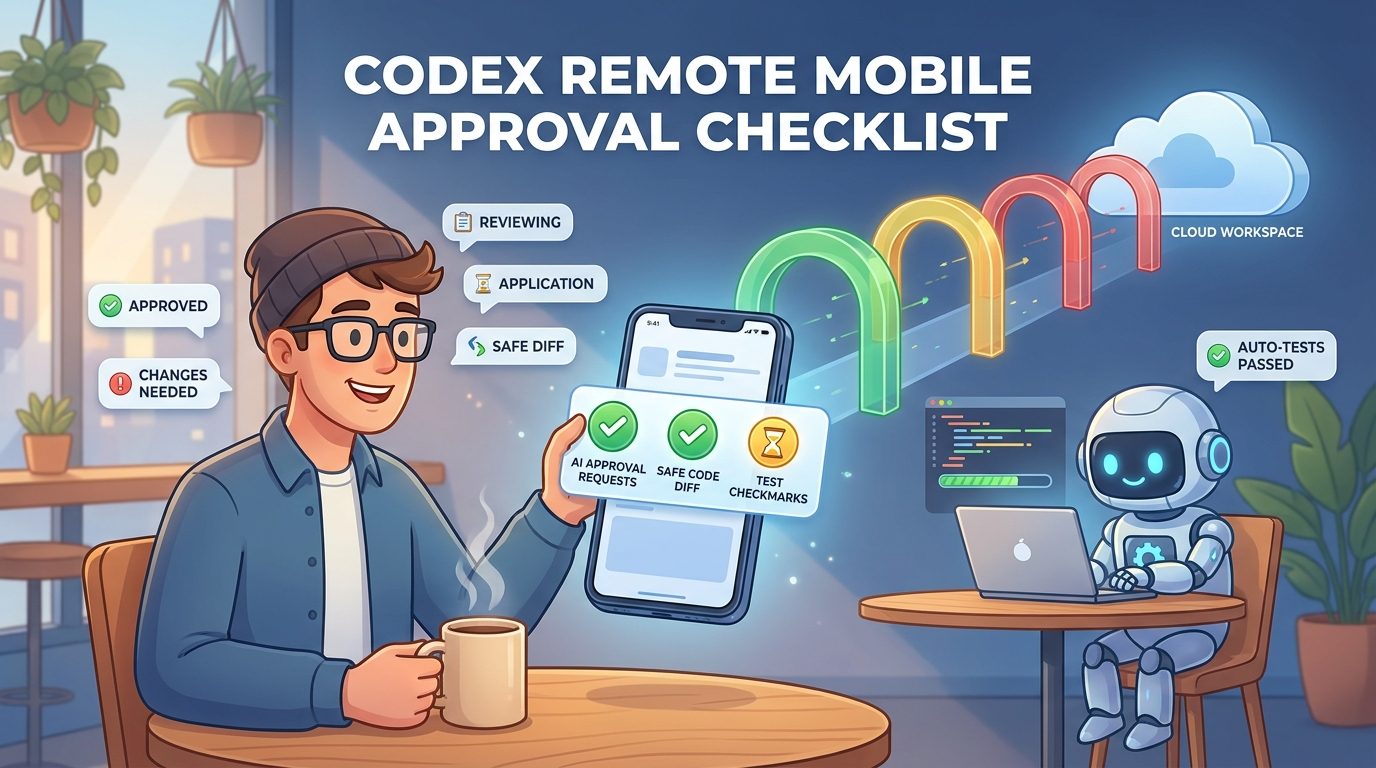
Quick Answer: What Should You Approve in Codex Remote From Your Phone?
Use Codex Remote approvals for decisions you can understand from the mobile evidence in front of you: a harmless test command, a read-only inspection, a small dependency install in an isolated worktree, a documented file edit, or a follow-up instruction that narrows the task. Do not approve actions that touch secrets, production data, deployments, billing-heavy cloud resources, broad filesystem access, destructive Git operations, or vague shell commands unless you can inspect the context properly.
Codex Remote is powerful because your phone becomes a control plane for work running on a connected Mac, Windows device, devbox, or SSH host. OpenAI’s remote connections documentation says remote access can start or continue threads, send follow-up instructions, approve commands and actions, review outputs, inspect diffs, see test results, view terminal output and screenshots, and receive notifications when Codex needs attention. That is enough for real engineering flow, but it is also enough to make a rushed mistake if you approve from a notification without checking what the agent is about to do.
This cluster article supports our broader pillar, Codex Remote Explained. The pillar explains the full remote setup, mobile pairing, DigitalOcean workspaces, security, and cloud cost control. This guide focuses on the narrower search intent: “I am using Codex Remote from my phone. What is safe to approve, what should I review first, and when should I stop?”
Why Mobile Approval Discipline Matters for Codex Remote
Remote coding agents change the rhythm of software work. You no longer have to be sitting in front of your laptop to unblock an agent. You can start a bug investigation while commuting, approve a test run from lunch, steer an agent away from the wrong package, or review a small diff before a meeting ends. OpenAI’s Codex Remote field guide describes the phone as an engineering control plane rather than a tiny terminal. That framing is useful because it keeps the phone in the decision layer, not the deep implementation layer.
The risk is that convenience can flatten judgment. A command that looks ordinary on desktop can be dangerous on mobile because you see less surrounding context. A diff that would be obviously wrong on a large monitor can look acceptable when you only skim the changed-file summary. A cloud workspace can feel disposable until it keeps running, installs large packages, exposes credentials, or modifies the wrong repository. The approval button is small; the consequences are not always small.
That is why a Codex Remote mobile approval checklist deserves its own article. Official docs explain what remote connections can do: pair a phone with a host, use the connected host’s projects and credentials, approve actions, review outputs, and manage connected devices. Security docs explain sandboxing, approval policies, and network controls. But a working developer needs a practical translation: what should I look at before tapping approve?
AIFeatureDrop’s analytics support this focused angle. During the latest 28-day GA4 window, the site recorded 295 active users, 382 sessions, and 677 page views. Organic Search produced 156 sessions and 82 engaged sessions, and OpenAI Codex topics were among the strongest pages, including Codex Banked Resets, Codex Computer Use on Windows, and Codex pricing/usage pages. Search Console access returned a permission error, so the topic choice leans on GA4, the latest OpenAI Codex Remote pillar, and live official documentation. The pattern is still clear: practical Codex workflow content is already working, and mobile approval safety is a narrow cluster gap that strengthens the pillar instead of repeating it.
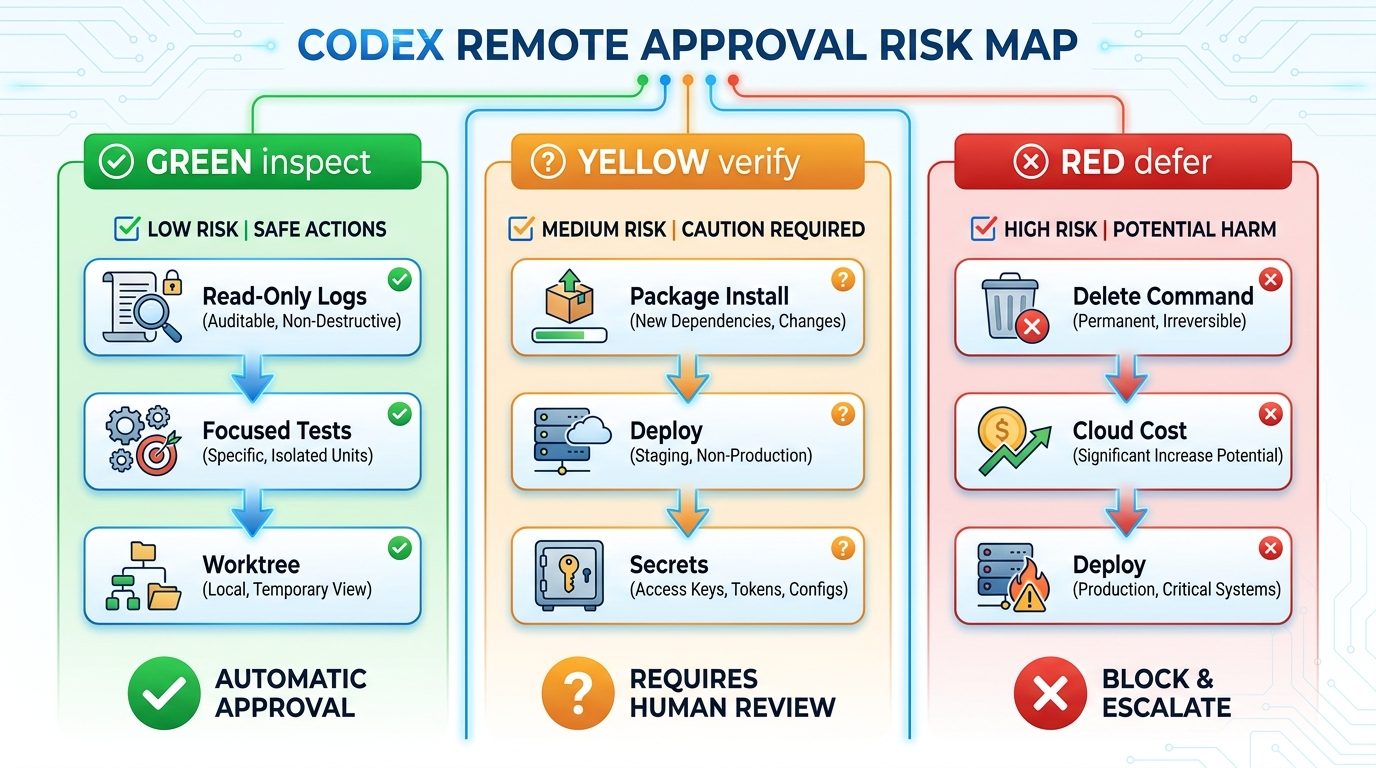
The Codex Remote Approval Map: Green, Yellow, and Red Decisions
Not every approval has the same risk. The fastest way to make better mobile decisions is to classify requests before reading every detail. Use this green, yellow, red map as a first pass.
The point is not to be slow. The point is to make the phone good at the decisions it is designed for. Codex Remote is excellent for unblocking an agent when the next action is bounded. It is weaker when you need deep code reading, multi-file architecture review, or operational certainty. If your brain says “I probably should look at this on a real screen,” listen to it.
Why “approve all” is the wrong mental model
Approvals are not friction to remove. They are checkpoints where the agent admits that it wants to do something outside its current safety envelope. OpenAI’s Codex security material describes two layers: sandbox mode, which controls what Codex can technically do, and approval policy, which controls when it must ask before acting. A mobile approval is therefore not just a UI event. It is a policy decision.
That is especially important when remote access uses the connected host’s projects, files, credentials, permissions, plugins, browser setup, local tools, and Computer Use configuration. If the host has sensitive access, your phone approval can indirectly authorize sensitive operations. Treat every approval as if the host matters, because it does.
The 10-Second Checklist Before You Tap Approve
Use this quick checklist before approving any Codex Remote action. It takes less time than recovering from a bad command.
If any answer is uncertain, ask Codex to explain the command in plain English, show the current Git status, summarize the changed files, or propose a safer read-only check first. The best mobile approval often comes after one clarifying prompt. Codex Remote supports follow-up instructions and steering, so use that channel before granting more access.
Queue vs Steer: Which Follow-Up Should You Use Before Approving?
One of the most useful Codex Remote habits is learning when to queue and when to steer. OpenAI’s Codex Remote guide explains the distinction: Queue waits until the current response finishes and sends your prompt as the next turn; Steer injects guidance into work already in progress. That choice directly affects approval safety.
Use Queue when the current action is acceptable and you want the next step to happen after it finishes. Examples: “After tests finish, summarize failing cases,” “Then update the changelog,” or “Next, check whether this affects the mobile package.” Queue preserves the current flow and reduces accidental interruption.
Use Steer when the current path is becoming risky or wasteful. Examples: “Stop editing shared auth; keep this in the admin package,” “Do not run the deployment script,” “Use a new worktree before changing files,” or “Check the offline path, not the live service.” Steer is a safety tool when waiting would increase cleanup.
For approvals, Queue is usually safer by default. Steer is more powerful, but it changes the current trajectory. Use it deliberately, not as a reflex. If you are distracted, queue a request for a concise summary instead of approving an unclear next step.
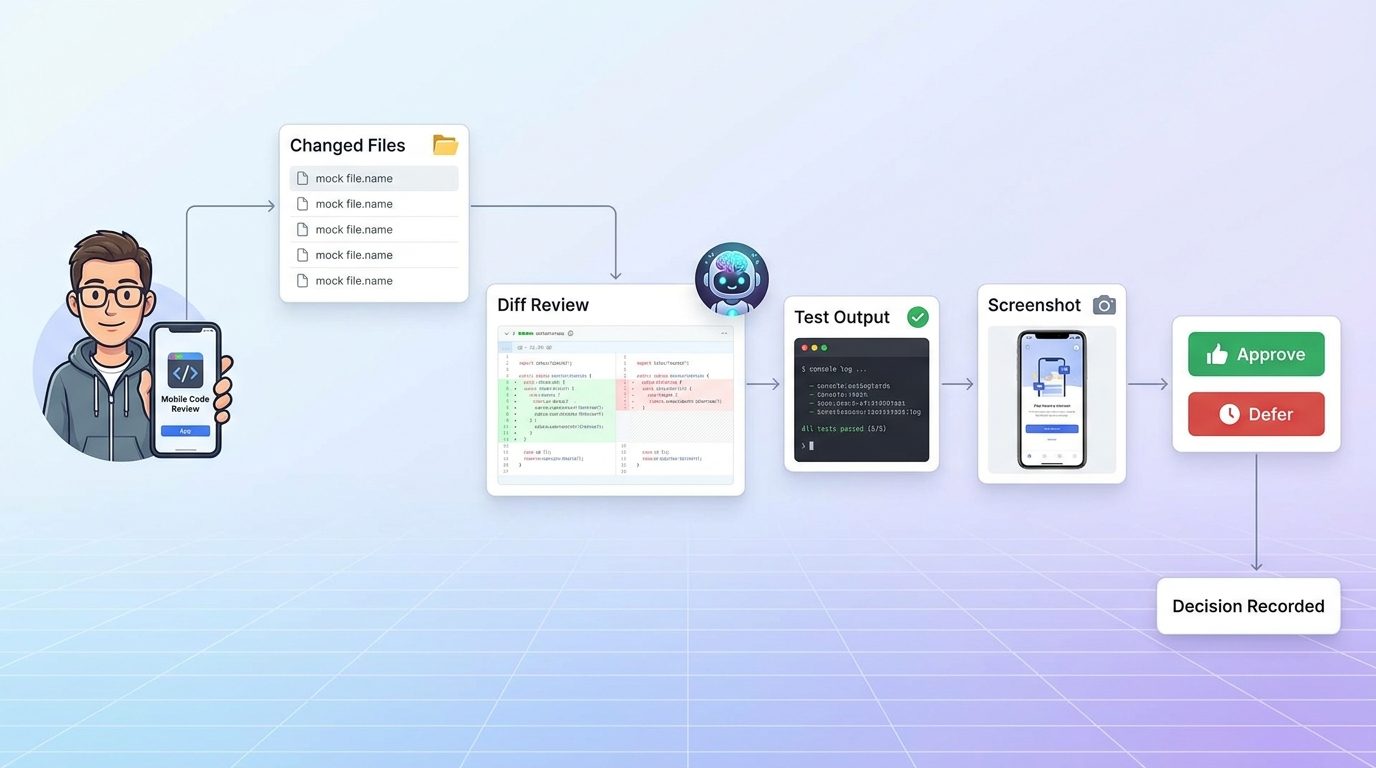
How to Review Diffs, Tests, and Screenshots From Mobile
A mobile review should answer three questions: what changed, how was it verified, and what could still be wrong? You do not need to read every line on a phone, but you do need enough evidence to decide whether the next action is safe.
Start with the changed-file summary
If Codex changed one or two files in the expected area, mobile review may be enough. If it changed many files, touched generated output, modified lockfiles, or edited unrelated packages, slow down. Ask for a summary grouped by purpose: bug fix, tests, formatting, dependency change, generated file, documentation. The grouping matters because it reveals whether the diff is coherent.
Look for mismatch, not perfection
On mobile, your job is often to catch mismatch. Did you ask for a frontend copy fix while Codex edited authentication middleware? Did it update a production config when you asked for a local test? Did it change tests to match broken behavior? Did it remove an error instead of handling it? These are approval blockers even if the code looks plausible.
Use test output as evidence, not decoration
A passing test command is only useful if it is the right test. Before approving a follow-up, check what test ran, from which directory, and whether failures were skipped. A narrow unit test is fine for a small function. A risky cross-package change needs a broader check. If Codex says “tests pass” but the command output is not visible, ask to see it.
Screenshots help, but they do not prove behavior
Remote screenshots can quickly show UI state, browser output, or visual regressions. They are great for sanity checks. But a screenshot does not prove form validation, edge cases, auth, accessibility, performance, or persistence. Treat screenshots as one piece of evidence, not a release gate.
Host, Worktree, and Cloud Workspace Risk Controls
Codex Remote decisions depend on where the agent is running. The same command can be safe in a disposable worktree and dangerous on a production-connected host. OpenAI’s remote connection docs note that remote access uses the connected host’s projects, files, credentials, permissions, plugins, Computer Use, browser setup, and local tools. That means host choice is a security decision.
Start with the least sensitive environment that can complete the task. A local worktree is better than the main checkout for experimental changes. A cloud devbox is better than a personal laptop for long-running builds if secrets are scoped properly. A DigitalOcean Droplet or other SSH host can be useful for persistent work, but it introduces cost, network, and credential management. DigitalOcean’s Droplets documentation describes droplets as Linux virtual machines that run on virtualized hardware. That is flexible, but it also means you are operating real infrastructure, not a magic sandbox.
Worktree rules for safer mobile approvals
- Use a separate worktree for changes that touch more than one file or package.
- Ask Codex to show branch and Git status before destructive or formatting-heavy commands.
- Reject broad cleanup commands until Codex explains what will change.
- Do not approve force pushes, rebases, or mass deletes from mobile unless you are intentionally doing Git surgery.
- Prefer tests and diffs over trust-based summaries.
Cloud workspace rules
- Know whether the remote machine is disposable or persistent.
- Check whether secrets are present in environment variables, config files, shell history, or mounted volumes.
- Set cost expectations before approving package installs, long builds, model-heavy runs, or new resources.
- Ask Codex to stop idle services after the task is finished.
- Use read-only credentials when the task does not need write access.
The safest pattern is a scoped repo, a fresh worktree, limited credentials, explicit tests, and a clear shutdown plan. If that sounds boring, good. Boring infrastructure makes mobile approvals much less dramatic.
Commands You Can Usually Approve vs Commands You Should Pause
Command review is hard on a phone because shell syntax can hide risk. When in doubt, ask Codex to restate the command, its working directory, its expected output, and its rollback plan. The table below gives a practical starting point.
The phrase “usually approve” never means “always approve.” A test command can be dangerous if it hits a paid API or real database. A read command can leak sensitive logs. A package install can trigger scripts. Context matters, and Codex Remote gives you enough context to ask one more question before tapping the button.
Practical Approval Scenarios
Scenario 1: Small bug fix in an isolated worktree
Codex reports that it created a worktree, changed one component file, and added one focused unit test. The next approval is to run the specific test file. This is a good mobile approval if the repository and branch are correct. Ask for the diff summary afterward, then queue a request to update the changelog if the test passes.
Scenario 2: Dependency upgrade request
Codex wants to install a new package to fix a bug. This is yellow, not green. Ask why the package is needed, whether the standard library or existing dependency can do the job, what license and maintenance risk it has, and what files will change. Approve only after the answer is specific. If the package runs install scripts or affects a shared lockfile, wait for desktop review.
Scenario 3: Remote cloud workspace running too long
A Codex task on a Droplet finishes tests but leaves services running. Queue a cleanup request: summarize active processes, stop temporary services, confirm no background build is running, and report whether the machine should be shut down. This is exactly where mobile control is useful. You do not need a desktop to prevent idle cost.
Scenario 4: Vague destructive command
Codex asks to run a broad cleanup command that removes build artifacts and temporary files. The command includes wildcards and deletion. Reject or ask for a dry run first. A safer approval path is: show target files, explain why each category is safe to remove, create a backup if needed, then run the smallest command possible.
Scenario 5: The agent is solving the wrong problem
You see from the transcript that Codex is debugging the UI, but the error came from a resumed network request. Use Steer immediately: “Stop UI investigation. Reproduce the resumed request path and inspect the server response handling.” This is not an approval decision; it is a direction correction before approval becomes necessary.
Mobile Approval Risk Estimator
Use this lightweight estimator before approving a Codex Remote action. It is not a security scanner; it is a thinking aid.
Common Codex Remote Mobile Approval Mistakes
Mistake 1: Approving because the task is urgent
Urgency is when approval discipline matters most. If the bug is serious, use Codex Remote to gather evidence, run safe diagnostics, and prepare a fix plan. Do not let urgency justify blind changes to production-adjacent systems.
Mistake 2: Ignoring the connected host
A phone approval is only as safe as the host behind it. A personal laptop with many credentials is different from a locked-down worktree. A shared SSH host is different from a disposable devbox. Check host context before approving anything that writes, networks, or runs for a long time.
Mistake 3: Treating screenshots as full QA
Screenshots are useful for visual confirmation, but they do not replace tests, logs, accessibility checks, or state transitions. If the change affects behavior, ask for behavioral evidence.
Mistake 4: Letting Codex change tests to pass
Test updates can be legitimate, but they can also hide regressions. If Codex changes a failing test, ask why the previous expectation was wrong. For bug fixes, prefer adding a regression test before changing expectations.
Mistake 5: Approving broad shell scripts on a tiny screen
Commands with pipes, chained operators, nested substitutions, globs, downloads, or destructive flags deserve full attention. If the command does not fit comfortably in your review window, ask Codex to break it into smaller explained steps.
Good mobile approvals
- Read-only checks.
- Focused tests in a safe workspace.
- Small diffs with clear summaries.
- Steering away from risky scope.
- Stopping idle cloud workspaces.
Bad mobile approvals
- Deployments you cannot inspect.
- Secret, billing, or auth changes.
- Destructive commands without dry runs.
- Broad refactors in main branches.
- Anything approved while distracted.
Keep Learning on AI Feature Drop
- Codex Remote Explained — the related pillar guide for setup, QR pairing, DigitalOcean workspaces, cloud cost, and remote workflow basics.
- Codex Banked Resets Explained — understand flexible Codex usage windows before planning long remote sessions.
- Codex Computer Use on Windows — compare mobile approvals with desktop Computer Use and remote control risks.
- OpenAI Codex Pricing and Usage Limits — plan usage before delegating long-running remote tasks.
- Codex Record & Replay Checklist — build reusable AI workflows without recording unsafe habits.
- How to Reduce GitHub Copilot AI Credits — a related cost-control workflow for AI coding agents.
Sources and References
- OpenAI Developers: Codex remote connections
- OpenAI Developers Blog: Mastering Codex Remote for engineering
- OpenAI Developers: Agent approvals and security
- OpenAI Help Center: Using Codex with your ChatGPT plan
- DigitalOcean Docs: Droplets
Product behavior, approval policies, pricing, and enterprise controls can change. Verify the active Codex interface, workspace policy, and host setup before approving sensitive work.
FAQ: Codex Remote Mobile Approvals
Is it safe to approve Codex Remote commands from my phone?
Yes, when the command is scoped, readable, and low blast radius. Read-only checks, focused tests, and small worktree changes are usually reasonable. Defer destructive, secret-related, production, deployment, billing, or vague commands to desktop review.
What is the safest Codex Remote approval habit?
Ask for evidence before permission. That evidence can be Git status, a diff summary, test output, screenshots, logs, a command explanation, or a dry run. If evidence is vague, do not approve yet.
Should I use Queue or Steer before approving?
Use Queue when the current path is safe and your instruction should happen next. Use Steer when Codex is moving in the wrong direction and waiting would increase risk or cleanup.
Can I approve dependency installs from mobile?
Only after checking why the dependency is needed, which files will change, whether install scripts run, and whether the dependency is trusted. For shared repos or production-adjacent systems, wait for desktop review.
What should never be approved casually from Codex Remote?
Deployments, force pushes, broad deletes, secret changes, auth changes, production data access, billing or cloud resource changes, and unclear shell scripts should not be approved casually from mobile.
Does Codex Remote use my connected host credentials?
OpenAI documentation says remote access uses the connected host’s projects, files, credentials, permissions, plugins, Computer Use, browser setup, and local tools. That is why host choice matters before approving actions.
How do I reduce risk on a cloud workspace?
Use disposable workspaces where possible, scope credentials, prefer worktrees, set cost expectations, avoid production data, stop idle services, and ask Codex to summarize active processes before ending the session.
When should I reject instead of asking for clarification?
Reject when a command is destructive, unclear, broader than the task, operating in the wrong workspace, touching sensitive data, or asking for permissions that are not needed. Ask for a safer alternative.
Post a Comment