
Codex Remote Explained: Use Your Phone and Cloud Workspaces for Safer AI Coding
Codex Remote is now a practical remote-development workflow: use your phone to guide Codex, approve actions, pair trusted hosts, and choose between a local machine or a DigitalOcean cloud workspace. Here is how to use it without turning convenience into risk.
Codex Remote: Quick Answer for Busy Developers
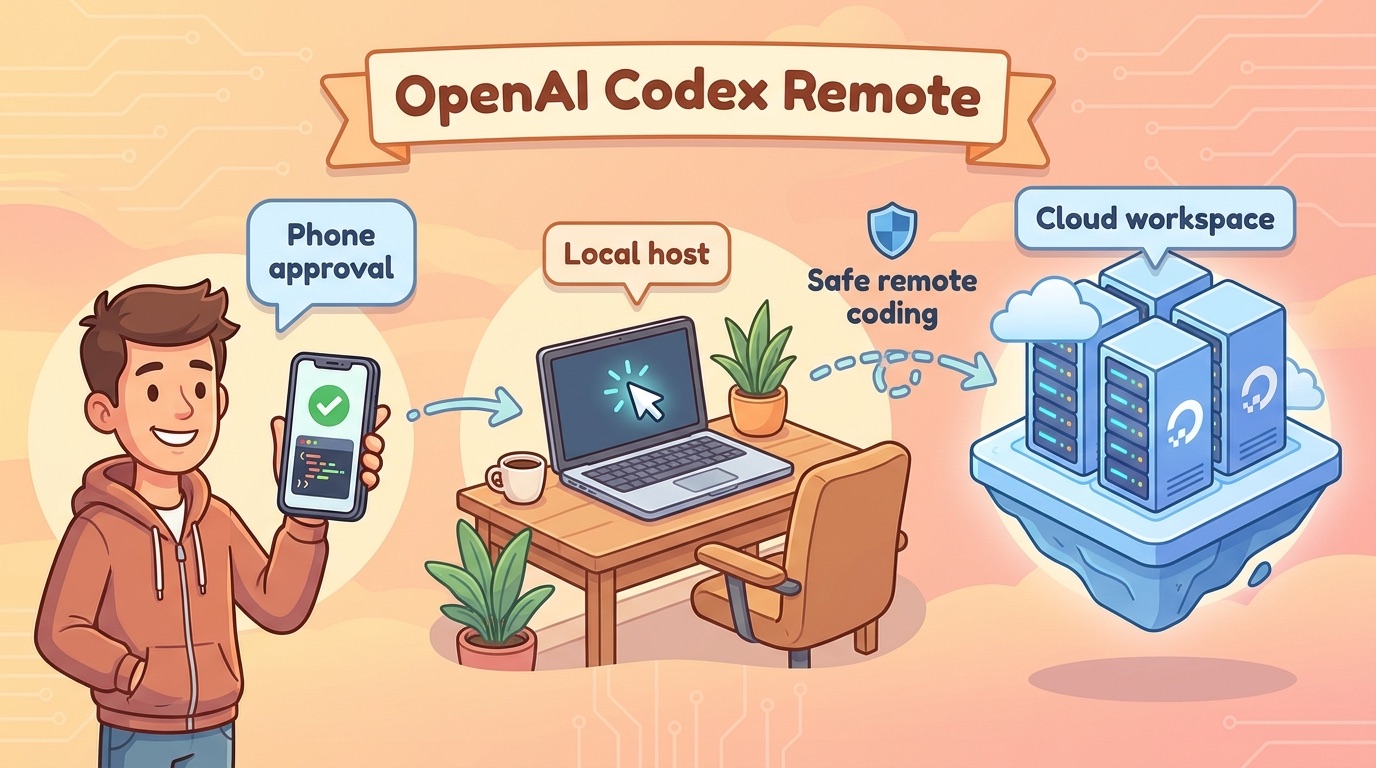
Codex Remote is OpenAI’s remote coding workflow that lets you start or continue Codex work on a connected Mac or Windows host from the ChatGPT mobile app. You can review progress from your phone, approve actions, and keep a coding task moving while the actual work happens on a paired computer.
The related update is the DigitalOcean Droplet Workspace plugin. Instead of relying only on a personal laptop or office workstation, Codex can provision a DigitalOcean Droplet, configure SSH access, and connect that cloud machine to the Codex app as a remote workspace. That turns Codex Remote from a convenience feature into a more serious agentic development pattern: local host when you want direct control, cloud droplet when you want a clean, disposable, always-reachable workspace.
This guide explains what changed, how the pieces fit together, when to use a local host versus a cloud workspace, what security checks matter, and how to design safer AI coding workflows around Codex Remote.
Why Codex Remote Matters Now
AI coding assistants have moved from line completion into real development workflows. They inspect files, edit code, run commands, install dependencies, read logs, open pull requests, and ask for human approval. Once a coding agent starts doing that kind of work, location matters. Where is the agent running? Which machine has the repository? Which credentials are available? Who sees the approval prompt? What happens if the task runs longer than expected?
Codex Remote sits inside those questions. OpenAI’s release notes say users can start or continue work on a connected Mac or Windows host from the ChatGPT mobile app, review progress, and approve actions from their phone. Remote Control now uses authenticated one-to-one QR pairing between each supported mobile device and each host. Connections used since June 8 remain paired, while older inactive connections need to pair again. Signing out turns off Remote Control without removing existing pairings.
That sounds small until you imagine the behavior change. A developer can leave a machine at home or in the office, then continue guiding Codex from a phone. A founder can kick off a cleanup task before a meeting and approve a safe next step later. A team member can inspect an agent’s progress without keeping a laptop open. The mobile interface becomes a command center for coding work that happens elsewhere.
The DigitalOcean plugin adds a second shift. A local machine is personal and messy. It may have secrets, unfinished branches, private browser sessions, SSH keys, and unrelated files. A fresh cloud droplet can be intentionally scoped: a clean workspace, a known repository, minimal credentials, and a lifecycle that ends when the task ends. For serious users, that isolation is often the real feature.
What Changed With Codex Remote GA and DigitalOcean Workspaces?
The OpenAI release note describes two connected updates. First, Codex Remote reached general availability on all ChatGPT plans. Second, the new DigitalOcean Droplet Workspace plugin can provision a cloud droplet, configure SSH access, and attach it to the Codex app as a remote workspace. Users are told to update both the ChatGPT mobile app and Codex app before connecting.
The important keyword is not only “Codex Remote.” It is the set of questions behind the keyword: Is Codex Remote safe? Does it work from a phone? What is QR pairing? Should I use a DigitalOcean Droplet or my own computer? What can Codex approve? How do I avoid giving an AI coding agent too much access?
AIFeatureDrop analytics support that focus. Recent GA4 data shows OpenAI Codex content already performs well on the site. The Codex Banked Resets explainer and Codex Computer Use on Windows setup guide are among the strongest landing pages. That means readers are not only browsing generic AI news; they are searching for operational Codex guidance. Codex Remote is the natural next pillar because it connects remote control, cloud workspaces, safety, and cost control.
How Codex Remote Works in Plain English
Think of Codex Remote as a three-part workflow. The first part is the controller, which can be the ChatGPT mobile app. The second part is the workspace, which can be your connected Mac, your connected Windows host, or a cloud droplet. The third part is the approval layer, where you review what Codex is doing and decide whether the next action is acceptable.
When the workspace is your own computer, Codex is close to your real development environment. That can be convenient because your repository, tools, package managers, environment variables, and test commands may already be available. It can also be risky because a personal machine usually contains more than one project and more credentials than one task needs.
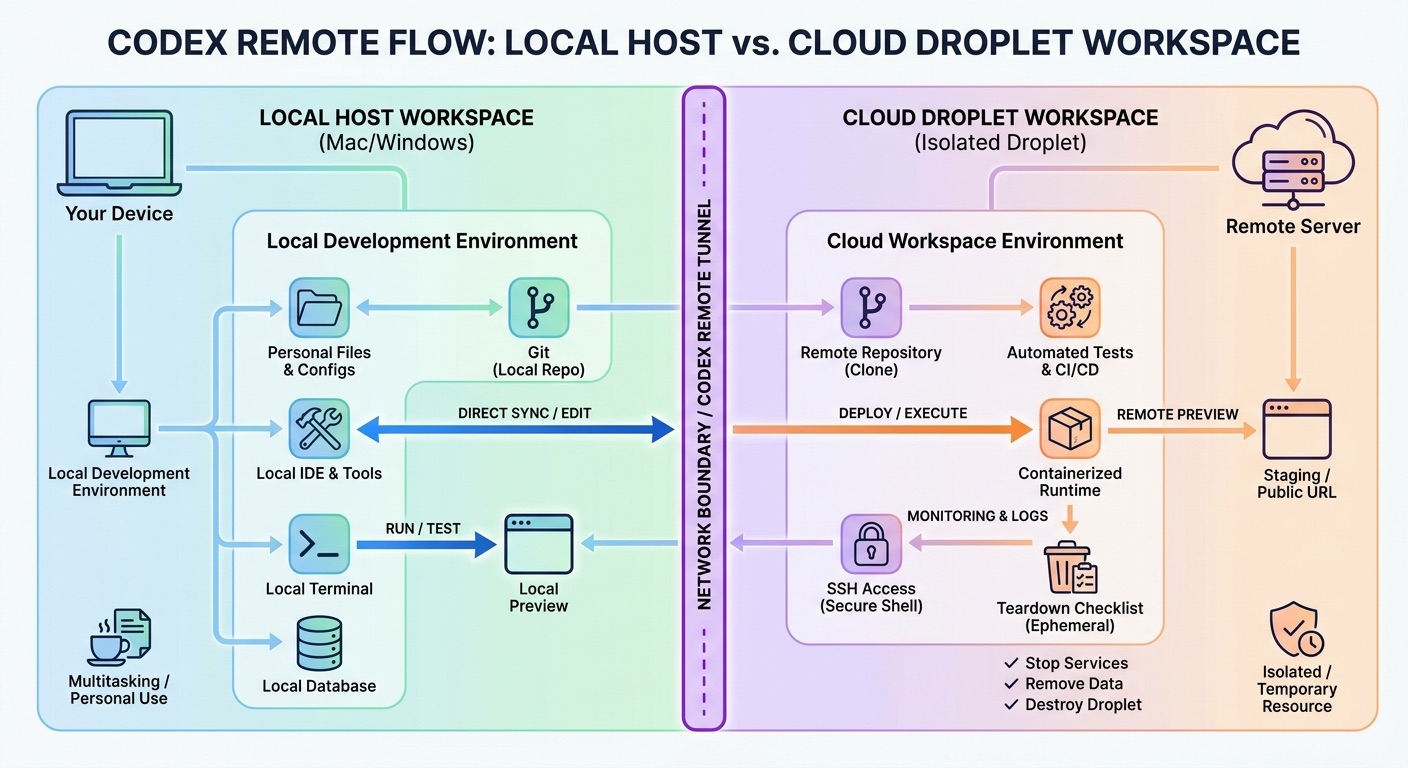
When the workspace is a DigitalOcean Droplet, Codex works in a cloud machine that can be created for the task. The plugin’s purpose is to provision the droplet, configure SSH access, and attach it to Codex. That gives you a more disposable environment. You can clone a repository, install dependencies, run tests, and then destroy the machine when the work is done. The tradeoff is that you must manage cloud cost, repository access, secrets, and cleanup.
| Component | What it does | What to watch |
|---|---|---|
| ChatGPT mobile app | Lets you monitor Codex work, continue sessions, and approve actions from your phone. | Do not approve prompts casually just because they appear on mobile. |
| Mac or Windows host | Runs Codex against your local development environment. | Limit access to sensitive folders, credentials, and unrelated repositories. |
| QR pairing | Connects one supported mobile device to one host using authenticated pairing. | Review paired devices and sign out if a device is lost or shared. |
| DigitalOcean Droplet | Provides a cloud workspace Codex can connect to through SSH. | Track uptime, machine size, repository permissions, and teardown steps. |
| Approval prompts | Create checkpoints before Codex takes actions that need user consent. | Approvals should be specific enough to judge risk. |
Local Host vs DigitalOcean Droplet: Which Should You Use?
The decision is less about which option is more advanced and more about which option matches the risk profile of the task. A local host is best when the work depends on your existing setup. A cloud droplet is best when you want isolation, reproducibility, or a clean machine that can be thrown away after the task.
| Use case | Better workspace | Why |
|---|---|---|
| Small change in a familiar project already open on your laptop | Local Mac or Windows host | Fastest path because dependencies and files are already present. |
| Testing a risky dependency upgrade | DigitalOcean Droplet | Isolation makes it easier to avoid polluting your primary machine. |
| Working while traveling with only a phone nearby | Either, depending on availability | Local host works if it stays online; cloud droplet may be more reliable. |
| Open-source contribution with no private secrets needed | DigitalOcean Droplet | A disposable clean environment is safer and easier to document. |
| Project requiring private local services or hardware | Local host | The cloud workspace may not have access to needed resources. |
| Team policy requires isolated agent sandboxes | DigitalOcean Droplet | Cloud workspaces can be standardized, logged, and destroyed. |
My recommendation is simple: use local hosts for low-risk, environment-specific tasks; use cloud droplets for experiments, larger refactors, dependency upgrades, open-source work, and anything where isolation matters. If you cannot explain why Codex needs your personal machine, a cloud workspace is often the cleaner default.
Codex Remote Setup Checklist
The exact interface can change, so treat this as a workflow checklist rather than a pixel-by-pixel tutorial. The stable idea is to prepare the workspace, update the apps, pair the device, test a harmless task, and then increase task complexity only after approvals and logs behave as expected.
1. Update the required apps
OpenAI’s release note says users should update the ChatGPT mobile app and Codex app before connecting. This matters because remote pairing, mobile approvals, and plugin behavior depend on app-side support.
2. Decide where Codex should run
Choose local host or DigitalOcean Droplet before starting. Do not default to your personal machine if the task does not need it. If you use a droplet, pick a machine size that is enough for the repository and tests but not so large that forgotten uptime becomes expensive.
3. Prepare a scoped repository
Codex works best when the workspace is not a junk drawer. Clone only the repository needed for the task. Check out a separate branch. Add a short task brief. Include test commands, lint commands, and constraints. If secrets are required, use the minimum viable secret and revoke it after the run.
4. Pair the device intentionally
Use the authenticated one-to-one QR pairing flow for the supported mobile device and host. Pairing should feel like granting remote control, not scanning a casual login code. If you share a phone, lose a phone, or rotate devices, review paired hosts and sign out where needed.
5. Run a harmless test task
Before asking Codex to modify a production project, ask for a small read-only inspection or documentation update. Confirm that you can see progress, understand approval prompts, and stop or redirect the task. A remote workflow you cannot supervise is not ready for real code.
6. Use approvals as decision points
Phone approval is powerful only if the prompt tells you what will happen. “Run command” is not enough. You want to know the command, working directory, expected result, and whether it touches network, files, dependencies, or credentials. If the approval is vague, decline and ask Codex to explain.
Security Rules for Codex Remote
Codex Remote is not inherently unsafe, but it concentrates several sensitive ideas: remote access, AI-generated commands, connected repositories, shell execution, mobile approvals, and possibly cloud infrastructure. That combination deserves a clear safety model.
Safer patterns
- Use a separate branch for every Codex Remote task.
- Prefer clean cloud workspaces for risky experiments.
- Give Codex the smallest repository and credential scope possible.
- Require tests or lint before merging generated work.
- Destroy droplets and revoke temporary secrets after the task.
- Document what Codex changed in the pull request.
Risky patterns
- Approving mobile prompts without reading the command.
- Running Codex inside a machine with broad personal secrets.
- Letting a droplet stay alive after the work is done.
- Using production credentials for development tasks.
- Asking for vague multi-file changes with no acceptance criteria.
- Merging AI-generated code without human review.
For teams, the policy should be written before adoption spreads. Define who can pair devices, which repositories can be used with Codex Remote, whether cloud workspaces are required for certain tasks, who pays for droplets, how secrets are injected, and what evidence is required before code can be merged.
For individuals, the most important rule is to separate convenience from authority. Your phone makes it easier to approve work, but it does not make the work safe. A good approval habit is to ask three questions every time: what exactly will Codex do, what can it affect, and how will I verify the result?
Cloud Cost and Usage Controls
The DigitalOcean plugin makes cloud workspaces easier, but easier provisioning can create easier waste. A droplet that runs for a short task may be cheap. A droplet that stays online for days because nobody cleaned it up is a process problem. The article topic has search value partly because users need this practical layer, not just “new plugin available.”
Use simple controls: name droplets clearly, tag them by project, set a shutdown reminder, use the smallest reasonable machine, avoid storing long-lived secrets, and delete the workspace when the task ends. If you work in a team, add these checks to the pull request template so the person reviewing the code also asks whether the agent workspace was cleaned up.
Practical Codex Remote Workflows
Codex Remote is strongest when the task is specific, observable, and reversible. It is weakest when the prompt is vague and the workspace has too much authority.
Dependency upgrade rehearsal
Create a fresh droplet, clone the repo, ask Codex to upgrade one dependency, run tests, and summarize breaking changes. This is a good cloud task because the dependency install can be messy and you do not need to pollute your personal machine. Approve only commands that relate to the branch and test plan.
Bug fix with a failing test
Use a local host if the bug depends on your current environment. Give Codex the failing test, stack trace, expected behavior, and the files most likely involved. From mobile, approve inspection and test commands. Do not approve broad cleanup unless Codex first explains why it is necessary.
Documentation and release-note cleanup
Remote mobile control is excellent for low-risk documentation work. Codex can update docs, generate examples, and check formatting while you review the output from your phone. This is also a good first workflow for learning the approval pattern.
Open-source contribution sandbox
A DigitalOcean Droplet can be a clean environment for open-source contribution work. Clone the project, run setup steps, ask Codex to inspect a labeled issue, and create a patch branch. Because the environment is disposable, you reduce the risk of mixing open-source dependencies with your private workspace.
Pull request preparation
Ask Codex to create a summary of changed files, tests run, known limitations, and reviewer notes. This turns the remote agent from a code generator into a collaborator that improves review quality. The final merge decision still belongs to a human.
Common Problems and Fixes
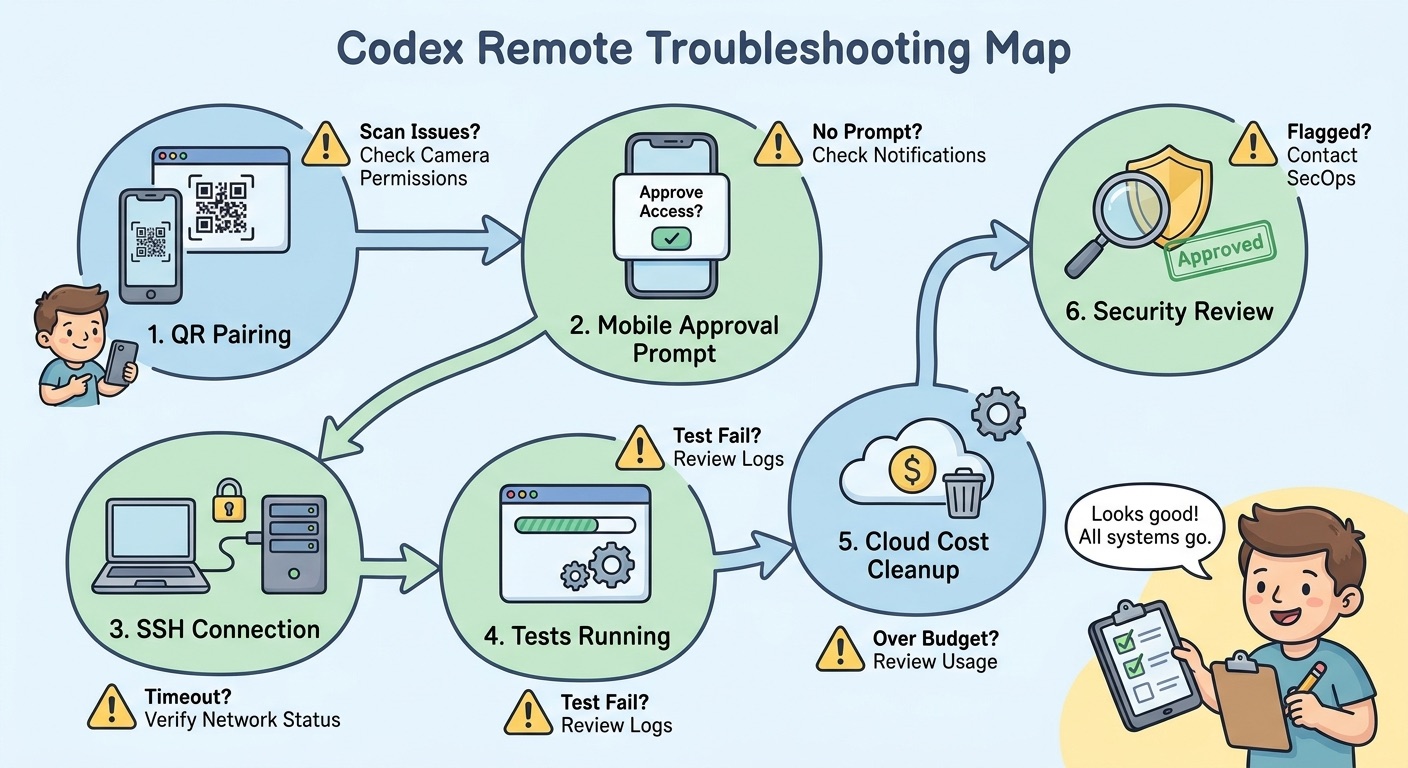
Pairing does not work
Update the ChatGPT mobile app and Codex app first. Confirm you are pairing the correct supported device with the correct host. If a connection was inactive before the recent pairing change, expect to pair again. If the device is shared or managed by an organization, check whether security settings block the flow.
Codex cannot reach the workspace
For local hosts, confirm the host is online, signed in, and reachable. For cloud droplets, confirm the droplet exists, SSH access is configured, and any firewall rules allow the expected connection path. Avoid solving this by opening broad network access; fix the specific connectivity issue.
Approvals feel too vague
Stop and ask Codex to restate the command, purpose, affected files, and rollback plan. Approval prompts are not a formality. If you cannot understand the action from your phone screen, do not approve it.
The agent keeps looping
Long-running agent loops are a productivity and cost risk. Pause the task, ask for a status summary, inspect the diff, and decide whether to continue. Often the right move is to narrow the task, provide the failing test, or reset the branch.
The droplet is still running
Add a cleanup checklist to every Codex cloud task: capture useful changes, push the branch, remove temporary secrets, stop or destroy the droplet, and note the cleanup in the task log. A forgotten cloud machine is not an AI problem; it is an operations habit problem.
Why This Topic Has a Search Gap
Official announcements are necessary, but they are rarely enough for users adopting a new agent workflow. OpenAI explains that Codex Remote is generally available and that the DigitalOcean plugin provisions a droplet and configures SSH access. DigitalOcean announces that Codex can run in the cloud. What many users still need is a decision guide: local or cloud, safe or risky, cheap or expensive, phone approval or desktop review, personal project or team policy.
The search gap is also timely. AIFeatureDrop’s GA4 data shows that practical Codex articles are already attracting users. The site’s strongest OpenAI pages are not broad news summaries; they are focused explainers about banked resets, computer use on Windows, and Codex pricing. Codex Remote fits the same pattern because it turns a product update into a workflow question developers can act on.
The content angle should therefore stay operational. This article is not trying to break news. It is trying to help a developer decide whether to pair a phone, use a local host, create a cloud droplet, approve an action, or stop the agent. That is where the information gain lives.
Keep Learning on AI Feature Drop
- Codex Banked Resets Explained — understand flexible Codex usage limits before longer remote sessions.
- Codex Computer Use on Windows — useful background for host setup and safe remote control habits.
- OpenAI Codex Pricing and Usage Limits — compare remote workflows with plan and usage constraints.
- How to Use Codex Banked Resets for Heavy Coding Sessions — plan longer Codex work without wasting high-value usage.
- GitHub Agentic Workflows Explained — related guidance for approvals, security, and automation boundaries.
Final Recommendation: Treat Codex Remote Like Remote Infrastructure
Codex Remote is exciting because it makes AI coding feel less tied to one physical machine. You can guide work from a phone, approve next steps, and use a cloud workspace when your local environment is the wrong place for an experiment. That is useful. It is also exactly why the workflow needs discipline.
For individual developers, start with low-risk tasks. Pair one device, run one simple workflow, inspect the output, and learn what the approval experience feels like. Move to cloud droplets when you need isolation or availability, not just because cloud sounds more powerful. Keep costs visible and delete workspaces after use.
For teams, do not wait until everyone invents their own remote-agent habits. Define policies for paired devices, repositories, secrets, workspace teardown, review requirements, and spending limits. Codex Remote can speed up work, but only if the organization knows where the agent is running and what authority it has.
The best mental model is this: Codex Remote is not a magic “code from anywhere” button. It is a remote development system with an AI worker inside it. Give it scoped work, supervise approvals, verify the diff, and keep the infrastructure clean.
Sources and References
- OpenAI Release Notes: Codex Remote GA and DigitalOcean plugin
- OpenAI Help Center: ChatGPT release notes
- DigitalOcean Blog: Run Codex in the cloud
- DigitalOcean Pricing
- OpenAI Codex product page
Product availability, app behavior, plan access, and cloud pricing can change. Always verify your current ChatGPT plan, Codex app version, DigitalOcean account settings, and organization policies before using Codex Remote for production work.
FAQ: Codex Remote and DigitalOcean Workspaces
What is Codex Remote?
Codex Remote is OpenAI’s remote coding workflow that lets users start or continue Codex work on a connected Mac or Windows host from the ChatGPT mobile app, review progress, and approve actions from a phone.
Is Codex Remote available to everyone?
OpenAI’s release notes say Codex Remote is generally available on all ChatGPT plans. Availability can still depend on app version, region, account state, and workspace settings, so verify inside your own ChatGPT and Codex apps.
What is the DigitalOcean Droplet Workspace plugin?
It is a Codex-related plugin that lets Codex provision a DigitalOcean Droplet, configure SSH access, and connect the cloud machine to the Codex app as a remote workspace.
Should I use a local computer or a DigitalOcean Droplet?
Use a local host when the task needs your existing development setup. Use a droplet when you want isolation, a clean environment, cloud availability, or a disposable workspace for experiments and open-source tasks.
Is Codex Remote safe?
It can be used safely if you scope access, read approvals, use separate branches, limit secrets, review diffs, run tests, and clean up cloud resources. It becomes risky when you approve vague commands or run agents inside overly privileged environments.
Does QR pairing make Codex Remote more secure?
Authenticated one-to-one QR pairing improves the device-to-host connection model, but it does not replace good operational security. You still need to protect devices, review paired hosts, and avoid approving risky actions.
Can Codex Remote run while I am away from my desk?
Yes, that is one of the main benefits. You can monitor and approve work from the ChatGPT mobile app while Codex runs on a connected host or cloud workspace, assuming the environment remains online and properly configured.
How do I avoid cloud costs with DigitalOcean workspaces?
Use the smallest suitable droplet, name and tag it clearly, set a cleanup reminder, stop or destroy it after the task, and avoid leaving long-running agent sessions unattended.
Can teams use Codex Remote?
Teams can use it, but they should define policies for repositories, paired devices, credentials, cloud workspaces, review requirements, and spending limits before broad adoption.
Post a Comment