
Use this practical checklist before, during, and after a Codex Record & Replay session so the generated skill is focused, safe, reusable, and easy to verify.
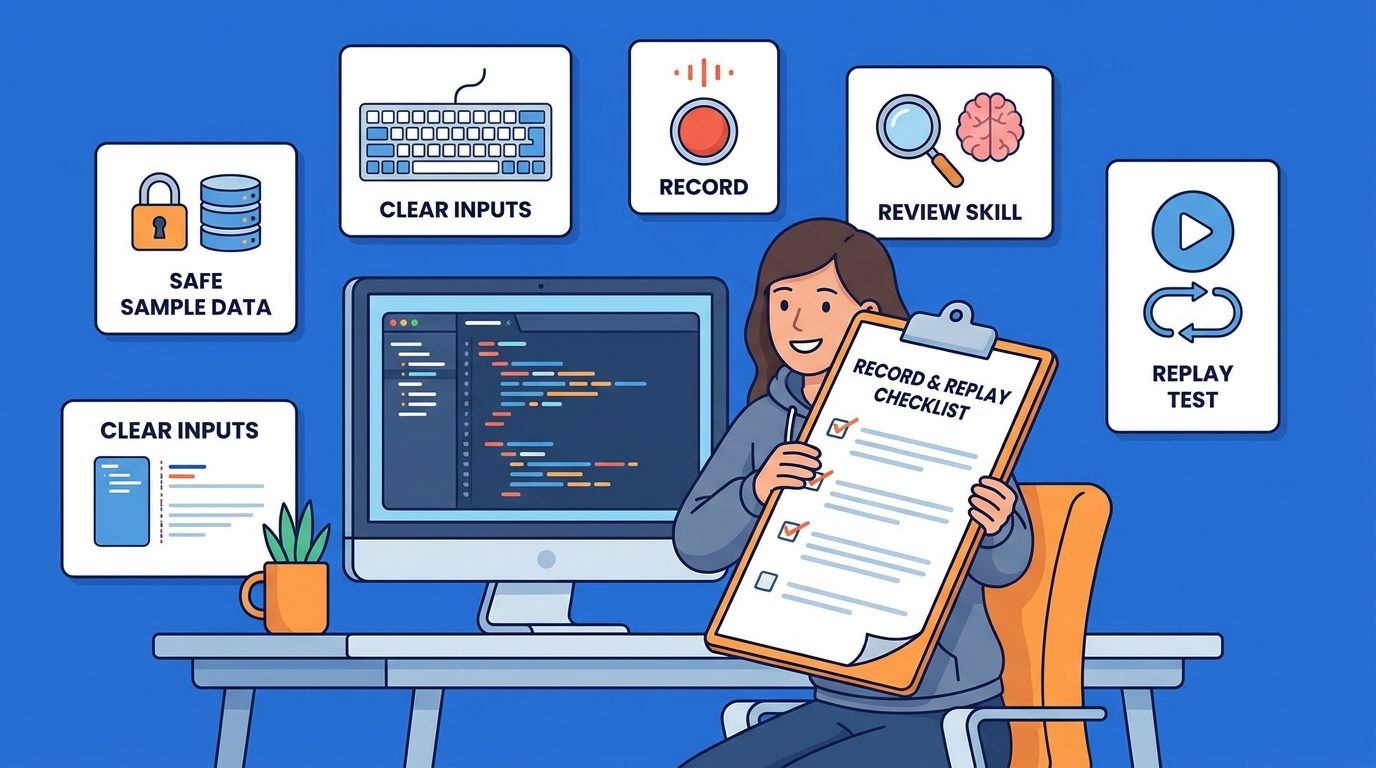
Quick Answer: The Codex Record & Replay Checklist
Codex Record & Replay lets you show OpenAI Codex a workflow on your Mac and turn that demonstration into a reusable skill. The feature is powerful because it captures details that are hard to explain in a prompt: the right page, the right menu, the order of clicks, the fields that matter, the confirmation screen, and the small preferences that make a workflow feel like yours.
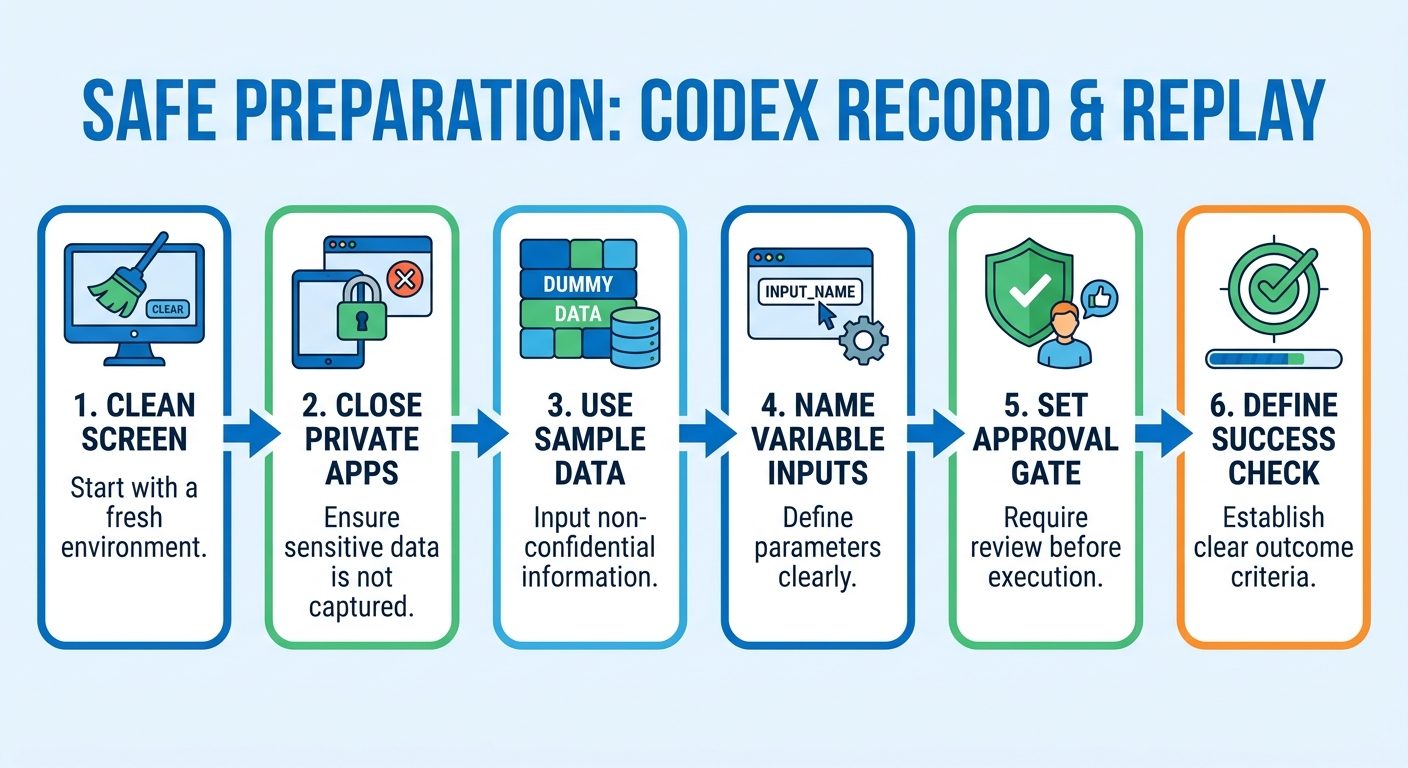
The safest way to use it is not to hit record immediately. Use a checklist. Pick one narrow workflow, prepare safe sample data, close unrelated windows, explain which values should change next time, record only the essential path, stop at a clear success signal, review the generated skill, and run a test replay before relying on it for real work.
This cluster article supports our broader pillar guide, Codex Record & Replay Explained. The pillar explains what the feature is and how it fits into Codex. This checklist focuses on the operational question many users will ask next: how do I record a reusable skill without capturing messy steps, private information, or fragile habits?
Why You Need a Checklist Before Recording a Skill
Recording a workflow feels simple, but a reusable AI skill is only as good as the demonstration it learns from. If the recording includes detours, stale tabs, hidden assumptions, private data, or unclear success criteria, Codex may generate a skill that repeats the wrong things. That is not a model failure. It is a workflow-design failure.
A checklist turns Record & Replay from “screen recording with AI” into structured process capture. The goal is to teach Codex the difference between fixed procedure and variable input. Fixed procedure is the part that should happen every time: open the correct dashboard, choose the export menu, select the standard file type, apply the team naming convention, and verify the file exists. Variable input is the part that changes: date range, customer name, project ID, issue title, file path, or publishing destination.
OpenAI’s documentation says Record & Replay works best when the workflow is repetitive, depends on your preferences, or is easier to show than describe. That sentence is the key. If a task is not repetitive, do not record it. If it does not depend on preferences, a normal prompt may be enough. If it cannot be verified, it probably needs a manual checklist before it becomes an AI skill.
Analytics also support this topic for AIFeatureDrop. In the latest complete 28-day window, GA4 shows 306 active users, 376 sessions, 683 page views, and Organic Search as the second-largest channel after Direct. Top article patterns include practical AI coding workflow guides such as Codex Computer Use, Codex banked resets, Copilot credits, Copilot workflows, and Claude Code permissions. That suggests readers are not looking for generic AI news. They want specific implementation guidance they can use while building, debugging, publishing, or managing AI coding assistants.
| Without a checklist | With a checklist |
|---|---|
| You record a long, messy path and hope Codex understands what mattered. | You record a short path with a clear goal, inputs, and success signal. |
| Sample values may be reused accidentally later. | Variable values are named before recording and documented after recording. |
| Private windows, chats, dashboards, or secrets may appear in the capture. | The screen is cleaned before recording and sensitive data is replaced with safe samples. |
| The generated skill may be vague or risky. | The generated skill becomes reviewable workflow documentation. |
Step 1: Pick the Right Workflow to Record
The first checklist item is selection. Do not record the first task that comes to mind. Choose a workflow that has repeated enough times to be annoying, stable enough to replay, and narrow enough to describe in one sentence. “Publish our weekly demo video with the standard metadata and a final approval checkpoint” is a good candidate. “Handle marketing operations” is not.
Good workflows have three qualities. First, they repeat. If you only do it once, recording and maintaining a skill is overhead. Second, they have stable steps. If the interface changes constantly or the path depends on unpredictable judgment, a recording becomes brittle. Third, they have a visible outcome. A created issue, downloaded file, saved setting, completed report, or staged draft gives Codex a verification target.
If you are unsure whether a workflow is worth recording, ask one question: would you write a checklist for a teammate? If yes, Record & Replay may be a good fit. If no, the task may be too ambiguous, too rare, or too judgment-heavy.
Step 2: Prepare the Screen, Inputs, and Safety Boundaries
Preparation is the most important privacy step. During recording, Codex observes the actions and window content needed to learn the workflow. That means the cleanest recording is a deliberate recording. Close unrelated apps, chats, inboxes, internal documents, password managers, terminals with secrets, dashboards with private rows, and browser tabs that do not belong to the task.
Next, prepare sample inputs. If the workflow needs a customer name, use a fake but realistic customer. If it needs a report date range, use a harmless example. If it needs a file path, create a safe test file. If it needs an issue title, make it obvious that the title is a placeholder. Before recording, tell Codex which values are variables. For example: “The project name, report date range, and output filename will change each time. The export format and verification steps should stay the same.”
| Preparation item | Why it matters | Example |
|---|---|---|
| Close unrelated windows | Prevents accidental context capture and confusing skill instructions. | Hide Slack, email, private docs, and unrelated browser tabs. |
| Create safe sample data | Prevents real sensitive values from becoming part of the learned pattern. | Use “Acme Demo” instead of a real client. |
| Name variable inputs | Helps Codex distinguish fixed steps from changing values. | “The date range changes each replay.” |
| Define success criteria | Gives the generated skill a reliable stopping point. | “Stop when the CSV appears in Downloads and the dashboard says export complete.” |
| Decide approval gates | Protects irreversible or public actions. | “Prepare the draft, but ask before publishing.” |
Teams should also define policy. A personal recorded skill can be informal. A team-shared skill should have review. If a skill might send a message, change billing, alter permissions, publish publicly, or touch production data, add a mandatory human checkpoint. This is the same principle we discuss in Claude Code permission rules: agentic tools are more useful when their boundaries are explicit.
Step 3: Record a Short, Complete Demonstration
When the environment is ready, open Plugins in the Codex app, use the plus menu, choose Record a skill, review the suggested prompt, add helpful context, and approve recording when you are ready. Then perform the workflow normally, but deliberately. The recording should be boring. Boring is good. It means Codex sees the canonical path instead of a maze of exploration.
Keep the demonstration short and complete. Do not include research, decision-making, unrelated setup, or cleanup that does not belong in the repeatable procedure. If you click the wrong page, expose something private, or take a long detour, stop and restart. It is better to spend two extra minutes recording a clean demonstration than to spend thirty minutes editing a confusing generated skill.
Stop the recording at the success point. This could be a confirmation page, created ticket, downloaded file, saved settings screen, generated draft, or passed check. If the success state is not visible, narrate it to Codex before stopping: “The workflow is complete when this file exists in the export folder and the dashboard shows the completed status.”
Good recording behavior
- Record one workflow, not a bundle of workflows.
- Move through the normal path without detours.
- Use safe sample values.
- Pause only when the pause teaches something.
- Stop as soon as the success signal is visible.
- Restart if sensitive or irrelevant information appears.
Bad recording behavior
- Recording a broad “do everything” workflow.
- Leaving private chats and dashboards visible.
- Mixing exploration with instruction.
- Using real secrets or customer data.
- Stopping before the success condition is clear.
- Assuming the generated skill will infer hidden team rules.
The best mental model is “teach once, review once, replay many times.” The recording teaches the visible path. Your review teaches the hidden rules.
Step 4: Review the Generated Skill Like Documentation
After you stop recording, Codex drafts a skill that explains when to use the workflow, what inputs it needs, which steps to follow, and how to verify the result. Do not skip this review. The draft is not just an output; it is the control surface for future replays.
Read the skill from top to bottom. Check whether it correctly describes the trigger. A good trigger is narrow: “Use this skill to export the weekly product analytics CSV from the demo dashboard.” A bad trigger is broad: “Use this for analytics.” Then check inputs. Every value that changes should be named. If the recording used a sample date, sample file, sample customer, or sample project, make sure Codex knows it was a placeholder.
Next, check the procedure. Remove accidental detours. Add missing steps that happened too quickly in the recording. Add fallback instructions if a menu has moved or a page loads slowly. Add a safety note if the workflow should not continue when data looks unexpected. Finally, check verification. A reusable skill needs a clear completion test.
| Skill section | What to look for | Fix if missing |
|---|---|---|
| When to use | A narrow use case, not a vague category. | Define one trigger and one outcome. |
| Inputs | All changing values are named. | Add date range, project, file, title, destination, or other variables. |
| Steps | No accidental clicks, secrets, or unrelated pages. | Remove detours and add stable instructions. |
| Safety | Approval gates for public, financial, permission, or customer-impacting actions. | Add “ask before final submit/publish/send/delete.” |
| Verification | A visible success check. | Add file exists, ticket created, status changed, draft saved, or tests passed. |
This review step is where Record & Replay becomes more than a screen capture. It becomes a reusable work instruction. If the skill is valuable to a team, consider promoting it later into a Codex plugin. OpenAI’s plugin docs describe plugins as bundles of skills, app integrations, and MCP servers. A recorded skill is a fast starting point; a plugin is a better home when the workflow needs distribution, packaging, managed installation, or a stronger integration contract.
Step 5: Replay With Test Inputs Before Real Work
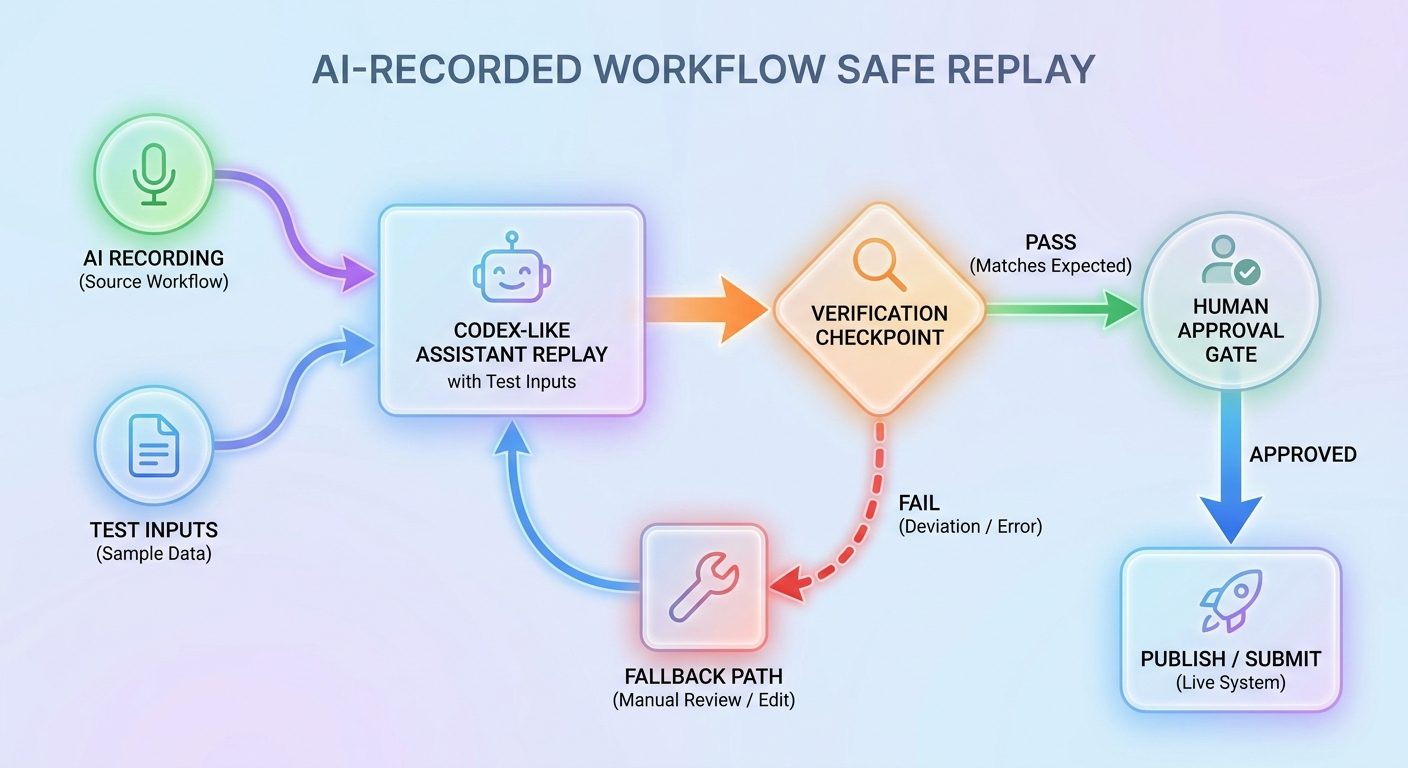
Do not trust the first replay on a high-stakes task. Start a new thread, ask Codex to use the generated skill, and provide safe test inputs that differ from the recording. This matters because a skill that only works with the original sample values is not reusable. You want to confirm that Codex swaps variables correctly, follows the stable steps, and stops at the verification point.
Watch the first replay closely. If Codex asks for missing context, that is useful feedback. Add that context to the skill. If it tries to reuse a sample value, make the input rule clearer. If it goes past the intended stopping point, add an approval gate. If it fails because the UI changed or a page loaded differently, add fallback steps.
A replay routine protects you from the two common failure modes: overconfidence and under-specification. Overconfidence is trusting a fresh skill before it has handled new inputs. Under-specification is discovering too late that the workflow depended on something you never told Codex.
Record & Replay Examples With Checklist Notes
Examples make the checklist easier to apply. Here are practical workflows where Record & Replay can help, plus the safety note that should be attached to each one.
Example 1: Create a configured GitHub issue
Record how you open the repository, choose the right issue template, apply labels, assign a project, add acceptance criteria, and save the issue. Tell Codex that the title, summary, assignee, and milestone may change. Verification is the created issue URL. Safety note: if the issue contains sensitive customer details, use a private repository and ask before posting.
Example 2: Download a recurring analytics report
Record the exact dashboard, filters, date range picker, export format, and file naming pattern. Tell Codex which date range changes each replay. Verification is the downloaded file in the expected folder. Safety note: use a demo account or filtered dataset while recording, and avoid exposing private rows.
Example 3: Prepare a release checklist
Record the sequence of opening the release branch, checking CI, collecting version notes, opening the deployment dashboard, and preparing the release issue. Verification is a completed draft checklist, not the final deployment. Safety note: require human approval before any production action.
Example 4: Publish a routine content asset
Record how to upload a file, set title format, add tags, choose visibility, and save a draft. Verification is the saved draft preview. Safety note: keep “publish” as a separate approval step unless the asset is truly low-risk and reversible.
Example 5: Run local QA in Codex Computer Use
Record how to start the local app, open a browser route, test a user flow, capture evidence, and report the result. This pairs naturally with Codex Computer Use. Verification is a passed check, screenshot, log line, or clear bug report. Safety note: avoid recording credentials for local services.
These examples share the same pattern: narrow scope, explicit variables, safe inputs, clear verification, and an approval gate when the action affects people, money, permissions, or public content.
Troubleshooting Common Record & Replay Problems
If the “Record a skill” option is missing, start with availability and policy. OpenAI’s Record & Replay documentation says the feature is available on macOS, requires Computer Use to be available and enabled, and initial availability excludes the European Economic Area, the United Kingdom, and Switzerland. Organization-managed settings can also affect whether Computer Use or plugins are available.
| Problem | Likely cause | Checklist fix |
|---|---|---|
| Generated skill is too vague | The recording did not include enough context about goal, inputs, or verification. | Add a short pre-recording note and revise the skill after recording. |
| Codex reuses sample values | Variables were not named clearly. | Add an inputs section with examples and placeholder warnings. |
| Replay fails when the UI changes | The workflow depends on fragile visual steps. | Add fallback navigation, stable URLs, or consider a plugin/API path. |
| Replay goes too far | No approval gate was written into the skill. | Add “stop and ask before final submit/publish/send/delete.” |
| Skill captures private context | The screen was not prepared before recording. | Delete or edit the skill, then rerecord with safe sample data. |
For teams, the fix is process. Maintain a small library of approved recorded skills, review them like code, and retire them when the underlying app changes. A stale skill is a maintenance liability. A reviewed skill is a lightweight operations asset.
Why This Cluster Topic Was Selected
The latest AIFeatureDrop pillar is about Codex Record & Replay, so a checklist article is a natural cluster page. It does not duplicate the pillar. The pillar answers “what is this feature and why does it matter?” This page answers “what exact steps should I follow to record safely and replay reliably?” That makes it narrower, more tactical, and better aligned with long-tail search intent.
The category sequence also points to OpenAI after the recent cycle. Existing cluster history already covers Codex banked resets and other Codex operational topics, but there was no checklist-focused support page for Record & Replay. Internal links can now flow from this article to the new pillar, Codex Computer Use, Codex pricing and usage limits, Codex banked resets, GitHub Agentic Workflows, and Claude Code permission rules. That strengthens topical authority around AI coding workflows, permissions, usage planning, and reusable agent behavior.
The feature-gap research found a clear content gap: official OpenAI docs cover the feature mechanics, but users need safer practical guidance. Search intent is likely to include “Codex record a skill,” “Codex Record and Replay examples,” “Codex Record and Replay privacy,” “Codex reusable skills,” and “Codex Record and Replay checklist.” This article targets that operational intent without stuffing keywords or pretending to have data that is not available.
Keep Learning on AI Feature Drop
- Codex Record & Replay Explained — the broader pillar guide for the feature.
- OpenAI Codex Computer Use Explained — understand the desktop-control foundation behind replayed workflows.
- OpenAI Codex Pricing and Usage Limits — plan agent workflows around usage constraints.
- Codex Banked Resets Explained — related Codex planning and usage-limit coverage.
- GitHub Agentic Workflows Explained — compare Codex workflow capture with GitHub-style agentic automation.
- Claude Code Permission Rules Explained — learn how permission boundaries improve AI coding safety.
Sources and References
- OpenAI Developers: Record & Replay
- OpenAI Developers: Codex changelog
- OpenAI Developers: Codex Computer Use
- OpenAI Developers: Codex plugins
Feature availability, region support, and organization-managed Codex settings can change. Verify current OpenAI documentation and your workspace policy before relying on Record & Replay for production workflows.
FAQ: Codex Record & Replay Checklist
What should I do before using Codex Record & Replay?
Pick one narrow workflow, close unrelated windows, prepare safe sample data, define variable inputs, decide approval gates, and know the success signal before starting the recording.
What is the best workflow to record first?
Start with a low-risk repetitive workflow such as configured issue creation, recurring report download, release checklist preparation, or local QA verification.
Can I record workflows with private data?
Use caution. Prefer safe sample data. Avoid passwords, API keys, private customer records, financial details, and unrelated screen content. Add approval gates for sensitive actions.
How do I know if a generated skill is good?
A good skill has a narrow trigger, clear inputs, stable steps, safety notes, fallback guidance, and a visible verification step.
Should Record & Replay replace plugins?
No. Record & Replay is great for quickly capturing a personal or small-team workflow. A plugin is better for packaged team distribution, app integrations, MCP servers, and managed installation.
Why might Record & Replay be unavailable?
OpenAI documents it for macOS with Computer Use enabled, and initial availability excludes some regions. Organization settings, app version, or policy can also affect access.
Should I let Codex publish or submit final actions automatically?
Only for low-risk reversible workflows. For public, billing, permission, customer, deletion, or production actions, Codex should prepare the work and ask for human approval before final submission.
Post a Comment