
Claude Code Dynamic Workflows Explained: 2026 Guide to Opus 4.8, Agent Teams, Safety, and Large-Scale Automation
Claude Code dynamic workflows are Anthropic’s new way to let Claude plan a large engineering job, split it across many background agents, and verify the result before reporting back. This guide explains what changed with Opus 4.8, when the feature is useful, and how to use it without turning your repository into a chaos experiment.
Quick answer: what are Claude Code dynamic workflows?
Claude Code dynamic workflows let Claude take a large task, build a plan, dispatch many background agents to work on separate parts, then verify and summarize the outcome. Anthropic introduced the feature with Claude Opus 4.8 as a research preview for Claude Code users on Enterprise, Team, and Max plans.
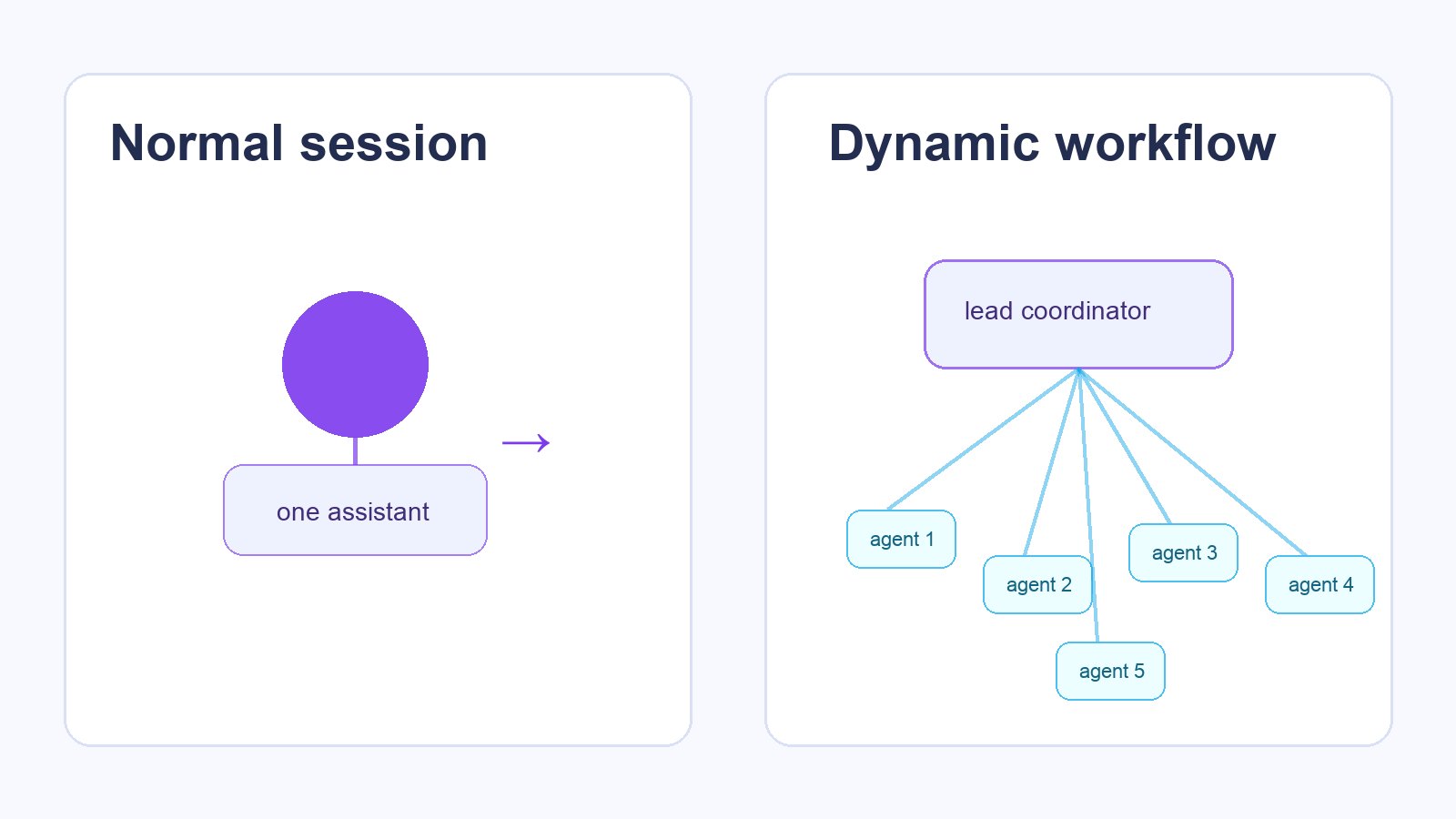
Think of a normal Claude Code session as one strong pair-programmer sitting with you. Dynamic workflows are closer to a temporary engineering squad: one lead agent breaks the problem into pieces, specialist agents investigate or modify different areas, and the lead agent pulls the work together.
The practical promise is simple: jobs that used to be too wide for one chat—large migrations, multi-package audits, dependency cleanups, security sweeps, documentation rewrites, or test expansion—can move faster because Claude can explore in parallel instead of walking through every file sequentially.
The practical risk is just as important: parallel agents can create duplicated work, conflicting edits, noisy diffs, high token usage, and false confidence if you do not give them a narrow target and a verification bar. This is not a magic “make my repo perfect” button. It is an orchestration feature, and orchestration only helps when the work can be divided safely.
What dynamic workflows add to Claude Code
Claude Code was already an agentic coding tool: it can read a codebase, edit files, run commands, integrate with IDEs, work with MCP tools, use project memory, and create commits or pull requests. Dynamic workflows add a higher-level coordination layer on top of that.
Claude turns a broad goal into sub-tasks with owners, dependencies, and success checks.
Background agents investigate or implement separate pieces instead of forcing one agent to do everything in order.
The lead agent is expected to reconcile outputs, run checks, and report what changed or what remains blocked.
Anthropic’s launch material describes dynamic workflows as a way for Claude Code to handle very large tasks by orchestrating work across tens to hundreds of agents in the background. The example they give is a codebase-scale migration across hundreds of thousands of lines with an existing test suite as the bar.
That phrase “with the existing test suite as its bar” matters. The better your repo’s tests, linting, type checks, fixtures, and review rules are, the more useful dynamic workflows become. Without those guardrails, the agents can still produce work, but you will spend more time deciding whether the work is safe.
What changed with Claude Opus 4.8
Dynamic workflows launched alongside Claude Opus 4.8, and the surrounding release matters because workflows depend heavily on planning, tool use, judgment, and long-running consistency.
- Opus 4.8: Anthropic says the model improves coding, agentic tasks, professional work, tool use, and reliability compared with Opus 4.7.
- Effort control: Users can choose how much effort Claude spends. In Claude Code, Anthropic recommends higher effort such as
xhighfor difficult tasks and long-running asynchronous workflows. - Fast mode: Opus 4.8 fast mode is described as running at 2.5× speed, with pricing lower than previous fast mode generations. Anthropic lists standard Opus 4.8 pricing at $5 per million input tokens and $25 per million output tokens, and fast mode at $10 per million input tokens and $50 per million output tokens.
- Claude Code changelog: Version 2.1.154 introduced dynamic workflows, the
/workflowsview, and Opus 4.8 support. Later 2.1.157 and 2.1.158 updates improved plugin/skill loading, worktrees, background sessions, and auto mode support on Bedrock, Vertex, and Foundry.
How Claude Code dynamic workflows work in practice
The exact product interface can evolve, but the workflow pattern is straightforward. You describe a broad task, Claude decides whether it should become a workflow, creates a plan, dispatches agents, monitors progress, and consolidates results. You can view workflow runs through /workflows.
Give Claude a concrete objective, affected areas, non-goals, and the verification command. “Migrate all date utilities from Moment to date-fns and keep behavior identical” is much better than “modernize dates.”
The lead agent reads project instructions, file structure, tests, package files, and relevant docs before deciding how to split work.
Some agents may inspect packages, others update files, others write tests, and others audit risk. This is where dynamic workflows can save time.
Parallel outputs are merged into one coherent set of changes. Conflicts, duplicated edits, and uncertain findings should be called out.
The best workflow ends with tests, linting, type checks, screenshots, or a targeted manual review checklist—not just a confident summary.
For a small bug fix, this overhead is unnecessary. For a broad migration or audit, the overhead is the point: a big task needs planning, division, reconciliation, and proof.
When should you use dynamic workflows?
Use dynamic workflows when the task is wide, parallelizable, and verifiable. Avoid them when the task is tiny, ambiguous, destructive, or mostly product judgment.
Good use cases
- Codebase migrations: framework upgrades, API rename migrations, package replacements, dependency cleanup.
- Test expansion: adding tests across many modules with a consistent pattern.
- Security and quality audits: scanning routes, auth flows, secrets handling, logging, permissions, or unsafe shell usage.
- Documentation refreshes: aligning docs, examples, README sections, and changelog notes with current behavior.
- Large refactors with clear boundaries: splitting a module, moving files, standardizing interfaces, or removing dead code.
- Multi-service investigations: tracing a bug across frontend, API, worker, database, and deployment config.
Weak use cases
- One-file edits that a normal Claude Code session can finish in minutes.
- Brand, legal, or pricing decisions with no objective verification.
- Production changes that require live credentials or irreversible actions.
- Messy repos with no tests, no linting, and no clear project instructions.
- Tasks where several agents editing the same files will obviously conflict.
Setup checklist before launching a dynamic workflow
The fastest way to waste a dynamic workflow is to launch it before the repo is ready. Use this checklist first.
| Preparation | Why it matters | What to write in your prompt |
|---|---|---|
| Define success | Agents need a finish line. | “Success means all tests pass and the public API remains backward compatible.” |
| List non-goals | Prevents ambitious rewrites. | “Do not redesign the UI or change database schema.” |
| Name verification commands | Turns confidence into evidence. | “Run npm test, npm run lint, and npm run typecheck.” |
| Protect sensitive files | Reduces accidental credential exposure or config churn. | “Do not modify .env, secrets, billing, or deployment credentials.” |
| Use project memory | Claude Code reads CLAUDE.md and project instructions. | “Follow CLAUDE.md conventions and keep changes minimal.” |
| Decide commit strategy | Large workflows need reviewable chunks. | “Group changes by module and summarize risky diffs.” |
“Use a dynamic workflow only if this task benefits from parallel work. Goal: [specific goal]. Scope: [folders/services]. Non-goals: [things not to change]. Verification: [commands]. Constraints: keep diffs small, preserve public APIs, do not touch secrets or deployment credentials. Report blockers separately from completed changes.”
Safety guardrails for large agent teams
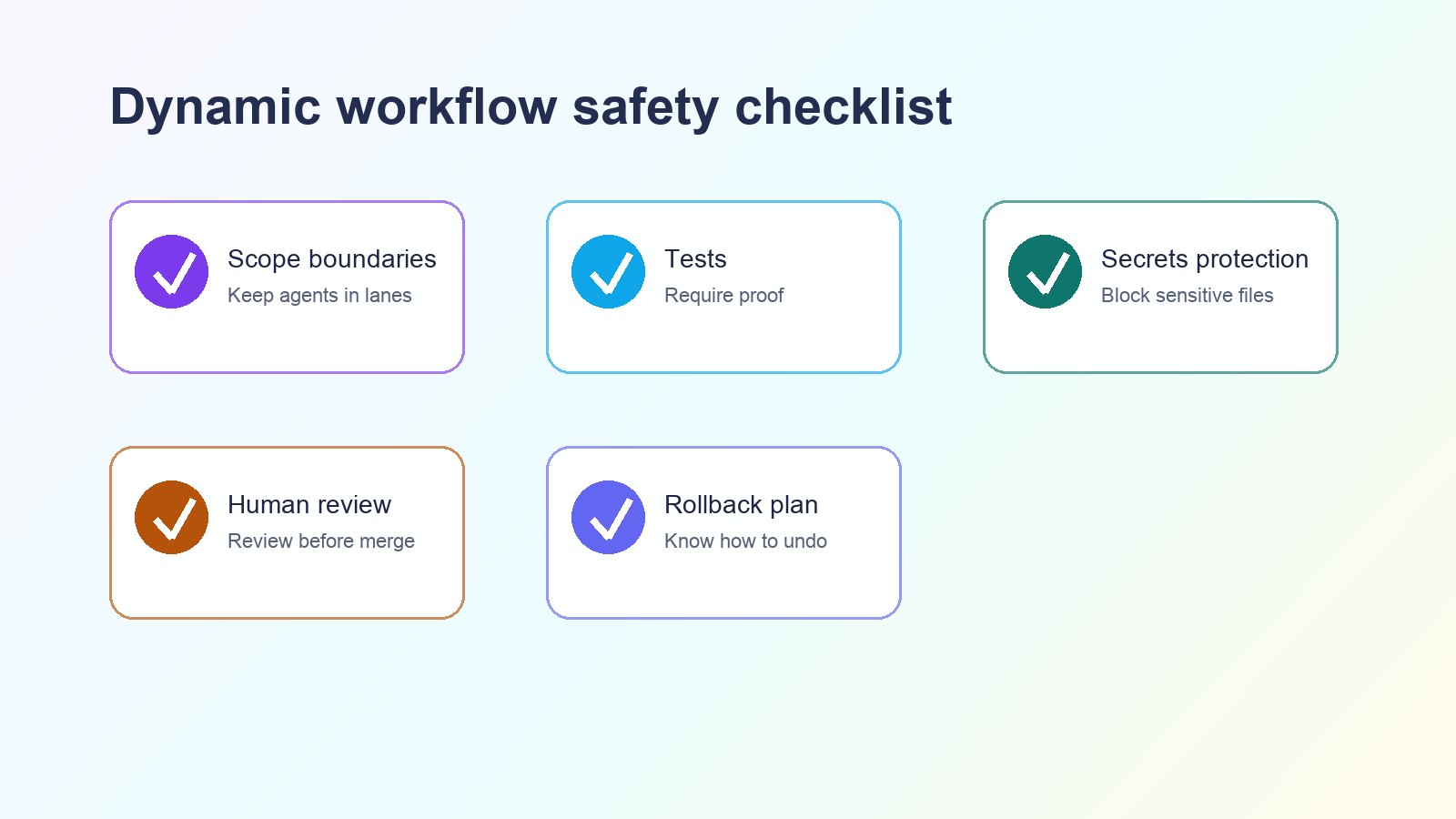
Dynamic workflows are powerful because they multiply effort. That also means they can multiply mistakes. Treat them like a junior team moving fast: give them lanes, review their work, and require proof.
Prefer specific directories, packages, or modules. Broad write access should be earned, not assumed.
Claude Code hooks can run deterministic commands after edits or block unsafe actions. Use them for formatting, tests, or protected-file rules.
Do not auto-merge large workflow output into production. Review diff clusters and run your own CI.
Also watch token and rate-limit usage. Higher effort helps hard tasks, but it costs more rate-limit budget. Fast mode trades higher per-token cost for speed. The right setting depends on whether your bottleneck is quality, time, or budget.
If your organization requires code review, branch protection, secrets scanning, or approval for deployments, keep those controls. A workflow can prepare work; it should not silently override governance.
Dynamic workflows vs subagents, background agents, and coding assistants
| Tool pattern | Best for | Main advantage | Main risk |
|---|---|---|---|
| Normal Claude Code session | Focused bug fixes and feature work | Simple, interactive, easy to review | Slow for very wide tasks |
| Manual subagents/background agents | Known independent subtasks | You control task split directly | You become the coordinator |
| Dynamic workflows | Large tasks that need planning and many agents | Claude coordinates the decomposition and synthesis | Needs strong scope and verification |
| GitHub Copilot coding agent | Issue-to-PR automation in GitHub workflows | Tight GitHub integration | Less suited to open-ended multi-agent exploration |
| OpenAI Codex-style coding agents | Cloud or local coding task execution | Strong autonomous coding loop | Safety and environment setup still matter |
The key distinction is coordination. Dynamic workflows are most interesting when you do not already know the perfect decomposition. You provide the goal and constraints; Claude creates a plan and manages parallel execution.
Example dynamic workflow prompts
1. Dependency migration
“Plan and run a dynamic workflow to replace Moment.js usage with date-fns in the frontend package. Preserve date formatting behavior, do not change API responses, add or update tests for affected utilities, and run the frontend test suite. Report any ambiguous formatting cases instead of guessing.”
2. Security audit
“Audit authentication and authorization code across API routes, middleware, and background jobs. Use parallel investigation if helpful. Do not modify production config. Produce a ranked findings report with file references, severity, exploit preconditions, and suggested fixes. Only implement low-risk fixes after listing them.”
3. Test coverage push
“Add missing tests for billing, account settings, and notification modules. Keep production code changes minimal. Use existing test style. Run targeted tests first, then the full test suite if targeted tests pass.”
4. Documentation alignment
“Refresh README, setup docs, and API examples so they match the current code. Verify commands against package scripts. Do not invent environment variables. Mark anything that cannot be verified.”
Troubleshooting and common mistakes
“Claude changed too much.”
Your prompt was probably too broad. Add non-goals, protected paths, and a requirement to ask before changing public APIs, schemas, billing, auth, or deployment config.
“The agents duplicated each other’s work.”
Ask for clearer lanes: one agent per package, module, or investigation track. Dynamic workflows are strongest when work boundaries are explicit.
“The output looks good but I do not trust it.”
Require evidence. Ask Claude to list commands run, tests passed, tests skipped, files changed, uncertain assumptions, and review hotspots.
“It used too much limit.”
Use narrower scope, lower effort for exploration, and higher effort only for the final design or synthesis. Avoid asking for full-repo work when one folder is enough.
“The workflow is blocked.”
Common blockers include missing dependencies, failing baseline tests, unclear auth setup, permission prompts, protected files, or contradictory instructions in project memory. Have Claude separate baseline failures from workflow-caused failures.
FAQ: Claude Code dynamic workflows
Who can use Claude Code dynamic workflows?
Anthropic announced dynamic workflows for Claude Code users on Enterprise, Team, and Max plans as a research preview. Availability may change, so check the current Claude Code product UI and Anthropic documentation.
Is this the same as Claude Code subagents?
No. Subagents are a way to run separate agents on tasks. Dynamic workflows add a higher-level planning and orchestration layer where Claude can decide how to split a large job, dispatch agents, and consolidate results.
Should I use Opus 4.8 extra or xhigh effort?
Use higher effort for difficult, long-running, high-impact workflows where judgment and verification matter. Use lower effort or a normal session for small edits, quick investigations, or low-risk tasks.
Can dynamic workflows edit my whole repository?
They may be able to work broadly, but you should not start that way. Give a clear scope, non-goals, protected files, and verification commands. Broad access without guardrails is a review burden.
Are dynamic workflows safe for production code?
They can prepare production code changes, but they should still go through normal review, CI, secrets scanning, staging, and deployment approval. Treat output as a pull request, not a direct production action.
What makes a good dynamic workflow task?
A good task is large, divisible, and testable: migrations, audits, test expansion, docs refreshes, and multi-service investigations. Bad tasks are vague, tiny, destructive, or impossible to verify.
Final recommendation
If you already use Claude Code, dynamic workflows are worth trying for the jobs you keep postponing because they are too wide: cleanup across many packages, codebase audits, test backfills, and migration prep. Start with a low-risk branch, a narrow folder, and a strict verification command. If the result is useful, expand the scope gradually.
The real win is not that Claude can run “hundreds of agents.” The win is that it can turn a large software chore into a planned, reviewable workflow. Keep your guardrails in place, demand evidence, and dynamic workflows can become one of the most practical Claude Code upgrades of 2026.
Post a Comment